Project Info
Inspiration
Agents have become really good at getting things done but they kind of need the manual human input for every small thing. I came across an analogy on social media that says LLM is the brain and skills/tools are hands. Then I thought what is missing to make it more autonomous? I believe answer is - senses, which I think corresponds to event driven waking up of agents. A way for agents to react when something happens, rather than waiting for a person to open a chat and give them work. Another big reason for me starting SquadAI is I think people use codex or any other agent just like another app, write skills around it or basic automations. But its much more powerful than that if we consider agent as a component in our system designs. For that programmatic access is needed and the ability to scale the agents automatically. I have 6 yrs of experience working with distributed systems at scale, thought it would be really cool to have the same concepts applied to AI agents as well :).
What it does
SquadAI is the infrastructure layer for running Codex agents as part of your systems not just as individual chat windows. It lets your agents wake up and react to changes (events) in the world. Example of changes/events : Ops tickets coming in, your script/monitor detects it and sends over, New work item created in jira, Flight price changes, Or anything around which a script/monitor can be written which can then send events to SquadAI Not only that, SquadAI also handles routing it to the right agent, queueing it, creating or resuming agent instances, managing persistent threads, shared library of skills, coordinating work across machines and giving you one place to see and control it all. Also, added the support to talk to multiple agents through telegram group, the agents could be on any machine and still have the relevant context of the group chat! Basically, SquadAI is a full control plane for your Codex agents. It turns individual agents into a system that can run, coordinate, and scale across any number of machines. What differentiates SquadAI from other solutions in same space? Recently lot of solutions have come out to run agents on cloud. But as a developer/user I would like my agents running on the machine where my setup, files or apps are already there. Squad AI makes it flexible for the users to install the runners (wrapper around codex app server) on any machine they like and connect to the same control plane. As an user you would get a unified view of all the machines. Few important design decisions: Lot of other solutions which support multiple machine, they require 1 agent to ssh into another machine and run commands there. This is not the case with SquadAI, no agent ssh-ing around, the agents live on their machine unaware of the other machine, all the communication is done through control plane. This makes the path for agent to agent communications across machines easier to handle. Agents are treated as instantiable objects (borrowed few concepts from Object Oriented Programming), which allows the control plane to easily instantiate a copy of same agent automatically. You don't need to worry about creating agents manually for same task. How I built it I came across codex app server which is really powerful and the backbone of the project. Made a wrapper around the codex app server APIs so the control plane above it can use it easily. Control plane was built which handles the event listening, queuing of tasks, routing the task to right agent etc. GPT-5.6 sol was used for this as it was bit complex piece. Built a completely new dashboard for visualizing the agents in a 3D topology view, and mainly the aim for it was to get an unified view of all the agents even if they are running on multiple machines. Codex made it easier by giving me images first to select the design and the coding it up. Annotation mode is super useful in building UI. Initially I had made it just keeping event driven waking up in mind (the famous loop engineering), then I realized why not have support for multiple machines and that's when i decoupled the control plane and codex app server wrapper code. Again gpt 5.6 sol helped here! Added support for tailscale to connect multiple machines easily. Once the event driven control and support for multiple machines was in place, then it was relatively easier to build any feature on top of it like for example the telegram group for agents. Whole project was completely built using codex and 5.6 terra/sol combination. That's why i say - built by codex for codex :) Challenges I ran into I didn't want to make a new UI at first as its really tough for people to adapt to new UI and codex desktop app already has a good one. But the issue is the threads started by custom code were not being actively displayed on the app. It does get displayed eventually but i wanted more synchronous way. And codex desktop app doesn't natively support listening to events. Had to take a route of creating the whole UI and wrapper on app server apis. Also, i am not good at networking part, gpt 5.6 suggested the tailscale solution! Accomplishments that I am proud of I have used it to automate the initial level of debugging required for ops tickets and I dont even need to do anything manually for 12 hrs straight. Looking at it work on its own for long makes me confident about the project and happy with its current state. Also, really proud of the fact I was able to make a mini distributed system all by myself with the help of codex. What I learned I realized the power of agent and LLM is not just in chat window but in treating them as intelligent components in any of your system design, to make the agents truly autonomous. While working on the project learned about solutions like tailscale for networking.
What's next
There is a lot of work that needs to be done but next immediate plan for Squad AI is to support graphs, IYKYK :). Few other interesting areas are to automatically scale agents across machines and agent to agent communication across machines. In future, I also want to onboard more agents so that project is not specific to codex only. Pre-existing work disclosure I had started working on the project before the build week. Before the build week I had the wrapper around codex app server API and control plane code with UI. During the build week I added the support for tailscale to be able to easily connect multiple machines, added shared skill library making it easier to transfer skills from one machine to another and added the whole telegram group chat integration supporting multiple agent tagging, conversation context handling and reply to msg feature. Few other changes were around making improvements in UI and fixing windows specific bugs.
SquadAI
SquadAI is the Kubernetes-like control plane for Codex agents turning every event into the right Codex task, on the machine where the work already lives!
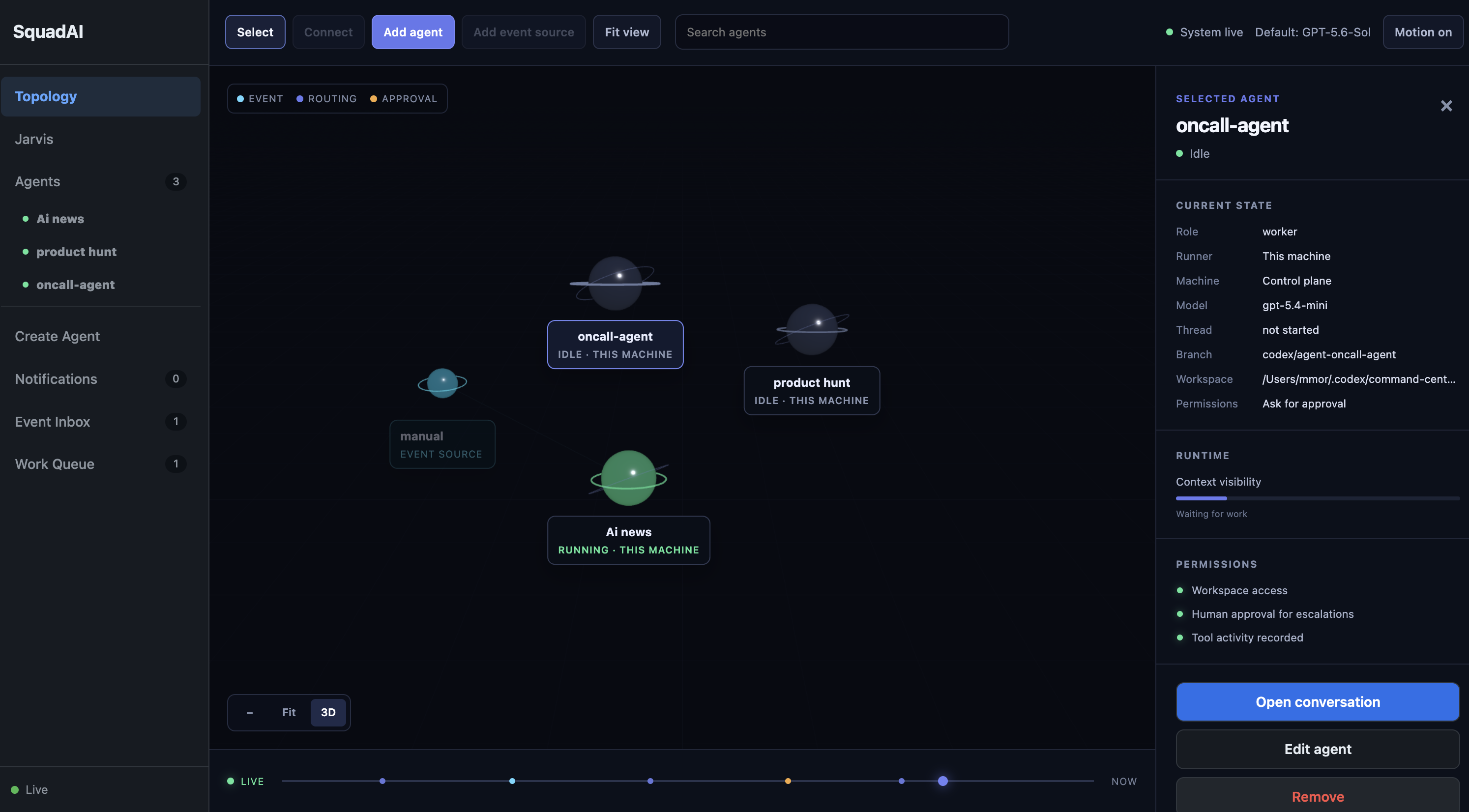
SquadAI gives you one place to manage and send work to Codex agents, even when those agents run on different machines. Your projects, tools, skills, and credentials stay on the machine where they are already set up. From the SquadAI dashboard, you can talk to an agent directly or send it work when something happens in another tool, such as a webhook, monitor, or Telegram message.
Get SquadAI Running
The fastest setup runs the control plane and agents on one machine. You need Git, Node.js 22.13 or newer, and a ChatGPT account that can sign in to Codex.
Open PowerShell and run:
powershell -ExecutionPolicy ByPass -c "irm https://chatgpt.com/codex/install.ps1 | iex"
codex login
git clone https://github.com/mohit17mor/SquadAI.git
Set-Location SquadAI\codex-control
npm ci
npm run build
Set-Location ..\codex-agent-manager
npm ci
npm run build
npm start -- --mode embedded --host 127.0.0.1 --port 4317
Open Terminal and run:
brew install --cask codex
codex login
git clone https://github.com/mohit17mor/SquadAI.git
cd SquadAI/codex-control
npm ci
npm run build
cd ../codex-agent-manager
npm ci
npm run build
npm start -- --mode embedded --host 127.0.0.1 --port 4317
Open Terminal and run:
curl -fsSL https://chatgpt.com/codex/install.sh | sh
codex login
git clone https://github.com/mohit17mor/SquadAI.git
cd SquadAI/codex-control
npm ci
npm run build
cd ../codex-agent-manager
npm ci
npm run build
npm start -- --mode embedded --host 127.0.0.1 --port 4317
Open http://127.0.0.1:4317, create an agent, choose its working directory, and send it a task. SquadAI stores your agents and their conversations locally, so they remain available after a restart.
Quick How To Use SquadAI
-
Click Create Agent (or Add agent in the topology view).
-
Choose the machine where the project lives, select its working directory, add instructions, and create the agent.
-
Select the agent and send it a message in its conversation, for example:
Review this repository and tell me the three riskiest areas. -
To test event-driven work, replace
my-coderwith your agent ID (the short, lowercase name created for the agent; for example,Repository Coderbecomesrepository-coder) and send this from a terminal on the control-plane machine:curl http://127.0.0.1:4317/api/sensor-events \ -H 'content-type: application/json' \ -d '{ "source": "quick-start", "type": "task.requested", "body": "Inspect the current project and report the most important next step.", "targetAgentId": "my-coder", "executionPolicy": "reuse" }'The task will appear in the work queue and run on that agent's machine.
Want your Telegram group connected too? Start with
npm start -- --mode embedded --telegram-token YOUR_CONTROL_BOT_TOKEN, then follow Telegram Group Control.
Built with Codex and GPT-5.6
SquadAI is built on codex app-server, which is the backbone that lets the
control plane create, resume, observe, and manage Codex sessions across
machines.
The entire project was written with Codex using GPT-5.6 Sol and GPT-5.6 Terra; no other model was used. Sol was used for the major architecture discussions and the core distributed control-plane pieces. Terra helped implement less complex features and sharpen ideas before they became requirements.
Codex also helped shape the UI: it generated visual directions, one was chosen as the reference, and the interface was refined with annotation-based pointed feedback. Across the project, the GPT-5.6 models were especially useful for understanding high-level requirements, turning them into concrete work, and proactively identifying edge cases that had not been specified yet.
Why SquadAI?
Coding agents are already effective when a person opens one conversation and gives it one task. The roughness appears when you need several agents, recurring work, parallel tasks, or long-running workflows:
- conversations become difficult to find and supervise;
- work must be copied manually from one tool or agent to another;
- nothing is listening for new work while you are away;
- multiple tasks aimed at one repository need isolated workspaces;
- approvals, failures, model changes, and unfinished work need one visible home;
- agents may need to run on different laptops, workstations, or VMs.
SquadAI provides the missing operational layer. Codex remains responsible for reasoning, coding, tools, MCP servers, skills, plugins, and sandboxing. SquadAI is responsible for organizing agents and work around it.
What You Get
- One command center: See agents, live status, conversations, commentary, tool activity, approvals, events, and queued work in one browser UI.
- Persistent agents: Resume Codex threads instead of starting every task from an empty conversation.
- Event-driven work: Send work from issue trackers, webhooks, monitors, schedulers, or any system that can call an HTTP endpoint.
- Reusable or isolated execution: Reuse one long-running agent for a stream of events, or automatically create a separate agent instance for every task.
- Human control: Choose Ask for approval, Approve for me, or Full access, and answer approval requests from the conversation.
- Repository isolation: Git repositories use managed worktrees so parallel agent tasks do not edit the same checkout.
- Remote runners: Keep the control plane on one machine while agents run where the repositories, credentials, skills, plugins, and MCP servers exist.
- Easy machine enrollment: Add a Windows, macOS, or Linux runner from the UI with one expiring command over a private Tailscale connection.
- Live runner inventory: See every control-plane and remote machine, connection status, assigned agents, active work, and last heartbeat.
- Telegram team chat: Give selected agents their own Telegram bots, tag them in one group, and receive their work, approvals, and final summaries in the same conversation.
- Shared skill library: Import a user skill from one runner and install it on another without creating a temporary agent or spending model tokens.
- Upgrade awareness: Detect incompatible pinned model settings and request a migration decision instead of repeatedly failing without explanation.
How It Works
People / webhooks / monitors / Telegram
            |
            v
  +-----------------------+
  | SquadAI control plane |
  | UI, API, SQLite, work |
  | queue, approvals      |
  +-----------+-----------+
              |
       commands and events
              |
       +------+------+
       |             |
       v             v
  Local runner   Remote runner(s)
       |             |
       v             v
  codex app-server on each runner machine
       |
       v
  Repositories, Git worktrees, tools, skills, plugins, and MCP servers
The control plane stores coordination state and presents the UI. A runner executes Codex sessions on its own machine and connects outward to the control plane. This means source code and machine-local tools do not have to be copied to the control-plane host.
Core Concepts
Agent
An agent is a reusable configuration: name, instructions, working directory, model settings, permissions, selected skills, and runner. Its Codex thread is created lazily and persisted for later conversations.
Agent instance
For task-oriented work, SquadAI can create an isolated instance from a base agent automatically. Each instance receives its own conversation and, for Git repositories, its own worktree and branch. The defaults allow three active instances and five unresolved instances per base agent. Select a base agent in the topology and open Advanced options to configure both limits for that agent. The unresolved limit must always be equal to or greater than the active limit; existing work is never stopped when a limit is lowered.
Event and work item
An event is an external signal. It may directly target an agent or wait for assignment/routing. Once accepted, it becomes a durable work item that SquadAI dispatches when the target is available.
Control plane and runner
The control plane owns visibility and coordination. The runner owns execution. They can run in one process on one computer or on separate machines.
Add Another Machine (Recommended)
This is the simplest way to run agents on another Windows, macOS, or Linux machine. The control plane remains on your main machine; source code, Codex, credentials, MCP servers, and local tools remain on the runner machine.
-
Install Tailscale, Node.js, Codex, and SquadAI on both machines, then sign in to the same Tailscale network.
-
Start the control plane on your main machine:
npm start -- --mode control --host 127.0.0.1 --port 4317 -
In SquadAI, open Topology and choose Add runner.
-
Select Generate enrollment command. SquadAI finds Tailscale even if its command is not on
PATH, creates a private address, and gives you one command to copy. -
Run that command on the new machine. It enrolls the runner, saves its runner-specific credential in
~/.squadai/runner.json, and connects it.
The first time Tailscale Serve is used, it may require a browser approval. Use the link shown by SquadAI, approve it once, then generate the enrollment command again. Enrollment commands expire after ten minutes and can only be used once.
On the runner machine, later reconnect it with:
squadai runner start
To check its last recorded state:
squadai runner status
There is no native installer or background service required for v1. The runner is simply a process you start on the machine where work should run.
Permissions
SquadAI exposes three simple presets:
| Mode | Behavior |
|---|---|
| Ask for approval | Codex pauses for actions that require your decision. Best default for new agents. |
| Approve for me | SquadAI reviews supported approval requests automatically while preserving the configured sandbox. |
| Full access | Codex can operate without approval in a danger-full-access sandbox. Use only on a trusted machine and repository. |
Permissions can be changed from the agent settings or chat composer. Model and reasoning changes apply to subsequent turns without discarding the conversation thread.
Git Worktrees
When an agent points at a Git repository, SquadAI prepares a managed worktree under the user's Codex data directory. Instantiated tasks receive separate branches and worktrees based on the original repository branch. This allows parallel tasks to modify the same repository without sharing one working tree.
Use Open in VS Code from the agent conversation to inspect that agent's checkout and diff directly. Worktrees are not deleted automatically when they contain uncommitted changes.
Event-Driven Work
Any monitor, scheduler, webhook adapter, or application can submit an event:
curl http://127.0.0.1:4317/api/sensor-events \
  -H 'content-type: application/json' \
  -d '{
    "source": "issue-tracker",
    "type": "issue.created",
    "title": "Investigate a production issue",
    "body": "Find the cause, prepare a fix, and report the evidence.",
    "dedupeKey": "issue:INC-123",
    "targetAgentId": "repository-coder",
    "executionPolicy": "new"
  }'
Important fields:
| Field | Meaning |
|---|---|
source | System that produced the event. |
type | Source-defined event type. |
body | Work description passed into SquadAI. |
dedupeKey | Optional source identity used to avoid accepting the same event twice. |
targetAgentId | Destination agent ID. Required in the normal setup; omit it only when using a router or assigning the event manually in SquadAI. |
executionPolicy | reuse sends work to the base agent; new creates an isolated task instance. |
The control plane stays source-agnostic. Integrations should translate external payloads into this small event contract rather than embedding source-specific logic in SquadAI.
Advanced: Manual Runner Connection
The Add runner flow above is recommended. Use these commands only when you already have a private network, VPN, reverse proxy, or tunnel and want to provide the control-plane address yourself.
1. Build SquadAI on both machines
Clone or copy the repository to both machines, install the Codex CLI on every
runner machine, and run the installation commands from the quick start. To use
the convenient squadai runner … commands on the runner machine, install the
manager package globally from its built checkout:
cd codex-agent-manager
npm install -g .
2. Start the control plane
Bind the control plane only to an address that runner machines can reach over a trusted network:
node codex-agent-manager/dist/src/cli.js \
  --mode control \
  --host 0.0.0.0 \
  --port 4317 \
  --runner-token replace-with-a-strong-random-token
3. Start a runner
On the machine where agents should execute:
node codex-agent-manager/dist/src/cli.js \
  --mode runner \
  --control-url http://CONTROL_HOST:4317 \
  --runner-id development-machine \
  --runner-name "Development machine" \
  --runner-token replace-with-the-same-token
Runner IDs must be unique. Agent names do not identify machines; every agent is associated with a runner ID.
To enable Open in VS Code for a remote runner, provide an SSH host that exists in the control-plane user's local SSH configuration:
node codex-agent-manager/dist/src/cli.js \
  --mode runner \
  --control-url http://CONTROL_HOST:4317 \
  --runner-id development-machine \
  --runner-token replace-with-the-same-token \
  --ssh-host development-machine
The runner makes outbound HTTP requests to the control plane. If it cannot directly reach the control plane, use Tailscale, another private overlay network, a VPN, or an authenticated SSH tunnel—do not expose the port publicly.
The legacy shared runner token remains supported for compatibility. New runner enrollment creates a distinct runner credential instead.
Telegram Group Control
Telegram makes SquadAI feel like a team chat: you, your friends, and selected agents can share one group while each agent still runs on its assigned runner. There is no agent-to-agent automation in v1; only a human message can start or resume work.
1. Create the control bot
-
In Telegram, open @BotFather and create a bot for SquadAI's control plane.
-
Start SquadAI with its token. Passing it as an environment variable is best for a long-running service; this command is convenient for local testing:
npm start -- --mode embedded --telegram-token YOUR_CONTROL_BOT_TOKEN -
Add that bot to your Telegram group and make it an administrator. Admin bots can receive ordinary group messages. If Telegram still says the bot cannot access group messages, use BotFather's
/setprivacyto disable privacy for that bot, then remove and re-add it to the group.
2. Connect an agent bot
Create one bot in BotFather for every agent you want to use in Telegram. You do not need a bot for every SquadAI agent. Add those bots to the same group, then open the agent's inspector in SquadAI's topology and connect its bot token in the Telegram section.
Each connected bot represents exactly one agent, which makes replies, running updates, approvals, and final answers easy to identify in the group.
3. Assign work naturally
Tag the desired agent bot in your newest group message:
@coder_bot please implement the login validation
@news_bot give us the five most important AI stories today
SquadAI queues work only for bots tagged in that newest message. It also gives the selected agent the preceding group context (currently the most recent 20 messages) so a reviewer can see what a coder already reported without manual copying. Bot-authored messages are ignored as new work requests.
Replying to an agent's message continues that agent's work. If the reply tags a different agent bot, the newly tagged agent takes precedence instead. Multiple people can use the same group; in v1, the person who started a task is the only person who can approve or deny its tool request from Telegram.
Shared Skill Library
Skills normally live in a machine's ~/.codex/skills directory. SquadAI can
now copy a user-level skill to another connected runner without asking a
Codex agent to do the work.
- Open Skills in the SquadAI command rail.
- Under Available to import, choose Import to library beside a skill found on any online runner.
- Under SquadAI library, choose Install on … for any online runner that does not already have that skill.
SquadAI packages the complete skill folder, validates paths and file sizes,
stores it with a content fingerprint next to the control-plane database, and
has the target runner write it to its own ~/.codex/skills/<skill-name> folder.
It never starts a temporary agent and never transfers repo, system, admin, or
plugin-scoped skills. Restart Codex sessions after installing a skill if an
existing session does not refresh its skill catalog immediately.
Run Modes
For almost every setup, start SquadAI with --mode embedded. It starts the
dashboard, runs local agents, and can connect to remote runners. This is
also the right mode when you use Telegram.
| Mode | What it means |
|---|---|
embedded | The normal control-plane mode. It manages agents on this machine and on any remote runners you connect from the UI. |
control | Currently starts the same control-plane services as embedded. Use it only when you want the name to describe a dashboard-first deployment. |
runner | A worker running on another machine. It executes agents against that machine's local projects, tools, skills, and credentials. The UI's Add runner flow gives you the command for this. |
Project Structure
squadai/
├── codex-control/         Stable TypeScript wrapper around codex app-server
├── codex-agent-manager/   Control plane, runner, UI, queues, state, worktrees
└── .github/workflows/     Linux, macOS, and Windows verification
Security Notes
- Keep the control plane on localhost or a trusted private network.
- Prefer the UI's Tailscale enrollment flow for remote runners. Do not expose the control-plane port to the public internet.
- Always configure a strong runner token when remote runners are enabled.
- Treat Full access as privileged machine access.
- A runner can access only the files, credentials, tools, skills, plugins, and MCP servers available to the user account running that process.
- A connected Telegram group can start work on the bots in that group. Add only people you are comfortable letting use those agents.
- The shared skill library stores imported user-skill files beside the control-plane SQLite database. Import only skills you trust.
- Review agent worktrees and diffs before merging changes into important branches.
- Do not place secrets in agent instructions or event payloads unless your deployment is designed to protect them.
Troubleshooting
codex is not found
Restart the terminal after installing Codex and confirm that codex --version
works. You can also pass an explicit executable:
npm start -- --mode embedded --codex-binary /path/to/codex
On Windows, SquadAI can resolve native executables and npm-installed
codex.cmd/codex.bat launchers from PATH.
Codex is installed but agents cannot start
Run:
codex
codex app-server --help
Complete authentication if prompted. Also confirm that the agent's working directory exists on its selected runner.
A runner appears offline
Check that:
- its control URL is reachable from the runner machine;
- the control plane and runner use the same token;
- its runner ID is unique;
- no firewall or proxy is interrupting long-polling HTTP requests.
For the recommended enrollment flow, also confirm both machines are signed in to the same Tailscale network. If SquadAI shows a Tailscale approval link, open it once, approve the private Serve configuration, and generate a new enrollment command.
Telegram messages do not queue work
Confirm that the control bot is running with SQUADAI_TELEGRAM_TOKEN (or
--telegram-token), is an administrator in the group, and has permission to
read group messages. Confirm the agent bot is connected to the intended agent
in SquadAI and that your newest human message tags that exact bot.
A shared skill is missing
The Skills panel lists only online runners and Codex user skills. Confirm
the source skill is under ~/.codex/skills, the source runner is online, and
the target runner has not already installed a skill with the same name.
A pinned model stopped working
Open the compatibility notification in SquadAI. The control plane can compare the agent's pinned settings with the current Codex model catalog and request approval before migrating it.
Worktree cleanup fails
SquadAI intentionally refuses to remove a dirty worktree. Commit, stash, or discard its changes explicitly, then retry cleanup.
Development
Run both test suites:
cd codex-control
npm test

cd ../codex-agent-manager
npm test
The SquadAI manager currently has 110 automated tests, with additional control library coverage. GitHub Actions can run both suites on Linux, macOS, and Windows.
Current Scope
SquadAI currently focuses on managing Codex agents. The architecture separates the control plane from the runtime so additional agent providers can be added later, but they are not implemented today. Visual agent-to-agent workflow chaining is also a future direction; current automation uses explicit event targets, optional routing, durable work items, Telegram human-to-agent handoffs, and isolated agent instances.
Codex Documentation
License
Licensed under the MIT License.
Analysis
View
Metric
- 23

Figures cover GitHub contributors during the hackathon window. A co-authored commit counts in full for each author, so per-member totals add up to more than the whole-team figures.
Technology
- TypeScriptIn code
1 of 1 appear in the indexed code.
AI coding agents
No AI coding agent signals were found in this repository.
Detected from committed agent config files and commit authorship. Absence of a signal is not proof an agent was unused.
Codebase size
Source size
872 KB
Source files
48
Counts recognized source files only; vendored directories, binaries and lockfiles are excluded, so this is smaller than the repository on disk.
Repository
mohit17mor/SquadAI
62 files · 1.5 MB · @ 78dadde
Structure
Interface
1 file · 2%Screens, components and styles rendered to the user.
Application logic
32 files · 52%Domain rules, services and shared utilities.
Supporting
Layers are inferred from where files sit in the tree, not from reading the code. A project that names its directories unconventionally will read oddly here — open the file browser to check anything the diagram implies.
Languages
- TypeScript97%
- Markdown3%
- YAML0%
Share of indexed source by file size. Binary and vendored files are excluded.
Dependencies
codex-agent-manager/package.json
npm · 5- codex-control
- three
- +3 more
codex-control/package.json
npm · 22 development-only dependencies.
Declared in the repository’s manifests at the indexed commit. A declared package is not proof it is used, and runtime dependencies are listed first.
This project’s features have not been analysed yet.
Export this project's context (description, README, evidence, key source files) to chat with an AI agent elsewhere.