Project Info
Inspiration
As a parent, I wanted to create a study tool that would help my children, aged 10 and 13, explore subjects beyond the classroom in a way that feels personal, accessible, and fun. Children do not always want to sit at a desk or open another textbook. However, they often have small pockets of time while walking, travelling on the bus, or waiting for an activity to begin. I wanted to explore whether AI and smart glasses could turn those moments into opportunities for convenient, hands-free learning. That idea became GenerativeAI.study and SmartGlasses.study: a connected learning platform that lets children create age-appropriate study material on the web and then practise it through interactive quizzes on a phone or using Meta smart glasses.
What it does
GenerativeAI.study is a web application where learners can: Sign in and select a subject. Enter a topic they are currently studying or interested in. Generate age-appropriate facts and learning material. Create question-and-answer flashcards. Test their knowledge through multiple-choice quizzes. Save their learning content for future study sessions. The same learning material can then be accessed through the SmartGlasses.study Android application. The mobile app connects to Meta smart glasses and delivers an audio-based, hands-free learning experience. A learner hears a question and several plausible answers through the glasses, then responds using their voice. The application evaluates the answer, provides feedback, and continues the quiz. This means learners can revise without looking at a screen, for example, while walking, travelling on the bus, or during other times when traditional study materials would be inconvenient. The project combines AI-generated learning content with voice interaction and wearable technology to make studying more flexible, engaging, and integrated into everyday life. How I built it I built the complete solution as a solo project using Codex with GPT-5.6. I used Codex to take a description of the project, build out the requirements for it, and create a specification in different .md files before tasking it with building the solution based on the spec. The platform consists of several connected components: GenerativeAI.study, an ASP.NET MVC web application. A purpose-built API shared by the web and mobile applications. An Android application written in Kotlin using Android Studio. Meta Wearables Device Access Toolkit integration for communication with Meta smart glasses. Azure Table Storage for structured application data. Azure Blob Storage for additional stored content and application assets. OpenAI-powered generation of age-appropriate facts, flashcards, questions, and multiple-choice answers. The web application and Android application both communicate through the same API. This allows learning material created in GenerativeAI.study to become immediately available within SmartGlasses.study. Codex and GPT-5.6 were used throughout the project to: Design the application architecture. Build the ASP.NET MVC web application. Create the shared API. Implement Azure storage integration. Develop the Kotlin Android application. Work through unfamiliar SDK integration. Diagnose errors and connectivity issues. Refine the user experience and question-and-answer interaction loop. Generate and improve documentation. Rather than using Codex for isolated code snippets, I used it as a development partner across the complete product - from the initial architecture to the working web, API, cloud, mobile, and wearable components. Challenges I ran into One of the biggest challenges was learning how to build interactions for Meta smart glasses. I had limited previous experience with the Meta Wearables Device Access Toolkit and had not done much Kotlin or native Android development. Creating a reliable conversational quiz loop also required careful thought. The system needs to: Retrieve the learner’s saved material. Present a question through the glasses. Read several plausible answers aloud. Capture the learner’s spoken response. Determine which answer was selected. Provide useful feedback. Continue naturally to the next question. Bluetooth connectivity introduced additional considerations, including device state, connection handling, audio input and output, permissions, and communication between the glasses and the mobile application. The project was also completed by one person within a short hackathon timeframe. This required balancing web development, API design, cloud storage, Android development, AI integration, testing, and wearable-device experimentation. Codex was particularly valuable in helping me move between these unfamiliar technologies and make progress across the entire stack. What I learned This project gave me practical experience with: The Meta Wearables Device Access Toolkit. Kotlin and native Android application development. Bluetooth and wearable-device connectivity. Designing voice-first user experiences. Building conversational question-and-answer loops. Sharing data between web and mobile applications through a common API. Using Azure Table Storage and Blob Storage as part of a connected learning platform. Using Codex with GPT-5.6 to build across multiple languages, platforms, and technologies. I also learned that designing for smart glasses is not simply a matter of moving a mobile interface onto another device. A hands-free experience needs short instructions, clear answer options, useful audio feedback, and interactions that do not require the learner to look at a screen.
What's next
My immediate goal is to continue improving the platform until my children can independently create learning material and use the glasses to enjoy practising subjects outside of school. Future development could include: Personalised difficulty based on previous answers. Spaced-repetition study sessions. Progress tracking for learners and parents. Support for different learning levels and curricula. Teacher-created topic collections. Improved voice recognition and conversational feedback. Explanations for incorrect answers. Achievement systems and learning streaks. More flexible revision sessions based on the learner’s available time. Additional wearable and audio-device support. Using more natural sounding TTS rather than the built in Android TTS. GenerativeAI.study creates the learning experience. SmartGlasses.study lets learners take it with them. Note: Both domain names GenerativeAI.study and SmartGlasses.study domain names have been registered. But ran out of time to put sites at those locations so have redirected them to the Git repository.
GenerativeAI.study
An AI-assisted learning platform that organises age-appropriate lessons by subject. This implementation currently includes a .NET 8 REST API, an ASP.NET MVC web client, Azure Blob Storage with a local-development fallback, OpenAI Responses API integration, and automated API workflow tests.
Solution Overview
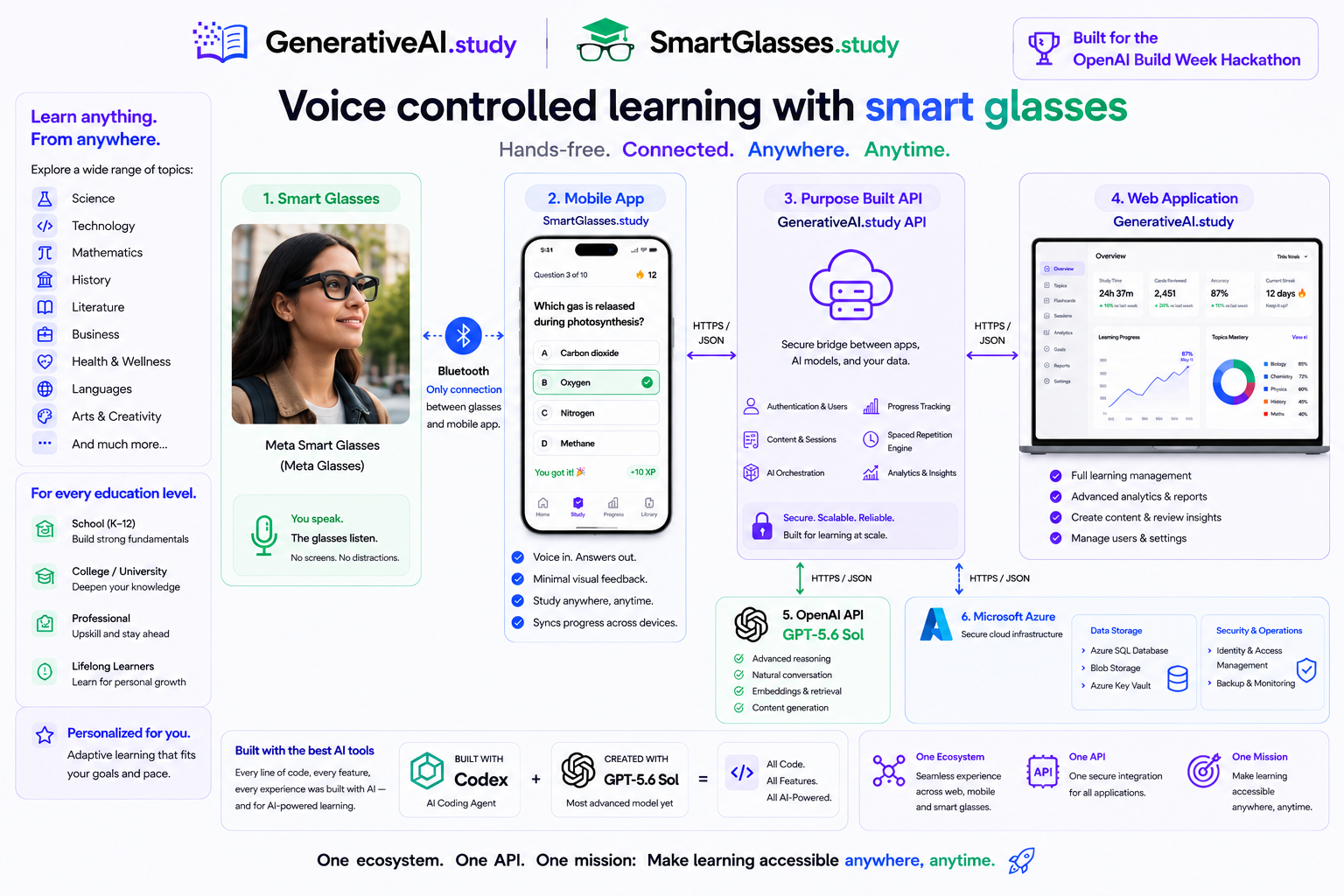
The platform connects a voice-controlled smart-glasses learning experience with the SmartGlasses.study Android application, the GenerativeAI.study API and web application, OpenAI-powered content generation, and Microsoft Azure infrastructure.
Projects
src/GenerativeAI.Contracts: shared domain models and API request/response contractssrc/GenerativeAI.Api: authentication, subjects, lessons, material generation, and progress endpointssrc/GenerativeAI.Web: responsive MVC learning experience backed entirely by the APIsrc/GenerativeAI.Tests: xUnit security and end-to-end API testssrc/mobile: Kotlin/Jetpack Compose Android and smart-glasses companion client
When AzureBlobStorage:ConnectionString is configured, application data—including users, password hashes, refresh tokens, lessons, and progress—is persisted in Azure Blob Storage. Without it, local development falls back to App_Data/study-data.json.
Prerequisites
- A .NET SDK capable of targeting .NET 8. The repository pins SDK
9.0.314, which is installed in the current development environment. - An OpenAI API key is required to generate facts. Browsing existing material works without one.
Run Locally
From the repository root, restore and verify the solution:
dotnet restore src/GenerativeAI.Study.sln
dotnet build src/GenerativeAI.Study.sln --no-restore
dotnet test src/GenerativeAI.Study.sln --no-restore
Start the API and web client in separate terminals:
dotnet run --project src/GenerativeAI.Api
dotnet run --project src/GenerativeAI.Web
Open http://localhost:5082. The API health endpoint is http://localhost:5081/health.
Local data is created in src/GenerativeAI.Api/App_Data/study-data.json and is ignored by Git. The API seeds Maths, Science, History, and an Algebra basics lesson on first run.
Configuration
Configuration is in each project's appsettings.json and can be overridden with user secrets or environment variables. Never commit production credentials.
dotnet user-secrets init --project src/GenerativeAI.Api
dotnet user-secrets set "OpenAI:ApiKey" "YOUR_KEY" --project src/GenerativeAI.Api
dotnet user-secrets set "JwtSettings:SecretKey" "A_LONG_RANDOM_SECRET" --project src/GenerativeAI.Api
Relevant sections are JwtSettings, OpenAI, Cors, and AzureBlobStorage. Configure secrets outside appsettings.json:
dotnet user-secrets set "OpenAI:ApiKey" "YOUR_OPENAI_KEY" --project src/GenerativeAI.Api
dotnet user-secrets set "AzureBlobStorage:ConnectionString" "YOUR_AZURE_STORAGE_CONNECTION_STRING" --project src/GenerativeAI.Api
The API creates the configured study-data container automatically. If the Azure connection string is absent, it uses local JSON storage; if the OpenAI key is absent, material generation returns 503 generation_unavailable.
API Surface
The API implements the authentication, subject, lesson, learning material, and progress routes from 3 - spec.md. State-changing subject routes require an admin token; topic creation, generation, and progress routes require an authenticated learner. Access tokens are HMAC-SHA256 signed and passwords use PBKDF2-SHA256 with per-password salts.
Tests
The test suite covers password hashing, signed-token validation/tampering, age groups, anonymous authorization, and the complete student workflow from registration through progress analytics. The first implementation milestone measures 78.4% line coverage for referenced application code.
Web Application
The responsive GenerativeAI.study web application provides subject discovery, learning statistics, topic management, generated fact review, progress tracking, and administrative actions through the same secured API used by the mobile client.
| Subject dashboard | Topic and generated facts |
|---|---|
Android App
The Android client uses Jetpack Compose, an OkHttp API client, Android Keystore AES-GCM token storage, automatic access-token refresh, manual dependency injection through StudyApp, and Meta's Wearables Device Access Toolkit (DAT). It includes registration/login, the complete flashcard workflow (topic creation, generation, review, study, questions, feedback, explanations, settings, and progress), topic/fact deletion, profile statistics, retryable offline states, and a connected smart-glasses quiz experience.
Mobile application
| Topic dashboard | Multiple-choice quiz |
|---|---|
The Android app defaults to the deployed Azure API. To use a locally running API from the emulator, add API_BASE_URL=http://10.0.2.2:5081/ to the ignored src/mobile/local.properties, then start the API before launching the app:
dotnet run --project src/GenerativeAI.Api --urls http://0.0.0.0:5081
Open src/mobile in Android Studio, or build from PowerShell:
$env:JAVA_HOME="C:\Program Files\Android\Android Studio\jbr"
$env:ANDROID_HOME="$env:LOCALAPPDATA\Android\Sdk"
cd src/mobile
.\gradlew.bat testDebugUnitTest assembleDebug
The debug APK is generated at src/mobile/app/build/outputs/apk/debug/app-debug.apk.
The Meta DAT artifacts are hosted in GitHub Packages. Supply a GitHub personal access token with read:packages permission as either GITHUB_TOKEN or github_token in the ignored src/mobile/local.properties file:
github_token=YOUR_GITHUB_TOKEN
Run on a physical Android device
-
Use an Android 10 or newer device with the Meta AI app installed and a supported pair of Meta glasses linked to it.
-
Enable Developer Mode for the glasses in the Meta AI app. For this development build, the DAT application ID and client token are both configured as
0. -
Enable Android Developer options and USB debugging, connect the phone by USB, and accept the debugging prompt.
-
Find the development machine's LAN IPv4 address (for example, with
ipconfig). The phone and development machine must be on the same network. -
Add the following machine-specific setting to the ignored
src/mobile/local.propertiesfile, using the development machine's address:API_BASE_URL=http://192.168.1.100:5081/ -
Start the API on all network interfaces with the command above. If Windows asks, allow port
5081through the firewall for the private network. -
Open
src/mobilein Android Studio, let Gradle sync, select the connected device, and click Run app. -
Open Profile in the app. Complete Meta AI registration if prompted, then select Connect glasses. The profile and quiz screens display the current connection state.
API_BASE_URL can also be supplied as a Gradle property (-PAPI_BASE_URL=...) or an environment variable. local.properties takes precedence over the environment variable and remains uncommitted.
Smart-glasses quiz experience
MetaGlassesSession implements registration, device discovery, connection, and disconnection through Meta DAT. CompanionGlassesSession remains available as a local implementation of the same GlassesSession contract.
When glasses are connected and the learner starts a multiple-choice quiz, the app:
- Reads the question and labelled answer choices through the glasses speakers.
- Says Listening, switches from the A2DP media profile to Bluetooth SCO, and listens for an answer through the glasses microphone.
- Accepts a spoken option letter or matching answer text exactly like a tap in the mobile interface.
- Says Correct, or says Incorrect followed by the correct answer.
- Advances automatically and repeats the sequence for the next question.
All spoken playback is sequenced through A2DP for consistent quality and volume. SCO is enabled only for recognition. Voice interaction fails closed when a glasses SCO input is unavailable: the application must never substitute the phone microphone. Android's RECORD_AUDIO permission is still required to use the platform speech recognizer, even though the selected input is the glasses microphone.
An ongoing microphone foreground service and partial wake lock keep an active glasses quiz running when the display turns off. The notification makes this background microphone use visible to the learner. Leaving the quiz intentionally stops its active voice controller, but the question order, current question, selected answer, and score remain in memory. The Topic page then presents Continue Quiz to resume the same position.
Required Android permissions include Bluetooth connection, audio recording, foreground service/microphone, wake lock, and Internet access. Android 11 and newer also require manifest visibility declarations for installed speech-recognition and text-to-speech services.
See the Meta Wearables DAT Android repository and Meta Wearables developer documentation for supported devices, current SDK requirements, registration, and firmware compatibility.
Why SmartGlasses.study Is a Strong Educational Tool
SmartGlasses.study combines generated study material with active recall in a form that can fit naturally into a learner's day. Instead of requiring constant attention to a phone, it can present a question, accept a spoken answer, give immediate corrective feedback, and move to the next prompt hands-free.
This experience is valuable because it supports:
- Active recall: learners retrieve an answer instead of only rereading material.
- Immediate feedback: misconceptions are corrected at the moment an answer is given.
- Short, repeatable sessions: a quiz can be used while walking, doing household tasks, or taking a study break, when it is safe to do so.
- Reduced screen dependence: audio-first interaction can make revision less visually demanding and more accessible for some learners.
- Continuity across phone and glasses: learners can answer by voice or touch, leave temporarily, and continue the same quiz from the Topic page.
- Age-appropriate personalisation: generated lessons and questions can be adapted to the learner's subject, age group, and desired difficulty.
Smart glasses are attracting growing interest because they combine familiar eyewear with speakers, microphones, cameras, AI assistants, and increasingly capable displays. Their value is broader than any single feature: the same hands-free interface can support learning, accessibility, navigation, translation, communication, field work, guided maintenance, first-person capture, and contextual assistance.
Education is a particularly natural use case. A wearable can deliver prompts without continually pulling the learner back to a screen, while voice interaction makes recall practice conversational. SmartGlasses.study demonstrates this direction with a focused and practical workflow rather than treating the glasses as a second phone display.
The experience should be used with situational awareness. Learners should not use quizzes when spoken prompts could distract them from driving, cycling, operating equipment, or navigating unsafe surroundings.
Analysis
View
Metric
- 17

Figures cover GitHub contributors during the hackathon window. A co-authored commit counts in full for each author, so per-member totals add up to more than the whole-team figures.
Technology
- C#In code
- CSSIn code
- JavaScriptIn code
- KotlinIn code
4 of 4 appear in the indexed code.
AI coding agents
No AI coding agent signals were found in this repository.
Detected from committed agent config files and commit authorship. Absence of a signal is not proof an agent was unused.
Codebase size
Source size
270 KB
Source files
51
Counts recognized source files only; vendored directories, binaries and lockfiles are excluded, so this is smaller than the repository on disk.
Repository
leeenglestone/OpenAIBuildWeek-Study
99 files · 9.7 MB · @ 9a27ad0
Structure
Interface
28 files · 28%Screens, components and styles rendered to the user.
API & routing
8 files · 8%Request entry points: routes, handlers and controllers.
Application logic
36 files · 36%Domain rules, services and shared utilities.
+1 moreData & schema
3 files · 3%Schema definitions, migrations and data access.
Supporting
Layers are inferred from where files sit in the tree, not from reading the code. A project that names its directories unconventionally will read oddly here — open the file browser to check anything the diagram implies.
Languages
- Kotlin47%
- C#23%
- Markdown15%
- JavaScript9%
- CSS4%
- XML2%
Share of indexed source by file size. Binary and vendored files are excluded.
This project’s features have not been analysed yet.
Export this project's context (description, README, evidence, key source files) to chat with an AI agent elsewhere.