Project Info
Inspiration
Always struggling with sharing my results.tsv file from traditional autoresearch, I thought to use this opportunity to create a central Mono(lith) for autoresearch with AI tooling integration. Note!!! Gallery screenshots and demo video use the old name! Please refer to the GitHub for installing and trying this project!
What it does
Mono is a self-hosted experiment registry and persistent memory layer for autonomous agents. It keeps the full research loop together: project goals, versioned instructions, exclusions, and tags; experiment proposals with hypotheses, reasoning, implementation plans, and dependencies; atomic worker claims so parallel agents do not unknowingly duplicate work; live run metrics and events streamed into the dashboard; parameters, commands, Git branches and commits, artifacts, outcomes, and conclusions; baselines and best-so-far progress for the project's primary metric; keyword search with optional pgvector semantic retrieval; reusable, project-defined RTVis result visualizations; role-based browser access and scoped, revocable agent tokens. Humans get a coherent web workspace. Agents use the same records through the Python SDK, CLI, HTTP API, or MCP server. How it works Orient: an agent asks Mono for the project context and searches prior evidence. Plan: it proposes an experiment or atomically claims an existing proposal. Execute: one owner creates the run and streams metrics, events, parameters, Git metadata, and artifacts. Conclude: the run is marked kept, discarded, or crashed with a durable conclusion. Reuse: future agents retrieve that evidence, compare against the baseline, and choose the next hypothesis from what is already known. The central design constraint is that every execution attempt has exactly one authoritative run record, even when MCP, the SDK, and the CLI are all available.
How we built it
Mono is a production-shaped, self-hosted system rather than a single demo page: FastAPI + SQLAlchemy provide the HTTP API and persistence layer. PostgreSQL 17 + pgvector store structured records and optional semantic embeddings. Next.js 16 + React 19 + TypeScript power the authenticated, responsive dashboard. Server-Sent Events update live metrics, events, and lifecycle status. A lightweight Python SDK and Typer CLI support instrumented code and tracked subprocesses. A stdio MCP server and Codex plugin expose 32 project, evidence, experiment, run, baseline, tag, and visualization tools. RTVis renders trusted, theme-aware components and isolates custom JavaScript without network or same-origin access. Docker Compose, Alembic migrations, health checks, demo seeding, and published packages make the project reproducible outside the development machine. How we used Codex and GPT-5.6 Codex with GPT-5.6 was the primary engineering collaborator across the build. It helped turn the initial “persistent memory for agents” idea into a complete product surface: shaping the data model and API contracts, implementing the FastAPI service and Next.js interface, building the SDK/CLI/MCP integration, debugging live-stream behavior, hardening authentication and project-scoped authorization, improving responsive charts, writing tests, and producing deployment and integration documentation. Codex was especially valuable for work that crossed boundaries. A change to run ownership, for example, had to remain consistent across HTTP routes, Python context managers, CLI subprocess tracking, MCP tool contracts, the dashboard, and the documentation. GPT-5.6 could reason across those layers, run the relevant checks, and revise the implementation as one coherent system. Mono also integrates back into Codex as a plugin. That created a useful feedback loop: Codex helped build the memory system, then used Mono's MCP tools to inspect context, track experiments, and generate reusable visualizations.
Challenges we ran into
Preventing duplicate run ownership The hardest correctness problem was supporting MCP, SDK, and CLI workflows without allowing the same execution to create multiple competing run records. We introduced explicit attachment semantics and a one-owner contract so an SDK process can attach to an MCP-created run rather than silently creating another. Making live evidence reliable Metrics can arrive quickly, browsers reconnect, and runs can finish while a stream is open. SSE resume cursors, polling fallback, terminal refreshes, and buffered SDK writes keep the UI responsive without replaying or losing evidence. Sharing data safely with headless agents Browser users need normal sessions and role-based controls; agents need scoped credentials that can be revoked and expired. Mono hashes tokens at rest, fixes their project grants, and prevents bearer tokens from administering identities or minting more credentials. Keeping custom visualizations portable and safe Agents can author reusable visualizations, but arbitrary dashboard code cannot be trusted. RTVis prefers trusted layout, metric, table, badge, and chart nodes; custom JavaScript is isolated, network-disabled, and receives only the intended data and theme.
Accomplishments we're proud of
A working end-to-end product spanning web, API, Python, CLI, MCP, and Docker deployment. Durable experiment evidence that captures decisions and failures, not only successful metrics. Cooperative proposal claiming for parallel workers. Live, reusable result displays and project-defined visualizations. Authentication and authorization designed for both humans and autonomous agents. A one-command seeded demo plus clear installation and testing documentation. Codex and Claude plugin bundles that can be installed without cloning the repository. Try it Clone the repository and run: For a local instance populated with demonstration records: Then open http://localhost:3000. The repository includes setup instructions, architecture documentation, feature coverage, integration examples, and verification commands. More concrete instructions can be found on the GitHub.
Mono
Mono is a self-hosted experiment registry and persistent memory layer for autonomous research agents. It keeps hypotheses, code metadata, live metrics, artifacts, outcomes, and conclusions together so future runs can build on prior evidence.
The repository contains the maintained FastAPI service, Next.js application, Python SDK/CLI, and MCP server. A new installation starts empty unless the development seed is explicitly enabled.
Table of contents
- Product tour
- What it provides
- Architecture
- How Codex was used
- Quick start
- Native development
- Install the CLI and Python package
- Codex and Claude Code plugins
- Configuration
- Verification
- Repository layout
- License
Product tour
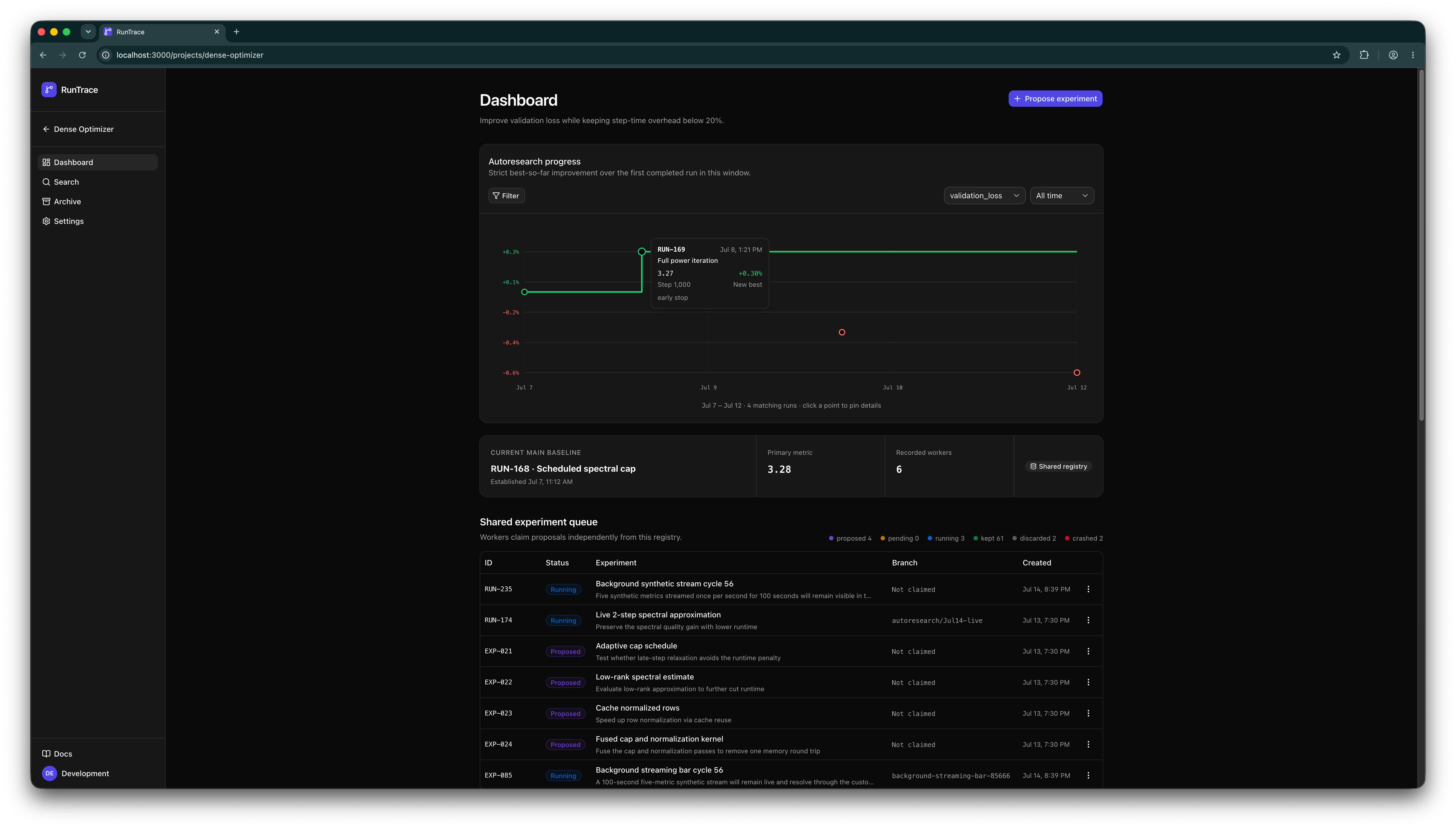
The dashboard keeps the research objective, best-so-far progress, baseline, worker activity, and cooperative experiment queue in one shared view.
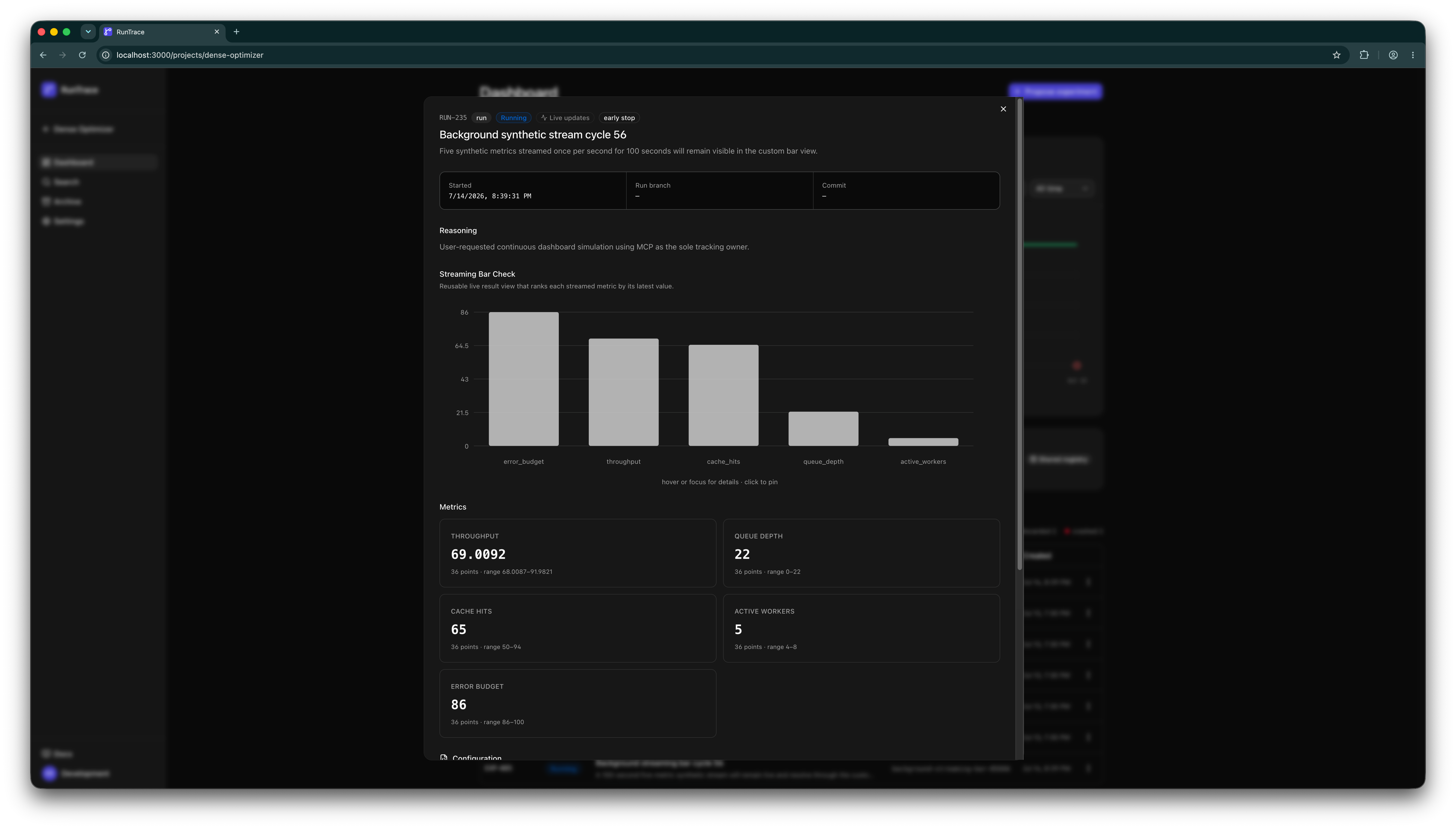
Every run preserves the hypothesis, reasoning, code metadata, live metrics, outcome, and artifacts as durable evidence.
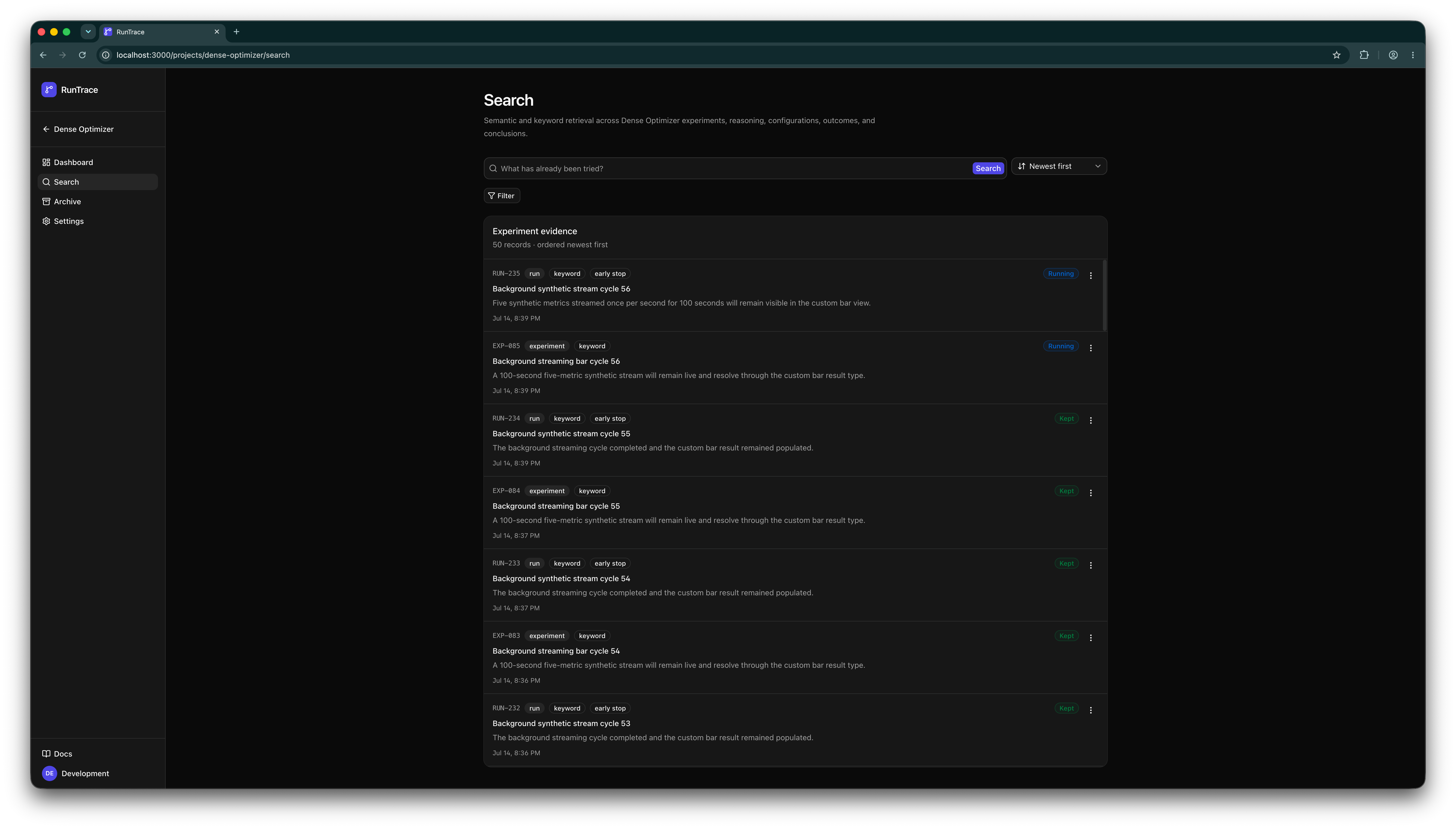
Agents and humans can retrieve what has already been tried before spending another run on the same idea.
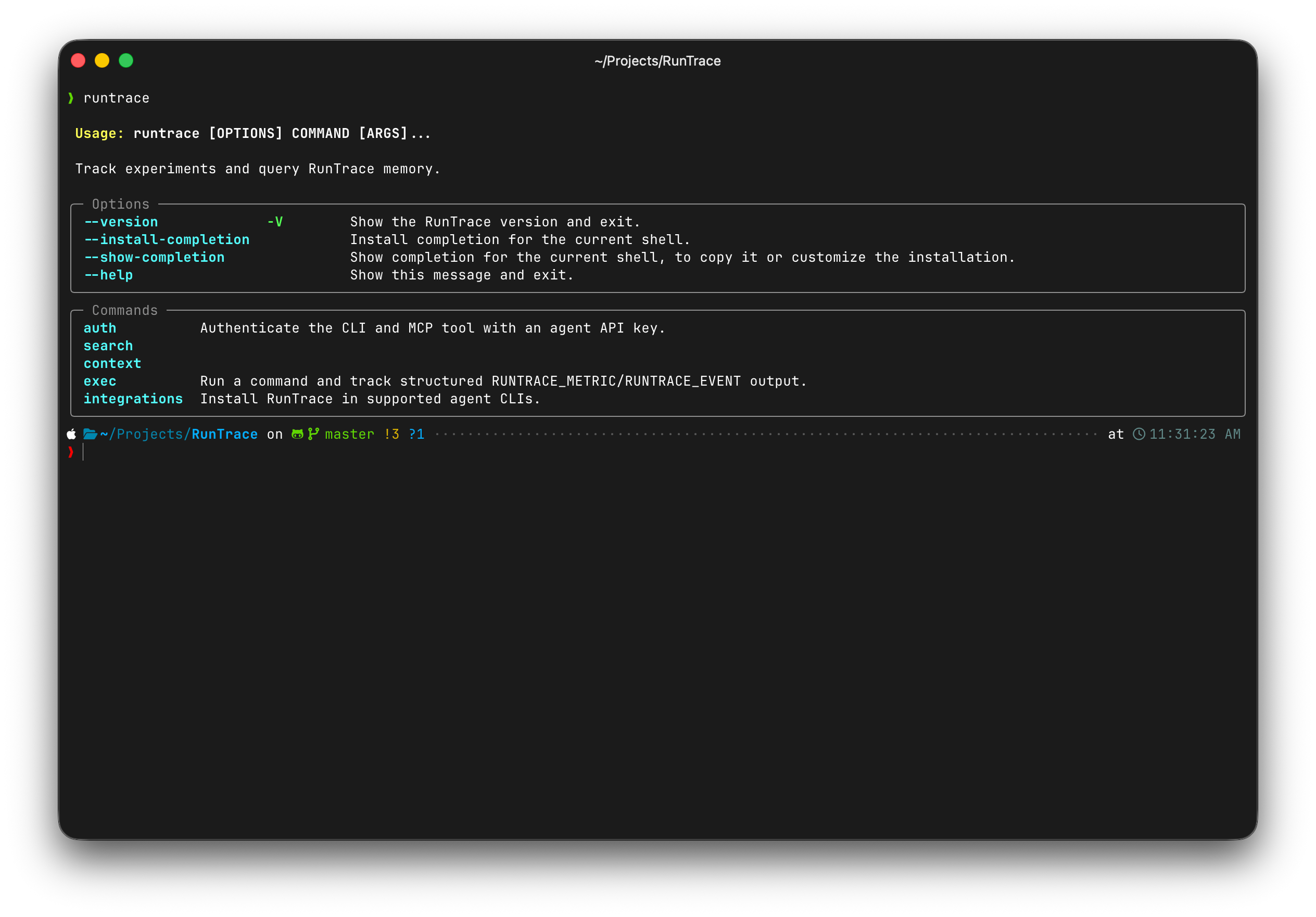
The CLI gives agents the same memory and experiment-tracking workflow without requiring a browser session.
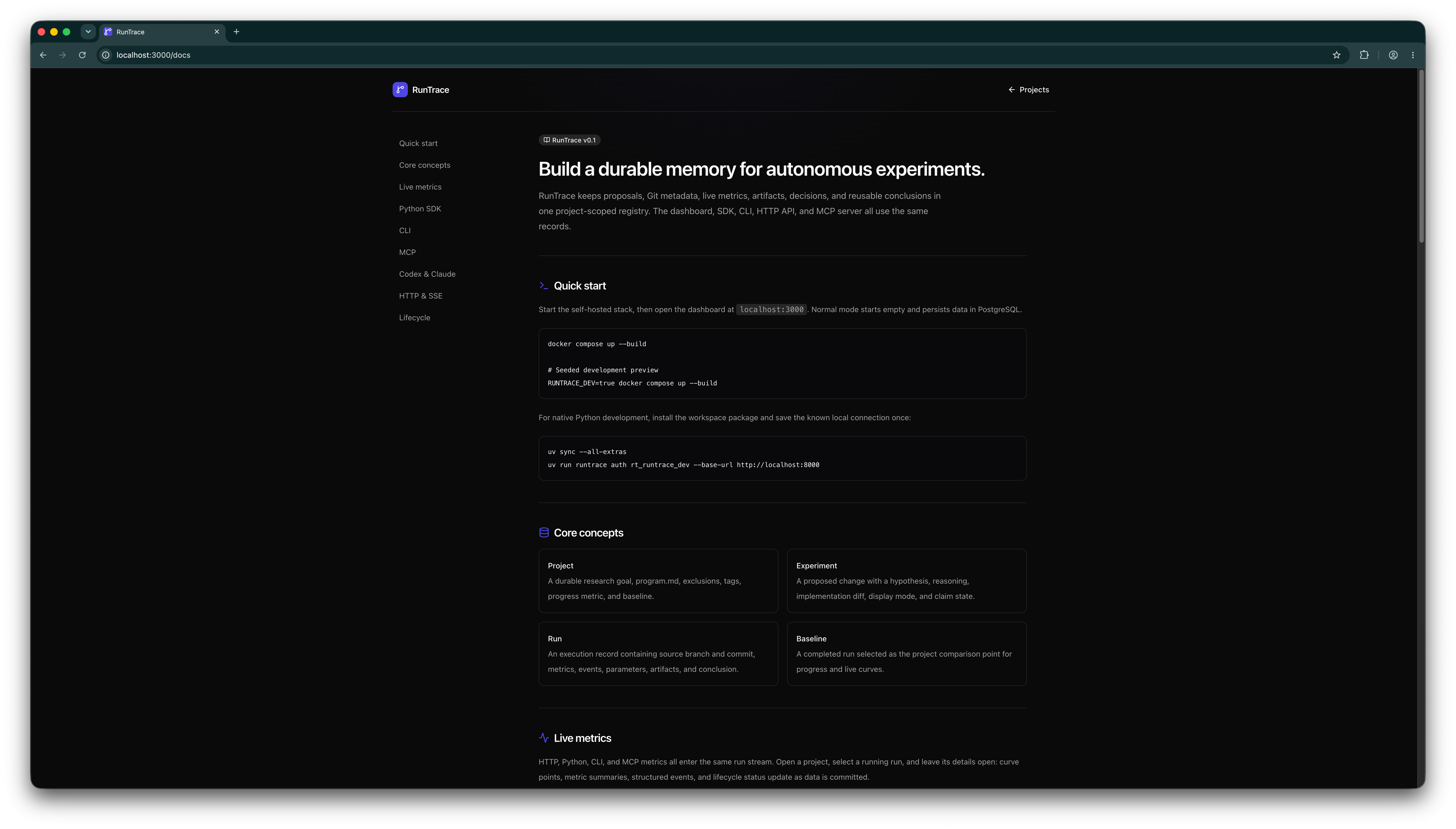
The built-in documentation connects the dashboard to the SDK, CLI, HTTP API, and MCP workflows agents use to produce those records.
What it provides
- project-scoped experiment proposals and atomic worker claims;
- live run metrics and events over Server-Sent Events;
- parameters, Git metadata, logs, and downloadable artifacts;
- versioned
program.mdinstructions and research exclusions; - completed-run baselines and best-so-far progress charts;
- archive, restore, soft-delete, and internal mutation audit records;
- keyword search, with optional pgvector semantic retrieval;
- browser password authentication for a self-hosted instance;
- revocable, expiring agent tokens for headless clients;
- read-only viewer, project editor, and project owner roles with matching API and web controls;
- project-scoped, MCP-generated RTVis widgets with ShadCN theming, sandboxed JavaScript, and portable JSON import and export;
- HTTP, Python, CLI, and MCP interfaces.
The complete feature catalog lists every current-source web, HTTP, SDK, CLI, MCP, visualization, authentication, and operational capability.
Architecture
| Component | Location | Technology |
|---|---|---|
| API | apps/api | FastAPI, SQLAlchemy, Alembic |
| Web app | apps/web | Next.js 16, React 19, TypeScript, Tailwind CSS |
| Python client and CLI | packages/python_sdk | HTTPX, Typer |
| MCP server | apps/mcp | Python MCP SDK |
| Database | Compose service | PostgreSQL 17 with pgvector |
How Codex was used
OpenAI Codex with GPT-5.6 was the primary AI engineering collaborator during Mono's development. The human developer supplied the product direction, constraints, acceptance criteria, and review; Codex helped turn those decisions into working code and repeatedly tested the result. This was an iterative engineering process rather than a one-shot code generation pass.
Codex worked across the full repository: it traced behavior through the FastAPI service, database models and migrations, Next.js interface, Python SDK and CLI, MCP server, Docker setup, release workflows, and documentation. It implemented and debugged cross-cutting features such as live metric streaming, run ownership and attachment, authentication and project authorization, custom visualizations, responsive layouts, localization, demo modes, and persistent user settings. Because a change in one interface often affects every other client, Codex was also used to keep HTTP, Python, CLI, MCP, UI, and documentation contracts aligned.
The most notable tools and integrations were:
| Codex capability | How it contributed |
|---|---|
| Coding and terminal tools | Inspected the repository, edited source and documentation, managed development services, and ran focused tests plus full Python, web, package, Compose, and release checks. |
| Browser | Exercised the live application with accessible-role interactions and DOM snapshots; changed viewport sizes; inspected console output and layout measurements; and captured before/after screenshots. This exposed issues that static review missed, including mobile record dialogs, fixed-width charts, horizontal overflow, and live-update behavior. |
| Computer Use | Controlled Chrome and macOS applications when page-level browser automation was not enough. It supported window-level visual QA, screen-capture experiments, and preparation of product-tour media. |
| Product Design plugin | Guided a responsive UX audit across desktop, mobile, and portrait-monitor layouts. Its recommendations were implemented and then verified in the browser, including full-screen mobile details, responsive charts, compact metadata, stable close controls, and removal of unintended page overflow. |
| GitHub plugin | Worked with codex/ branches and pull requests, monitored GitHub Actions, and verified release assets. It was used for production hardening, the 0.1.4 release, and the 0.1.5 public-repository hygiene release across GitHub Releases, PyPI, and GHCR. |
| Mono plugin and MCP tools | Dogfooded Mono from Codex itself: retrieving project context, searching prior evidence, exercising experiment lifecycles, streaming metrics and events, and creating or validating project visualizations. That feedback loop helped refine both the product and its agent workflow. |
Codex also used separate focused tasks for agent-facing QA. Those tasks tested MCP memory retrieval, single-owner experiment lifecycles, CLI and SDK subprocess tracking, saved authentication, run attachment, failure closure, and visualization import/export against live instances. Synthetic fixtures were kept under MonoDemo, while reproducible regression coverage was added to the main test suites.
Generated changes were accepted only after evidence appropriate to their risk: unit and integration tests, lint and type checks, production builds, migration and Compose checks, browser interaction tests, visual inspection, or public artifact verification. Representative public milestones are production hardening in PR #1, release 0.1.4 in PR #2, and the 0.1.5 repository-hygiene release in PR #3.
Quick start
Requirements: Docker with Compose support. From the repository root:
./scripts/install.sh
The install script builds the API and web images from the cloned source, starts PostgreSQL and the application services, and waits for their health checks. The equivalent Compose command is docker compose up -d --build --wait.
Open http://localhost:3000. On a fresh database, the first browser creates the instance owner and a password. Data is stored in named PostgreSQL and artifact volumes and survives docker compose down.
To update an existing checkout, fast-forward it to the latest revision and rebuild the running Compose services:
./scripts/update.sh
The update preserves the named database, artifact, and model volumes. It stops if Git cannot fast-forward or if Docker is unavailable.
To deploy the published GitHub Container packages instead of building locally:
docker compose -f docker-compose.yml -f docker-compose.ghcr.yml up -d
The overlay defaults to ghcr.io/vano04/mono:0.1.6 and ghcr.io/vano04/mono-web:0.1.6. Confirm that the selected tag exists in GitHub Packages or set MONO_VERSION to another published release.
Useful endpoints:
- web app: http://localhost:3000
- API health: http://localhost:8000/health
- OpenAPI UI: http://localhost:8000/docs
To run a local, unauthenticated instance populated with demonstration records:
MONO_DEV=true docker compose up --build
MONO_DEV=true disables authentication. Never enable it on a network-reachable deployment. Demo data is inserted only when the database has no projects.
To host the real Mono interface as a public, read-only demo, use demo mode instead:
MONO_DEMO=true docker compose up -d --build
MONO_DEMO=true seeds the same demonstration records into an empty database, signs visitors in as viewers, hides mutation controls in the web app, and rejects create, update, archive, upload, token, access, and delete requests in the API. Read-only search, artifact viewing, and live demo metrics remain available. Do not combine it with MONO_DEV=true.
Local clients use the known development key rt_mono_dev. The API remains unauthenticated in this mode, but using one stable client credential makes the CLI and agent plugins follow the same connection path as a normal deployment.
To deliberately erase the Compose volumes and recreate the demo:
./scripts/reset-demo.sh
This command is destructive. For ordinary shutdowns, use docker compose down without -v.
Native development
Native API development requires Python 3.11 or newer and PostgreSQL with the vector extension. Copy .env.example to .env, review its values, and run:
UV_CACHE_DIR=.uv-cache uv sync --all-extras
UV_CACHE_DIR=.uv-cache uv run uvicorn mono_api.main:app --reload --port 8000
In a second terminal:
npm --prefix apps/web ci
npm --prefix apps/web run dev
Open http://localhost:3000. The server proxies /api/* to
INTERNAL_API_URL, which defaults to http://localhost:8000.
Install the CLI and Python package
You do not need to clone the repository on an agent or application host. Install the lightweight CLI from PyPI:
uv tool install mono-research
For Python applications:
python -m pip install mono-research
In normal mode, create a token at Access → Your agent tokens, then authenticate the CLI and installed MCP plugin:
mono auth rt_... --base-url https://mono.example.com
For the local development stack, use its known key instead:
mono auth rt_mono_dev --base-url http://localhost:8000
This validates the key and saves it in a private user-level credential file. The MCP server rereads that file for every tool call, so Codex and Claude use the authenticated connection without shell exports or a host restart. MONO_BASE_URL and MONO_API_TOKEN remain supported and take precedence over saved credentials. The CLI can then retrieve context, search evidence, and track a command:
mono context <project-slug>
mono search <project-slug> "what has already been tried?"
mono exec --project <project-slug> --name "new variation" \
  --hypothesis "this should improve the primary metric" -- \
  python benchmark.py
Agent loops should claim one proposal at a time. When create_run starts a pending proposal, pass the same cooperative worker_id returned on the claim; Mono rejects missing or mismatched claim identifiers.
Run the MCP server over stdio without a persistent install:
uvx --from 'mono-research[mcp]==0.1.6' mono-mcp
Public packages can lag this checkout. To exercise the exact current source during development, use uv run --extra mcp mono-mcp.
Codex and Claude Code plugins
# Codex app and CLI
codex plugin marketplace add vano04/Mono --ref master
codex plugin add mono@mono

# Claude Code
claude plugin marketplace add vano04/Mono
claude plugin install mono@mono --scope user
If the Mono CLI is already installed, mono integrations install codex or mono integrations install claude performs the same setup. Run mono auth once before or after installing the plugin; the plugin uses the saved connection automatically. See the integration guide for direct MCP and Python examples.
Configuration
.env.example documents native-development defaults. Important settings include:
| Variable | Purpose |
|---|---|
MONO_DATABASE_URL | SQLAlchemy database connection URL |
MONO_BASE_URL | API URL used by CLI, SDK, and MCP clients |
MONO_API_TOKEN | Agent bearer token used by headless clients; overrides mono auth credentials |
MONO_ARTIFACT_PATH | Local artifact storage directory |
MONO_CORS_ORIGINS | Comma-separated browser origins |
MONO_DEV | Disable auth for trusted local development only |
MONO_DEMO | Serve the seeded application as an unauthenticated, server-enforced read-only viewer |
MONO_SEED_DEMO | Seed an empty database with demo records |
MONO_EMBEDDINGS_ENABLED | Enable FastEmbed semantic indexing |
MONO_SECURE_SESSION_COOKIE | Mark browser cookies Secure when the public origin uses HTTPS |
MONO_OWNER_RECOVERY_PASSWORD | One-start owner password recovery; remove immediately after use |
MONO_MAX_ARTIFACT_SIZE | Maximum upload size in bytes |
MONO_CLAIM_TIMEOUT_SECONDS | Age at which abandoned claims are requeued |
Compose disables embeddings by default to keep the base deployment lightweight. See the live metrics guide, deployment guide, authentication guide, and integration guide before exposing an instance beyond localhost.
Verification
UV_CACHE_DIR=.uv-cache uv sync --all-extras
UV_CACHE_DIR=.uv-cache uv run pytest
UV_CACHE_DIR=.uv-cache uv build
npm --prefix apps/web test
npm --prefix apps/web run lint
npm --prefix apps/web run typecheck
npm --prefix apps/web run build
docker compose config
docker compose -f docker-compose.yml -f docker-compose.ghcr.yml config
MONO_DEV=true docker compose config
MONO_DEMO=true docker compose config
Repository layout
apps/api/            API service and database migrations
apps/mcp/            MCP stdio server
apps/web/            production web application
.agents/              Codex repository marketplace
.claude-plugin/       Claude Code repository marketplace
docs/                deployment and authentication documentation
examples/            small instrumentation examples
packages/python_sdk/ Python SDK and CLI
plugins/mono/     Codex and Claude Code plugin bundle
MonoDemo/         reusable integration-test harnesses
scripts/             maintenance and import helpers
tests/               API, migration, SDK, CLI, and MCP tests
Runtime databases, artifacts, caches, dependency directories, build output, and local environment files are intentionally excluded from version control and Docker build contexts.
License
Mono is licensed under the GNU Affero General Public License v3.0 only (AGPL-3.0-only). If you modify Mono and make it available to users over a network, you must offer those users the corresponding source code as required by the license.
Analysis
View
Metric
- 53

Figures cover GitHub contributors during the hackathon window. A co-authored commit counts in full for each author, so per-member totals add up to more than the whole-team figures.
Technology
- CSSIn code
- FastAPIIn code
- Next.jsIn code
- PythonIn code
- ReactIn code
- Tailwind CSSIn code
- TypeScriptIn code
- DockerClaimed
- PostgreSQLClaimed
7 of 9 appear in the indexed code. 2 claimed on Devpost could not be matched to code, which may simply mean the tool leaves no trace in the repository.
AI coding agents
- Claude CodeConfig
- CodexConfig
Detected from committed agent config files and commit authorship. Absence of a signal is not proof an agent was unused.
Codebase size
Source size
1.1 MB
Source files
180
Counts recognized source files only; vendored directories, binaries and lockfiles are excluded, so this is smaller than the repository on disk.
Repository
vano04/Mono
219 files · 15.3 MB · @ 957c148
Structure
Interface
58 files · 26%Screens, components and styles rendered to the user.
API & routing
11 files · 5%Request entry points: routes, handlers and controllers.
Application logic
56 files · 26%Domain rules, services and shared utilities.
+9 moreData & schema
17 files · 8%Schema definitions, migrations and data access.
Supporting
Layers are inferred from where files sit in the tree, not from reading the code. A project that names its directories unconventionally will read oddly here — open the file browser to check anything the diagram implies.
Languages
- TypeScript52%
- Python38%
- Markdown8%
- YAML1%
- CSS1%
- Shell0%
Share of indexed source by file size. Binary and vendored files are excluded.
Dependencies
apps/web/package.json
npm · 20- @base-ui/react
- class-variance-authority
- clsx
- lucide-react
- next
- next-themes
- react
- react-dom
- shadcn
- sonner
- tailwind-merge
- tw-animate-css
- +8 more
pyproject.toml
pypi · 15- httpx
- psutil
- typer
- +12 more
Declared in the repository’s manifests at the indexed commit. A declared package is not proof it is used, and runtime dependencies are listed first.
This project’s features have not been analysed yet.
Export this project's context (description, README, evidence, key source files) to chat with an AI agent elsewhere.