Project Info
ResearchOS is an AI-powered, local-first research workspace built to simplify the modern research process. Researchers often juggle multiple disconnected tools for reading papers, taking notes, managing citations, organizing literature, and using AI assistants. This fragmented workflow creates unnecessary context switching and slows down scientific discovery. ResearchOS brings these essential workflows together into one integrated application. It combines literature management, intelligent PDF reading, AI-powered paper understanding, citation analysis, knowledge graph visualization, research gap discovery, journal recommendations, and project organization in a unified workspace. By keeping research data local while integrating powerful AI capabilities, ResearchOS enables researchers to work more efficiently without compromising privacy or ownership of their work. Our vision is to provide a single operating system for research that allows students, academics, and professionals to spend less time managing information and more time generating meaningful insights. The idea for ResearchOS came from experiencing the fragmented nature of academic research firsthand. Reading papers, organizing notes, managing references, discovering related work, and using AI assistants often require switching between numerous applications and browser tabs. While AI has made individual research tasks easier, there is still no unified workspace where the entire research workflow exists in one place. We wanted to build a platform that removes this friction by integrating every stage of the research process into a single, AI-native environment. ResearchOS provides researchers with an end-to-end research workspace that includes: Literature management and organization Intelligent PDF reading and annotation AI-assisted paper understanding Citation analysis Interactive knowledge graph visualization Research gap discovery Journal recommendation support Research project organization Local-first document management Instead of treating these as separate tools, ResearchOS connects them into a seamless workflow that keeps knowledge organized and accessible throughout the research lifecycle. ResearchOS was built using a modern full-stack architecture designed for performance, scalability, and maintainability. Frontend Next.js React TypeScript Tailwind CSS Backend Next.js API Routes Prisma ORM SQLite AI & Research Infrastructure OpenAlex API GPT-5 via OpenAI Local-first document storage Knowledge graph generation Intelligent metadata extraction Development was accelerated using OpenAI Codex for architecture planning, implementation, refactoring, debugging, and rapid iteration. Throughout development, we focused on creating modular, production-ready components rather than isolated prototypes. One of the biggest challenges was designing a research workflow that felt unified instead of simply combining multiple independent tools. Integrating literature management, AI-powered analysis, citation workflows, and visualization into a cohesive user experience required several iterations of both the architecture and interface. Another challenge was balancing powerful AI features with a local-first approach. We wanted users to benefit from modern AI capabilities while maintaining ownership and control over their research data. Finally, ensuring smooth interaction between multiple data sources, asynchronous AI processing, and responsive user interfaces required careful engineering throughout the project. We're particularly proud that ResearchOS evolved beyond a collection of utilities into a cohesive research platform. Some highlights include: A polished and modern user interface Integrated literature management AI-assisted research workflows Interactive knowledge graph visualization Citation intelligence Local-first architecture Modular and scalable codebase Production-quality demonstration Rather than solving a single research problem, ResearchOS demonstrates how AI can support the complete research lifecycle. Building ResearchOS reinforced the importance of designing software around real user workflows instead of individual features. We also learned how thoughtful integration of AI can significantly improve productivity without overwhelming users. The project strengthened our understanding of modern full-stack development, AI-assisted software engineering, modular architecture, and designing products that balance usability, performance, and privacy. ResearchOS is only the beginning. Our roadmap includes: Multi-agent AI research assistants Semantic search across personal research libraries Automated literature review generation Collaborative research workspaces Advanced citation network exploration Plugin ecosystem Optional cloud synchronization while preserving local-first principles Deeper integrations with academic databases and publishing platforms Our long-term vision is for ResearchOS to become the operating system researchers use every day—from discovering ideas to publishing new knowledge.
ResearchOS Core
The offline-first workspace for turning literature into understanding.
Discover trusted research, capture evidence in context, reveal connections, and produce defensible synthesis—without losing the thread of your thinking.





Explore the demo · Architecture · Contributing
Research, without the fragmented workflow
ResearchOS Core is a full research environment for people who need more than a reference manager and more rigor than a chat window. It brings discovery, reading, annotation, deterministic analysis, graph exploration, and exports into one focused workspace—without a hosted LLM or cloud AI account.
Built around evidence. AI outputs are designed as durable, source-linked artifacts—not opaque answers detached from the research that supports them.
What you can do
| Capability | What it helps you achieve | |
|---|---|---|
| 🔎 | Discover & import | Search scholarly work and build a local, source-aware paper library. |
| 📖 | Read in context | Open PDFs, track progress, create page-linked highlights, and write notes. |
| ✦ | Ask grounded questions | Use AI-assisted research conversations tied to workspace evidence. |
| ◌ | See the research graph | Explore relationships among papers, concepts, notes, and citations. |
| ≡ | Synthesize literature | Turn selected evidence into structured literature reviews. |
| ◈ | Delegate research tasks | Launch and inspect research-agent plans, steps, and artifacts. |
| ↓ | Ship results | Export citation-ready research in portable formats. |
Research workflow
flowchart LR
  A["Ask a research question"] --> B["Discover papers"]
  B --> C["Import & normalize"]
  C --> D["Read PDF"]
  D --> E["Highlight evidence"]
  E --> F["Write linked notes"]
  F --> G["Ask grounded AI"]
  G --> H["Explore knowledge graph"]
  H --> I["Generate literature review"]
  I --> J["Export results"]

  classDef primary fill:#0e7490,stroke:#155e75,color:#fff;
  classDef artifact fill:#ecfeff,stroke:#0891b2,color:#164e63;
  class A,J primary;
  class B,C,D,E,F,G,H,I artifact;
Every step leaves behind reusable research artifacts. Notes retain their evidence, AI results retain their provenance, and graph connections remain explainable.
Screenshots
| Landing | Workspace |
|---|---|
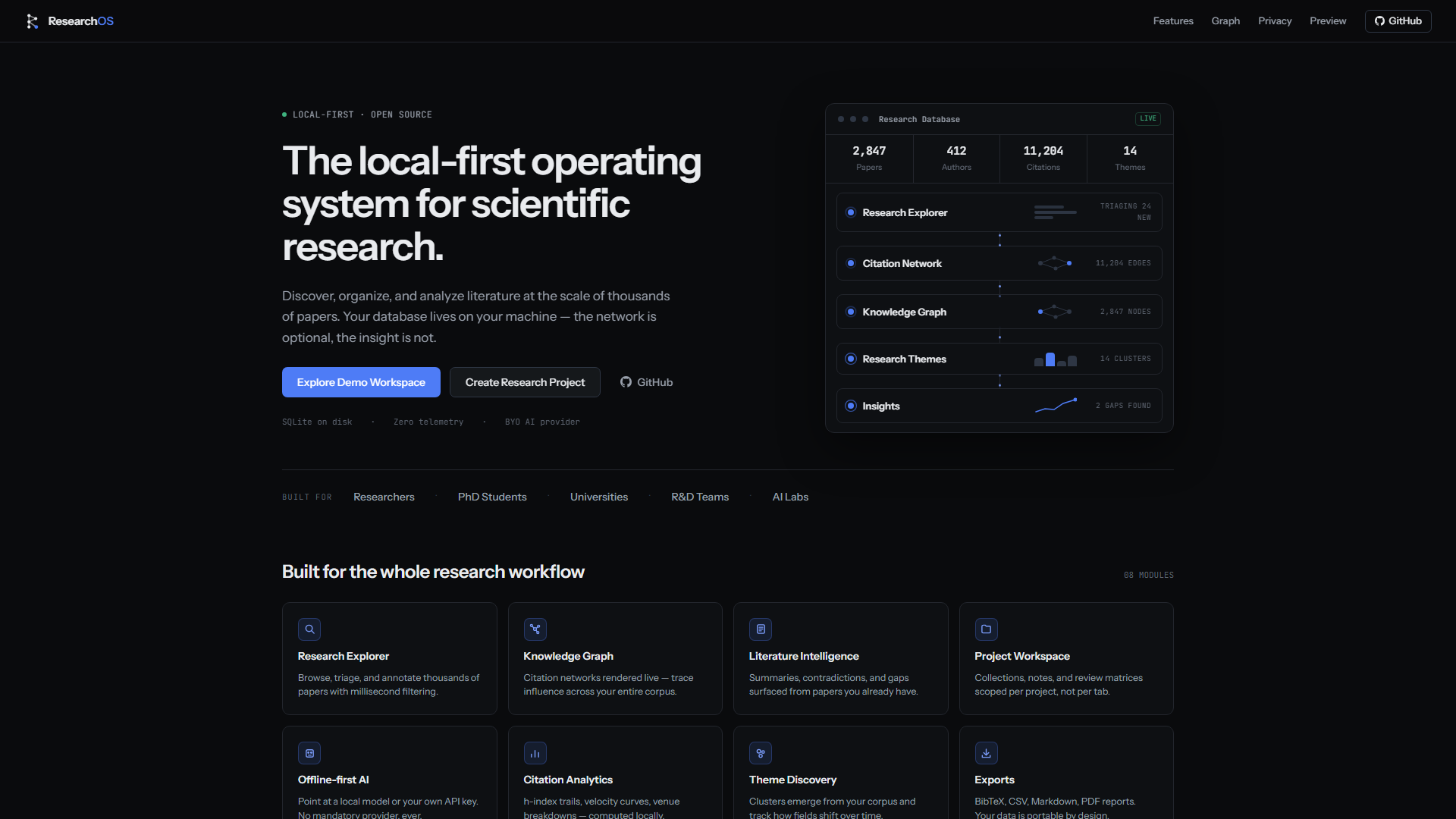 | 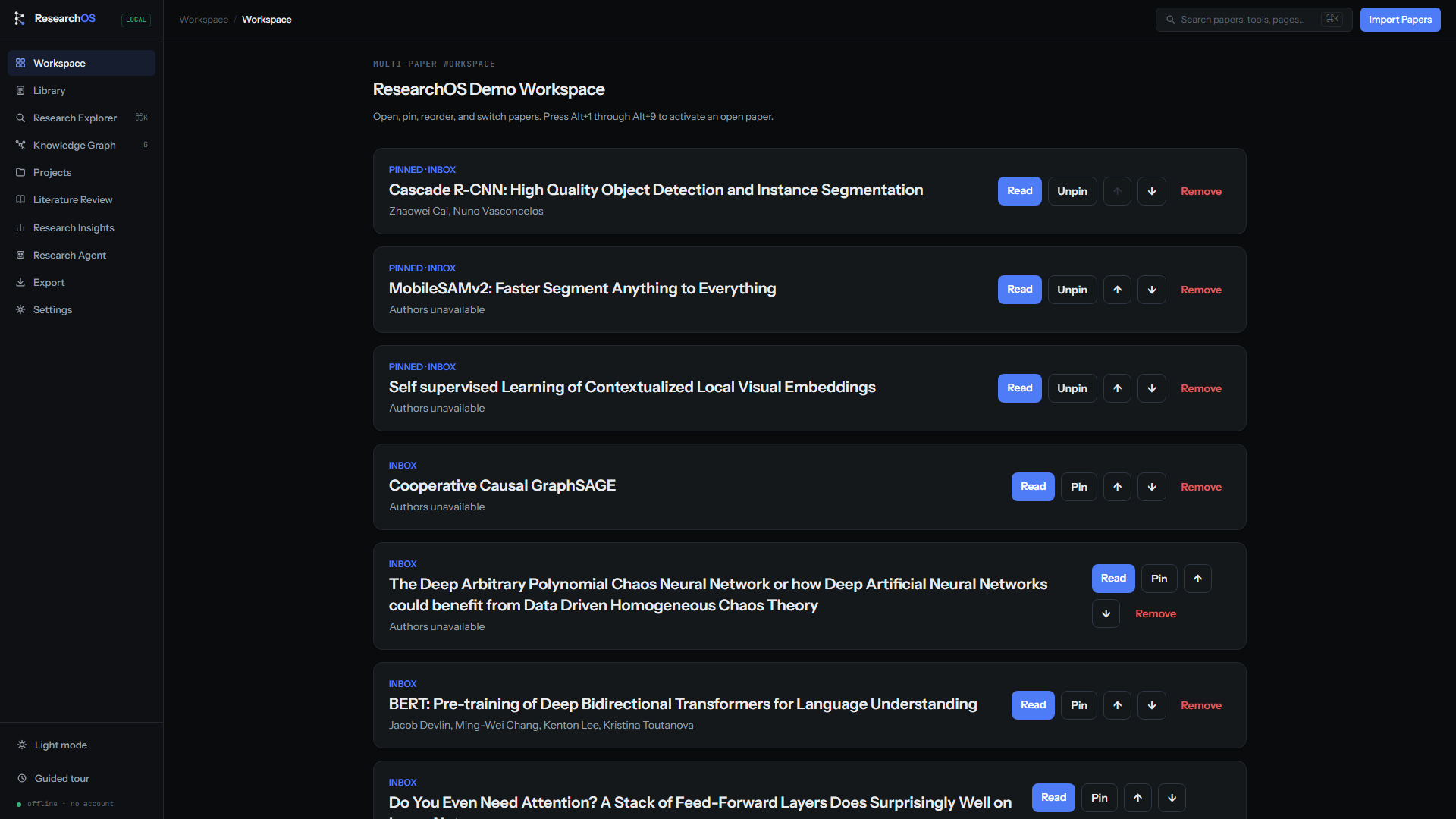 |
| Research library | Knowledge graph |
|---|---|
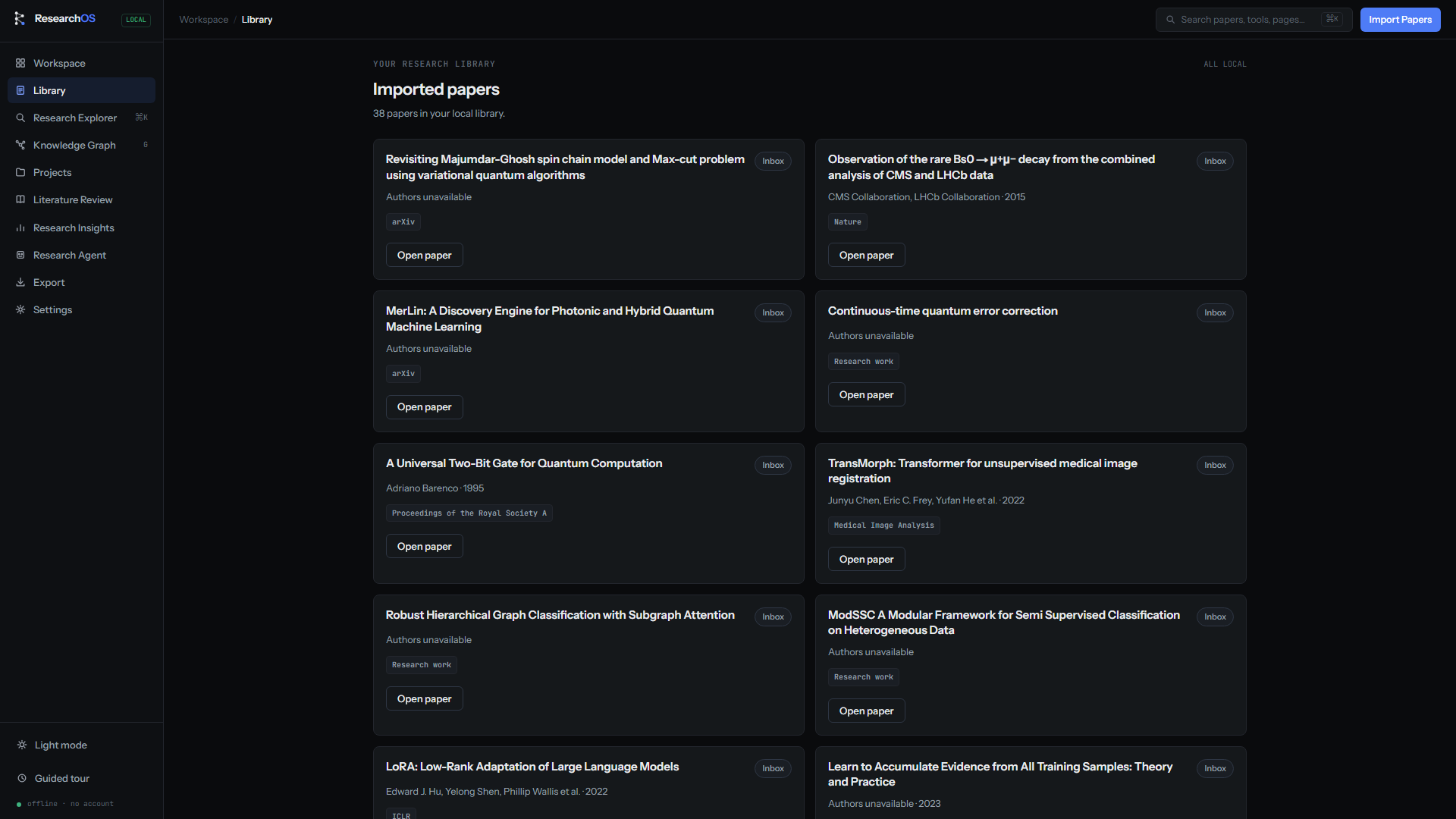 | 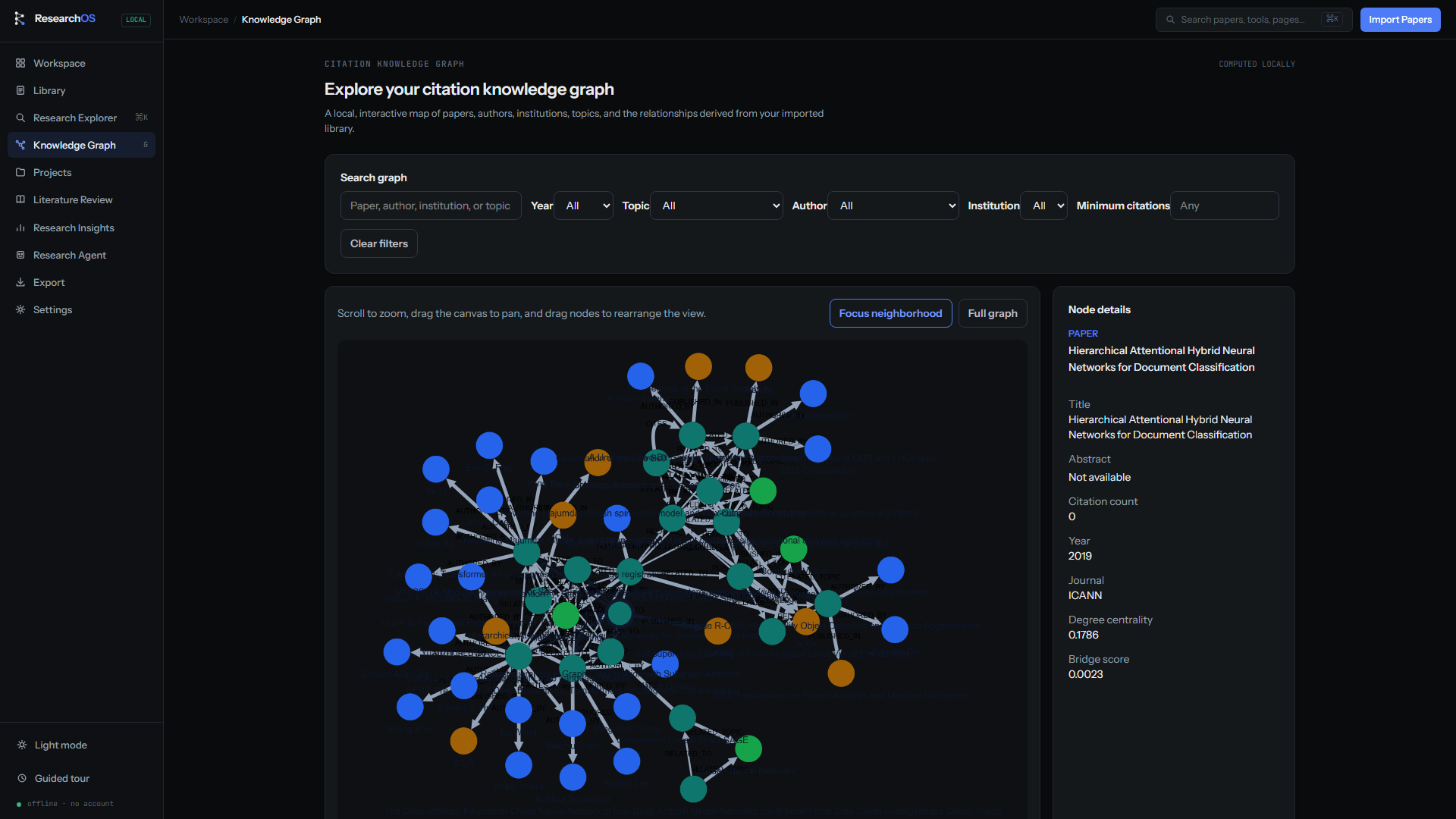 |
| Research insights | Project workspace |
|---|---|
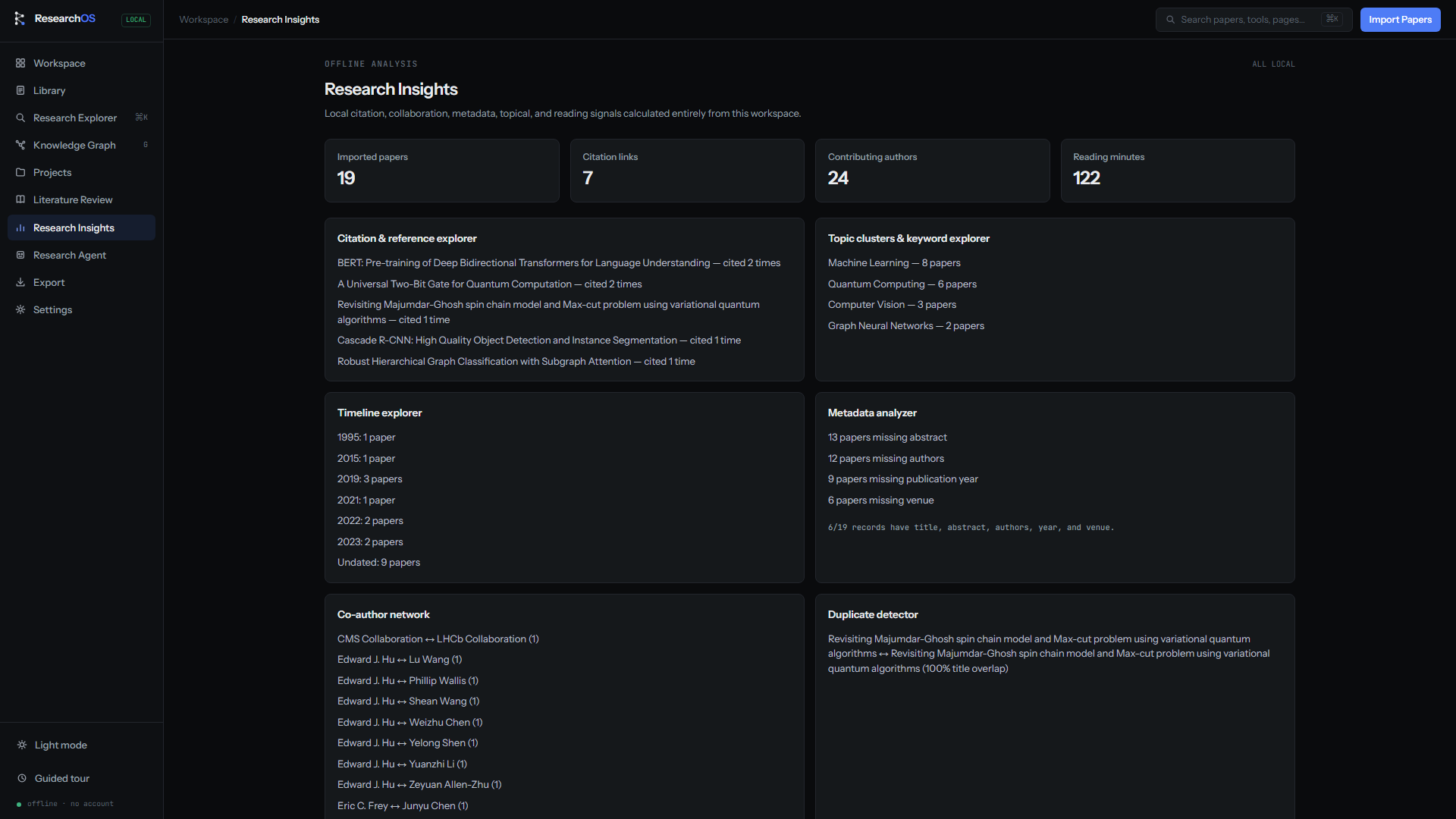 | 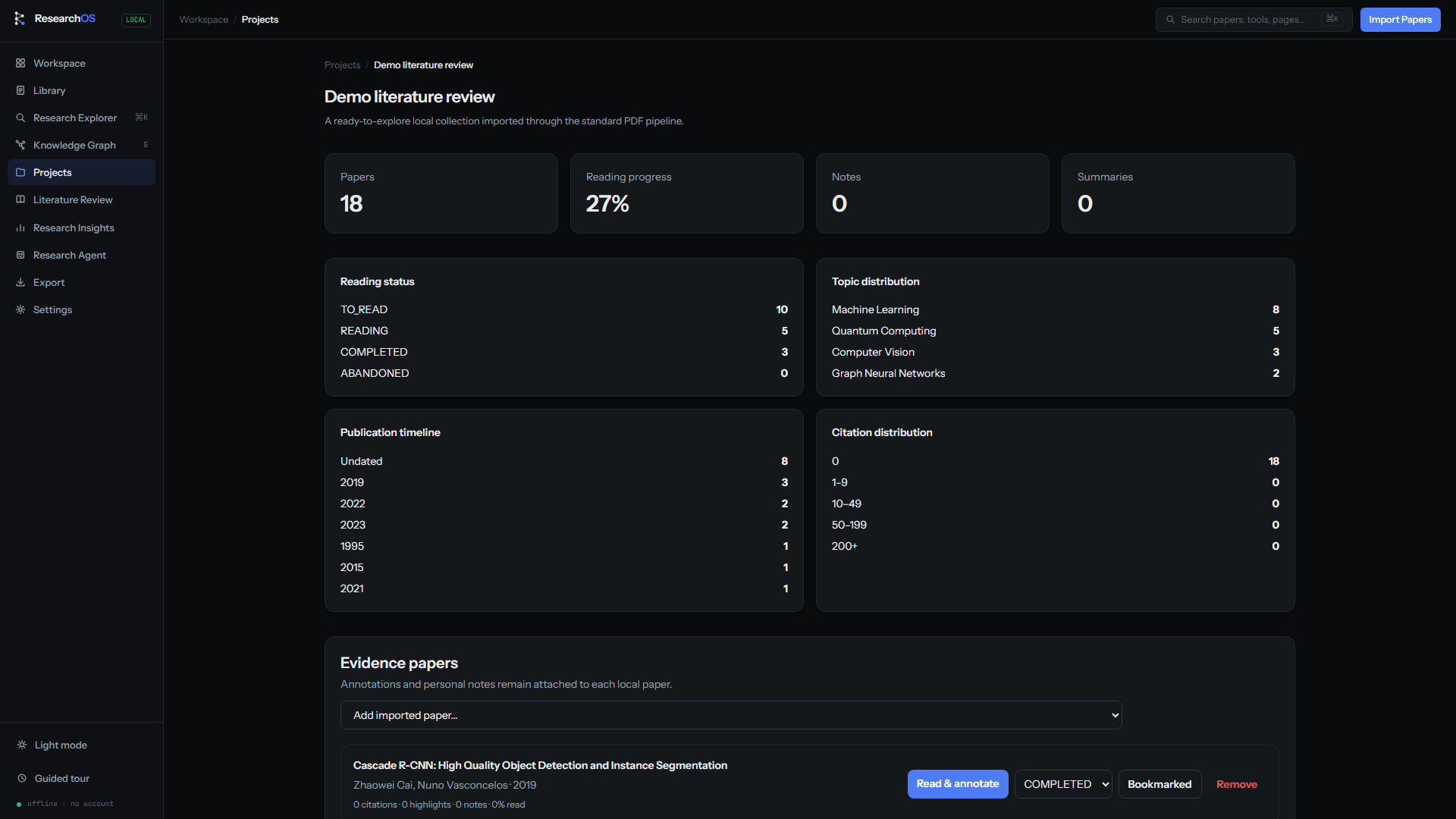 |
| Reading & evidence |
|---|
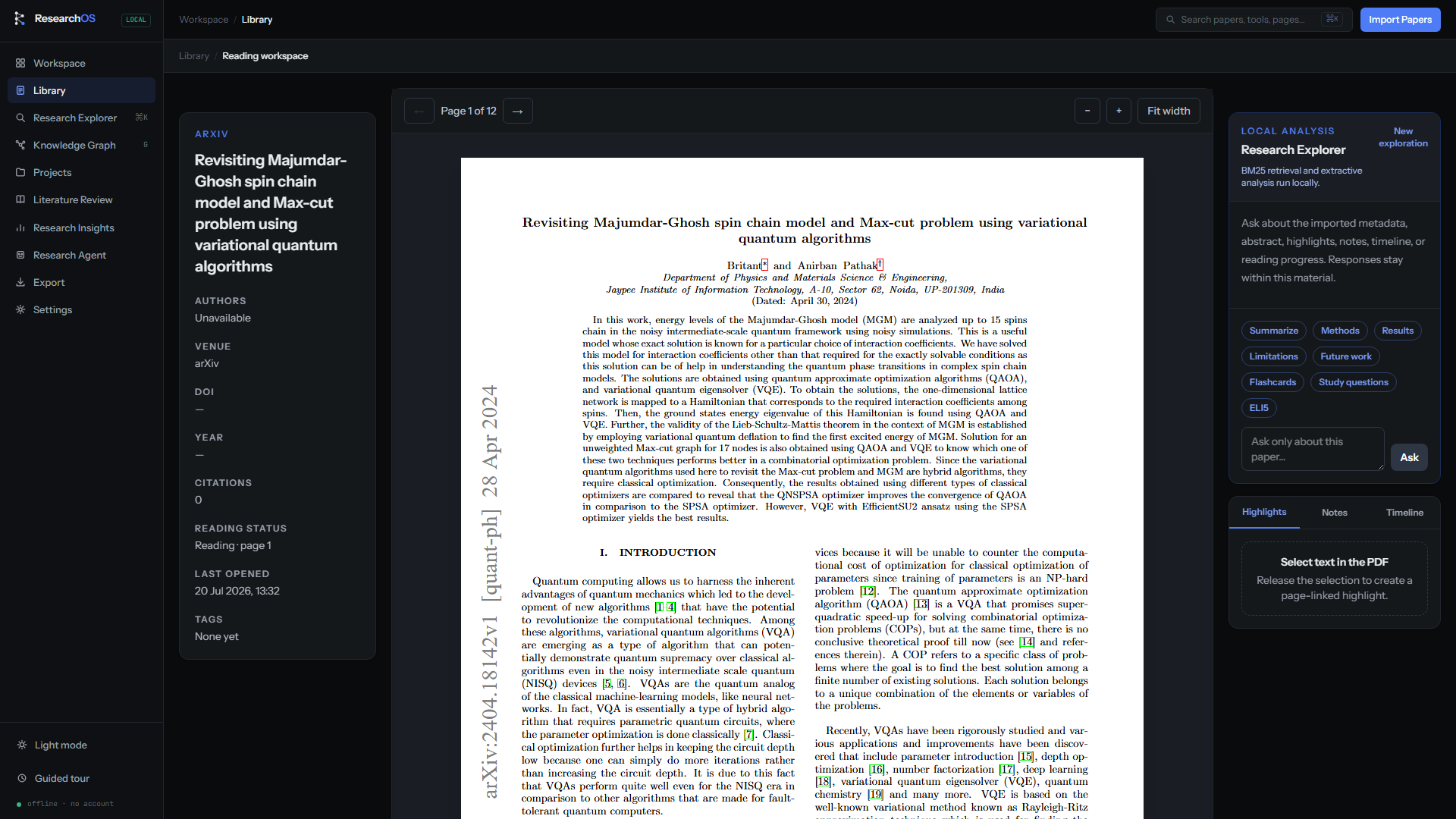 |
Demo
A full 1920×1080 product walkthrough — landing, demo workspace, library, knowledge graph, insights, projects, and the PDF reader — is available at docs/demo/researchos-demo.webm.
Regenerate the screenshots and video at any time against a running server:
npm run build && npx next start   # serve the production app on :3000
npm run demo:capture              # record docs/assets/*.png + docs/demo/researchos-demo.webm
Installation
Prerequisites
- Node.js 20 or later
- npm 10 or later
Local setup
From a fresh clone, the complete local database setup is one command:
npm run bootstrap
bootstrap installs dependencies, creates .env from .env.example when it
is absent, generates Prisma Client, and applies the local SQLite migrations.
It never overwrites an existing .env.
To run the required commands individually instead, no manual environment-file copy is needed:
git clone <your-repository-url>
cd researchos
npm install
npx prisma generate
npx prisma migrate dev
npm run dev
Open http://localhost:3000 to start exploring.
Environment
Configuration is validated at startup and kept server-side. npm install and
all npm run startup scripts automatically create .env from the complete
.env.example when it is absent. Prisma, Next.js, and the typed server
configuration all read the same DATABASE_URL. Never commit .env.
Quick start
- Open the application and choose Launch demo workspace for a guided, curated tour.
- Search for a paper, concept, or author and import a useful source.
- Open a paper, select text in the PDF, and save a highlight or note.
- Search across workspace material or use the Research Explorer to retrieve cited evidence.
- Inspect relationships in the knowledge graph, synthesize a literature review, then export your result.
Press Ctrl + K (or ⌘ + K) anywhere in the product to jump between research tools.
Architecture
ResearchOS is a modular monolith: one Next.js application with clear boundaries around the capabilities most likely to evolve—AI providers, data storage, identity, and background execution.
flowchart TB
  UI["Next.js App Router\nServer & Client Components"] --> API["Typed route handlers\nvalidation · auth · response mapping"]
  API --> SVC["Application services\nuse cases · domain policies"]
  SVC --> PORTS["Ports & contracts"]
  PORTS --> DB[("Relational data")]
  PORTS --> OBJ[("Object storage")]
  PORTS --> ANALYSIS["Offline Analysis Engine\nBM25 · LexRank · local embeddings"]
  PORTS --> JOBS["Durable jobs & workers"]
- UI stays presentational. React components do not own business rules, database access, or secrets.
- Services own application behavior. Routes validate, authorize, invoke a use case, and map a stable response.
- External dependencies live behind ports. The database, object storage, queues, and optional local model adapters can evolve without leaking through the product.
- Derived analysis artifacts are traceable. Algorithm version, input provenance, and schema version belong with durable results.
Read more in Architecture, Modules, and API design.
Offline Analysis Engine
sequenceDiagram
  participant R as Researcher
  participant W as Workspace
  participant I as Local index
  participant E as Analysis engine
  participant A as Artifact store

  R->>W: Ask a source-grounded question
  W->>I: Incrementally index workspace evidence
  I->>E: BM25 passages and local vectors
  E->>E: LexRank, keyword, graph, and metadata analytics
  E->>A: Persist output + algorithm + provenance
  A-->>R: Evidence-linked research artifact
The UI never acts as a model proxy. Requests pass through a task-oriented local analysis boundary, so source provenance and optional future local-model adapters remain consistent.
Technology stack
| Layer | Technology |
|---|---|
| Application | Next.js 16, React 19, TypeScript |
| UI | Tailwind CSS, Framer Motion |
| Data | Prisma 7, SQLite for local development |
| Offline analysis | BM25, LexRank/TextRank-style ranking, TF-IDF, hashing embeddings |
| Research tooling | OpenAlex, PDF.js, Cytoscape, Graphology |
| Search & exports | Lunr, Fuse.js, DOCX, BibTeX, Markdown, HTML |
| Quality | ESLint, Prettier, strict TypeScript |
Project structure
app/           Routes, layouts, and HTTP route handlers
components/    Reusable presentation components
services/      Application services, domain logic, and adapters
repositories/  Persistence implementations
lib/           Shared infrastructure: analysis, auth, graph, search, export
prisma/        Data schema and migrations
types/         Shared public TypeScript contracts
validators/    Boundary validation schemas
docs/          Architecture, module, API, and roadmap documentation
Available commands
npm run dev              # Start the local development server
npm run lint             # Run ESLint
npx tsc --noEmit         # Type-check without emitting files
npm run prisma:generate  # Generate the Prisma client
npm run prisma:migrate   # Apply local database migrations
npm run build            # Generate Prisma client and create production build
Roadmap
- Foundation: strict TypeScript, App Router, validated configuration, Prisma
- Local research flows: paper library, reading, annotations, search, graph
- Grounded research intelligence: AI-assisted research artifacts
- Production platform: managed database, storage, queue workers, observability
- Collaboration: memberships, shared collections, revisions, notifications
- Scale: semantic search and scalable graph computation
The detailed technical plan and decision gates live in docs/roadmap.md.
Contributing
Contributions are welcome. For a focused change:
-
Create a branch from the current default branch.
-
Keep business rules in services and preserve the boundaries documented in
docs/. -
Run the quality checks before opening a pull request:
npm run lint npx tsc --noEmit npm run build -
Describe the user-facing outcome and any architecture trade-offs in the pull request.
Please avoid introducing direct provider, database, or business-logic access into client components.
Built with OpenAI Codex
ResearchOS was designed and developed with OpenAI Codex acting as an AI software engineering assistant and reviewer.
Codex accelerated:
- Architecture design
- Full-stack implementation
- Component generation
- Refactoring
- Debugging
- Documentation
- Test generation
- UI iteration
GPT-5.6 and Codex were used throughout development to rapidly prototype, implement, and refine production-ready features while keeping a human-in-the-loop engineering workflow.
License
No open-source license has been declared for this repository yet. Until a license is added, all rights are reserved by the repository owner.
FAQ
It includes a paper library, but its purpose is broader: keeping sources, annotations, AI-assisted thinking, graph context, and outputs connected throughout the research process.
AI work is modeled as a source-backed artifact. The architecture records the provider/model policy, prompt version, inputs, output schema, and evidence references rather than treating an answer as untraceable text.
Yes. SQLite is intentionally appropriate for local development and single-user demos; repository boundaries are designed so production can move to managed Postgres without rewriting application services.
Open a GitHub issue in the repository, including a concise reproduction, expected behavior, and relevant screenshots or logs with sensitive information removed.
Acknowledgements
ResearchOS is built with the open-source ecosystem around Next.js, React, Prisma, Tailwind CSS, OpenAlex, Cytoscape.js, and PDF.js. Thank you to the maintainers and research communities that make ambitious, evidence-driven tools possible.
Analysis
View
Metric
- 39

Figures cover GitHub contributors during the hackathon window. A co-authored commit counts in full for each author, so per-member totals add up to more than the whole-team figures.
Technology
- CSSIn code
- Next.jsIn code
- ReactIn code
- SQLIn code
- Tailwind CSSIn code
- TypeScriptIn code
- JavaScriptClaimed
- Node.jsClaimed
- OpenAIClaimed
- PythonClaimed
6 of 10 appear in the indexed code. 4 claimed on Devpost could not be matched to code, which may simply mean the tool leaves no trace in the repository.
AI coding agents
- Claude CodeConfig
- CodexConfig
Detected from committed agent config files and commit authorship. Absence of a signal is not proof an agent was unused.
Codebase size
Source size
821 KB
Source files
245
Counts recognized source files only; vendored directories, binaries and lockfiles are excluded, so this is smaller than the repository on disk.
Repository
cerebrimbor/researchos-core
346 files · 76.3 MB · @ 12a435b
Structure
Interface
58 files · 17%Screens, components and styles rendered to the user.
+19 moreAPI & routing
41 files · 12%Request entry points: routes, handlers and controllers.
Application logic
131 files · 38%Domain rules, services and shared utilities.
+22 moreBackground jobs
8 files · 2%Work run outside a request: tasks, workers and schedules.
Data & schema
43 files · 12%Schema definitions, migrations and data access.
Supporting
Layers are inferred from where files sit in the tree, not from reading the code. A project that names its directories unconventionally will read oddly here — open the file browser to check anything the diagram implies.
Languages
- TypeScript82%
- Markdown12%
- SQL4%
- CSS1%
Share of indexed source by file size. Binary and vendored files are excluded.
Dependencies
package.json
npm · 41- @prisma/adapter-better-sqlite3
- @prisma/client
- better-sqlite3
- bibtex-parse-js
- cytoscape
- docx
- file-saver
- framer-motion
- fuse.js
- graphology
- graphology-layout
- graphology-metrics
- graphology-shortest-path
- lunr
- markdown-it
- mime
- nanoid
- next
- +23 more
Declared in the repository’s manifests at the indexed commit. A declared package is not proof it is used, and runtime dependencies are listed first.
This project’s features have not been analysed yet.
Export this project's context (description, README, evidence, key source files) to chat with an AI agent elsewhere.