Project Info
Inspiration
Organizations often spend weeks planning teams, workflows, documentation, and execution before real development begins. Existing AI tools generate responses, but they don't create complete operational organizations. Genesis was built to bridge that gap.
What it does
Genesis is an AI Organization Architect that transforms a single mission into a complete AI-powered operational organization. It automatically generates organizational structures, execution plans, worker assignments, project documentation, validation reports, deployment guidance, and exportable project foundations.
How we built it
Genesis was built during OpenAI Build Week using GPT-5.6 and Codex. The frontend is built with Next.js, React, TypeScript, and Tailwind CSS. The backend uses FastAPI with provider abstraction supporting OpenAI, Gemini, and Ollama. Codex accelerated architecture design, backend implementation, debugging, provider integration, documentation, and workflow optimization.
Challenges we ran into
One of the biggest challenges was coordinating multiple AI generation stages while keeping the interface responsive. We redesigned the workflow to support background AI execution, progressive updates, timeout handling, retries, and provider abstraction.
Accomplishments we're proud of
• Complete AI organization generation • Interactive Mission Control dashboard • Background AI execution • Multi-provider AI support • Automatic documentation generation • Exportable project foundation
What we learned
We learned how to combine structured AI reasoning with software architecture to build systems that generate organizations instead of isolated responses. We also learned how important workflow optimization and asynchronous execution are for user experience.
What's next
for Genesis Future work includes collaborative multi-user organizations, persistent organization memory, agent collaboration, cloud deployment, organization templates, and deeper enterprise integrations.
Genesis
Build Organizations. Not Prompts.
Genesis is an AI Organization Platform—an Organization OS for AI work—built for OpenAI Build Week. Give Genesis a mission and it designs a validated organization, turns its departments into an execution plan, coordinates specialist workers, captures shared knowledge, and assembles a reviewable project foundation.





📸 Screenshots
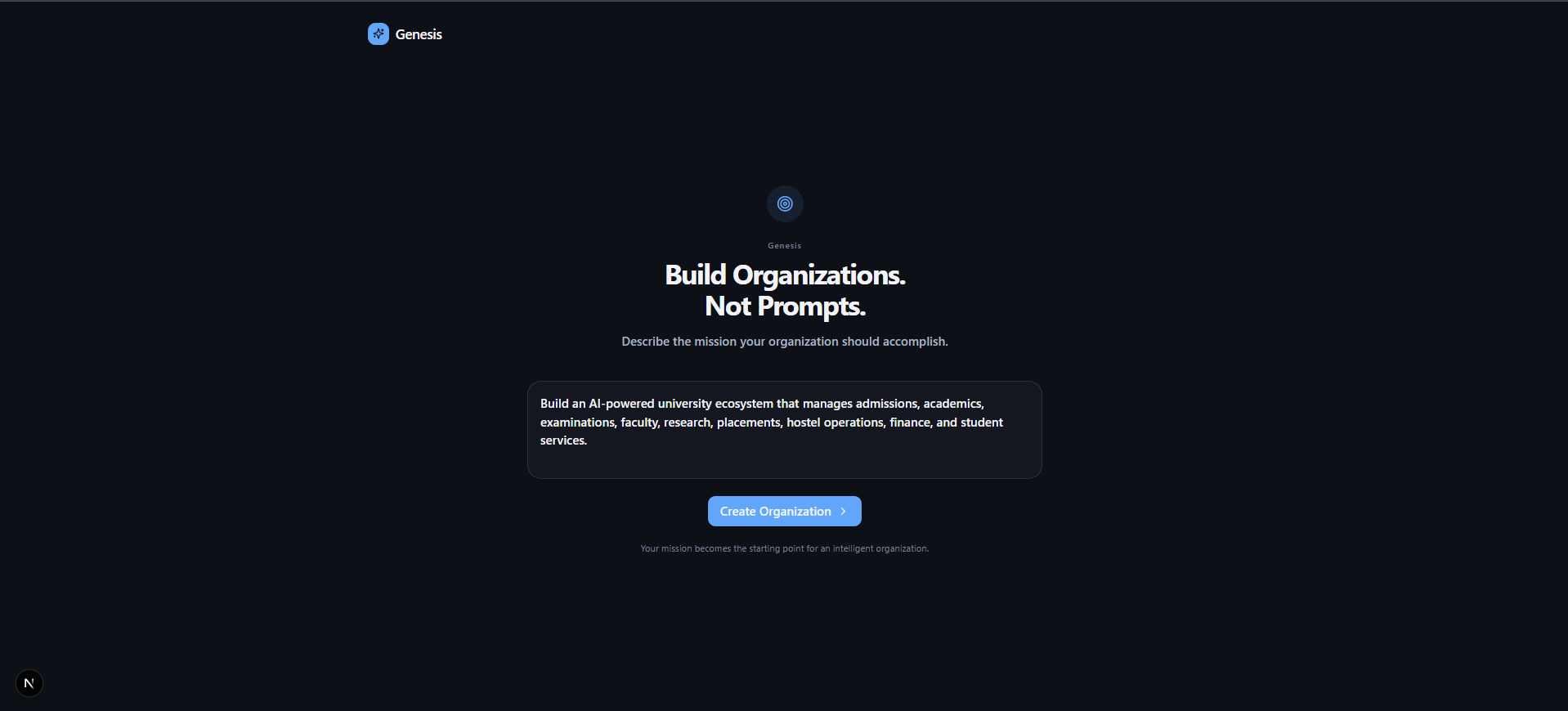
🏠 Mission Input
The entry point of Genesis where users describe their mission in natural language.
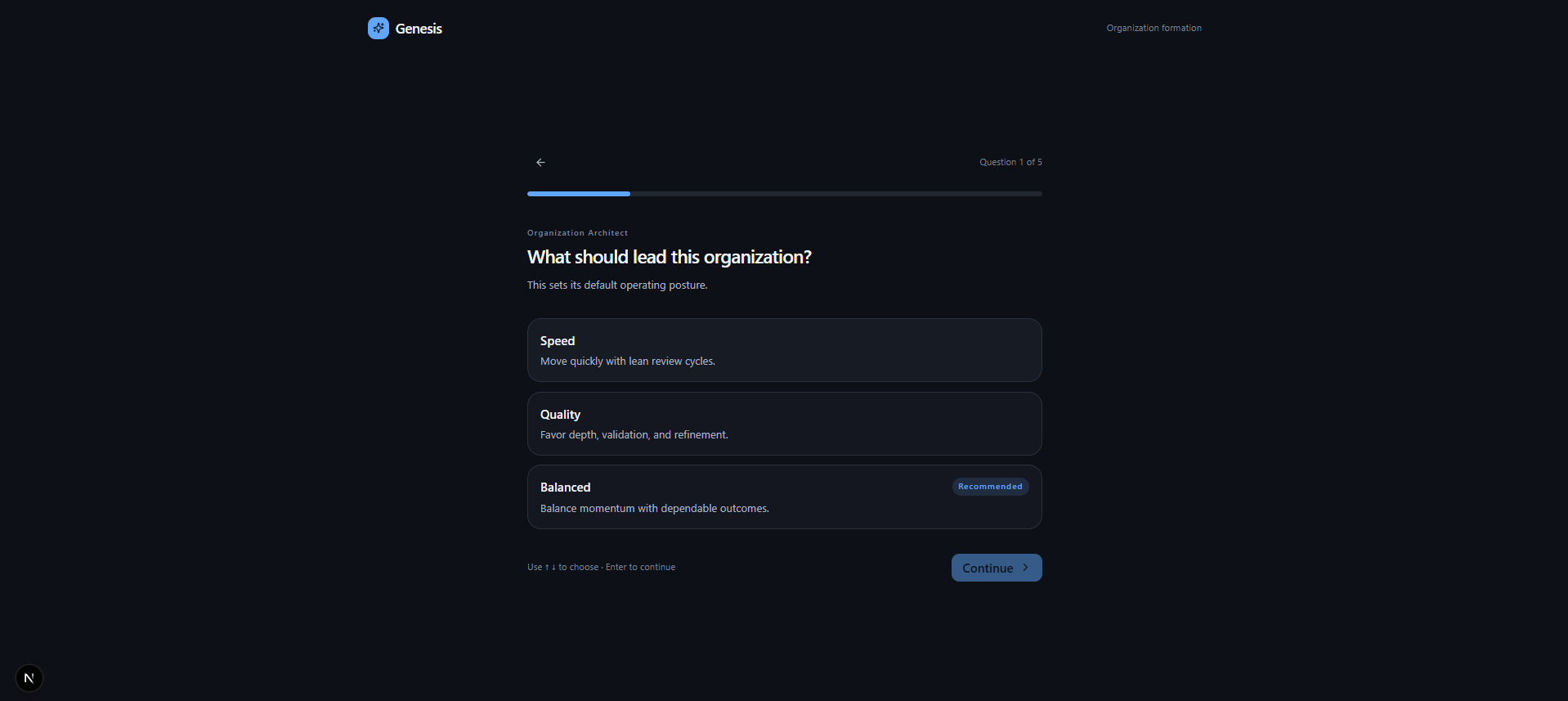
❓ Organization Questionnaire
Genesis gathers additional context through a guided organization questionnaire before generating the final blueprint.
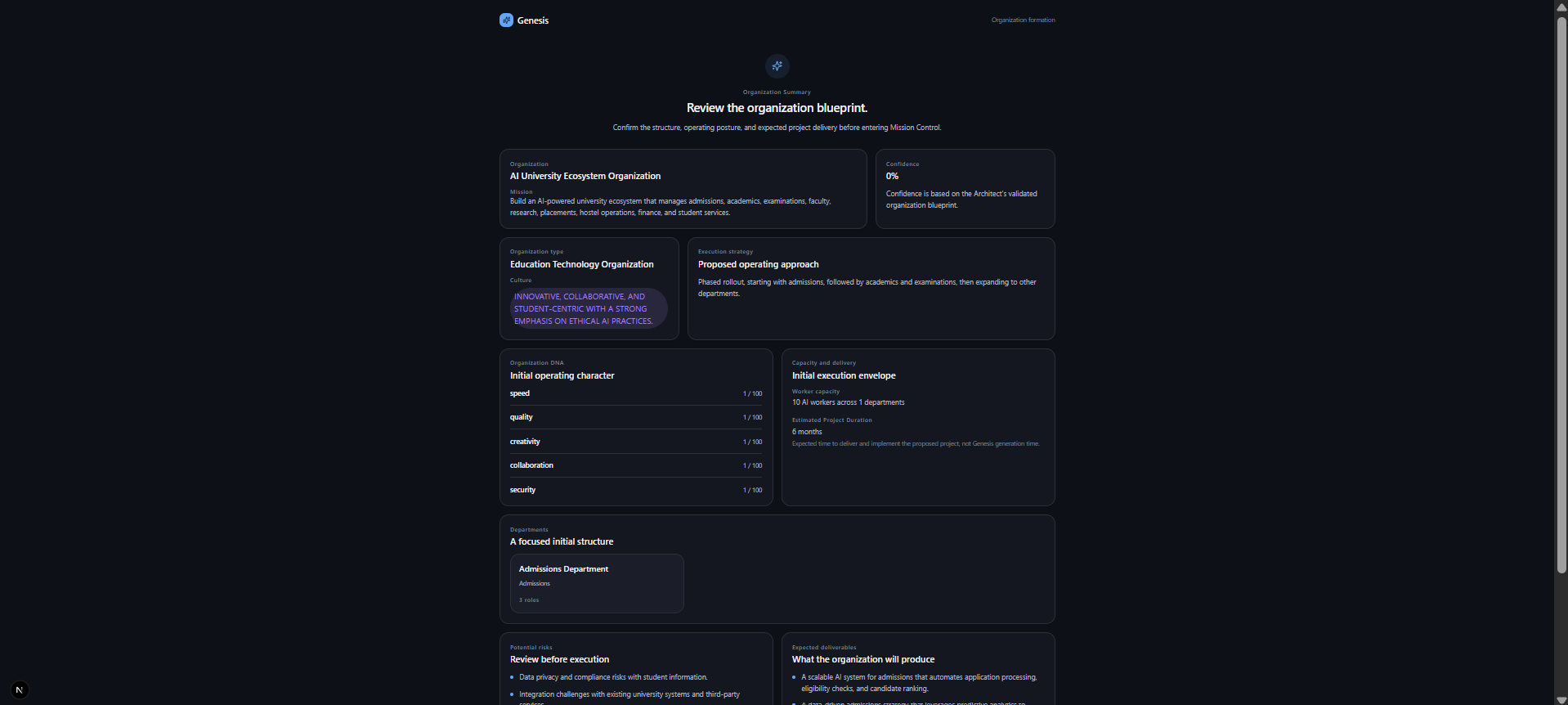
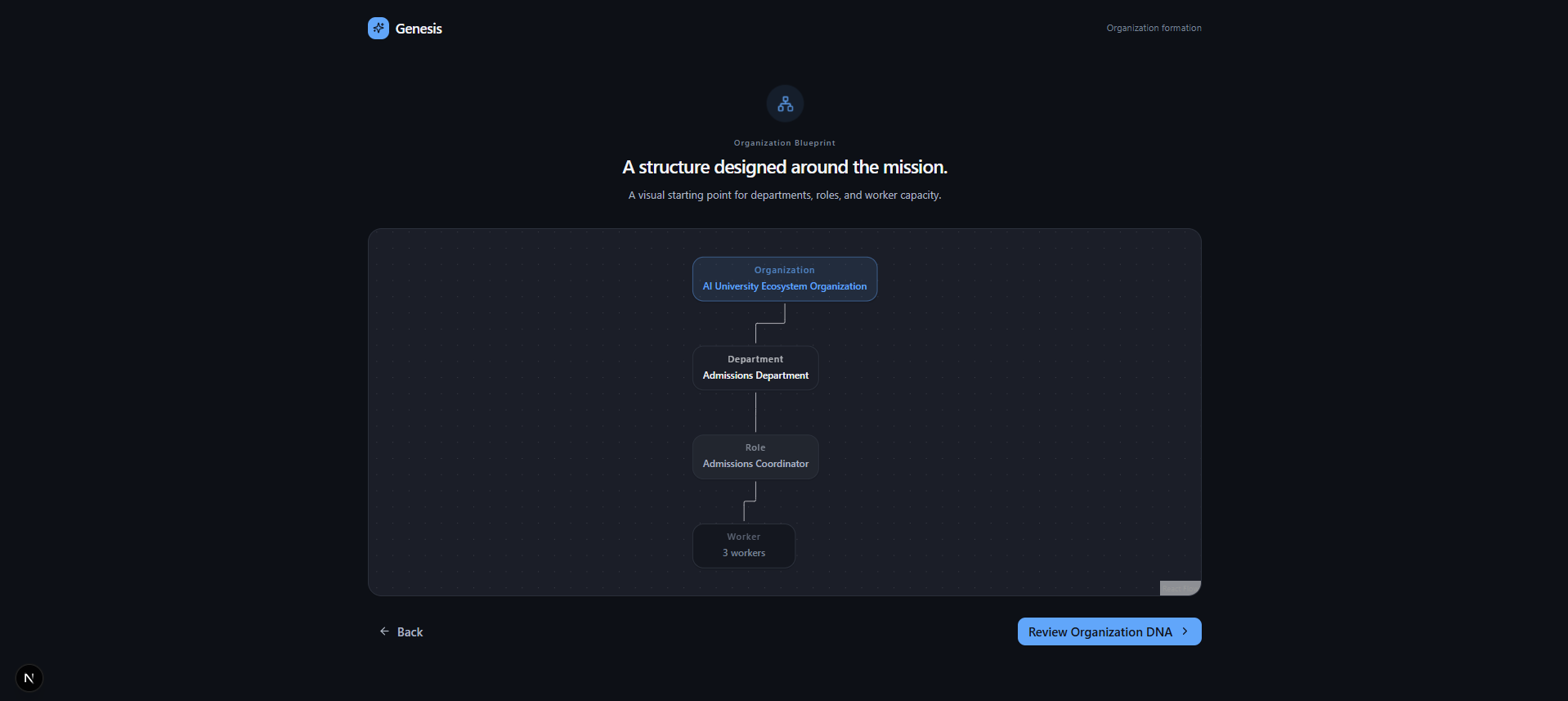
🏗️ Organization Blueprint
The generated organization is visualized as an interactive blueprint showing departments, relationships, and overall structure.
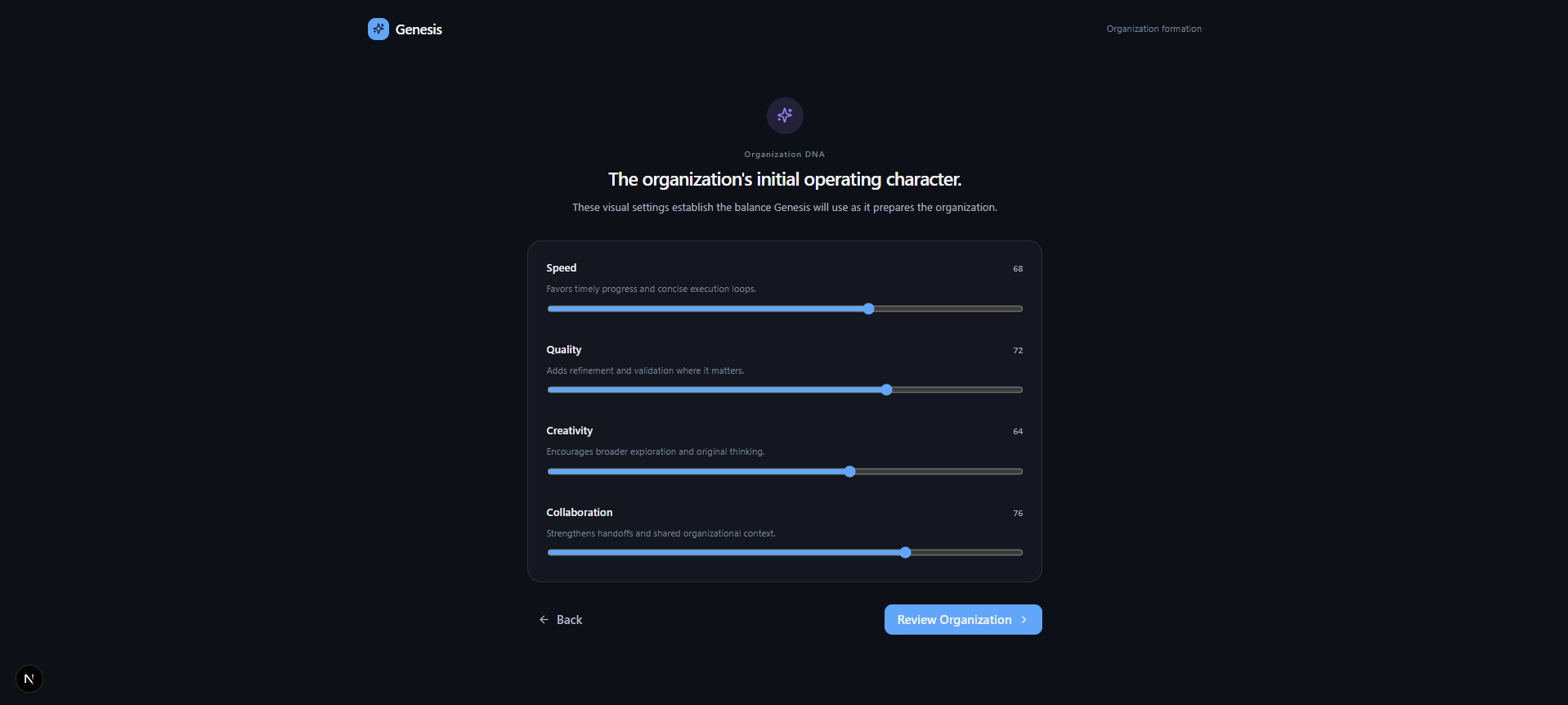
🧬 Organization DNA
Genesis summarizes the organization's identity through its mission, culture, values, and strategic DNA.
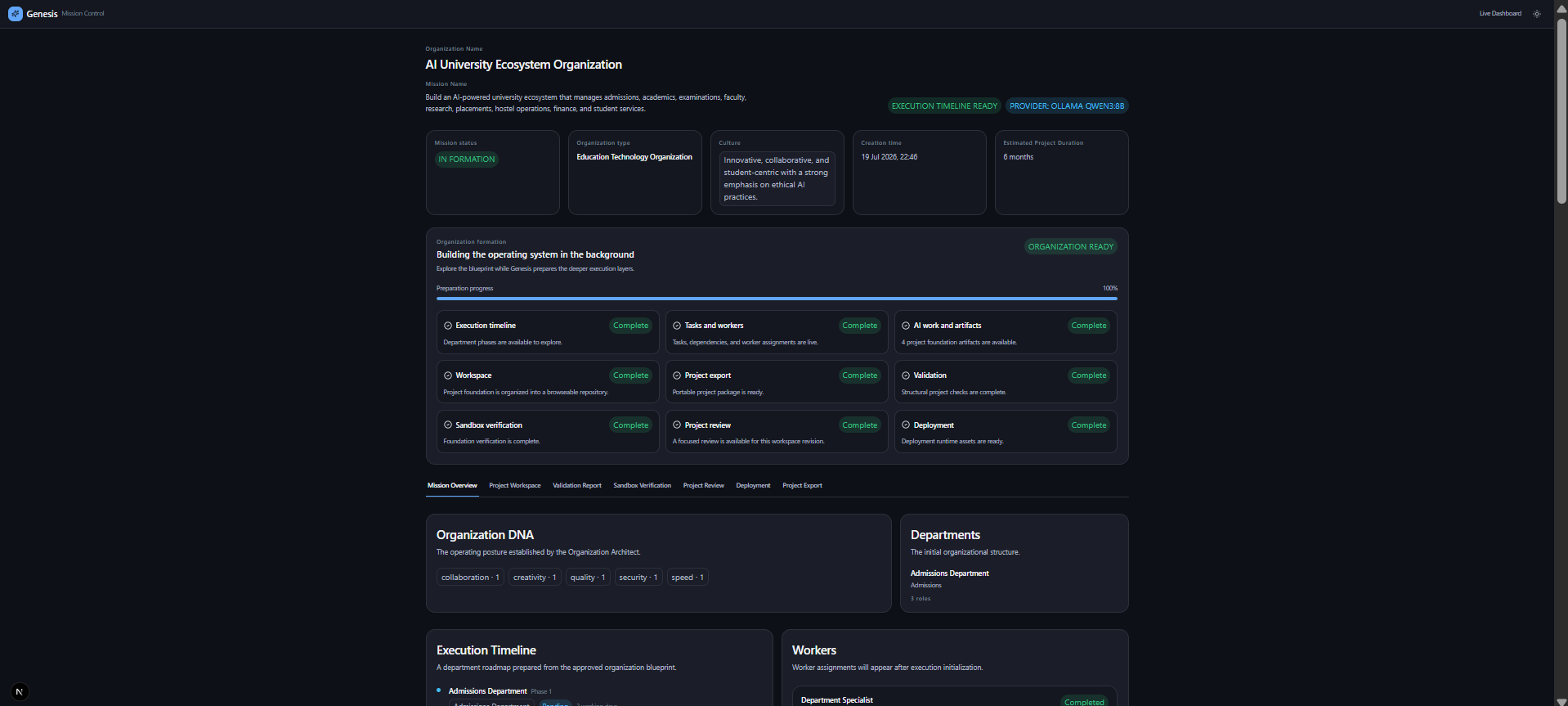
🎯 Mission Control
Mission Control provides a live operational view of organization generation, execution progress, workers, background AI tasks, and project readiness.
📂 Project Structure
Genesis automatically generates a structured project foundation that serves as the starting point for implementation.
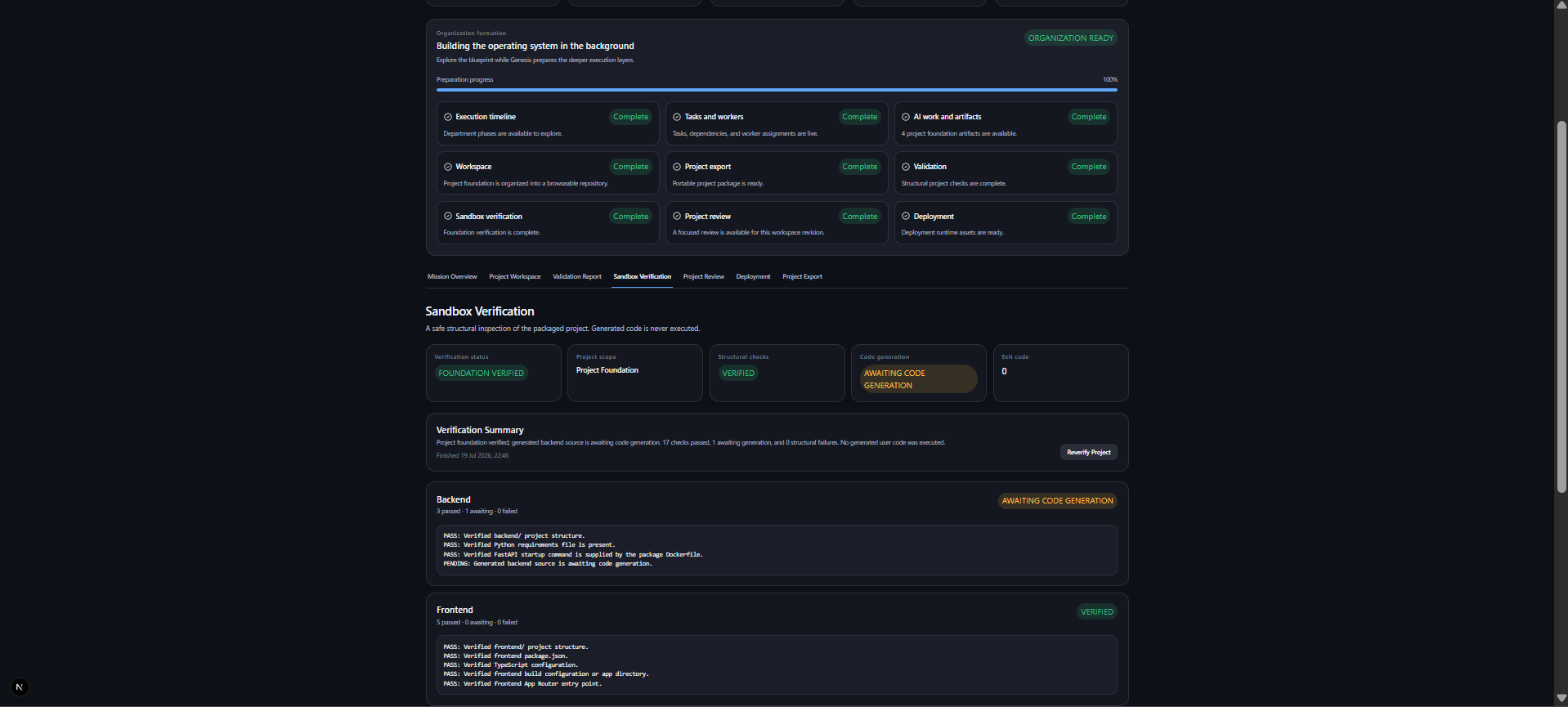
🛡️ Sandbox Verification
Generated project foundations are safely verified before export to ensure structural integrity and implementation readiness.
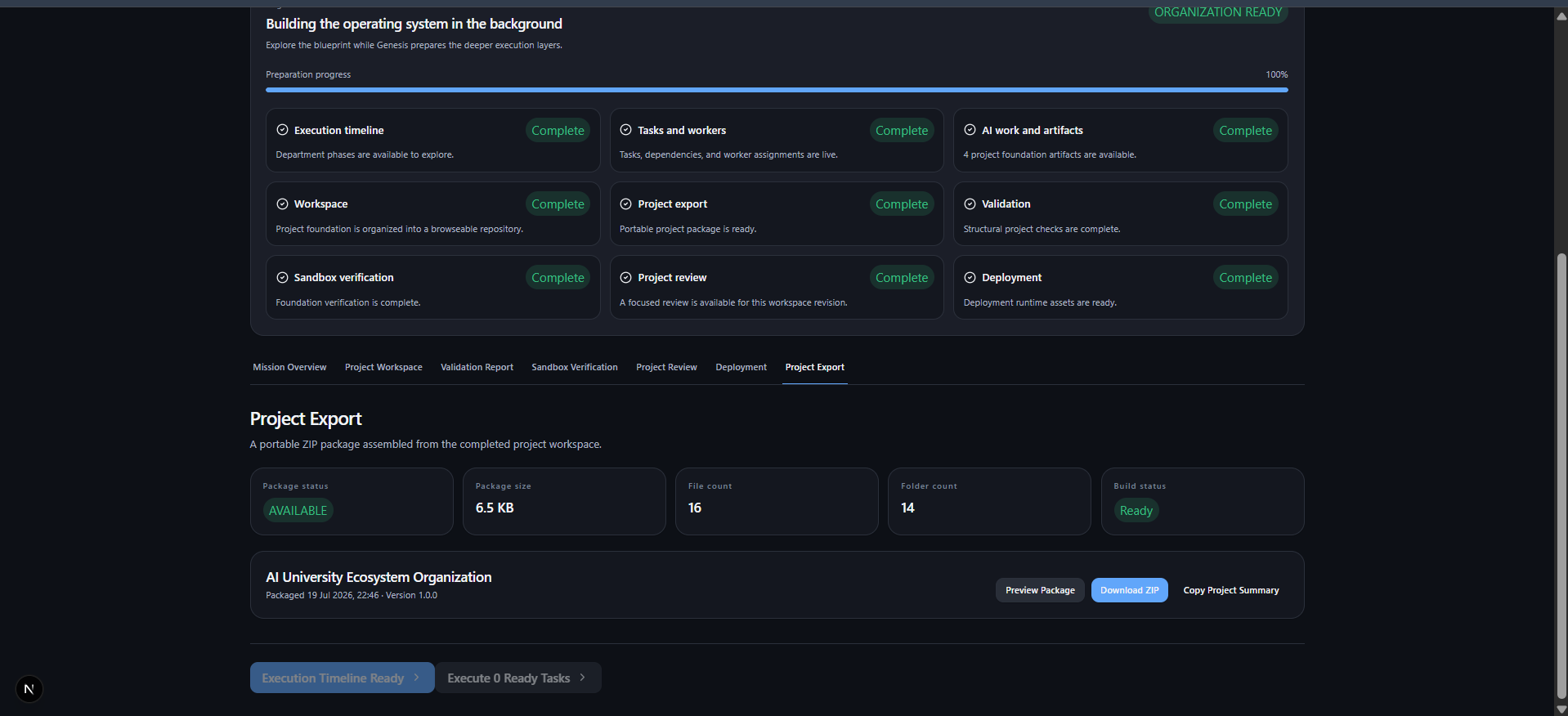
📦 Project Export
Export the generated organization, documentation, and project foundation for future development.
In 60 seconds
Genesis is for work that is too broad for one prompt and too connected for a collection of isolated agents. A user begins with a mission such as “Build a secure AI-powered hospital operations platform.” Genesis creates a typed Organization Blueprint, sequences the newly created departments, generates deterministic tasks and worker assignments, manages task readiness, and enriches the operational view in the background.
The result is not a chat transcript. It is a navigable organization with a mission brief, DNA, departments, workers, workflow state, memory, artifacts, a workspace, package, validation report, verification report, review, and deployment plan.
Problem statement
Complex initiatives do not fail because teams lack a single answer; they fail because research, strategy, design, engineering, quality, operations, and communication need to happen in the right order and share context. Planning that organization is slow, difficult to inspect, and usually trapped in documents and meetings.
Most AI products begin with a prompt and return an answer. That interaction is useful, but it does not model responsibilities, dependencies, handoffs, institutional knowledge, or project readiness. Genesis treats the organization itself as the product surface: a mission becomes a structured operating model that can be inspected before work starts and followed while it progresses.
Solution
Genesis turns a plain-language mission into an operational organization without exposing a provider-specific workflow to the browser. The Organization Architect produces a Pydantic-validated blueprint; deterministic services make the resulting sequence and work graph reproducible; a provider-neutral execution layer can use Mock AI, OpenAI, Gemini, or local Ollama; and Mission Control keeps the organization useful while enrichment continues asynchronously.
flowchart TD
    M[Mission input] --> A[Organization Architect]
    A --> B[Validated Organization Blueprint]
    B --> Q[Conversational organization questions]
    Q --> P[Blueprint and Organization Brief]
    P --> MC[Mission Control]
    MC --> EP[Execution Planner]
    EP --> TG[Task Generator]
    TG --> WA[Worker Assignment]
    WA --> WF[Workflow Engine]
    WF --> CE[Collaboration and ready-task execution]
    CE --> MEM[Organization Memory]
    CE --> ART[Project-foundation artifacts]
    ART --> WS[Project Workspace]
    WS --> PKG[ZIP package and manifest]
    PKG --> V[Validation and safe verification]
    PKG --> R[Project review and selective refinement]
    PKG --> D[Deployment plan]
    MEM --> DASH[Mission Dashboard]
    V --> DASH
    R --> DASH
    D --> DASH
Key features
Organization Architect and Blueprint
The Architect accepts a mission through POST /api/v1/architect, asks a selected structured-response provider for JSON, then validates the result against the OrganizationBlueprint schema before returning it. The blueprint contains the organization name and type, mission summary, culture, Organization DNA, departments, roles, execution strategy, capacity, risks, deliverables, and confidence score. Invalid provider output is never passed directly to the UI.
The Mission Initiation experience deliberately keeps the mission central. It moves from a focused mission input through a preparation animation and a one-question-at-a-time organization conversation to a React Flow blueprint, DNA, and an approval brief. Mission Control is reached only after the user approves that summary.
Deterministic planning, tasks, and staffing
The Execution Planner orders the departments in a validated blueprint using department and mandate keywords—research, strategy, design, engineering, quality, operations, then marketing—while retaining unmatched departments. The Task Generator expands each phase using deterministic department templates. Worker Assignment creates role-specific workers and attaches tasks using department and task-type rules.
This separation matters: a provider may change, but the planned organization, task graph, and worker assignment remain explainable and repeatable. It also avoids asking a model to regenerate information Genesis already has.
Workflow Engine and provider-neutral execution
Every task has a typed lifecycle: Pending, Ready, Running, Completed, Failed, or Blocked. Only work without unsatisfied dependencies is initially ready; the workflow service refreshes dependent work when prerequisites complete.
The Execution Engine consumes only ready workflow tasks. It depends on the AIProvider interface rather than a vendor SDK, so the same workflow can use the deterministic Mock provider, OpenAI, Gemini, or Ollama. Provider selection is one environment value, not a frontend or API contract change.
Collaboration and organization memory
The Collaboration Engine records phase-scoped messages with a sender, optional receiver, message type, related task, and timestamp. Execution context includes organization memory, relevant artifacts, prior decisions, and task-related conversation history. Completed work produces typed memory entries; artifact, workspace, and refinement references are also retained.
Mission Control exposes this as Team Collaboration and Organization Memory instead of hiding institutional context inside individual model calls. Current memory is in the active browser session and is deliberately capped by the backend service; semantic retrieval and durable persistence are future work.
Responsive Mission Control
Mission Control opens with the approved organization DNA, departments, and execution timeline available immediately. Tasks, workers, workflow state, execution, collaboration, foundation artifacts, workspace, package, validation, verification, review, and deployment are then requested in the background. Cards animate and fill as results arrive, so the UI does not wait for every enrichment step.
The background pipeline isolates failures. It retries AI Work & Artifacts once; if that work still fails it remains pending with “Will retry automatically.” Collaborative execution has a 90-second boundary, becomes Deferred rather than a hard UI error, retries automatically once, and can be retried from Mission Control. Workspace, packaging, validation, verification, review, and deployment also continue independently when another subtask is deferred.
Project foundation, workspace, package, and quality views
Artifact generation intentionally creates four concise project-foundation artifacts from completed work without an additional provider call: README.md, project-structure.md, worker-summary.md, and deployment-summary.md. The Workspace Engine maps those artifacts into a deterministic repository tree with backend, frontend, database, tests, docs, deployment, and assets surfaces.
The Packaging Engine creates an in-memory ZIP payload and manifest from that workspace, adding required package files and a minimal runtime scaffold when the workspace does not provide one. Validation checks required structure, artifacts, dependencies, workers, workspace paths, and package contents. Verification safely inspects structure and source syntax; it never executes generated user code. A scaffold-only package is accurately reported as Foundation Verified with backend code generation pending rather than as a failed build.
Review and deployment planning
Project Review produces typed strengths, weaknesses, opportunities, and file-scoped suggestions. A user can select suggestions and selectively refine only the associated artifacts, rather than regenerating a whole repository. Deployment Generation produces an additive deployment overlay: runtime requirements, required configuration, health-check assets, manifest, and deployment recommendations. These stages consume existing workspace/package data and do not change the execution pipeline.
Live Mission Dashboard
The dashboard aggregates the existing plan, tasks, workflow, workers, executions, memory, artifacts, workspace, package, validation, verification, review, and deployment results. It calculates progress from completed tasks, shows phase completion, worker state, recent activity, memory, repository/export status, and project health. It reads the same client session data used by Mission Control rather than creating a duplicate backend state model.
Architecture
Runtime boundaries
flowchart LR
    UI[Next.js 15 / React 19 browser] -->|typed JSON over HTTP| API[FastAPI /api/v1]
    API --> ARCH[Organization Architect service]
    API --> SVC[Planning, workflow, workspace, quality services]
    ARCH --> RC[ResponsesClient contract]
    SVC --> PC[AIProvider / review-provider contracts]

    RC --> OAI[OpenAI Responses API]
    RC --> GEM[Google Gen AI SDK]
    RC --> OLL[Ollama HTTP API]
    PC --> MOCK[Mock AI]
    PC --> OAI
    PC --> GEM
    PC --> OLL

    UI --> SS[Browser sessionStorage]
    API -. infrastructure prepared .-> PG[(PostgreSQL + pgvector)]
    API -. infrastructure prepared .-> REDIS[(Redis)]
Frontend
The frontend/ workspace is a Next.js App Router application. Route components are intentionally thin; reusable UI is organized under components/design-system, components/mission, components/mission-control, and components/mission-dashboard. Typed API adapters in frontend/lib/api mirror the backend response models. The active organization session is stored under one browser sessionStorage key, enabling Mission Control and the dashboard to update without a page refresh during the demo flow.
Backend
The FastAPI service is grouped by API route, schema, and service responsibility. Routes only wire requests, dependency injection, and response models. The services own architecture prompting, deterministic planning, assignment, workflow state, provider execution, collaboration, memory, artifacts, workspace assembly, packaging, validation, verification, review, and deployment generation. Pydantic is the validation boundary for requests, model output, and responses.
Provider abstraction
ProviderFactory selects the configured AIProvider for worker execution and the compatible structured-response client for the Architect. The UI calls the same endpoints no matter which provider is selected. The backend keeps all provider credentials and SDK access server-side.
| Provider | Architect structured JSON | Worker execution / review | Best use in this repository |
|---|---|---|---|
ollama | OllamaResponsesClient via local /api/generate | OllamaProvider and Ollama review provider | Local, offline-capable inference after Ollama and the selected model are running |
openai | OpenAI Responses API with strict JSON Schema | OpenAIProvider and OpenAI review provider | Cloud inference using GENESIS_OPENAI_MODEL |
gemini | Google Gen AI SDK structured JSON | GeminiProvider and Gemini review provider | Cloud inference using GENESIS_GEMINI_MODEL |
mock | Falls back to the OpenAI structured-response client for the Architect | Deterministic Mock execution and review | Deterministic execution/test paths; use Ollama or a configured cloud provider for a no-surprises browser mission run |
Note: PostgreSQL, pgvector, Redis, SQLAlchemy, Alembic, and migration configuration are provisioned in the repository and Compose environment. The current interactive demo keeps mission state in browser session storage; it does not yet persist organizations to database tables.
Tech stack
| Area | Technologies present in this repository | Purpose |
|---|---|---|
| Frontend | Next.js 15, React 19, TypeScript 5.7, App Router | Browser application and routes |
| Styling and UI | Tailwind CSS 3, class-variance-authority, clsx, tailwind-merge | Token-based reusable UI styling |
| Interaction and visualization | Framer Motion, React Flow (@xyflow/react), Lucide React | Motion, organization graph, and icons |
| Frontend quality | ESLint 9, eslint-config-next, Prettier, prettier-plugin-tailwindcss | Linting and formatting |
| Backend | Python 3.12+, FastAPI, Uvicorn, Pydantic Settings | Typed asynchronous API and configuration |
| AI integrations | OpenAI Python SDK, Google Gen AI SDK, HTTPX, Ollama HTTP API | Provider-neutral structured and worker responses |
| Data foundation | SQLAlchemy async, asyncpg, Alembic, pgvector | PostgreSQL/embedding-ready persistence foundation |
| Development and test | uv, Ruff, pytest | Dependency management, linting, formatting, tests |
| Local infrastructure | Docker Compose, PostgreSQL 16 with pgvector, Redis 7 | One-command development services |
| CI | GitHub Actions, Node.js 22, uv | Frontend build and backend Ruff checks |
Project structure
Genesis/
├── frontend/                 # Next.js application workspace
│   ├── app/                  # App Router routes: mission, control, dashboard, style guide
│   ├── components/           # Design system, mission, control, dashboard, and theme UI
│   └── lib/                  # Typed API clients, session state, metrics, motion, utilities
├── backend/                  # FastAPI service
│   ├── app/api/v1/           # Typed HTTP endpoints
│   ├── app/core/             # Settings, errors, database wiring
│   ├── app/schemas/          # Pydantic request, response, and domain models
│   ├── app/services/         # Architect, providers, execution, workspace, quality services
│   └── tests/                # Release-validation and focused service/API tests
├── database/                 # Alembic configuration and migration location
├── docs/                     # Vision, architecture, stack, roadmap, and release documents
├── assets/                   # Versioned repository assets
├── prompts/                  # Prompt asset location
├── .github/workflows/        # Continuous-integration workflow
├── .env.example              # Local runtime configuration template
├── docker-compose.yml        # Frontend, backend, PostgreSQL/pgvector, and Redis services
├── package.json              # Root npm workspace scripts
└── requirements.txt          # Convenience Python requirements entry point
Installation
Prerequisites
Install the following before starting. The versions below come from the repository’s CI and package metadata.
| Requirement | Required for | Version / source in this repository |
|---|---|---|
| Git | Cloning the repository | Any current Git client |
| Node.js and npm | Frontend install and scripts | CI uses Node.js 22; root pins npm 10.9.2 |
| Python | FastAPI backend | Python 3.12+ (backend/pyproject.toml) |
| uv | Python environment and dev dependencies | Used by CI and backend commands |
| One AI provider | Creating an organization blueprint | Ollama, OpenAI, or Gemini |
| Docker Desktop / Docker Engine | Optional Compose path for frontend, backend, PostgreSQL, Redis | docker-compose.yml |
Tip: For the shortest local demo path, use Ollama with the model configured in
.env(llama3.2:3bby default), or configure one cloud provider. PostgreSQL and Redis are provided by Docker Compose but are not required to hold the current browser-session demo state.
Windows (PowerShell)
git clone <repository-url> Genesis
Set-Location Genesis
Copy-Item .env.example .env
npm install
uv --directory backend sync --all-groups
Configure a provider in .env as described in Environment variables, then open two PowerShell windows in the repository root:
# Terminal 1: backend
uv --directory backend run uvicorn app.main:app --reload
# Terminal 2: frontend
npm run dev
Open http://localhost:3000.
macOS (Terminal)
git clone <repository-url> Genesis
cd Genesis
cp .env.example .env
npm install
uv --directory backend sync --all-groups
In separate terminals:
# Terminal 1: backend
uv --directory backend run uvicorn app.main:app --reload
# Terminal 2: frontend
npm run dev
Open http://localhost:3000.
Linux (Terminal)
git clone <repository-url> Genesis
cd Genesis
cp .env.example .env
npm install
uv --directory backend sync --all-groups
In separate terminals:
# Terminal 1: backend
uv --directory backend run uvicorn app.main:app --reload
# Terminal 2: frontend
npm run dev
Open http://localhost:3000.
Docker Compose alternative
After copying and configuring .env, this starts the frontend, backend, PostgreSQL with pgvector, and Redis:
docker compose up --build
The frontend is exposed on http://localhost:3000 and the backend on http://localhost:8000.
Note: Compose configures its backend’s default local Ollama address as
http://host.docker.internal:11434. Docker Desktop supplies that host alias. If it is unavailable in your environment, select a cloud provider or setGENESIS_OLLAMA_BASE_URLto an Ollama address reachable from the backend container.
Environment variables
Copy .env.example before setting values. Do not commit .env or any API key.
Application, frontend, and infrastructure
| Variable | Default / example | Used by | What it does |
|---|---|---|---|
GENESIS_APP_NAME | Genesis | Backend settings | Optional application title override. |
GENESIS_APP_DESCRIPTION | Build Organizations. Not Prompts. | Backend settings | Optional application description override. |
GENESIS_APP_VERSION | 0.1.0 | Backend settings | Optional backend version override. |
GENESIS_ENVIRONMENT | development | Backend / Compose | Labels the runtime environment. |
GENESIS_FRONTEND_ORIGIN | http://localhost:3000 | Backend settings / health report | Configured browser origin shown in System Health. CORS currently allows local ports 3000 and 3001. |
NEXT_PUBLIC_API_BASE_URL | http://localhost:8000 | Next.js browser API clients / Compose | Backend URL compiled into the frontend client. Restart Next.js after changing it. |
GENESIS_DATABASE_URL | postgresql+asyncpg://genesis:genesis@localhost:5432/genesis | Backend settings | Required async PostgreSQL connection URL. Compose uses postgres as the host internally. |
GENESIS_REDIS_URL | redis://localhost:6379/0 | Backend settings | Redis connection configuration; Redis is provisioned by Compose. |
POSTGRES_DB | genesis | Compose PostgreSQL service | Database name for the local container. |
POSTGRES_USER | genesis | Compose PostgreSQL service | Database user for the local container. |
POSTGRES_PASSWORD | genesis | Compose PostgreSQL service | Database password for the local container. Replace outside local development. |
GENESIS_COLLABORATIVE_EXECUTION_TIMEOUT_SECONDS | 90.0 | Collaboration service | Optional maximum wait for collaborative generation before Genesis marks that background stage deferred. |
Provider selection
Set exactly one provider value, then restart the backend:
GENESIS_AI_PROVIDER=ollama
| Value | Required configuration | Behavior |
|---|---|---|
ollama | GENESIS_OLLAMA_BASE_URL, GENESIS_OLLAMA_MODEL, plus a running local server with that model installed | Local Ollama is used for Architect structured JSON, worker execution, and review. It enables local/offline-capable inference after the model has been downloaded. |
openai | OPENAI_API_KEY, GENESIS_OPENAI_MODEL | OpenAI Responses API is used for structured organization design and OpenAI provider execution/review. Cloud inference is generally faster than a small local model. |
gemini | GENESIS_GEMINI_API_KEY, GENESIS_GEMINI_MODEL | Google Gen AI SDK is used for structured organization design and Gemini provider execution/review. Cloud inference is generally faster than a small local model. |
mock | No execution API key | Uses deterministic Mock execution and review. The Architect’s structured-response client falls back to OpenAI, so use ollama, openai, or gemini for the complete browser mission flow unless OPENAI_API_KEY is also configured. |
OpenAI
GENESIS_AI_PROVIDER=openai
OPENAI_API_KEY=your_openai_api_key
GENESIS_OPENAI_MODEL=gpt-5.6
OPENAI_API_KEY is intentionally not prefixed; it is a validation alias in Settings. GENESIS_OPENAI_MODEL defaults to gpt-5.6.
Gemini
GENESIS_AI_PROVIDER=gemini
GENESIS_GEMINI_API_KEY=your_gemini_api_key
GENESIS_GEMINI_MODEL=gemini-3.5-flash
GENESIS_GEMINI_MODEL defaults to gemini-3.5-flash.
Important Gemini configuration note: the committed
.env.exampleand Compose file currently containGEMINI_API_KEY, but the currentSettingsfield follows theGENESIS_prefix and therefore resolvesGENESIS_GEMINI_API_KEYat runtime. UseGENESIS_GEMINI_API_KEYfor a working Gemini backend configuration. This note documents the actual configuration behavior; it does not expose or require a secret.
Ollama
GENESIS_AI_PROVIDER=ollama
GENESIS_OLLAMA_BASE_URL=http://localhost:11434
GENESIS_OLLAMA_MODEL=llama3.2:3b
Install and start Ollama using its platform installer, then install the model configured above:
ollama pull llama3.2:3b
Genesis calls Ollama’s local /api/tags health endpoint to confirm the server and selected model, and /api/generate for responses. The client retries malformed structured JSON once with the instruction to return only valid JSON.
Running Genesis
Start the backend
From the repository root:
uv --directory backend run uvicorn app.main:app --reload
The backend serves on http://localhost:8000. Its public API documentation routes are intentionally disabled; use the typed routes and System Health endpoint below.
Start the frontend
From the repository root, in another terminal:
npm run dev
The root script delegates to @genesis/frontend, whose dev script is next dev. Open http://localhost:3000.
Check backend readiness
The System Health endpoint reports backend/frontend configuration, selected provider, safe environment status, provider connectivity, and availability of Python, uv, Ruff, and pytest. It never returns API keys.
PowerShell
Invoke-RestMethod http://localhost:8000/api/v1/system-health
macOS / Linux
curl http://localhost:8000/api/v1/system-health
For a configured Ollama provider, the healthy response identifies the local model. For cloud providers, it reports whether the configured credentials and model metadata can be reached. Fix startup_messages, missing_dependencies, or active_ai_provider.error before attempting a mission.
Verify the frontend
Open http://localhost:3000. You should see the Genesis mission input—not a dashboard. The browser sends requests to NEXT_PUBLIC_API_BASE_URL, so it must match the reachable backend URL.
Judge walkthrough and testing
A complete product walkthrough
-
Configure a working provider. For a local demonstration, choose Ollama and confirm System Health reports the configured model as healthy. For cloud inference, choose OpenAI or Gemini and provide the corresponding key.
-
Start backend and frontend as shown above.
-
At http://localhost:3000, submit this mission:
Build a secure AI-powered hospital operations platform that coordinates patient scheduling, staff workflows, and operational reporting. -
Watch Organization Preparation run: Analyzing Mission, Understanding Requirements, Selecting Organization Pattern, Generating Blueprint, and Preparing Organization.
-
Continue through the conversational organization questions, React Flow Organization Blueprint, Organization DNA, and Organization Brief. Confirm the brief includes organization name/type, mission summary, culture, DNA, departments, risks, deliverables, confidence, and the Estimated Project Duration label.
-
Select Continue to Mission Control / approve the organization. Mission Control opens immediately with DNA, departments, and the execution timeline.
-
Observe background stages populate incrementally: execution plan, task groups, worker assignments, workflows, collaboration/execution, project foundation artifacts, workspace, package, validation, verification, review, and deployment.
-
Open the Mission Control tabs: Project Workspace, Validation Report, Sandbox Verification, Project Review, Deployment, and Project Export. Download/preview and copy operations are presented only after their typed results are available.
-
Open the Mission Dashboard to inspect aggregated mission progress, phases, workers, memory, activity, project health, verification, package, review, and deployment state.
Expected result
A successful run produces an approved organization and an ordered timeline before deep enrichment finishes. It then displays deterministic tasks and workers, workflow badges, collaboration/memory, four project-foundation artifacts, a structured workspace, an in-memory ZIP export bundle and manifest, validation, safe verification, review suggestions, and deployment readiness guidance.
If a provider is slow, the expected result is still a usable Mission Control view. The delayed background stage is Pending or Deferred, not a browser-blocking hard failure. The reason is retained in server logs and the UI offers the stage-specific retry behavior implemented by Mission Control.
Automated quality checks
Run these commands from the repository root after dependencies are installed:
npm run format:check
npm run lint
npm run typecheck
npm run build
Run backend checks from the root as well:
uv --directory backend run ruff check .
uv --directory backend run ruff format --check .
uv --directory backend run pytest
The focused tests that cover the most recent background-quality and deferred-collaboration behavior are:
uv --directory backend run pytest tests/test_workspace_quality.py tests/test_collaborative_execution.py -q
The GitHub Actions workflow runs frontend lint/typecheck/build and backend Ruff lint/format checks using Node.js 22 and uv.
API surface
All application routes are prefixed with /api/v1. The frontend uses typed adapters for these routes; no browser-to-provider calls exist.
| Endpoint | Responsibility |
|---|---|
POST /architect | Generate and validate an Organization Blueprint from a mission. |
GET /system-health | Report non-secret runtime/provider/prerequisite diagnostics. |
POST /execution-plans | Deterministically order blueprint departments into phases. |
POST /task-groups | Generate deterministic phase task groups. |
POST /worker-assignments | Create workers and deterministic task assignments. |
POST /workflows, POST /workflows/refresh | Initialize and refresh task dependency state. |
GET /execution-provider/health, POST /executions | Check the selected execution provider and execute ready work. |
POST /collaborative-executions | Create collaboration context and run the bounded collaborative stage. |
POST /artifacts | Create project-foundation artifacts from completed execution. |
POST /workspaces, POST /packages | Build a repository workspace and portable ZIP package/manifest. |
POST /validations, POST /verifications | Check package structure and safely verify generated project foundations. |
POST /project-reviews, POST /project-reviews/refinements | Produce review suggestions and selectively refine affected artifacts. |
POST /deployments | Generate deployment assets and runtime guidance from a package. |
Troubleshooting
| Symptom | What to check | Resolution |
|---|---|---|
| Backend will not start | GENESIS_DATABASE_URL is required by Settings; uv packages may be absent. | Copy .env.example to .env, keep a valid GENESIS_DATABASE_URL, run uv --directory backend sync --all-groups, then start Uvicorn again. |
| Frontend cannot reach the backend | Browser requests use NEXT_PUBLIC_API_BASE_URL. | Start the backend on port 8000, set NEXT_PUBLIC_API_BASE_URL=http://localhost:8000, then restart npm run dev. |
| Ollama is not reachable | System Health / Architect returns an Ollama availability error. | Start Ollama, verify GENESIS_OLLAMA_BASE_URL, then call GET /api/v1/system-health. Docker uses host.docker.internal by default. |
| Ollama model is missing | System Health says the selected model is not installed. | Run ollama pull <the value of GENESIS_OLLAMA_MODEL>; with defaults, ollama pull llama3.2:3b. |
| OpenAI mission creation fails | OpenAI is selected but no usable key is loaded. | Set OPENAI_API_KEY, keep GENESIS_AI_PROVIDER=openai, restart the backend, and recheck System Health. |
| Gemini mission creation fails | Gemini key is configured under the template’s non-prefixed name. | Set GENESIS_GEMINI_API_KEY (the effective current settings name), set GENESIS_AI_PROVIDER=gemini, restart, and recheck System Health. |
| Provider switching seems ignored | Settings are cached per backend process. | Change GENESIS_AI_PROVIDER and its provider variables in .env, then restart Uvicorn. No frontend code change is required. |
| Port 3000 or 8000 is in use | Another Next.js/Uvicorn/Compose process owns the port. | Stop the existing process or select a different port and update NEXT_PUBLIC_API_BASE_URL to match the backend. |
| Next.js build or file-watch issues under OneDrive | Cloud-sync and reparse-point behavior can interfere with generated .next files. | Keep the clone in a normal local directory outside an actively synced OneDrive tree, reinstall dependencies there, and rerun the commands. |
| A background stage is slow | Local model throughput and prompt generation can take longer than the UI. | Continue exploring Mission Control. AI Work & Artifacts retries once; collaborative execution becomes Deferred after the configured 90-second limit and retries once automatically. |
| Workspace & Quality shows Deferred | One of workspace, package, validation, verification, review, or deployment was independently delayed. | Open the completed tabs; other subtasks continue. Retry or revisit the deferred section after provider capacity is available. |
| Verification says “Foundation Verified” or code is pending | The export contains a project foundation rather than a complete production implementation. | This is expected for scaffold-only output. Structural failures remain failures; missing backend source is reported as awaiting code generation. |
Performance notes
- Ollama speed depends on the local model, available memory, CPU/GPU, and concurrent local work. Genesis keeps the local artifact stage compact—four essential artifacts—and reuses Architect, plan, task, worker, and workflow data instead of regenerating it.
- OpenAI and Gemini generally provide faster cloud inference than a small local model, subject to account limits and network latency.
- Change
GENESIS_AI_PROVIDERin.envand restart the backend to switch providers. The frontend and API schema remain unchanged. - Collaborative execution is bounded by
GENESIS_COLLABORATIVE_EXECUTION_TIMEOUT_SECONDS(90 seconds by default). Project review has a 60-second service timeout. These limits favor an operational UI over waiting indefinitely.
How Codex was used
Codex was used as an engineering collaborator across the actual Genesis codebase, not as a one-shot code generator. The repository reflects that collaboration in several concrete ways:
- Foundation and conventions: Codex helped establish the npm workspace, Next.js App Router frontend, FastAPI/uv backend, typed Pydantic schemas, Docker Compose services, GitHub Actions checks, and strict formatting/linting paths that remain visible in
package.json,backend/pyproject.toml, and.github/workflows/ci.yml. - Provider-independent backend work: Codex helped shape the
AIProviderand structuredResponsesClientboundaries,ProviderFactory, OpenAI/Gemini/Ollama adapters, provider health checks, and the rule that browser code never receives provider credentials. - Mission Control and frontend implementation: Codex assisted with the reusable design-system components, Mission Initiation sequence, React Flow blueprint, session-backed Mission Control, dashboard aggregation, typed frontend API adapters, loading states, and responsive background-stage progress UI.
- Debugging and reliability: A Python 3.13 startup failure caused by the self-referencing
FolderNodeannotation was resolved using postponed annotations inworkspace_engine.py. Codex also helped add actionable System Health diagnostics, typed errors, original-exception logging for provider/collaboration failures, and stage-specific deferred states instead of generic HTTP 502 errors in the UI. - Local-model optimization: Codex helped reduce local Ollama work by retaining only the four essential project-foundation artifacts, using deterministic cached outputs where appropriate, limiting review scope, reusing existing organization data, and allowing independent Workspace & Quality subtasks to progress without blocking one another.
- Product-quality validation: Codex helped add and run focused coverage for workspace quality and deferred collaboration behavior, then used those results to keep the architecture modular while improving startup diagnostics, timeout behavior, verification semantics, and user-facing copy such as Estimated Project Duration.
The collaboration was iterative: inspect a real failure or user journey, trace it through frontend adapter, FastAPI route, service, provider, parser, and schema boundary, make the narrowest change, and validate the existing commands. That is why the architecture remains modular while the demo remains responsive.
How GPT-5.6 is used
GPT-5.6 is the default value of GENESIS_OPENAI_MODEL and is used only when the OpenAI provider is selected:
- Organization design:
OpenAIResponsesClientcalls the OpenAI Responses API with the Organization Blueprint’s JSON Schema in strict mode. TheOrganizationArchitectServiceparses that response into the typed blueprint used everywhere else. - Ready-task execution:
OpenAIProviderreceives an already-ready task, its assigned worker, current organization memory, relevant artifacts, and collaboration context. It returns a structured execution result consumed by workflow state and memory. - Collaboration and quality: the OpenAI-backed provider can produce role-aware collaboration messages, while the OpenAI project-review provider produces structured review suggestions and selectively refines affected artifacts.
GPT-5.6 never runs in the browser and does not own the workflow or planning rules. Genesis passes it a bounded, typed context through provider interfaces; deterministic services continue to own ordering, tasks, assignments, dependency state, workspace organization, packaging, validation, verification, and deployment planning. Selecting Gemini or Ollama preserves that same workflow while replacing only the provider implementation.
Engineering decisions
| Decision | Why it was made |
|---|---|
| Validate at every AI boundary | Architect JSON is parsed into Pydantic models before it reaches the frontend, preventing malformed provider responses from becoming product state. |
| Separate deterministic orchestration from model generation | Planning, task generation, assignment, and workflow state are explainable and provider-independent; models are reserved for design/execution/review where they add value. |
| Keep providers behind factories and protocols | OpenAI, Gemini, Ollama, and Mock can be selected through environment configuration without altering endpoints, frontend contracts, or business services. |
| Launch Mission Control early | The approved blueprint, DNA, departments, and plan are useful immediately; expensive enrichment runs asynchronously instead of blocking a demo or user. |
| Use deferred states, retries, and time limits | A slow or unavailable provider should not turn a usable organization into a failed page. AI Work & Artifacts retries once; collaborative execution has a configurable 90-second boundary; review has a 60-second boundary. |
| Keep Workspace & Quality independent | Workspace, package, validation, verification, review, and deployment consume existing data and progress separately, preventing one failure from masking the rest. |
| Verify safely | The Verification Engine inspects structure and parses Python syntax but does not execute arbitrary generated project code. It distinguishes a project foundation from partial and complete implementation. |
| Use client session state for the current demo | sessionStorage makes the multi-step UI fast and simple for a browser session. Database/Redis infrastructure is prepared for the later move to durable multi-user orchestration. |
Development journey
Genesis evolved from a production-minded monorepo foundation into a complete, inspectable organization workflow:
- Foundation and design system — Next.js, FastAPI, typed schemas, Compose, quality tooling, and the calm Genesis visual system.
- Mission initiation and approval — mission input, Architect loading, conversational organization questions, blueprint visualization, DNA, and an executive organization brief.
- Operational organization — Mission Control, deterministic phases/tasks/workers, workflow state, provider-neutral execution, collaboration, and shared memory.
- Project readiness — artifacts, workspace, portable packaging, structural validation, safe verification, review/refinement, deployment planning, and the aggregated dashboard.
- Demo resilience — system diagnostics, local-provider support, compact artifacts, background stages, retry/deferred UX, and isolated Workspace & Quality work so a slow model does not block exploration.
Future roadmap
- Persist organizations, missions, executions, memory, and packages through the existing PostgreSQL/SQLAlchemy/Alembic foundation.
- Add vector-backed semantic memory retrieval using the provisioned pgvector capability.
- Move background work to durable jobs with resumable progress and multi-user collaboration.
- Stream provider output and stage progress while preserving typed completion boundaries.
- Expand artifact generation from concise foundations to reviewed, implementation-ready source modules.
- Add authenticated organizations, governance/approval policies, audit history, and role-based controls.
- Add export destinations and deployment integrations after package verification.
- Build the long-term organization marketplace and organization-evolution insights described in the product vision.
Contributing
Contributions should preserve the established boundaries: keep frontend provider-agnostic, keep routing thin, place business behavior in focused services, preserve Pydantic and TypeScript typing, and avoid changing unrelated pipeline stages.
Before opening a pull request, run the relevant commands from Automated quality checks. Add or update focused tests for backend behavior. Add an Alembic migration for any future persistent schema change. Do not commit .env, API keys, generated .next output, virtual environments, or local database data.
License
Genesis is distributed under the MIT License.
Acknowledgements
- OpenAI Build Week for the challenge and the opportunity to explore organization-first AI workflows.
- OpenAI, the OpenAI Python SDK, and GPT-5.6 for the OpenAI-backed structured organization and execution path.
- The FastAPI, Next.js, React, Pydantic, SQLAlchemy, Alembic, Docker, Ollama, Google Gen AI, Tailwind CSS, Framer Motion, React Flow, Lucide, Ruff, pytest, and uv communities whose tools power this repository.
Analysis
View
Metric
- 9

Figures cover GitHub contributors during the hackathon window. A co-authored commit counts in full for each author, so per-member totals add up to more than the whole-team figures.
Technology
- CSSIn code
- FastAPIIn code
- Next.jsIn code
- OpenAIIn code
- PythonIn code
- ReactIn code
- Tailwind CSSIn code
- TypeScriptIn code
- DockerClaimed
- Google GeminiClaimed
- OllamaClaimed
8 of 11 appear in the indexed code. 3 claimed on Devpost could not be matched to code, which may simply mean the tool leaves no trace in the repository.
AI coding agents
No AI coding agent signals were found in this repository.
Detected from committed agent config files and commit authorship. Absence of a signal is not proof an agent was unused.
Codebase size
Source size
672 KB
Source files
175
Counts recognized source files only; vendored directories, binaries and lockfiles are excluded, so this is smaller than the repository on disk.
Repository
jagadiswarambati/GENESIS---ORGANISATION-AI
208 files · 1.8 MB · @ 810f7cb
Structure
Interface
88 files · 42%Screens, components and styles rendered to the user.
API & routing
33 files · 16%Request entry points: routes, handlers and controllers.
Application logic
14 files · 7%Domain rules, services and shared utilities.
Data & schema
24 files · 12%Schema definitions, migrations and data access.
Supporting
Layers are inferred from where files sit in the tree, not from reading the code. A project that names its directories unconventionally will read oddly here — open the file browser to check anything the diagram implies.
Languages
- TypeScript46%
- Python44%
- Markdown9%
- CSS1%
- YAML0%
Share of indexed source by file size. Binary and vendored files are excluded.
Dependencies
frontend/package.json
npm · 18- @xyflow/react
- class-variance-authority
- clsx
- framer-motion
- lucide-react
- next
- react
- react-dom
- tailwind-merge
- +9 more
backend/pyproject.toml
pypi · 10- alembic
- asyncpg
- fastapi
- google-genai
- httpx
- openai
- pgvector
- pydantic-settings
- sqlalchemy[asyncio]
- uvicorn[standard]
backend/requirements.txt
pypi · 10- alembic
- asyncpg
- fastapi
- google-genai
- httpx
- openai
- pgvector
- pydantic-settings
- sqlalchemy[asyncio]
- uvicorn[standard]
package.json
npm · 33 development-only dependencies.
Declared in the repository’s manifests at the indexed commit. A declared package is not proof it is used, and runtime dependencies are listed first.
This project’s features have not been analysed yet.
Export this project's context (description, README, evidence, key source files) to chat with an AI agent elsewhere.