Project Info
Inspiration
Most productivity tools tell you what's happening. Plenty of AI tools will summarize your notes or chat with your documents. What I kept running into was a different problem: after a few days of work spread across projects, documents, meeting notes, and tasks, I still had to figure out what actually mattered. The idea behind NexusOS came from that frustration. I wanted something that could understand the state of my workspace, connect information across different sources, and answer a much more useful question: "Given everything that's going on, what should I do next, and why?" That became the foundation for NexusOS.
What it does
NexusOS is an AI operating system for knowledge work. Instead of acting like another chatbot, it observes the current workspace, analyzes projects, tasks, documents, analytics, and relationships inside a knowledge graph, then turns all of that context into an actionable mission. Rather than asking users to trust a black box, every recommendation is backed by evidence. Mission Briefs, Investigation Replay, the Evidence Graph, and the After Action Report all explain what the system found, why it matters, and how it arrived at its recommendation.
How we built it
I built NexusOS as a pnpm monorepo using Next.js, React, TypeScript, Prisma, PostgreSQL, and a shared package architecture. The AI layer is organized as a set of specialized agents that each focus on a different part of the workspace: project analysis, task prioritization, knowledge analysis, risk detection, execution planning, insight generation, and recommendations. Their outputs are combined into a structured work session instead of a single chat response. GPT-5.6 is responsible for the reasoning layer through the OpenAI Responses API, using structured outputs so results can be validated before they're shown in the interface. Codex became part of the development process rather than just a coding assistant. It helped scaffold features, review architecture, refactor components, improve testing, organize the repository, strengthen documentation, and prepare the project for release. Codex was essential for hardening the repository, organizing documentation, improving CI, auditing the workspace, and preparing the project for public release.
Challenges we ran into
The biggest challenge wasn't getting AI to generate recommendations—it was making those recommendations trustworthy. Early versions felt like a smart task manager, but it wasn't obvious why the AI was suggesting something. That pushed me to redesign the experience around evidence instead of answers. Every important recommendation now points back to supporting context through Investigation Replay, the Evidence Graph, and the Mission Brief. Another challenge was turning what started as a hackathon project into something that actually felt like a real product. A surprising amount of time went into improving documentation, testing, repository organization, CI, and the overall developer experience.
Accomplishments we're proud of
I'm most proud that NexusOS doesn't stop at being another AI chat interface. It brings together a multi-agent reasoning pipeline, explainable recommendations, a polished frontend, a typed backend, structured AI outputs, and a repository that someone else can actually clone and run. By the end of the project, it felt much closer to a product than a prototype.
What we learned
One lesson stood out more than anything else: People don't trust AI because it gives answers. They trust it when they can understand where those answers came from. Building features like Investigation Replay and the Evidence Graph reinforced that explainability isn't just a technical feature—it directly changes how confident users feel about acting on AI recommendations. I also gained a much greater appreciation for release engineering. A clean repository, good documentation, reproducible builds, and a polished README are just as important as writing the code itself.
What's next
The current version focuses on demonstrating the core operating-system experience, but there are several directions I'd like to explore next. The biggest step would be integrating with real productivity tools like GitHub, Google Workspace, Slack, Notion, and Linear so NexusOS can reason over live workspace data instead of seeded examples. Beyond that, I'd like to add collaborative mission planning, persistent AI session history, richer knowledge graph exploration, stronger evaluation tooling for agent performance, and production deployment. The long-term goal is to move from an AI assistant that responds to requests to an AI system that continuously understands the state of work and helps people make better decisions before problems become blockers.
NexusOS
An AI operating system for turning scattered workspace context into executable missions.
NexusOS is a mission-control layer for knowledge work. It analyzes projects, tasks, documents, analytics, knowledge graph signals, risks, and user context, then turns that fragmented workspace state into a focused mission: what to do next, why it matters, what evidence supports it, and how the decision was made.
Built for OpenAI Build Week, NexusOS is not a chatbot bolted onto a dashboard. It is a coordinated AI work-session system with specialized agents, structured outputs, an explainable mission brief, investigation replay, an evidence graph, and after-action reporting.





Preview
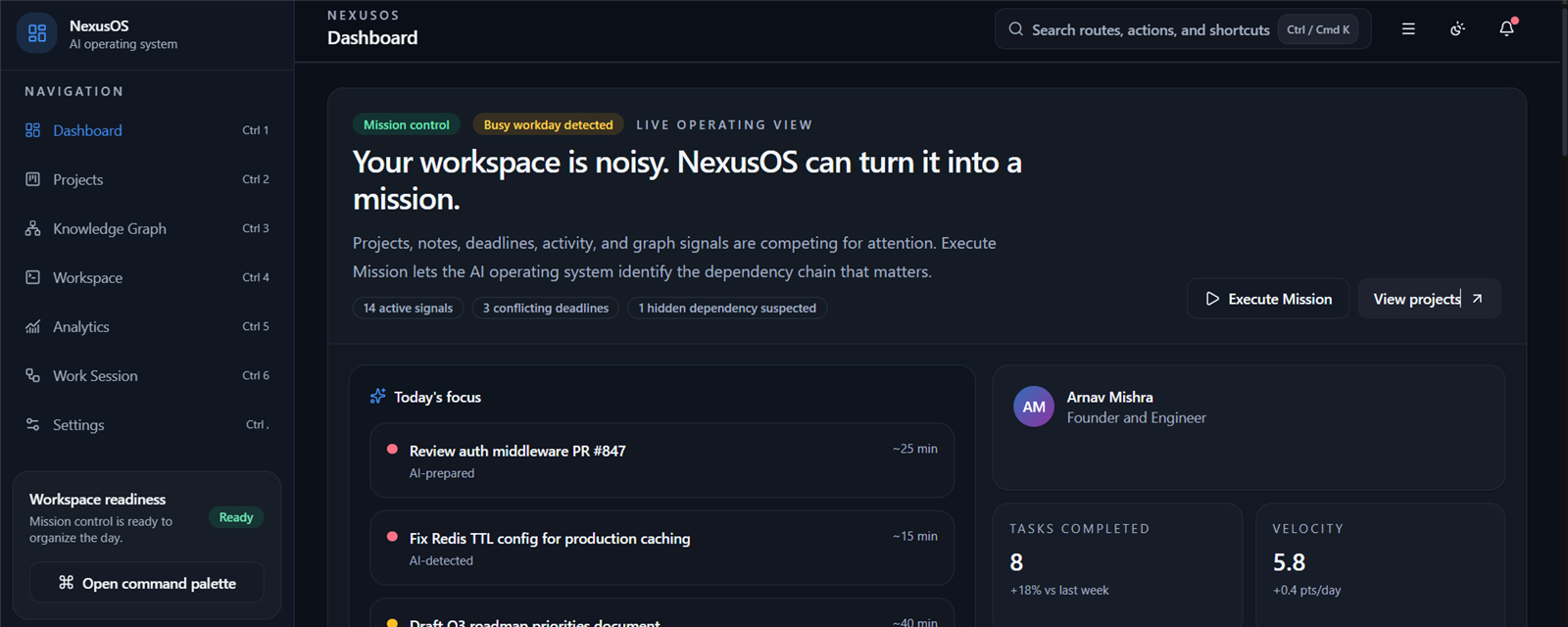
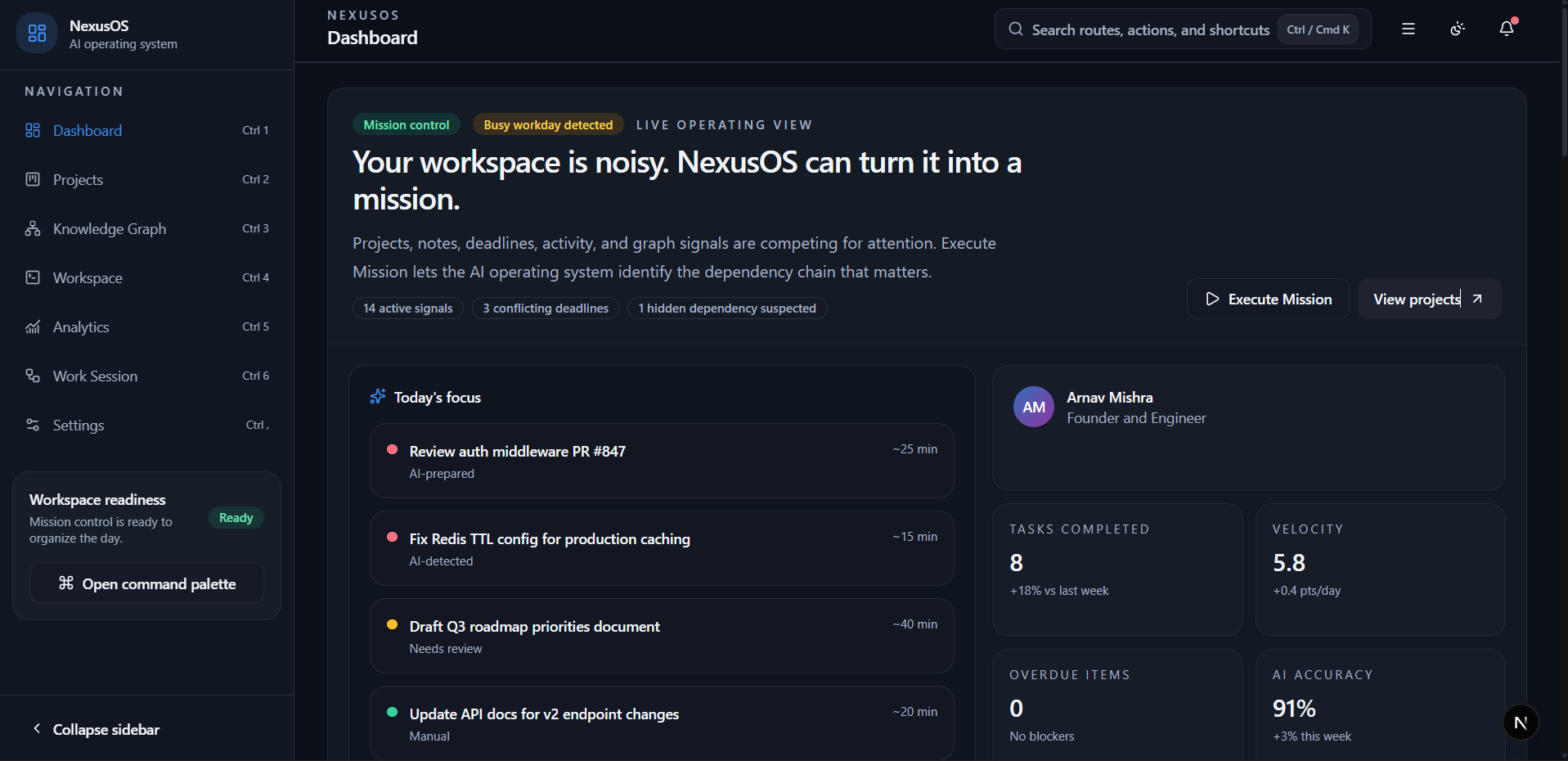
| Dashboard | Mission Command Center |
|---|---|
 | 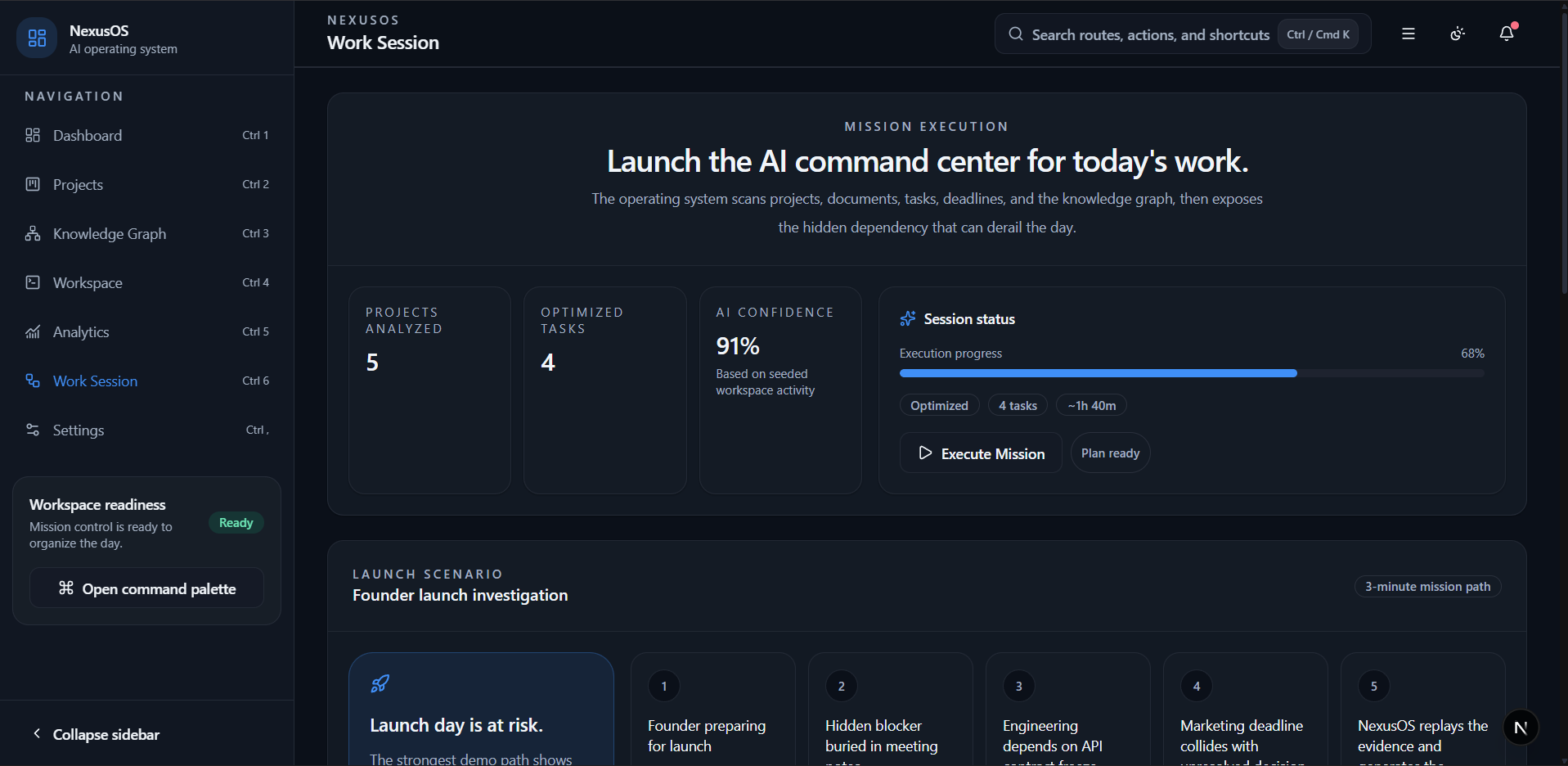 |
| Mission Brief | Knowledge Graph |
|---|---|
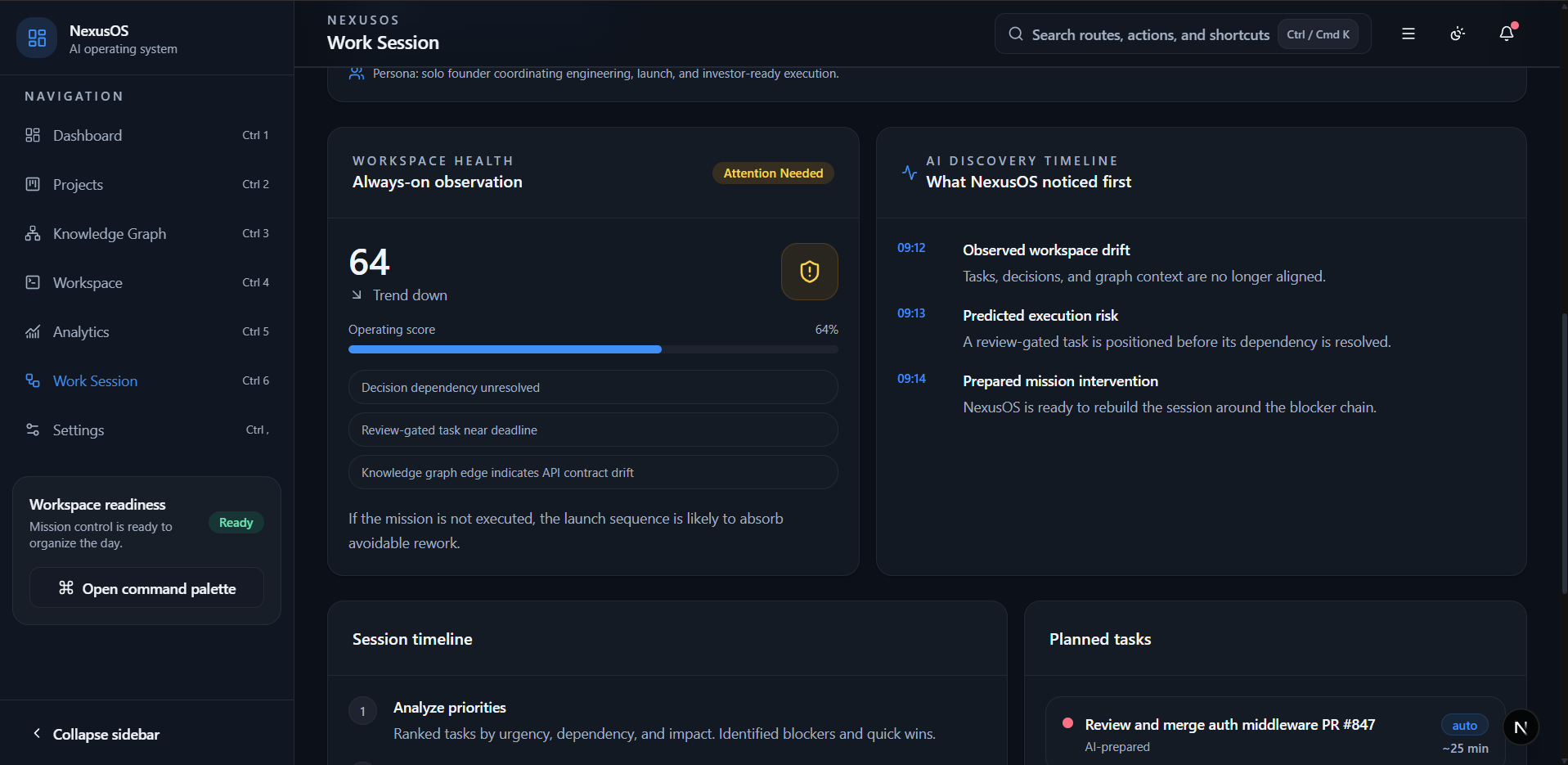 | 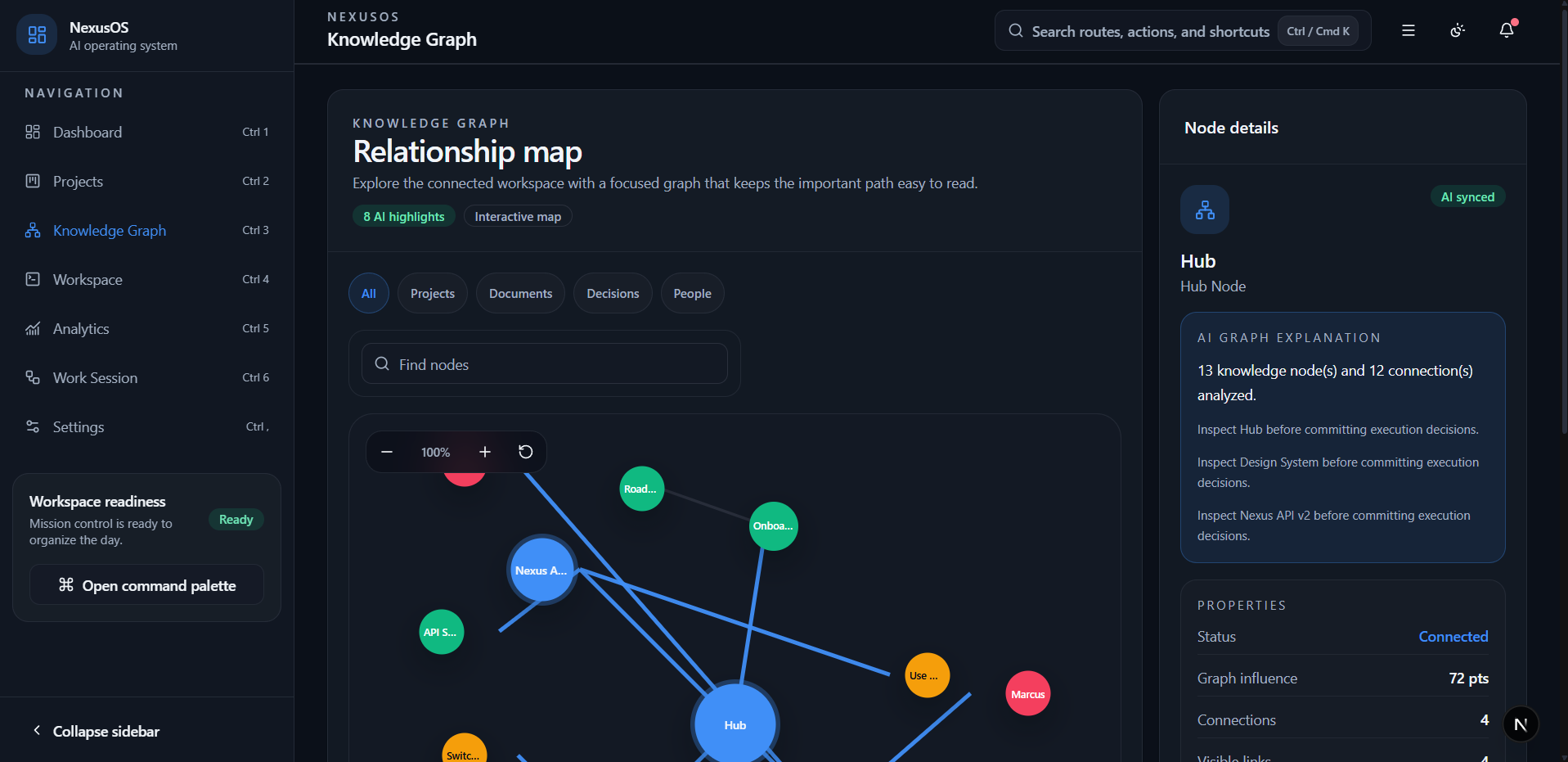 |
Vision
Modern teams do not need another place to store work. They need a system that understands the state of the work, detects what changed, explains what matters, and turns that understanding into the next executable move.
NexusOS is built around that idea: AI should not sit beside the product as a chat box. It should operate across the product as a reasoning layer, reading the same projects, tasks, documents, analytics, and knowledge graph that the team uses, then producing decisions that are structured, inspectable, and actionable.
The long-term vision is an AI operating system for work: a trusted layer that can plan, explain, prioritize, replay its reasoning, and help teams move from uncertainty to execution without losing the evidence behind each decision.
Problem
Knowledge work is rarely blocked because teams have too little software. It is blocked because the important signals are scattered across too many surfaces: project dashboards, task lists, documents, analytics, settings, notifications, and informal decisions that live in the team's memory.
That fragmentation creates three problems:
- teams can see activity, but not always the next best action
- AI recommendations can feel untrustworthy when the evidence is hidden
- dashboards show status, but rarely explain the reasoning behind a change
The result is a costly gap between knowing what exists and knowing what to do next. NexusOS is designed to close that gap.
What Makes It Different
NexusOS treats AI as an operating layer for work, not a sidebar assistant. The system loads workspace state, routes it through specialized agents, validates typed outputs, and renders the result as a mission that can be inspected from multiple angles.
That makes the core idea memorable: the AI does not just answer a question. It organizes the workspace into a decision, shows the evidence behind that decision, and leaves a reviewable execution record.
Solution
NexusOS turns a workspace into a mission.
When a user starts a work session, NexusOS loads the current project, task, milestone, workspace, analytics, insight, settings, and knowledge graph context. It then runs a coordinated set of specialized AI agents that analyze the state of the workspace, identify risks, rank priorities, generate an execution plan, and produce recommendations.
The output is not a loose chat response. NexusOS returns a structured mission experience:
- a Mission Command Center that shows the AI work session as it runs
- a Mission Brief that summarizes the safest next action
- an Investigation Replay that explains how the system reached its conclusion
- an Evidence Graph that connects projects, tasks, documents, decisions, and knowledge signals
- an After Action Report that captures what changed and what should happen next
This makes the AI recommendation inspectable. The user can see the action, the reasoning, the evidence, and the expected impact in one continuous workflow.
Features
AI Mission System
- Start Work Session runs the AI operating system pipeline from the product interface.
- Mission Command Center shows the active AI run, stage progress, elapsed time, completion state, cancellation state, retry state, and result summary.
- Mission Brief converts the AI result into a clear objective, blocker, confidence score, execution plan, and suggested next action.
- Investigation Replay lets users step through the reasoning sequence that produced the recommendation.
- Evidence Graph connects the supporting project, task, document, knowledge, decision, milestone, and timeline signals.
- After Action Report captures the outcome of the mission and creates a reviewable execution record.
Workspace Intelligence
- Dashboard summarizes project health, daily focus, recommendations, notifications, and mission alerts.
- Projects provides portfolio-level visibility into project status, ownership, risk, progress, tags, and upcoming deadlines.
- Workspace combines active documents, editable content, task context, and AI conversation history.
- Knowledge Graph maps workspace relationships and exposes inspectable node details.
- Analytics shows metrics, trends, distribution, and operational tables with source-aware states.
- Settings centralizes local AI, notification, appearance, shortcut, and API configuration controls.
Trust And Explainability
- Structured AI outputs validated against typed schemas.
- Agent execution trace with prompt IDs, prompt versions, latency, and status.
- Repository-backed tools for loading workspace context and persisting generated insights.
- Deterministic local provider for reliable development and demo execution.
- OpenAI provider adapter for Responses API structured output.
OpenAI Build Week
GPT-5.6 is central to the OpenAI-backed mode of NexusOS. The repository is
configured with OPENAI_MODEL=gpt-5.6 in .env.example, and the OpenAI
provider adapter uses Responses API structured output so agent results can be
validated, persisted, and rendered safely by the product.
Codex was essential to the release process: it helped harden the monorepo, organize documentation, audit package manifests, add CI, verify build health, and polish the public GitHub presentation without changing runtime behavior.
Architecture
NexusOS is implemented as a pnpm monorepo with a Next.js application, shared backend packages, a Prisma/PostgreSQL persistence layer, and a dedicated AI orchestration package.
NexusOS
  apps/web
    Next.js App Router UI
    API route handlers
    mission, dashboard, workspace, graph, analytics, and settings screens

  packages/ai
    work-session orchestrator
    specialized agents
    provider abstraction
    structured schemas
    evaluation, memory, tools, cache, and observability

  packages/database
    Prisma schema
    repository layer
    persisted view helpers
    seed data

  packages/auth
    session and permission helpers

  packages/server
    API route wrapper, response envelopes, auth guard, and rate limiting

  packages/prompts
    versioned prompt templates and prompt registry
The frontend never talks directly to Prisma or an AI SDK. Product routes call typed API handlers or repository-backed view helpers. The AI orchestrator loads context through tools, runs agents through a provider abstraction, validates the structured result, persists generated insight, and returns a dashboard-ready mission update.
More detailed architecture notes live in:
Technology Stack
| Layer | Technology |
|---|---|
| Application | Next.js 15 App Router, React 19, TypeScript 5.8 |
| Styling | Tailwind CSS 3.4, semantic CSS variables, class-variance-authority |
| Product UI | Lucide icons, Recharts, Framer Motion, React Hook Form |
| State | Zustand for client-side shell and work-session state |
| Backend | Next.js route handlers, shared @nexusos/server API wrapper |
| Auth | @nexusos/auth session, token, and permission helpers |
| Database | Prisma 6, PostgreSQL schema, repository pattern |
| AI | @nexusos/ai orchestrator, specialized agents, typed schemas, evaluation |
| OpenAI | Responses API provider adapter with structured JSON schema output |
| Prompts | @nexusos/prompts versioned templates and prompt registry |
| Tooling | pnpm 11 workspaces, Turborepo, ESLint, Prettier, TypeScript project checks |
Folder Structure
NexusOS/
  apps/
    web/                    # Next.js app, product UI, API routes
    api/                    # reserved app workspace

  packages/
    ai/                     # AI orchestrator, agents, tools, schemas, providers
    auth/                   # session, token, and permission helpers
    config/                 # environment parsing and validation
    database/               # Prisma schema, repositories, views, seed data
    prompts/                # versioned prompt templates and prompt registry
    server/                 # API route wrapper, auth guard, rate limit, responses
    shared/                 # shared errors, HTTP helpers, logging, validation
    types/                  # shared domain and API contracts
    ui/                     # shared package workspace

  docs/                     # product, architecture, and development notes
  tests/                    # integration and AI test suites
  docker/                   # local infrastructure support
  assets/                   # demo, logo, icon, and screenshot assets
The active product experience lives in apps/web. The AI operating system
logic lives in packages/ai, while database access is isolated behind
repositories and view helpers in packages/database.
Prerequisites
- Node.js 24 or newer
- pnpm 11.13.0 through Corepack
- Docker Desktop, if using the provided PostgreSQL container
- PostgreSQL 16, if running the database without Docker
Enable Corepack before installing dependencies:
corepack enable
Installation
Clone the repository and install dependencies:
git clone https://github.com/ArnavMishra23/NexusOS.git
cd NexusOS
pnpm install
Environment Variables
Copy one of the example environment files before running the app:
cp .env.example .env
The checked-in .env.example, .env.development.example,
.env.local.example, and .env.production.example files contain placeholders
only. Local .env files are ignored by Git.
| Variable | Purpose |
|---|---|
DATABASE_URL | PostgreSQL connection string used by Prisma. |
AI_PROVIDER | AI backend selection. Use deterministic for local development or openai for OpenAI-backed runs. |
OPENAI_MODEL | Model name used when AI_PROVIDER=openai; the release example uses gpt-5.6. |
OPENAI_API_KEY | OpenAI API key. Leave unset for deterministic local runs. Never commit a real key. |
SESSION_SECRET | Local session signing secret. Use a strong generated value outside demos. |
REFRESH_SECRET | Local refresh token signing secret. Use a strong generated value outside demos. |
AUTH_REQUIRED | Enables or disables auth enforcement for local/demo runs. |
RATE_LIMIT_WINDOW_MS | API rate-limit window in milliseconds. |
RATE_LIMIT_MAX | Maximum requests allowed per rate-limit window. |
ACCESS_TOKEN_TTL_MS | Access token lifetime in milliseconds. |
REFRESH_TOKEN_TTL_MS | Refresh token lifetime in milliseconds. |
APP_URL and API_URL | Local app and API base URLs. |
COOKIE_SECURE | Set to true when serving auth cookies over HTTPS. |
Database Setup
Start PostgreSQL with Docker:
docker compose up -d postgres
Generate Prisma Client, apply migrations, and seed demo data:
pnpm db:generate
pnpm db:migrate:dev
pnpm db:seed
For production-style environments, use the deploy migration command instead:
pnpm db:migrate:deploy
Running The Application
Run the Next.js development server:
pnpm dev
The app runs at http://localhost:3000.
Create a production build:
pnpm build
Quality Checks
Run TypeScript checks:
pnpm typecheck
Run ESLint:
pnpm lint
Run the AI unit tests:
pnpm test:ai
Run the integration tests:
pnpm test:integration
Integration tests require a valid .env, a reachable PostgreSQL database,
applied migrations, and seeded demo data. The AI tests are intended to run
without secrets by using the deterministic provider.
Troubleshooting
- If
pnpmis not available, runcorepack enableand open a new terminal. - If Prisma commands fail, confirm PostgreSQL is running and
DATABASE_URLmatches the database container or local database. - If OpenAI-backed runs fail, confirm
AI_PROVIDER=openai,OPENAI_MODEL, andOPENAI_API_KEYare set locally. Keep secrets out of Git.
AI Operating System Overview
The core of NexusOS is the Start Work Session pipeline. It is designed as an AI operating system loop: load the workspace, reason across it with specialized agents, validate the result, persist the useful insight, and return a mission the user can inspect.
Start Work Session
  -> Load workspace context
  -> Project Analyzer
  -> Task Prioritizer
  -> Knowledge Analyzer
  -> Risk Detector
  -> Execution Planner
  -> Insight Generator
  -> Recommendation Agent
  -> Validate structured result
  -> Persist generated insight
  -> Return mission update
Each agent has a narrow responsibility and produces a typed output. The
orchestrator combines those outputs into a WorkSessionResult that powers the
Mission Command Center, Mission Brief, Investigation Replay, Evidence Graph,
After Action Report, and dashboard updates.
| Agent | Responsibility | Output |
|---|---|---|
| Project Analyzer | Reads project and milestone health signals | ProjectAnalysis |
| Task Prioritizer | Ranks the highest-leverage work for the session | PriorityList |
| Knowledge Analyzer | Finds important graph nodes and weak signals | KnowledgeAnalysis |
| Risk Detector | Identifies blockers and mitigation paths | RiskAssessment |
| Execution Planner | Converts priorities and risks into ordered steps | ExecutionPlan |
| Insight Generator | Produces dashboard-ready AI insight cards | GeneratedInsight[] |
| Recommendation Agent | Creates actionable recommendations with confidence | Recommendation[] |
The system can run with a deterministic provider for local reliability or an OpenAI provider adapter for structured Responses API output. In both modes, the rest of the product depends on the same provider interface and typed result contracts.
Mission Execution Flow
The main product loop begins when the user clicks Start Work Session. From there, NexusOS turns the workspace into an explainable mission.
User starts work session
  -> POST /api/ai/work-session
  -> createApiRoute applies request handling, rate limiting, and auth context
  -> WorkSessionOrchestrator loads workspace context through AI tools
  -> agents generate structured outputs
  -> evaluation validates the WorkSessionResult
  -> memory persists the generated insight
  -> API returns the mission result
  -> UI renders command progress, mission brief, replay, graph, and report
The returned mission result drives the visible experience:
| Product Surface | What It Shows |
|---|---|
| Mission Command Center | Run state, stage progress, elapsed time, completion, retry, and cancellation feedback |
| Dashboard Update | Daily focus, project health score, blocker count, and top recommendation IDs |
| Mission Brief | Objective, blocker, confidence, evidence, execution plan, and suggested action |
| Investigation Replay | Step-by-step explanation of how the system reached the recommendation |
| Evidence Graph | Causal relationship between project, task, document, decision, knowledge, milestone, and timeline signals |
| After Action Report | Reviewable record of estimated impact, evidence, and next action |
This flow is designed for trust. A recommendation is not presented as a black box; it arrives with progress feedback, traceable reasoning, supporting evidence, and an execution record.
Investigation Replay
Investigation Replay is the explanation layer for a NexusOS mission. It breaks the AI work session into reviewable stages so the user can inspect how the system moved from raw workspace context to a recommended action.
Instead of asking users to trust an opaque answer, NexusOS shows the reasoning path:
Workspace context loaded
  -> priority path ranked
  -> risk assessment completed
  -> execution plan generated
  -> recommendation prepared
Each replay stage includes:
- a clear title for the reasoning step
- a plain-language explanation
- the evidence used at that point in the analysis
- keyboard-accessible controls for moving through the replay
- selected-evidence feedback for the active stage
This makes the AI result easier to audit, demo, and trust. A judge can see that the product is not only producing an answer; it is preserving the reasoning trail behind that answer.
Roadmap
NexusOS is feature-complete for this release candidate. Future work would focus on deeper workspace integrations, richer graph exploration, collaborative mission review, and production deployment hardening.
Acknowledgements
Built for OpenAI Build Week with GPT-5.6, the OpenAI Responses API, Codex, and the open-source TypeScript, Next.js, Prisma, and PostgreSQL ecosystem.
License
NexusOS is released under the MIT License.
Analysis
View
Metric
- 7

Figures cover GitHub contributors during the hackathon window. A co-authored commit counts in full for each author, so per-member totals add up to more than the whole-team figures.
Technology
- CSSIn code
- Next.jsIn code
- ReactIn code
- SQLIn code
- Tailwind CSSIn code
- TypeScriptIn code
- OpenAIClaimed
- PostgreSQLClaimed
6 of 8 appear in the indexed code. 2 claimed on Devpost could not be matched to code, which may simply mean the tool leaves no trace in the repository.
AI coding agents
- CodexConfig
Detected from committed agent config files and commit authorship. Absence of a signal is not proof an agent was unused.
Codebase size
Source size
796 KB
Source files
242
Counts recognized source files only; vendored directories, binaries and lockfiles are excluded, so this is smaller than the repository on disk.
Repository
ArnavMishra23/NexusOS
284 files · 2.5 MB · @ c3e99cf
Structure
Interface
83 files · 29%Screens, components and styles rendered to the user.
API & routing
18 files · 6%Request entry points: routes, handlers and controllers.
Application logic
66 files · 23%Domain rules, services and shared utilities.
+1 moreBackground jobs
1 file · 0%Work run outside a request: tasks, workers and schedules.
Data & schema
33 files · 12%Schema definitions, migrations and data access.
Supporting
Layers are inferred from where files sit in the tree, not from reading the code. A project that names its directories unconventionally will read oddly here — open the file browser to check anything the diagram implies.
Languages
- TypeScript69%
- YAML21%
- Markdown6%
- SQL2%
- CSS0%
Share of indexed source by file size. Binary and vendored files are excluded.
Dependencies
apps/web/package.json
npm · 29- @nexusos/ai
- @nexusos/auth
- @nexusos/config
- @nexusos/database
- @nexusos/prompts
- @nexusos/server
- @nexusos/shared
- @nexusos/types
- class-variance-authority
- clsx
- date-fns
- framer-motion
- lucide-react
- next
- react
- react-dom
- react-hook-form
- recharts
- +11 more
package.json
npm · 17- @prisma/client
- +16 more
packages/database/package.json
npm · 5- @nexusos/auth
- @nexusos/shared
- @nexusos/types
- @prisma/client
- +1 more
packages/ai/package.json
npm · 4- @nexusos/database
- @nexusos/prompts
- @nexusos/shared
- @nexusos/types
packages/server/package.json
npm · 4- @nexusos/auth
- @nexusos/config
- @nexusos/database
- @nexusos/shared
packages/auth/package.json
npm · 2- @nexusos/shared
- @nexusos/types
packages/config/package.json
npm · 1- @nexusos/shared
packages/shared/package.json
npm · 1- @nexusos/types
Declared in the repository’s manifests at the indexed commit. A declared package is not proof it is used, and runtime dependencies are listed first.
This project’s features have not been analysed yet.
Export this project's context (description, README, evidence, key source files) to chat with an AI agent elsewhere.