Project Info
Inspiration
This story starts with Louie, one of LEGATO's creators. Freshman year, I liked a girl who looked like an angel - but more importantly, sang like one. One night during orientation week, we ditched whatever event we were supposed to attend and ended up in a church with a grand piano sitting open in the corner. She wanted to sing. She wanted me on piano behind her. I'd been playing since I was five, but only from sheet music. Put Mozart, Bach, and Beethoven in front of me all at once and I wouldn't break a sweat. But I couldn't sit at that piano, listen to her land on a note, and find the right chord to play next. That gap stayed with me longer than the night did. I understood harmony as something I memorized for an exam, not something I could use freely. Many classically trained pianists end up in the same place: drilled on notation for a decade, but never taught how to improvise. I wanted to build the tool I wish I'd had that night - something that would let me create a transition myself, hear it immediately, and understand why it worked. Not another flashcard quiz, and not a progression generator asking me to trust its answer. That idea became LEGATO.
What it does
LEGATO is an AI-powered progression coach that helps musicians explore the space between chords. Users can build a chord progression, choose how long each chord lasts, and customize the transition between any two chords. LEGATO supports techniques such as passing diminished chords, secondary dominants, tritone substitutions, ii-V-I movements, suspended passing chords, scale runs, and arpeggio bridges. Every change is immediately compiled into playable piano audio and rendered as animated sheet music. Users can hear the result, see exactly what is happening, and continue experimenting without leaving the composition workspace. Our AI companion, Tenutino, moves through the score alongside the playback. Users can ask it to: Explain a chord or transition Suggest ways to improve the progression Answer open-ended music theory questions Instead of replacing the musician, LEGATO keeps the user in control. The goal is not to generate a finished progression with one click - it is to help people develop the intuition to create one themselves.
How we built it
LEGATO uses a lightweight, framework-free JavaScript architecture. The chord and transition engine compiles every musical decision into one shared event structure. That same structure drives the audio, sheet music, animation, and AI context, keeping every part of the experience musically consistent. We used: VexFlow to engrave responsive SVG sheet music Tone.js and the Web Audio API for piano sampling and transport scheduling Three.js, WebGL, and GLSL for the animated particle score OpenAI API for grounded explanations, suggestions, and multi-turn tutoring SortableJS for drag-and-drop progression editing Node.js for the server and secure API-key handling LocalStorage for browser-based projects and conversation history Tenutino’s position is calculated from the actual rendered measures. During playback, it follows musical time, moves between systems, jumps over notes extending above the staff, and returns to the most recently edited measure when playback finishes.
Challenges we ran into
The hardest challenge was synchronizing three different systems: audio time, engraved notation, and real-time animation. Audio is scheduled by Tone.js, sheet music is positioned by VexFlow, and particles are rendered independently through WebGL. Early versions allowed each system to estimate progress differently. This caused notes, particles, highlights, and Tenutino to drift apart or jump at measure boundaries. We solved this by making the audio transport the authoritative clock. VexFlow now reports the exact rendered position of each note, which we associate with its musical beat. Particle reconstruction and Tenutino’s movement follow those shared musical anchors instead of approximating time from screen position. Another challenge was preserving visual quality without introducing lag. The notation uses tens of thousands of particles, so rebuilding geometry during playback caused occasional frame drops. We added particle preloading, sampling caches, deterministic reveal timing, and geometry locking during playback. Music theory accuracy created its own challenges. Enharmonic spelling, tied notes, incomplete measures, generated transition material, and technique eligibility all needed to remain correct across different keys and time signatures. This is also the first Hackathon for all three of us, and time management became a real problem. However, we managed to have everything done in time through effective teamwork. Cheers!
Accomplishments we're proud of
We are especially proud that LEGATO feels like an instrument for learning rather than a form that produces an AI answer. Users can make a musical decision, hear it instantly, see its notation, ask why it works, and then revise it. That tight feedback loop is the heart of the project. We are also proud of: Building a custom progression and transition engine Keeping audio, notation, particles, and AI explanations grounded in the same musical data Creating a responsive particle score without sacrificing notation clarity Turning Tenutino into a companion that reacts to editing and playback Supporting project persistence, import, export, and multi-turn tutoring Building 97 automated tests for music theory, rhythm, playback, animation, persistence, and UI behavior
What we learned
We learned that synchronization is more of a data-model problem than a visual problem. Once audio, notation, and animation shared the same musical timeline, many seemingly unrelated interface bugs disappeared. We also learned that AI is most useful in creative education when it is grounded in the user's actual work. A generic explanation of a secondary dominant is less valuable than an explanation referencing the exact notes, voicing, key, and transition the learner just created. Most importantly, we learned that educational software does not need to feel like homework. Feedback can be technically rigorous while still being warm, playful, and encouraging.
What's next
Next, we want to expand LEGATO from a progression coach into a broader improvisation companion. Planned features include: MIDI keyboard input and live chord recognition More transition styles, voicing controls, and genre-specific suggestions Ear-training exercises generated from the user's own progressions Deeper AI suggestion previews with selective apply and undo Cloud synchronization and collaborative projects Additional instruments and playback sounds Mobile and accessibility improvements Personalized learning paths based on the concepts each user explores Our long-term goal is simple: help more people move beyond reproducing music from a page and experience the joy of creating it themselves.
LEGATO
LEGATO helps intermediate-to-advanced pianists learn harmony through experimentation. Instead of generating a finished progression and hiding the reasoning, LEGATO lets a learner build exact chord voicings, connect them with a harmonic technique, see and hear the compiled result, and get help from our cute AI tutor, Tenutino. (Wordplay on tenuto, get it? :wink:)
The result is a complete learning loop: Compose. Connect. See. Hear. Understand. Enjoy. Repeat!
Contents
- App Tour
- The Problem We Solve
- How we collaborated with Codex
- Features and Functionality
- For Judges: Get the App Going!
- Run Locally
- Project Storage and Portability
- Architecture
- Testing
App Tour
Project Library
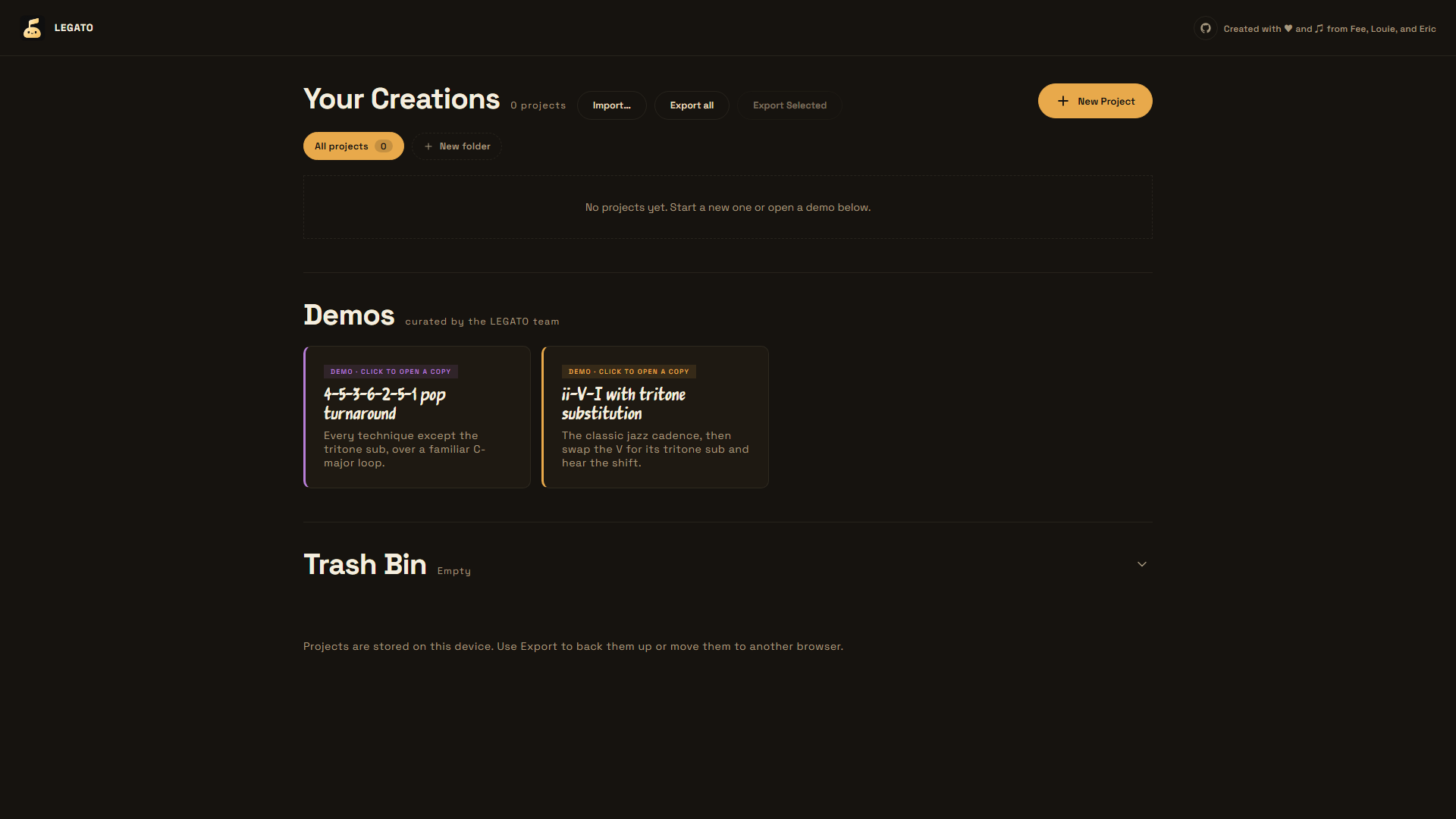
Create and organize local projects, move work between browsers with JSON import/export, or open a bundled progression for an immediate walkthrough.
Progression Studio
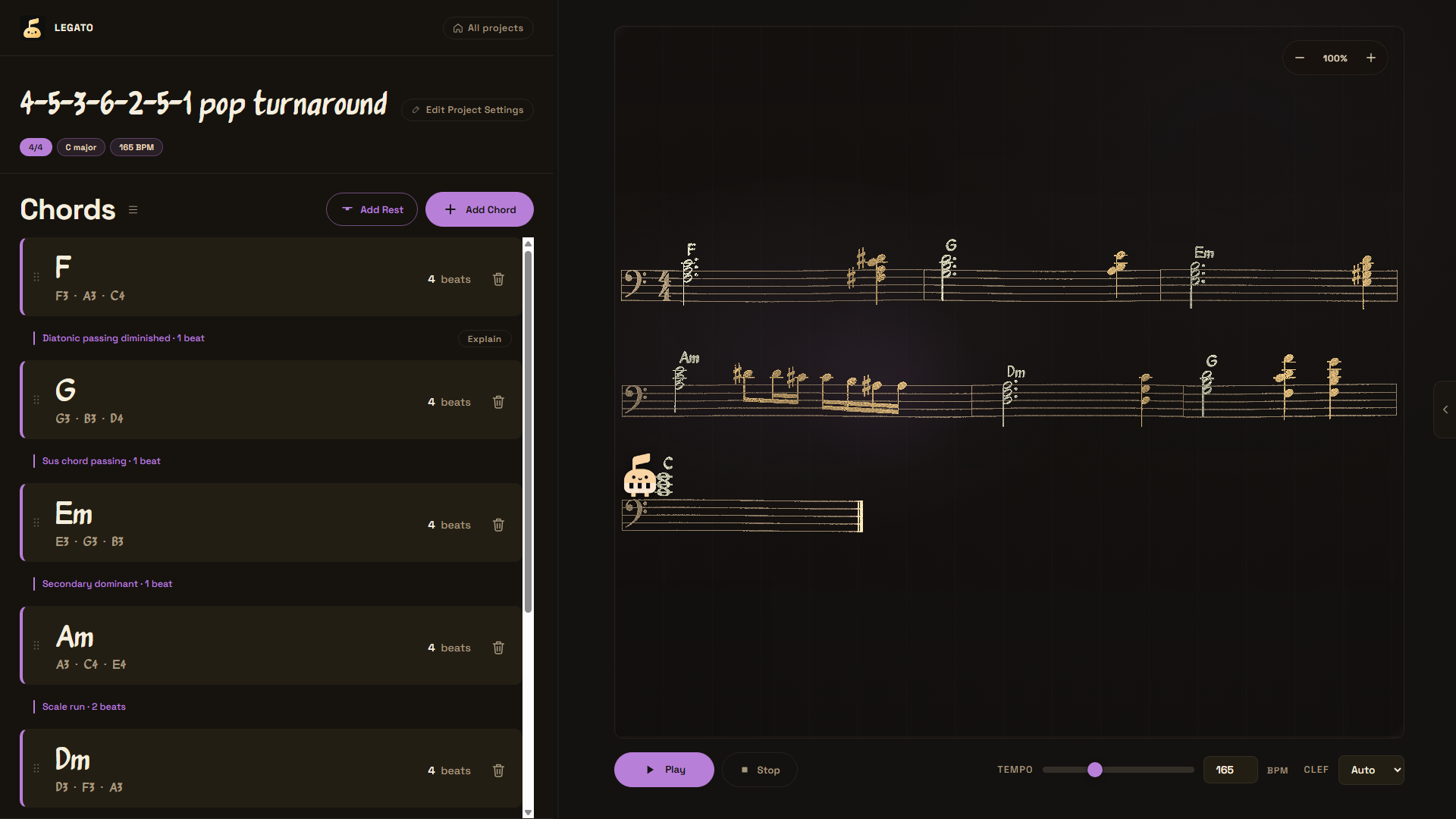
Edit exact chord voicings and transition techniques on the left while the compiled sheet music, playback controls, and Tenutino all remain synchronized on the right.
Tenutino AI Tutor
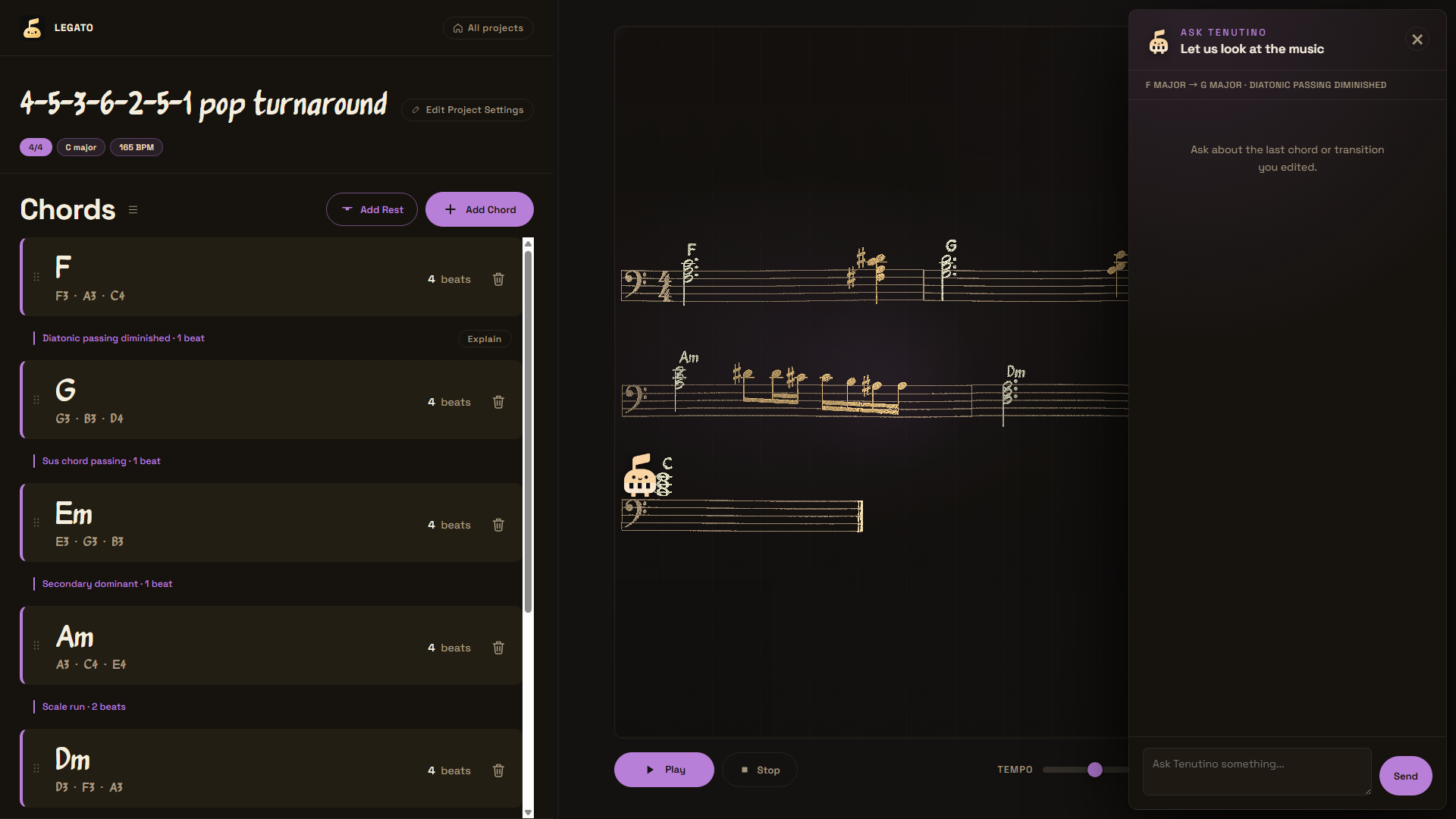
Ask about the most recently edited chord or seam using score-aware Explain, Suggestions, and conversational Ask modes.
The Problem We Solve
Music-theory resources often explain harmony away from the instrument, getting too bogged down in the pure theories and textbooks, while composition tools often produce or play music without teaching the decisions inside it. Musicians need a way to compare their own voicings and transitions in context - visually, gaurally, and conversationally - without surrendering control to an opaque generator.
LEGATO keeps the learner's notes as the source of truth. AI explains the learner's musical choices, it does not replace them.
How we collaborated with Codex
We used Codex as an engineering collaborator across the full project lifecycle, not as a one-shot code generator. We began by giving Codex a written product plan, a canonical music data model, explicit acceptance criteria, and ownership boundaries. For each iteration, Codex inspected the existing repository, proposed or implemented a scoped change, ran the relevant tests, and helped us review regressions before the next decision.
Decisions we've made
The human team (us!) retained full control on the product, music, engineering, and design direction. Our key decisions included:
- Teach rather than generate. We chose an Education product for musicians who already understand basic chords, with AI supporting active listening and revision instead of composing on the learner's behalf.
- Store notes, not recipes. An explicit MIDI-note array is authoritative. Root and quality are optional display hints, so learners keep complete control of voicing, octave, doubling, and inversion.
- Make "what you see" equal "what you hear." We chose one pure compiler and one segment contract for notation, playback, animation, and tutor grounding.
- Constrain the theory engine. We selected the eight techniques, their musical definitions, beat costs, eligibility rules, and the rule that generated material - but never a user's chord - may be voice-led.
- Ground the tutor deterministically. We decided code should calculate objective musical evidence and GPT-5.6 should explain it. The key signature is treated as a spelling instruction, not proof of a tonal centre.
- Prefer a local-first, judge-runnable product. We chose a build-free frontend, browser storage, versioned JSON import/export, bundled demos, and an optional server-only AI key.
- Build a coherent studio experience. We directed the editorial sand-and-hologram visual language, project library, interactive score, animated Tenutino character, and compact three-mode tutor experience.
Where Codex accelerated the workflow
- Turned the agreed state and compiler contracts into a modular vertical slice spanning the theory engine, notation, playback, UI, persistence, and server endpoint.
- Helped refactor a fast-moving multi-branch codebase without abandoning the established data model or re-voicing user input.
- Implemented and debugged difficult edge cases such as seam preservation after reorder, technique beat budgets, cross-measure ties, enharmonic spelling, rests, compound-meter durations, pause/resume synchronization, wrapped score systems, and malformed tutor responses.
- Converted discovered bugs and musical invariants into regression tests, shortening the loop from observation to verified fix.
- Accelerated late-stage product polish: project folders and trash, bulk export, responsive score layout, transport states, accessible labels, startup choreography, particle timing, and Tenutino's score-following motion.
- Audited the final repository and submission requirements, then helped turn the implementation history into reproducible setup and testing documentation.
Codex provided speed and breadth; we supplied the problem, musical judgment, priorities, constraints, and final approval. When generated code or a proposed interaction conflicted with the learning goal or musical contract, we corrected the requirement and asked Codex to revise against the written source of truth.
How GPT-5.6 contributed to the final result
GPT-5.6 is both part of the building workflow through Codex and a user-facing component of LEGATO. At runtime, the server calls GPT-5.6 through the OpenAI Responses API to transform verified score evidence into a warm, concise explanation, suggestion, or answer. The API key remains server-side, response formats are selected by tutor mode, and every response is validated before the UI renders it.
Features and Functionality
Compose with exact voicings
- Build chords on an interactive piano keyboard interface using 11 quality presets: Major, Minor, dominant 7, major 7, minor 7, diminished, diminished 7, half-diminished 7, sus2, sus4, and augmented.
- Toggle individual MIDI notes to control register, spacing, doubling, and inversion. The notes entered are the notes rendered and played.
- Add rests, set chord duration in counted beats, drag to reorder material, and edit or delete any item.
- Configure tempo, simple or compound meter, key signature, clef, accent colour, and chord-symbol typography.
Explore harmonic transitions
Each seam between two chords can use a direct transition or one of eight techniques:
| Technique | What LEGATO inserts |
|---|---|
| Diatonic passing diminished | A diminished seventh chord approaching the target |
| Secondary dominant | A dominant seventh that tonicizes the arriving chord |
| Tritone substitution | A substitute dominant resolving into the target |
| 2-5-1 insert | A two-chord ii-V approach to the destination |
| Sus chord passing | A suspended sonority on the target root |
| Leading-tone bass | A single chromatic approach note below the target |
| Scale run | A capped chromatic line from the current top note toward the target |
| Arpeggiated bridge | An ascending arpeggiated dominant bridge |
LEGATO filters techniques by both musical eligibility and the time available in the departing chord. Inserted connective material is voice-led near the current register, while user-authored voicings are never rewritten.
See and hear one shared musical result
- VexFlow engraves the compiled progression with key-aware and chord-aware note spelling, accidentals, rests, dotted durations, and ties across measures.
- Tone.js plays a sampled piano from the exact same compiled event list used by the score.
- Play, pause, resume, stop, tempo adjustment, and notation zoom are available on the panel.
- Measure highlighting, score particles, and Tenutino's animated movement follow the audio timeline.
Learn with Tenutino, powered by GPT-5.6!
Tenutino supports three focused modes:
- Explain describes what the learner hears, why the transition works, one experiment to try, and a reflection question.
- Suggestions proposes one concrete change and explains the musical reason for it.
- Ask allows the user to ask a free-form question conversationally using the current score context.
LEGATO deterministically computes the selected measure, exact MIDI voicings, generated notes, common tones, bass and soprano motion, pitch-class motion, interval changes, rhythmic cost, and technique metadata. GPT-5.6 turns those supplied facts into concise pedagogy rather than guessing them from a chord label. Explain and Suggestions use strict structured-output schemas; Ask uses validated plain text.
For Judges: Get the App Going!
- Start LEGATO and open one of the demo projects. No sample-data setup is required.
- Select a chord to inspect its exact notes, or add a chord and customize its voicing on the piano.
- Open a transition between two chords and choose an eligible technique.
- Press Play to hear the same notes shown in the score and watch the playback visualization track them.
- Open Tenutino, choose Explain or Suggestions, or ask a question about the focused transition.
- Change a voicing or technique, replay it, and compare the tutor's new explanation.
The 4-5-3-6-2-5-1 pop turnaround demo presents a longer loop with several transition techniques. The ii-V-I with tritone substitution demo provides a short before-and-after jazz example.
We can't wait for you to try it out!
Run Locally
Requirements
- Node.js 20 or newer
- A modern browser with Web Audio support
- Internet access for the CDN-hosted VexFlow, Tone.js, Three.js, SortableJS, and first-load piano samples
- An OpenAI API key only if you want to use Tenutino; composition, notation, playback, and project management work without it
There are no npm dependencies to install and no database to configure.
Start the app
npm start
Open http://localhost:8000. Do not open index.html directly because browser ES modules require an HTTP server.
To use a different port:
# macOS or Linux
PORT=8001 npm start
# Windows PowerShell
$env:PORT = "8001"
npm start
Enable GPT-5.6 coaching
Set the API key on the server before starting LEGATO. NEVER add it to client-side code or commit it to the repository.
# macOS or Linux
export OPENAI_API_KEY="your-api-key"
export OPENAI_MODEL="gpt-5.6" # optional; this is already the default
npm start
# Windows PowerShell
$env:OPENAI_API_KEY = "your-api-key"
$env:OPENAI_MODEL = "gpt-5.6" # optional
npm start
server.mjs serves both the static app and the local /api/coach.js route. The same handler in api/coach.js can run as a Vercel serverless function; set OPENAI_API_KEY and optionally OPENAI_MODEL in the deployment environment.
Project Storage and Portability
Projects and folders are autosaved in browser localStorage; no account is required. The library supports creating, renaming, duplicating, organizing, selecting, exporting, importing, trashing, restoring, and permanently deleting projects. JSON export provides a versioned, validated way to move work between browsers or devices. Bundled demos are cloned before editing, so the originals remain available.
Architecture
The core architectural decision is a pure compile(progression) boundary:
Editor actions
     │
     ▼
Progression state ──► compile() ──► atomic musical segments
                                      ├──► VexFlow notation
                                      ├──► Tone.js playback + visual timeline
                                      └──► deterministic coach evidence ──► GPT-5.6
This single event list prevents notation, audio, animation, and tutoring context from drifting apart.
| Area | Responsibility |
|---|---|
js/state.js | Runtime data contract, validation, factories, seam reconciliation, compile entry point |
js/engine/ | Chord spelling, transition generation and eligibility, rhythm, timing, and closest-voicing search |
js/sheet-music/ | VexFlow rendering, score layout, playback timeline, particles, and Tenutino movement geometry |
js/audio/playback.js | Tone.js sampler scheduling and transport state |
js/coach/ | Evidence extraction, prompts, client validation, and tutor modes |
api/coach.js | Server-only Responses API call and mode-specific output validation |
js/persistence.js | Versioned local project store, folders, trash, import, and export |
js/views/ and js/ui/ | Router-driven library and editor experiences |
The frontend uses vanilla HTML, CSS, and JavaScript ES modules, so the source runs directly in the browser without a build step.
Testing
npm test
The current suite contains 97 Node tests. Coverage includes all eight transition techniques, user-voicing integrity, beat budgets, seam reconciliation, rests, rhythm and measure layout, enharmonic spelling, notation/audio synchronization, coach evidence and response schemas, API-key isolation, persistence and folders, playback controls, score particles, and Tenutino positioning.
The core experience can be tested without an API key. Set OPENAI_API_KEY to test live GPT-5.6 responses.
Analysis
View
Metric
- 57
- 29
- 12


Figures cover GitHub contributors during the hackathon window. A co-authored commit counts in full for each author, so per-member totals add up to more than the whole-team figures.
Technology
- CSSIn code
- HTMLIn code
- JavaScriptIn code
- Node.jsClaimed
3 of 4 appear in the indexed code. 1 claimed on Devpost could not be matched to code, which may simply mean the tool leaves no trace in the repository.
AI coding agents
- CodexConfig
Detected from committed agent config files and commit authorship. Absence of a signal is not proof an agent was unused.
Codebase size
Source size
605 KB
Source files
74
Counts recognized source files only; vendored directories, binaries and lockfiles are excluded, so this is smaller than the repository on disk.
Repository
Feegoat06/LEGATO
91 files · 2.7 MB · @ 848fe75
Structure
Interface
26 files · 29%Screens, components and styles rendered to the user.
API & routing
1 file · 1%Request entry points: routes, handlers and controllers.
Application logic
26 files · 29%Domain rules, services and shared utilities.
+2 more
Supporting
Layers are inferred from where files sit in the tree, not from reading the code. A project that names its directories unconventionally will read oddly here — open the file browser to check anything the diagram implies.
Languages
- JavaScript64%
- CSS18%
- Markdown17%
- HTML1%
Share of indexed source by file size. Binary and vendored files are excluded.
This project’s features have not been analysed yet.
Export this project's context (description, README, evidence, key source files) to chat with an AI agent elsewhere.