Project Info
Inspiration
Students often struggle not because they cannot learn, but because the explanation is too advanced, too generic, or disconnected from their own chapter. We wanted to create a study buddy that adapts to a student’s class, subject, and uploaded material—without making learning feel like another boring worksheet.
What it does
LearnStep is an NLP-first learning companion for Classes 5–8 Mathematics and Science. Students upload a chapter PDF, notes, or worksheet. LearnStep extracts concepts, definitions, formulas, examples, and exercises; turns them into short lessons; asks class-appropriate questions; gives hints before solutions; and recommends what to revise next. Instead of calling students “weak” or “smart,” it tracks learning evidence such as: Introduced Developing with support Demonstrated independently Ready for revision
How we built it
We built LearnStep using: React and TypeScript for the learning interface FastAPI for the backend APIs PostgreSQL and pgvector for structured data and semantic retrieval PyMuPDF for PDF extraction spaCy and rule-based NLP for detecting headings, definitions, formulas, examples, and questions MiniLM embeddings for retrieving relevant chapter content DistilBERT classifiers for question cognitive level and difficulty Docker for reproducible local development and deployment The retrieval system uses both semantic similarity and strict metadata filters such as student, class, subject, chapter, document, and concept. $$ \text{score}(q, c) = \cos(\mathbf{e}_q, \mathbf{e}_c) $$ where ( \mathbf{e}_q ) is the query embedding and ( \mathbf{e}_c ) is the learning-content chunk embedding.
Challenges we ran into
The hardest challenge was making content truly class-appropriate. A shorter answer is not automatically easier—vocabulary, prerequisites, notation, numbers, and reasoning steps all need to match the student’s level. We also had to prevent the system from treating retrieval as teaching. Finding a relevant paragraph is not enough; the system needs to convert it into a structured flow: $$ \text{Learn} \rightarrow \text{Example} \rightarrow \text{Practice} \rightarrow \text{Hint} \rightarrow \text{Explain} \rightarrow \text{Revise} $$ Another major challenge was answer evaluation. Numerical answers need value, unit, and tolerance checks, while explanations need rubric-based feedback and should sometimes remain low-confidence instead of being force-marked correct or incorrect.
Accomplishments we're proud of
Built a curriculum-grounded learning flow instead of a generic “chat with PDF” tool Designed an NLP pipeline that identifies educational content such as formulas, definitions, examples, and exercises Created class-, subject-, concept-, and document-filtered RAG retrieval Added staged hints so students can think before seeing the answer Separated curriculum coverage, learning evidence, and revision priority Designed the system without student ranking, behavioural profiling, or unnecessary personal-data collection Added a deep-learning evaluation plan that compares DistilBERT against a TF-IDF baseline instead of assuming the neural model is better
What we learned
We learned that RAG alone is not enough for educational products. Good retrieval does not guarantee a good explanation for a Class 5 student. We also learned that AI feedback needs uncertainty. It is better for a system to say that an explanation needs another attempt than to confidently give incorrect feedback. Most importantly, we learned that building for children requires privacy, safety, and age-appropriate design from the first line of the product—not as an afterthought.
What's next
We are starting with Classes 5–8 Mathematics and Science in English. Next, we plan to: Evaluate the NLP extraction pipeline on varied educational PDFs Train and benchmark the cognitive-level and difficulty classifiers Build a reviewed question bank with explanations and hint stages Add concept-level revision planning Deploy a safe demo using synthetic sample chapters Expand carefully to more subjects, languages, and curriculum mappings after evaluation
LearnStep
Upload. Learn. Ace it. 🚀

LearnStep is an NLP-first learning companion portfolio demo for Classes 5–8 Mathematics and Science. Students often struggle because an explanation is too advanced, too generic, or disconnected from their chapter. LearnStep explores a different flow: upload learning material, extract structured evidence, teach one clear concept, practise with staged hints, receive deterministic feedback, and decide what to revise next.
This repository is a controlled synthetic demonstration, not a public product for children. Demo accounts, chapters, PDFs, questions, labels, and evaluation corpora are synthetic. Nothing here is official, reviewed, CBSE/NCERT-endorsed, or evidence of educational improvement. Do not enter real child information.
Try it out
| Resource | URL | Availability |
|---|---|---|
| Public repository and evidence | https://github.com/Shradd7/LearnStep | Public |
| Local application | http://localhost:5173 | After Docker setup below |
| Local controlled demo | http://localhost:5173/demo | After Docker setup below |
| Local API documentation | http://localhost:8000/docs | After Docker setup below |
There is currently no public live application. For a Devpost “Try it out” field, use the public repository URL and state that the executable demo is local-only.
What works
- two synthetic demo identities with Argon2 password hashes and short-lived signed tokens;
- private temporary PDF storage with generated keys, validation, automatic expiry, and owner-authorized deletion;
- page-preserving PyMuPDF extraction with deterministic educational content labels;
- mandatory user, document, class, subject, and concept filters before pgvector retrieval;
- deterministic lessons with sources, evidence IDs, confidence wording, and limitations;
- hint 1 and hint 2 before solution reveal;
- exact multiple-choice and numeric-with-unit/tolerance evaluation;
- immutable attempt observations and non-ranking progress guidance;
- reproducible synthetic extraction, TF-IDF baseline, retrieval/isolation, and assessment evaluations;
- a complete synthetic journey: login → optional upload → lesson → hint → answer → feedback → progress → deletion.
Architecture
flowchart LR
    UI["React + TypeScript<br/>accessible learning flow"] -->|"JSON + temporary PDF"| API["FastAPI modular monolith"]
    API --> NLP["PyMuPDF + deterministic<br/>educational NLP"]
    API --> TEACH["Deterministic lessons,<br/>hints and evaluators"]
    NLP --> DB["PostgreSQL 16 + pgvector"]
    TEACH --> DB
    API --> STORE["Private expiring<br/>file storage"]
The runtime has no external LLM, agents, queues, public file paths, student rankings, or cross-student comparisons. The controlled retrieval demo uses a clearly labeled deterministic 384-dimensional hash vector; it is not a claim about MiniLM semantic quality.
Demo screenshots
All screenshots below were captured from the running synthetic demo at 1440×960 (3:2) and are under 5 MB.
| Screenshot | What it shows |
|---|---|
 | Landing page, product boundary, and live service state |
 | Class 5 Mathematics and Class 6 Science synthetic identities |
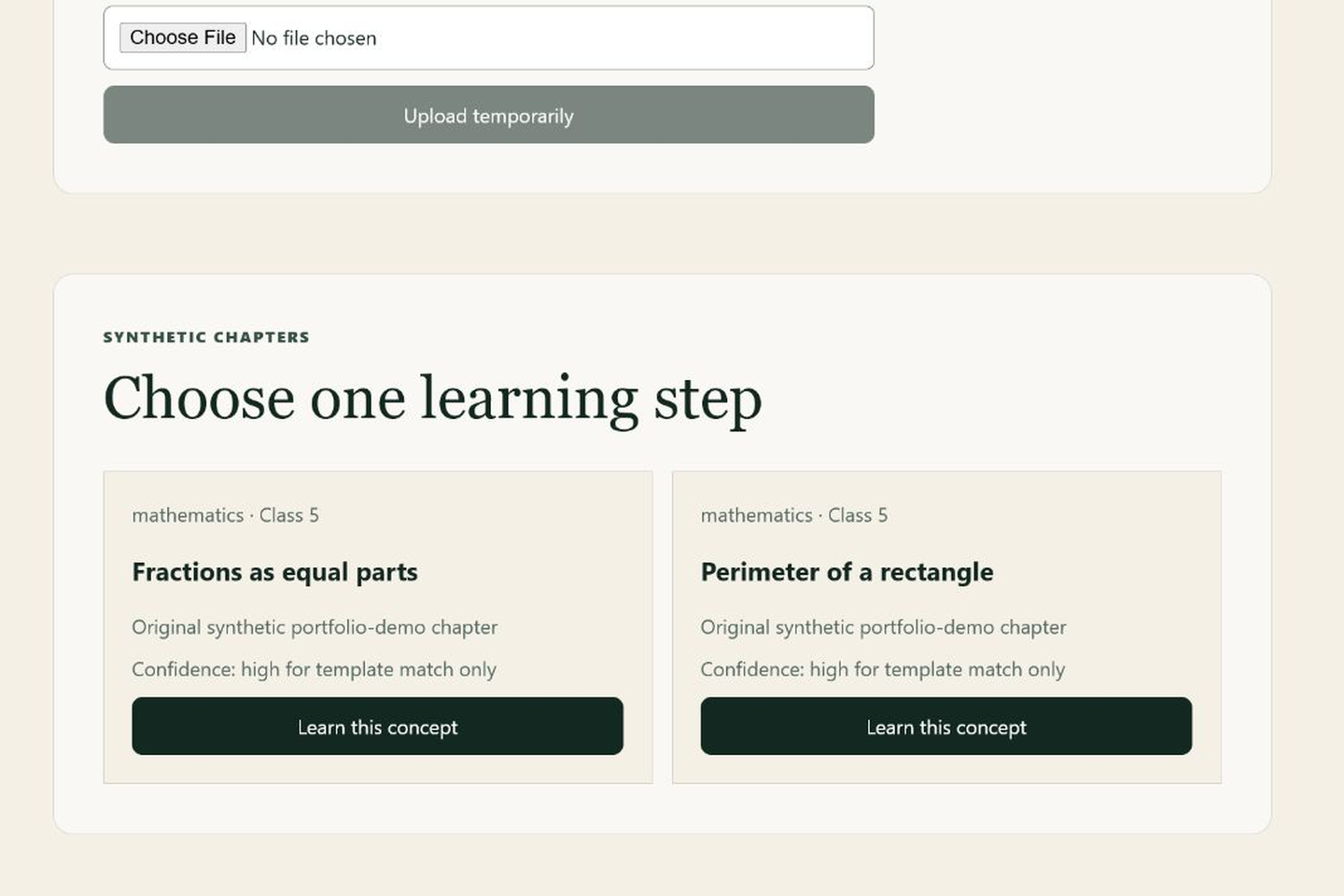 | Class-filtered chapters with source and confidence wording |
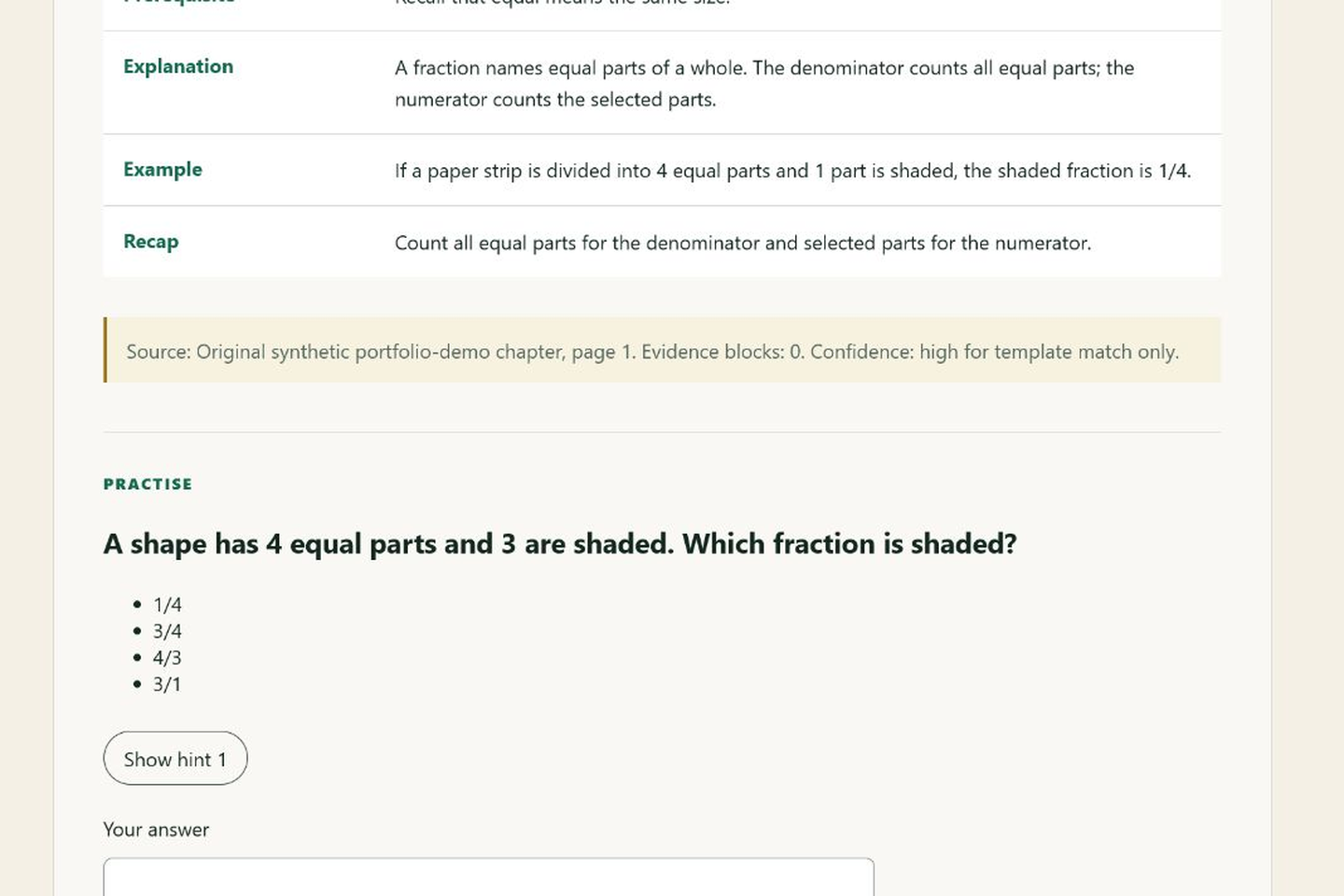 | Structured lesson, source details, and practice question |
 | Hint-first interaction before answer reveal |
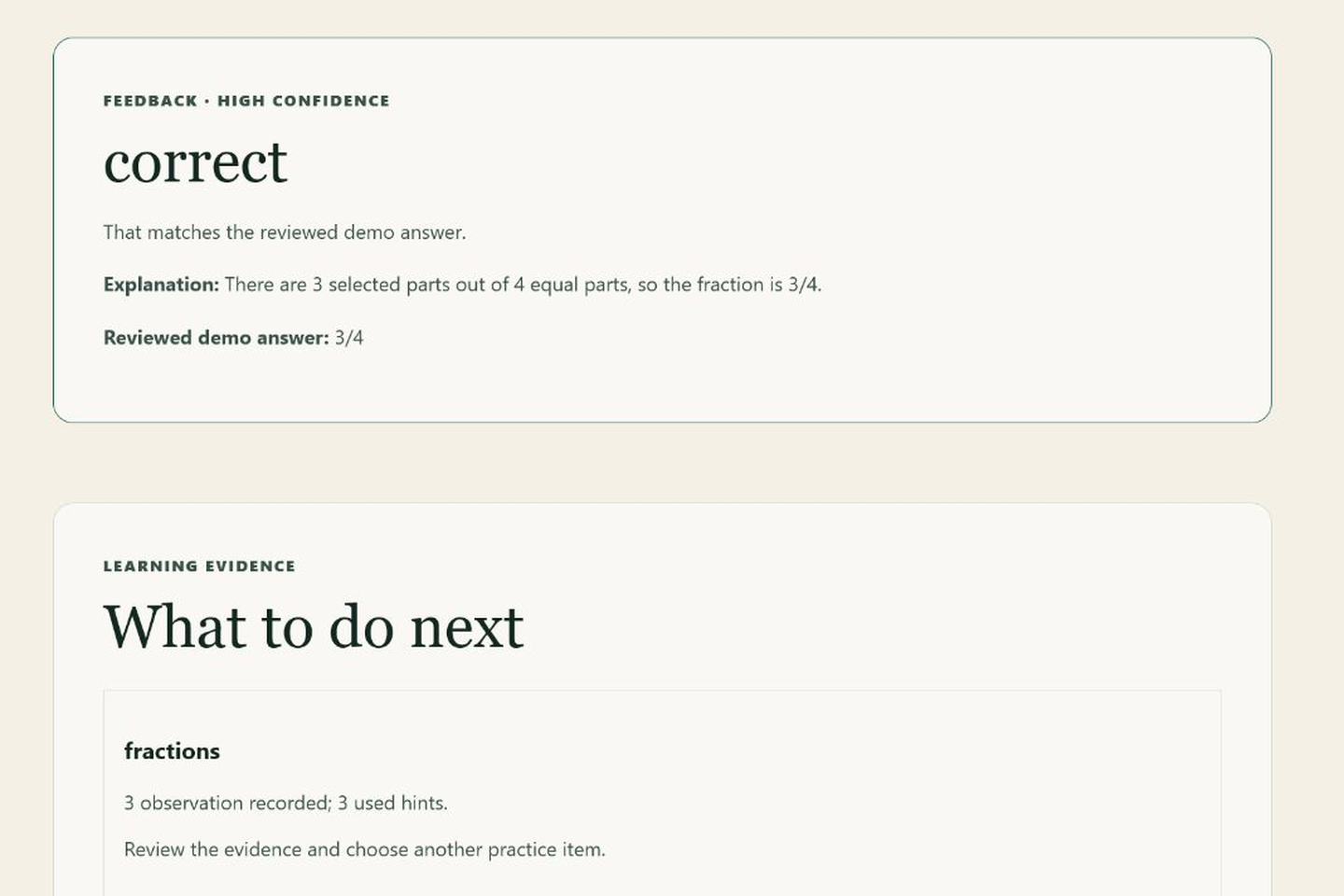 | Transparent answer feedback and non-ranking learning evidence |
Run locally with Docker
Prerequisites: Docker Desktop with the Linux engine running. Git is optional for local testing.
docker compose up -d db
docker compose run --rm backend alembic upgrade head
docker compose run --rm backend python -m classpath.scripts.seed_demo_curriculum
docker compose up -d --build backend frontend
docker compose ps
Open http://localhost:5173/demo. The UI enters either synthetic account without requiring manual credentials. Direct API testing may use:
| Account | Password | Scope |
|---|---|---|
math-demo@example.invalid | Demo-Math-2026 | Class 5 Mathematics |
science-demo@example.invalid | Demo-Science-2026 | Class 6 Science |
These public credentials are intentional fixtures and must never be reused for a real deployment.
Synthetic controlled-demo results
Measured locally on 2026-07-13. These results verify deterministic behavior on generator-controlled fixtures; they do not establish curriculum quality, educational effectiveness, or real-document generalization.
| Evaluation | Synthetic scope | Measured result |
|---|---|---|
| PDF extraction | 60 generated PDFs, 8 concepts, 3 layouts | 60/60 extracted; content-type micro F1 1.00; concept micro F1 1.00 |
| Cognitive classifier | 384 unreviewed synthetic questions; grouped test n=64 | Majority macro F1 0.0556; TF-IDF macro F1 1.00 |
| Difficulty classifier | Same grouped test | Majority macro F1 0.1818; TF-IDF macro F1 1.00 |
| Retrieval and isolation | 120 synthetic queries, real PostgreSQL/pgvector, 2 users | Recall@5 1.00; MRR@10 1.00; 0 cross-user, wrong-class, or wrong-concept results |
| Assessment | 100 MCQ + 100 numeric synthetic cases | Rule-outcome accuracy 1.00 for each implemented answer type |
The perfect synthetic scores are expected because fixtures and labels are generator-controlled. DistilBERT was not trained: the repository does not yet have approved human-reviewed labels, a frozen real-world test set, inter-annotator review, or 100 reviewed classifier errors. No classifier is promoted.
Built with Codex and GPT-5.6
Codex was used to plan, scaffold, implement, test, audit, and document LearnStep. GPT-5.6/Codex helped iterate on the modular architecture, deterministic test cases, child-safety boundaries, ownership isolation, and synthetic evaluation artifacts. The final system was verified using the documented controlled-demo test suite and real local PostgreSQL/pgvector integration checks.
Codex and GPT-5.6 did not independently validate curriculum quality, perform human educational review, run a student study, or create evidence for claims beyond the committed synthetic artifacts. Generated suggestions were treated as engineering input and checked against executable tests and recorded outputs.
Verification commands
cd backend
.\.venv\Scripts\ruff.exe check . ..\scripts
.\.venv\Scripts\ruff.exe format --check . ..\scripts
.\.venv\Scripts\mypy.exe src tests ..\scripts
.\.venv\Scripts\pytest.exe -m "not integration"
$env:APP_ENV="test"
$env:DATABASE_URL="postgresql+psycopg://classpath:classpath_dev@localhost:5432/classpath"
.\.venv\Scripts\pytest.exe -m integration
cd ..
pnpm --dir frontend verify
docker compose build backend frontend
Evaluation regeneration commands are documented in docs/evaluation.md. Media regeneration is documented in docs/media/devpost/README.md.
Safety, privacy, and limitations
- No real student data, private school PDFs, or external curriculum sources are included.
- Demo uploads expire after 60 minutes and can be deleted immediately by their synthetic owner.
- Learning evidence is not a mastery score and never ranks or compares learners.
- No DistilBERT training has been completed.
- No real-school document validation or qualified curriculum review has been completed.
- The 100-package human-review queue remains 0/100 completed.
- No public child-facing deployment exists.
- No student study has been conducted, so no educational-improvement claim is made.
- A real release still requires qualified privacy/legal review, educational-content review, rate-limit and abuse testing, operational monitoring, backup/restore rehearsal, and deployment-specific consent/retention decisions.
Documentation
- Architecture
- API
- Evaluation and failure boundaries
- Dataset card
- Synthetic TF-IDF baseline model card
- Child safety and privacy
- Threat model
- Deployment design
- Human review protocol
- Portfolio evidence checklist
Deployment status
The repository includes buildable containers and an intentionally inert Azure Container Apps workflow. No cloud resources or public app URL exist. Provisioning remains blocked until the owner explicitly approves a subscription, region, spend, credentials, private storage, database, and public hostname.
Analysis
View
Metric
- 4

Figures cover GitHub contributors during the hackathon window. A co-authored commit counts in full for each author, so per-member totals add up to more than the whole-team figures.
Technology
- CSSIn code
- FastAPIIn code
- HTMLIn code
- JavaScriptIn code
- PythonIn code
- ReactIn code
- TypeScriptIn code
- DockerClaimed
- PostgreSQLClaimed
- PyTorchClaimed
7 of 10 appear in the indexed code. 3 claimed on Devpost could not be matched to code, which may simply mean the tool leaves no trace in the repository.
AI coding agents
- CodexConfig
Detected from committed agent config files and commit authorship. Absence of a signal is not proof an agent was unused.
Codebase size
Source size
377 KB
Source files
103
Counts recognized source files only; vendored directories, binaries and lockfiles are excluded, so this is smaller than the repository on disk.
Repository
Shradd7/LearnStep
203 files · 5.0 MB · @ b065bc4
Structure
Interface
5 files · 2%Screens, components and styles rendered to the user.
API & routing
7 files · 3%Request entry points: routes, handlers and controllers.
Application logic
36 files · 18%Domain rules, services and shared utilities.
+1 moreData & schema
15 files · 7%Schema definitions, migrations and data access.
Supporting
Layers are inferred from where files sit in the tree, not from reading the code. A project that names its directories unconventionally will read oddly here — open the file browser to check anything the diagram implies.
Languages
- Python36%
- YAML27%
- Markdown27%
- TypeScript8%
- CSS2%
- JavaScript0%
- Other (1)0%
Share of indexed source by file size. Binary and vendored files are excluded.
Dependencies
frontend/package.json
npm · 21- react
- react-dom
- react-router-dom
- +18 more
backend/pyproject.toml
pypi · 17- alembic
- argon2-cffi
- fastapi
- pgvector
- psycopg[binary]
- pydantic-settings
- PyJWT
- PyMuPDF
- python-multipart
- sqlalchemy
- uvicorn[standard]
- +6 more
Declared in the repository’s manifests at the indexed commit. A declared package is not proof it is used, and runtime dependencies are listed first.
This project’s features have not been analysed yet.
Export this project's context (description, README, evidence, key source files) to chat with an AI agent elsewhere.