Project Info
Inspiration
Developers often struggle with writing optimized, production-ready Dockerfiles. Figuring out the perfect base image, dependency management commands, and security best practices can be tedious and prone to error. For the OpenAI Build Week, we wanted to completely eliminate this friction and create a tool that does the heavy lifting for you—generating perfect Dockerfiles automatically from nothing but a GitHub URL.
What it does
Gitship is an AI-powered web application that takes any public GitHub repository link, deeply analyzes the entire codebase structure, and generates a custom, highly optimized Dockerfile. Not only does it stream the generation process live to the user, but it also automatically detects the tech stack (Python, Node.js, Go, etc.) and even suggests a docker-compose.yml file for multi-container setups. You can even pass it custom instructions like "Use Alpine Linux" or "Include PostgreSQL".
How we built it
We built the backend using Python and FastAPI, heavily utilizing WebSockets to stream real-time responses to the UI. Here is the flow: When a user submits a URL, the backend temporarily clones the repository locally. It uses gitingest to create a dense, token-optimized text summary of the codebase and file tree. This context is passed to Groq's API (running Llama models) with a highly specialized prompt. The generated infrastructure code is streamed live back to the frontend. The frontend is built with vanilla HTML/CSS and TailwindCSS via Jinja2 templates. We integrated the Monaco Editor (the engine behind VS Code) to display the generated code with syntax highlighting. Throughout our development, we also used GPT-5.6 and Codex for architectural planning, debugging, and backend scaffolding.
Challenges we ran into
Handling large repositories was tricky. We had to ensure we extracted the relevant dependency files (package.json, requirements.txt, etc.) without blowing past the LLM's context window. Additionally, maintaining a stable WebSocket connection to stream the AI's response character-by-character required careful asynchronous state management in FastAPI to ensure the UI updated perfectly without dropping chunks.
Accomplishments we're proud of
We are incredibly proud of the absolute speed of Gitship. By utilizing Groq's API, the Dockerfiles are generated almost instantaneously. We also managed to build a very clean, responsive, and intuitive UI that feels like a premium developer tool right out of the box.
What we learned
We significantly deepened our understanding of asynchronous Python and WebSocket architecture. We also learned advanced prompt engineering techniques specifically tailored for infrastructure-as-code (IaC) generation, ensuring the AI outputs valid Docker syntax rather than conversational text.
What's next
We plan to build a native GitHub App integration so Gitship can automatically open a Pull Request with the generated Dockerfile directly in the user's repository. We also plan to integrate one-click deployments to cloud providers right from our dashboard.
Gitship 🐳
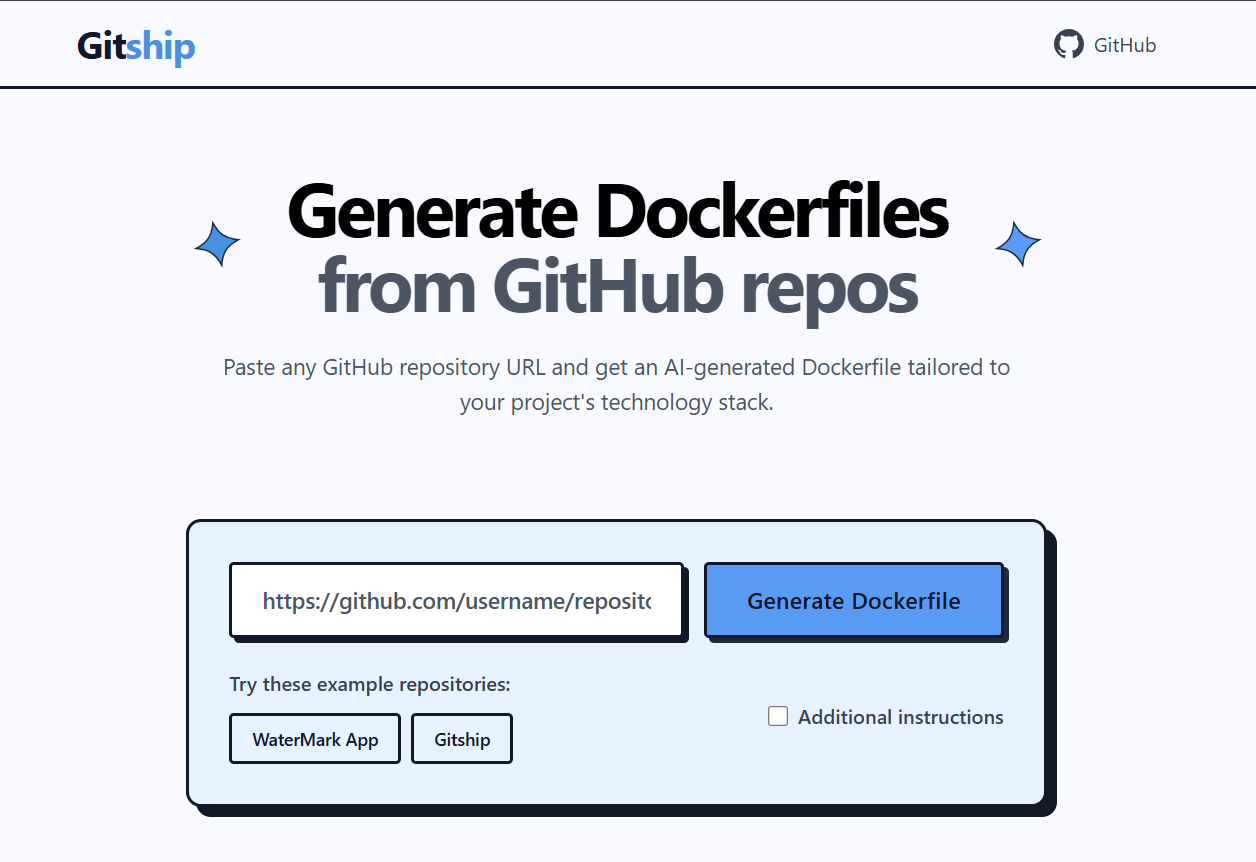
Turn any GitHub repository into a production-ready Docker container with AI-powered Dockerfile generation.


Gitship is an AI web application that automatically generates production-ready Dockerfiles by analyzing GitHub repositories. Paste in a GitHub URL and get a tailored Dockerfile back, complete with intelligent base image selection, dependency management, and Docker best practices.
🏆 Built for OpenAI Build Week : Developer Tools track.
🤖 How Codex & GPT-5.6 Were Used
- Codex: Codex used to write complete code, such as the FastAPI backend scaffolding, the WebSocket streaming logic, or the Dockerfile-generation prompt engineering
- GPT-5.6: GPT-5.6 Model was used for planning the architecture, writing prompts, debugging, reviewing code.
✨ Features
- 🤖 AI-Powered Analysis: Uses Groq's Llama models to analyze repository structure and generate intelligent Dockerfiles
- ⚡ Real-time Streaming: Watch the AI generate your Dockerfile live via WebSocket streaming
- 🎯 Smart Detection: Automatically detects technology stacks (Python, Node.js, Java, Go, etc.)
- 🔧 Production-Ready Output: Generates Dockerfiles following best practices: proper security, multi-stage builds, and optimization
- 📋 Custom Instructions: Add your own requirements for specialized environments
- 📄 Docker Compose Support: Automatically suggests a
docker-compose.ymlfor multi-service applications - 🎨 Modern UI: Clean, responsive interface with Monaco editor for syntax highlighting
- 📱 Mobile Friendly: Works seamlessly on desktop and mobile
🚀 Quick Start
Prerequisites
- Python 3.9 or higher
- Git
- A Groq API key (console.groq.com)
Installation
-
Clone the repository:
git clone https://github.com/hasnainaliasghar/Gitship.git cd Gitship -
Install dependencies:
pip install -r requirements.txt -
Set up environment variables:
# Create .env file echo "GROQ_API_KEY=your_groq_api_key_here" > .env echo "GROQ_MODEL=llama-3.1-70b-versatile" >> .env -
Run the application:
python app.py -
Open your browser: Navigate to
http://localhost:8000
🛠️ How It Works
- Repository Cloning: Gitship clones the target GitHub repository locally using Git
- Code Analysis: Uses gitingest to analyze repository structure and extract relevant context
- AI Generation: Sends the analysis to Groq's API with specialized prompts for Dockerfile generation
- Smart Optimization: The AI considers:
- Technology stack detection
- Dependency management
- Security best practices
- Multi-stage builds where beneficial
- Port configuration
- Environment variables
- Health checks
📁 Project Structure
Gitship/
├── app.py                 # Main FastAPI application
├── requirements.txt       # Python dependencies
├── .env                   # Environment variables (create this)
├── static/                # Static assets (icons, CSS)
├── templates/
│   └── index.jinja        # Main HTML template
└── tools/                 # Core functionality modules
    ├── __init__.py
    ├── create_container.py  # AI Dockerfile generation
    ├── git_operations.py    # GitHub repository cloning
    └── gitingest.py          # Repository analysis
🔧 Configuration
Environment Variables
| Variable | Description | Required |
|---|---|---|
GROQ_API_KEY | Your Groq API key | Yes |
GROQ_MODEL | Groq model to use (e.g. llama-3.1-70b-versatile) | No |
PORT | Server port (default: 8000) | No |
HOST | Server host (default: 0.0.0.0) | No |
Advanced Usage
You can also use the tools programmatically:
from tools import clone_repo_tool, gitingest_tool, create_container_tool
import asyncio

async def generate_dockerfile(github_url):
    # Clone repository
    clone_result = await clone_repo_tool(github_url)

    # Analyze with gitingest
    analysis = await gitingest_tool(clone_result['local_path'])

    # Generate Dockerfile
    dockerfile = await create_container_tool(
        gitingest_summary=analysis['summary'],
        gitingest_tree=analysis['tree'],
        gitingest_content=analysis['content']
    )

    return dockerfile

# Usage
result = asyncio.run(generate_dockerfile("https://github.com/user/repo"))
print(result['dockerfile'])
🎨 Customization
Use the "Additional instructions" field to customize generation, for example:
"Use Alpine Linux for smaller image size""Include Redis and PostgreSQL""Optimize for production deployment""Add development tools for debugging"
📝 License
This project is licensed under the MIT License , see the LICENSE file for details.
🔗 Links
- GitHub Repository: github.com/hasnainaliasghar/Gitship
- Issues: Report bugs or request features
Turn any repository into a container in seconds.
Analysis
View
Metric
- 5
- 2


Figures cover GitHub contributors during the hackathon window. A co-authored commit counts in full for each author, so per-member totals add up to more than the whole-team figures.
Technology
- FastAPIIn code
- PythonIn code
- DockerClaimed
- HTMLClaimed
- Tailwind CSSClaimed
2 of 5 appear in the indexed code. 3 claimed on Devpost could not be matched to code, which may simply mean the tool leaves no trace in the repository.
AI coding agents
No AI coding agent signals were found in this repository.
Detected from committed agent config files and commit authorship. Absence of a signal is not proof an agent was unused.
Codebase size
Source size
36 KB
Source files
8
Counts recognized source files only; vendored directories, binaries and lockfiles are excluded, so this is smaller than the repository on disk.
Repository
hasnainaliasghar/Gitship
19 files · 172 KB · @ a02a56d
Structure
Interface
1 file · 5%Screens, components and styles rendered to the user.
Application logic
4 files · 21%Domain rules, services and shared utilities.
Supporting
Layers are inferred from where files sit in the tree, not from reading the code. A project that names its directories unconventionally will read oddly here — open the file browser to check anything the diagram implies.
Languages
- Python84%
- Markdown16%
Share of indexed source by file size. Binary and vendored files are excluded.
Dependencies
requirements.txt
pypi · 8- api-analytics[fastapi]
- fastapi
- gitingest
- jinja2
- openai-agents
- python-dotenv
- python-multipart
- uvicorn[standard]
Declared in the repository’s manifests at the indexed commit. A declared package is not proof it is used, and runtime dependencies are listed first.
This project’s features have not been analysed yet.
Export this project's context (description, README, evidence, key source files) to chat with an AI agent elsewhere.