Project Info
Inspiration
Compass started with two memories. The first was OpenAI’s GPT-4o launch demo. A child was working on a geometry problem and pointed to the wrong side of a triangle. Instead of simply giving the answer, the AI noticed what was happening and gently helped them correct it. The second was my father. He taught mathematics for more than 50 years and often spoke to me about GeoGebra. On paper, geometry can feel static. In GeoGebra, students can move a point, test an idea, and immediately see what changes—and what does not. When I saw the OpenAI demo, I imagined combining these two ideas: GeoGebra as the space where the student experiments. A realtime AI companion that understands enough of that space to offer the right help at the right moment. With the release of gpt-realtime-2.1, I felt that the time had come—and the hackathon was a good excuse to finally build it. I called my father and told him: “I’m going to bring your project to life.” That became Compass.
What it does
Compass is a bilingual learning companion that helps students work through an exercise without doing the thinking for them. The main demonstration is a guided investigation of the Varignon theorem. A student opens the activity in one click and works directly inside GeoGebra. No account or classroom code is required for this public journey. The investigation contains nine missions. Students: Construct the four exact midpoints of a quadrilateral. Connect them. Explore convex, concave, and crossed configurations. Formulate a conjecture. Verify parallel relationships. Build a justification. Finish with a transfer question. Compass can speak with the student or respond through text. It can ask a short question, offer a progressive hint, or point to the exact GeoGebra tool or object it is discussing. For example, if a student does not know how to construct a midpoint, Compass can highlight the real Midpoint tool. It can explain which points to select and, when explicitly requested, perform one bounded construction using existing points. However, Compass cannot click anywhere it wants or send arbitrary commands to GeoGebra. The application controls the available actions, their targets, and their effects. The student also remains in control of the conversation. Speaking or manipulating the figure interrupts any response or guidance already in progress. The student is no longer alone in front of their screen. They have a companion that helps them discover, experiment, and think at their own pace. A clear difference between help and verification One of the most important ideas behind Compass is that the AI does not decide whether the mathematics is correct. Compass receives a limited description of the GeoGebra construction, but exact relationships are checked by the application. A point placed approximately in the middle of a segment is not accepted as an exact midpoint. Compass checks the actual geometric dependency. The application also verifies supported parallel relationships and identifies the convex, concave, and crossed configurations used during the investigation. This creates two distinct types of progress: A student can explain what they tried and mark a mission as completed. A compatible deterministic check can confirm that the mission has been verified. The AI cannot award verified XP, complete a mission, or turn its own construction into student evidence. Progressive help Compass uses several levels of support. It can begin with a simple question, continue with a more precise hint, and then provide visual guidance inside GeoGebra. A guided demonstration is only possible after the student has agreed to it. I spent a lot of time thinking about when Compass should intervene. I did not want it to react negatively to a first mistake or constantly interrupt the learner. At the same time, Compass should not simply repeat the same explanation again and again. That is why I created an agent harness that gives Compass the ability to help—but prevents it from helping too quickly. Compass can take limited initiative: When the activity begins. After the current mission changes. When a repeated difficulty has been detected. Its first response should always be the smallest useful hint, not the solution. Teacher preparation The repository also contains a teacher space where an activity can be prepared from: A topic. An existing worksheet. A manually written exercise. The generated draft is never published automatically. The teacher can edit the statement, learning objective, missions, common difficulties, and support instructions before reviewing the real student experience. For the Varignon investigation, the teacher can edit the wording and XP value of each mission while keeping the deterministic mathematical structure intact. The project also includes a general workflow for reading a photograph of a school exercise. The student reviews the extracted statement before beginning. If the image is incomplete or unclear, Compass asks for clarification instead of inventing the missing information. Conversational guidance can support different school subjects. Automatic verification, however, is only displayed when Compass has a compatible deterministic module. Today, the complete specialist experience is the GeoGebra Varignon investigation. Privacy and classroom reporting Compass does not produce a school grade. By default, the public prototype keeps media, progress, and reports in memory. Audio, transcripts, and uploaded images are not stored in the learning report. The teacher can receive factual information such as: Completed missions. Verified missions. Captured configurations. Earned XP. The highest support level used. The student’s free-text reasoning and transfer answer are not sent back to the teacher. I also built a limited classroom pilot with rotating joining codes, student pseudonyms, targeted assignments, and PostgreSQL. It is separate from the public one-click demonstration and is not intended to be a complete learning management system. How I built it I used Codex throughout the project as an engineering and review collaborator. It helped me turn each product idea into a small implementation slice, keep specifications and runtime contracts aligned, write tests, and challenge the project from technical, educational, accessibility, and product perspectives. Compass uses GeoGebra under its Non-Commercial License, so the GeoGebra code remains subject to GeoGebra’s license. I contacted the GeoGebra team, and they confirmed that I could use GeoGebra for this hackathon. Compass is a Next.js and TypeScript application built around three separate AI responsibilities: gpt-5.6-terra reads a student’s exercise image and converts it into a strict structured format. The image is processed in memory, without tools, using store: false. gpt-5.6-luna can create one editable teacher draft from a topic or learning objective. It does not publish anything and does not receive tools. gpt-realtime-2.1 provides low-latency voice and text tutoring over WebRTC. Everything else is controlled by the application. Challenges I ran into Defining what the AI should be allowed to do The hardest challenge was deciding what the AI should be allowed to do. Giving a model unrestricted access to GeoGebra would have made the demonstration easier to build, but it would also have made the result difficult to trust. Instead, I created a closed set of semantic actions. Compass can refer to a midpoint, a line, or an existing point, while the application chooses the actual command, validates it, and can roll it back. Separating conversation from proof Another challenge was separating conversation from proof. An encouraging AI response is useful, but it is not mathematical evidence. I had to ensure that the model could never: Validate its own answer. Award verified XP. Transform an assistant-created object into student work. Handling realtime interruptions Realtime interruption was also more difficult than I expected. If the student moves a point while Compass is speaking, the current response may already refer to an outdated figure. Compass therefore cancels the response and waits for the construction to become stable before continuing. Knowing when helping becomes interrupting Finally, I had to decide when helping becomes interrupting. Compass needed to be proactive enough to feel present, but patient enough to let the student try. This part can still be improved, but the current experience already feels surprisingly alive. Accomplishments that I’m proud of The moment I am most proud of was when my father called me and said: “It’s amazing—and you’re not even a mathematics teacher!” I told him: “Codex helps me. I’m the coach!” I am also proud that Compass does more than place a chatbot next to GeoGebra. The companion can: Understand a limited geometric world. Point to real controls. Follow the student’s progress. Act inside the exercise without taking ownership of the work. Discuss mathematical demonstrations. Adapt the level of the conversation to the student. The agent harness was an especially important achievement for me. It feels as though someone is actually beside the learner, reacting to what is happening instead of repeating generic instructions. I am equally proud that the project states its limits clearly. Compass does not claim to: Correct every exercise. Understand every subject deterministically. Replace a teacher. What I learned I learned that building useful educational AI is not only about making the model more capable. It is also about deciding where its authority should stop. The model can be excellent at listening, explaining, and encouraging. Verification, rewards, and irreversible actions require stronger guarantees. I also learned that good tutoring often means doing less. A short question at the right moment can be more helpful than a complete explanation. Finally, Codex helped me understand the value of keeping product decisions, implementation, and tests connected. When I changed an educational rule, I could follow that decision through the contracts, interface, and browser journeys instead of treating it as prompt wording alone.
What's next
I joined this hackathon to: Turn a personal idea into something real. Help make AI useful in education. Honor my father’s 50 years as a mathematics teacher. Varignon is the first complete specialist investigation, not the final destination. The next step is to create a reusable system where teachers and contributors can add other validated geometry investigations without rebuilding the entire runtime. I would also like to test Compass in a real classroom with a teacher and a small group of students. That would help me understand: When students accept proactive guidance. When they prefer silence. What information is genuinely useful to the teacher. I intend to make the source code available to the GeoGebra community so that educators and developers can continue improving it. Compass currently uses GeoGebra under its Non-Commercial License and is intended for accessible, educational, and non-commercial use. If Compass wins first or second place, I will use 20% of the cash prize to fund API credits for a school and support a real educational pilot. Realtime AI has a cost—and the long testing sessions with my father definitely hurt my bank account! No student should lose access to foundational learning because they cannot afford individual help.
Compass
A bilingual, realtime AI learning companion that helps students think—not just get answers.
Compass combines a live GeoGebra workspace with a voice and text tutor that can observe a bounded geometric world, point to the exact tool or object it is discussing, and provide the smallest useful hint while the application keeps mathematical verification under deterministic control.
Inspiration
Compass started with two memories.
The first was OpenAI's GPT-4o launch demo. A child was working on a geometry problem and pointed to the wrong side of a triangle. Instead of simply giving the answer, the AI noticed what was happening and gently helped them correct it.
The second was my father.
He taught mathematics for more than 50 years and often spoke to me about GeoGebra. On paper, geometry can feel static. In GeoGebra, students can move a point, test an idea, and immediately see what changes—and what does not.
When I saw the OpenAI demo, I imagined combining these two ideas:
- GeoGebra as the space where the student experiments.
- A realtime AI companion that understands enough of that space to offer the right help at the right moment.
With the release of gpt-realtime-2.1, I felt that the time had come—and the
hackathon was a good excuse to finally build it.
I called my father and told him:
“I'm going to bring your project to life.”
That became Compass.
What it does
Compass is a bilingual learning companion that helps students work through an exercise without doing the thinking for them.
The flagship experience is a guided investigation of the Varignon theorem. A student opens the teacher-prepared activity in one click and works directly inside GeoGebra. No account, classroom code, or pseudonym is required for the public journey.
The investigation contains nine missions. Students:
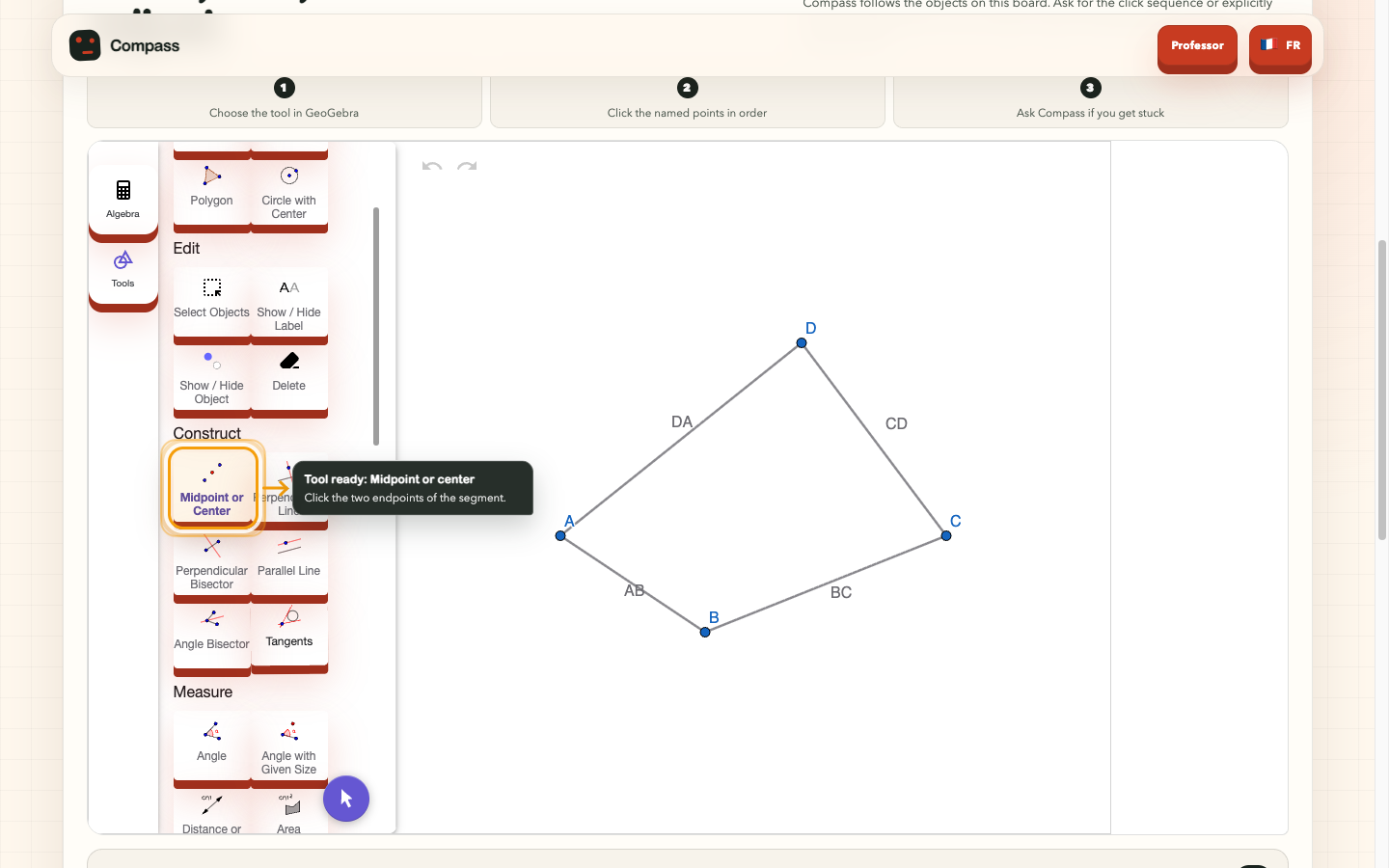
- Construct the four exact midpoints of a quadrilateral.
- Connect the midpoints.
- Explore a convex configuration.
- Explore a concave configuration.
- Explore a crossed configuration.
- Formulate a conjecture.
- Verify the relevant parallel relationships.
- Build a justification.
- Finish with a transfer question.
Compass can speak with the student or respond through text. It can ask a short question, offer a progressive hint, or point to the exact GeoGebra tool or object it is discussing.
For example, if a student does not know how to construct a midpoint, Compass can highlight the real Midpoint tool and explain which points to select. When explicitly requested, it can also perform one bounded construction using existing points.
Compass cannot click anywhere it wants or send arbitrary commands to GeoGebra. The application controls the available actions, their targets, permissions, budgets, and effects.
The student also remains in control of the conversation. Speaking or manipulating the figure interrupts any response or guidance already in progress. The student is no longer alone in front of the screen: they have a companion that helps them discover, experiment, and think at their own pace.
Help is not verification
One of the most important ideas behind Compass is that the AI does not decide whether the mathematics is correct.
Compass receives a limited description of the GeoGebra construction, but exact relationships are checked by the application. A point placed approximately in the middle of a segment is not accepted as an exact midpoint: the application checks its actual geometric dependency. It also verifies supported parallel relationships and identifies the convex, concave, and crossed configurations used during the investigation.
This creates two distinct types of progress:
- A student can explain what they tried and mark a compatible mission as completed.
- A deterministic application check can confirm that a compatible mission has been verified.
The AI cannot award verified XP, complete a mission, or turn its own construction into student evidence.
Progressive help
Compass uses several levels of support:
- Begin with a short question.
- Continue with a more precise hint.
- Provide temporary visual guidance inside GeoGebra.
- Offer a bounded guided step only when the activity policy allows it and the student has requested enough help.
I spent a lot of time thinking about when Compass should intervene. I did not want it to react negatively to a first mistake or constantly interrupt the learner. At the same time, Compass should not simply repeat the same explanation again and again.
That is why I created an agent harness that gives Compass the ability to help while preventing it from helping too quickly.
Compass can take limited initiative when the activity begins, after the current mission changes, or when a repeated difficulty has been detected. Its first response should always be the smallest useful hint, not the solution.
Teacher preparation
The repository also contains a teacher space where an activity can be prepared from:
- A topic or learning objective.
- An existing worksheet image.
- A manually written exercise.
The generated draft is never published automatically. The teacher can edit the statement, learning objective, missions, common difficulties, support instructions, and XP rewards before reviewing the real student experience.
For the Varignon investigation, the teacher can edit the wording and XP value of each mission while keeping the deterministic mathematical structure intact.
The project also includes a general workflow for reading a photograph of a school exercise. The student reviews the extracted statement before beginning. If the image is incomplete or unclear, Compass asks for clarification instead of inventing the missing information.
Conversational guidance can support different school subjects. Automatic verification, however, is only displayed when Compass has a compatible deterministic module. Today, the complete specialist experience is the GeoGebra Varignon investigation.
Privacy and classroom reporting
Compass does not produce a school grade.
By default, the public prototype keeps media, progress, and reports in memory. Audio, transcripts, and uploaded images are not stored in the learning report.
The teacher can receive factual information such as:
- Completed missions.
- Verified missions.
- Captured configurations.
- Earned XP.
- The highest support level used.
The student's free-text reasoning and transfer answer are not sent back to the teacher.
The repository also contains a limited classroom pilot with rotating joining codes, student pseudonyms, targeted assignments, and PostgreSQL 16. It is separate from the public one-click demonstration and is not intended to be a complete learning management system.
How I built it
I used Codex throughout the project as an engineering and review collaborator. It helped me turn each product idea into a small implementation slice, keep specifications and runtime contracts aligned, write tests, and challenge the project from technical, educational, accessibility, and product perspectives.
Compass is a Next.js and TypeScript application built around three separate AI responsibilities:
| Responsibility | Model | Boundary |
|---|---|---|
| Read a student's exercise image | gpt-5.6-terra | One server call, in-memory image, store:false, no tools, strict structured output |
| Prepare an editable teacher draft | gpt-5.6-luna | At most one call, low effort, store:false, no tools, no automatic publication |
| Provide voice and text tutoring | gpt-realtime-2.1 | Low-latency WebRTC session with closed functions in the specialist investigation |
| Check relations, evidence, and XP | No model | Deterministic TypeScript engine, versioned contracts, and a local ledger |
Everything else belongs to the application. Teacher instructions, extracted text, and GeoGebra observations remain untrusted data. They cannot change the system prompt, permissions, evidence, or scoring rules.
Trust boundaries
| Level | Examples | Authority |
|---|---|---|
| Dialogue | Question, explanation, or short prompt | The model chooses the wording; the application decides when an opportunity to speak exists |
| O2 guidance | Activate a tool, highlight, frame, or point | Closed, non-constructive, budgeted, cancellable actions restored during cleanup |
| O3 bounded action | Move one A–D vertex or construct an approved object from existing points | The application owns coordinates, labels, commands, verification, and rollback; no evidence is awarded |
| O4–O5 privileged mutation | Restore or guided demonstration | Visible confirmation, closed targets, rollback, and deterministic verification |
| Evidence and XP | Midpoint, parallelism, configuration, and progress | Application only; model output can never verify a mission |
There is no arbitrary GeoGebra command, unrestricted DOM click, or model-selected screen coordinate. A student gesture or resumed speech cancels the coach's in-flight work.
Challenges I ran into
Defining what the AI should be allowed to do
The hardest challenge was deciding what the AI should be allowed to do. Giving a model unrestricted access to GeoGebra would have made the demonstration easier to build, but it would also have made the result difficult to trust.
Instead, I created a closed set of semantic actions. Compass can refer to a midpoint, a line, or an existing point, while the application chooses the actual command, validates it, and can roll it back.
Separating conversation from proof
An encouraging AI response is useful, but it is not mathematical evidence. I had to ensure that the model could never validate its own answer, award verified XP, or transform an assistant-created object into student work.
Handling realtime interruptions
Realtime interruption was more difficult than I expected. If the student moves a point while Compass is speaking, the current response may already refer to an outdated figure. Compass therefore cancels the response and waits for the construction to become stable before continuing.
Knowing when helping becomes interrupting
Compass needed to be proactive enough to feel present, but patient enough to let the student try. This part can still be improved, but the current experience already feels surprisingly alive.
Accomplishments that I am proud of
The moment I am most proud of was when my father called me and said:
“It's amazing—and you're not even a mathematics teacher!”
I told him:
“Codex helps me. I'm the coach!”
I am also proud that Compass does more than place a chatbot next to GeoGebra. The companion can understand a limited geometric world, point to real controls, follow the student's progress, act inside the exercise without taking ownership of the work, discuss mathematical demonstrations, and adapt the level of the conversation to the student.
The agent harness was an especially important achievement for me. It feels as though someone is actually beside the learner, reacting to what is happening instead of repeating generic instructions.
I am equally proud that the project states its limits clearly. Compass does not claim to correct every exercise, understand every subject deterministically, or replace a teacher.
What I learned
I learned that building useful educational AI is not only about making the model more capable. It is also about deciding where its authority should stop.
The model can be excellent at listening, explaining, and encouraging. Verification, rewards, and irreversible actions require stronger guarantees.
I also learned that good tutoring often means doing less. A short question at the right moment can be more helpful than a complete explanation.
Finally, Codex helped me understand the value of keeping product decisions, implementation, and tests connected. When I changed an educational rule, I could follow that decision through the contracts, interface, and browser journeys instead of treating it as prompt wording alone.
What's next for Compass
I joined this hackathon to turn a personal idea into something real, help make AI useful in education, and honor my father's 50 years as a mathematics teacher.
Varignon is the first complete specialist investigation, not the final destination. The next step is to create a reusable system where teachers and contributors can add other validated geometry investigations without rebuilding the entire runtime.
I would also like to test Compass in a real classroom with a teacher and a small group of students. That would help me understand when students accept proactive guidance, when they prefer silence, and what information is genuinely useful to the teacher.
The source code is available under a non-commercial software license so that the GeoGebra community can study it, adapt it for permitted uses, and continue improving the idea without opening commercial use by default.
If Compass wins first or second place, I will use 20% of the cash prize to fund API credits for a school and support a real educational pilot. Realtime AI has a cost—and the long testing sessions with my father definitely hurt my bank account!
No student should lose access to foundational learning because they cannot afford individual help.
Architecture
The runtime is a Next.js App Router TypeScript application under
apps/frontend. Server routes keep secrets out of the browser; the client
orchestrates GeoGebra, WebRTC, progress, and cancellation controllers. The
adapter, gateway, fact engine, checkpoints, policy, and arbiter remain separate
authorities behind closed Zod contracts.
The direct demo creates a validated geometry_investigation.v1 publication
locally and mounts the same investigation runtime used by the teacher workflow.
It uses neither a parallel runtime nor a validation shortcut.
Remote audio may feed one local, ephemeral energy value into Compass's mouth animation. No sample, transcript, or audio history is stored. Memory remains the default for the public demo, media, XP, and reports. PostgreSQL is reserved for the classroom pilot and fails closed when its configuration is missing.
See the detailed architecture, roadmap, decisions, and classroom data contract.
Run locally
Requirements: Node.js 22.17.x and pnpm 10.6.3.
corepack enable
pnpm install --frozen-lockfile
cp .env.example .env
pnpm dev
Open http://localhost:3000.
OPENAI_API_KEY is optional for local deterministic paths, but required for
photo reading, teacher drafts, and Realtime sessions. It must remain
server-only: never prefix it with NEXT_PUBLIC_ or commit it.
The classroom pilot is disabled by default. Enabling it requires PostgreSQL, migrations, and the secrets described in the classroom runbook. No in-memory fallback is allowed in Production.
Verification
pnpm test:docs:t0
pnpm lint
pnpm typecheck
pnpm test
pnpm build
pnpm --dir apps/frontend exec playwright test --grep-invert @live
Credentialed gates remain separate. They require an API key, a certificate, and an audio track that are not stored in the repository.
GEOTUTOR_TLS_CERT=/path/to/cert.pem \
GEOTUTOR_TLS_KEY=/path/to/key.pem \
pnpm gate:t6:live
The demo runbook distinguishes the local harness, physical microphone, and trusted certificate.
Public production
The public demonstration is served from the stable HTTPS alias compass-geotutor-demo.vercel.app. It opens without an application access code. Teacher and student pilot sessions remain separate authentication boundaries, and a Vercel WAF rule limits the public API request budget before functions execute.
See the public access runbook for the deployment and operational boundaries.
Known limitations
- Compass only verifies relations covered by a compatible deterministic contract; elsewhere, tutoring remains conversational.
- The public demo is not an LMS, a high-stakes grading system, or a persistent student record.
- Persistent GeoGebra progress restoration is not yet qualified for a multi-student classroom pilot.
- Reasoning and transfer text is neither graded nor sent to the teacher; media, transcripts, and Base64 checkpoints are not persisted.
- Live features depend on credentials, browser capabilities, a microphone, and external services. Fallbacks never present themselves as a live session.
- The current GeoGebra integration is limited to non-commercial use under the terms described below.
License and GeoGebra attribution
Compass source code
Copyright © 2026 Vincent Loreaux.
Source code and documentation authored for Compass are available under the PolyForm Noncommercial License 1.0.0. You may use, study, modify, and redistribute that software for the non-commercial purposes permitted by the license. Commercial use is not granted and requires a separate agreement with the project owner.
This is a source-available non-commercial license, not an OSI-approved open
source license. Third-party components keep their own terms; see
THIRD_PARTY_NOTICES.md.
GeoGebra
Made with GeoGebra®
Compass loads the official GeoGebra web application and currently uses it only for an educational, hackathon, and non-commercial prototype under GeoGebra's published non-commercial terms.
GeoGebra is separate third-party software and is not licensed under the Compass license. Its components are governed by their own terms, including:
- The GeoGebra source code is offered under the EUPL v1.2.
- GeoGebra installers, web services, materials, and the complete GeoGebra product are subject to the GeoGebra Non-Commercial License.
- GeoGebra language files, documentation, and user-interface image and style files are offered under CC BY-NC-SA 4.0 or later.
The complete GeoGebra product may only be used for non-commercial purposes unless a separate commercial License and Collaboration Agreement has been obtained from GeoGebra. Anyone considering commercial use of Compass or its GeoGebra integration must first contact office@geogebra.org.
GeoGebra® and its related materials remain the property of GeoGebra GmbH and their respective licensors. No endorsement of Compass by GeoGebra is implied.
Submission materials
The adaptable submission package is available in
docs/DEVPOST_SUBMISSION.md. It includes the
submission copy, jury journey, a video script under three minutes, and the
checklist of actions that remain under human responsibility.
Analysis
View
Metric
- 46

Figures cover GitHub contributors during the hackathon window. A co-authored commit counts in full for each author, so per-member totals add up to more than the whole-team figures.
Technology
- CSSIn code
- Next.jsIn code
- OpenAIIn code
- PostgreSQLIn code
- PythonIn code
- ReactIn code
- SQLIn code
- TypeScriptIn code
- VercelClaimed
8 of 9 appear in the indexed code. 1 claimed on Devpost could not be matched to code, which may simply mean the tool leaves no trace in the repository.
AI coding agents
- CodexConfig
Detected from committed agent config files and commit authorship. Absence of a signal is not proof an agent was unused.
Codebase size
Source size
3.8 MB
Source files
425
Counts recognized source files only; vendored directories, binaries and lockfiles are excluded, so this is smaller than the repository on disk.
Repository
VincentNinIA/Compass
584 files · 66.3 MB · @ 1bab184
Structure
Interface
25 files · 4%Screens, components and styles rendered to the user.
API & routing
9 files · 2%Request entry points: routes, handlers and controllers.
Application logic
107 files · 18%Domain rules, services and shared utilities.
Data & schema
6 files · 1%Schema definitions, migrations and data access.
Supporting
Layers are inferred from where files sit in the tree, not from reading the code. A project that names its directories unconventionally will read oddly here — open the file browser to check anything the diagram implies.
Languages
- TypeScript68%
- Markdown23%
- YAML5%
- CSS4%
- Python0%
- SQL0%
Share of indexed source by file size. Binary and vendored files are excluded.
Dependencies
apps/frontend/package.json
npm · 21- next
- openai
- pg
- react
- react-dom
- sharp
- zod
- +14 more
Declared in the repository’s manifests at the indexed commit. A declared package is not proof it is used, and runtime dependencies are listed first.
This project’s features have not been analysed yet.
Export this project's context (description, README, evidence, key source files) to chat with an AI agent elsewhere.