Project Info
Inspiration
We are Codex power users and we wanted to be able to have more insight into how our tokens are spent and how we could use Codex more effectively. The app hides a lot of technical detail from the user. We want to be able to see what context Codex had received, or how work was distributed across agents. Answering those questions meant manually searching large session logs and reconstructing events by hand. We wanted the observability tools we expect from other developer systems, but designed specifically for private, local Codex workflows.
What it does
Codex Inspector turns the Codex session logs already on your computer into a local dashboard. It shows where tokens and capacity went, lets you trace a root session through its turns, spawned agents, tool calls, compactions, and recorded evidence, and can launch an opt-in Effectiveness Review that offers evidence-backed strengths and improvements. Every insight remains connected to the session events behind it.
How we built it
We built Inspector as three connected pieces: a Codex plugin with lifecycle hooks and skills, a Go CLI that creates a versioned local SQLite index, and a React dashboard for exploring usage, sessions, and reviews. Codex and GPT-5.6 helped us move from brainstorming and product-design grilling through architecture, implementation, browser-driven design reviews, and end-to-end verification. The team then combined the strongest ideas from independent MVP explorations into one coherent workflow.
Challenges we ran into
Codex history is large, evolving, and spread across several formats that do not always have identical coverage or identifiers. We had to correctly connect root sessions with spawned agents, distinguish exact facts from derived, estimated, or unavailable information, and keep searches responsive across large histories. Preserving a strict privacy boundary while supporting exact evidence and model-powered reviews also required careful scope previews, explicit consent, compatibility checks, and failure-safe indexing.
Accomplishments we're proud of
We shipped a complete local-first journey from aggregate usage to a causal session map, chronological event evidence, and an explicitly started GPT-5.6 review whose citations return to the original session. Inspector handles large histories incrementally, keeps model judgment separate from deterministic indexing, and never rewrites the source sessions. We are especially proud that the full installation and hero workflow were exercised repeatedly through clean-install, browser, crash-recovery, security, and synthetic end-to-end tests.
What we learned
We learned that Codex’s local history contains enough information to build a surprisingly rich observability experience, but trustworthy interpretation depends on careful provenance and honest fidelity labels. Token usage alone rarely tells the whole story: context growth, retries, tool choice, task framing, and delegation matter just as much. Most importantly, improvement advice becomes far more useful when users can inspect its evidence and remain in control of whether Codex acts on it.
What's next
Next, we want to support more platforms and Codex history versions, improve live inspection of active sessions, and add stronger privacy controls for sharing evidence. We also see opportunities for recurring reviews, longitudinal workflow trends, and detectors that identify repeated processes worth turning into skills, hooks, or automations. The long-term goal is to help every Codex user build a workflow that continuously becomes more understandable, reliable, and effective.
Codex Inspector
OpenAI Build Week 2026 · Developer Tools
See how you use Codex, understand what happened, and improve what happens next.
Codex Inspector gives people who use Codex heavily a clear view into how they work. It turns the Codex sessions already on your Mac into a dashboard where you can explore usage, investigate individual sessions, and ask Codex for evidence-backed advice about your workflow.
Your session history and Inspector data stay on your machine. There is no account, cloud dashboard, remote database, or sample data to configure.
Try the hosted sample
Open the interactive Codex Inspector sample to explore the dashboard without installing anything. This separate public sandbox uses a privacy-safe synthetic dataset with internally consistent projects, sessions, models, reasoning levels, agent contributions, and token records. It never reads local Codex files.
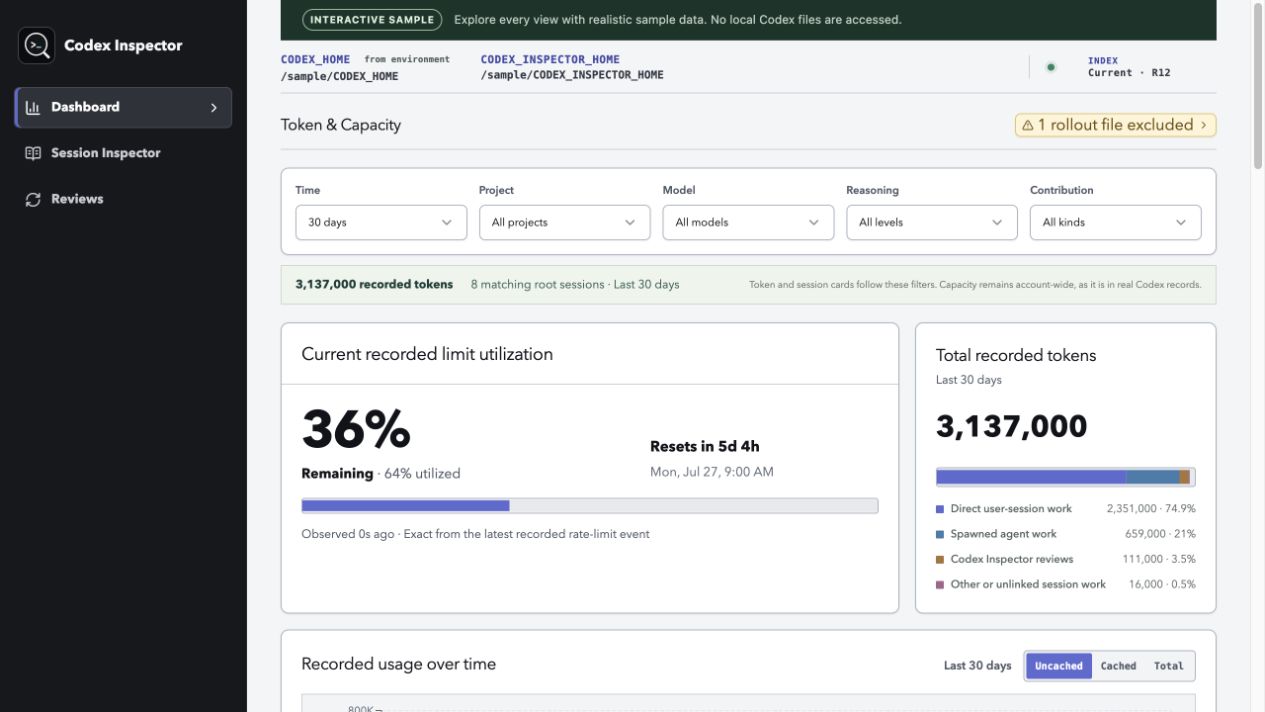
The 30-day overview includes eight matching root sessions and 3,137,000 recorded tokens.
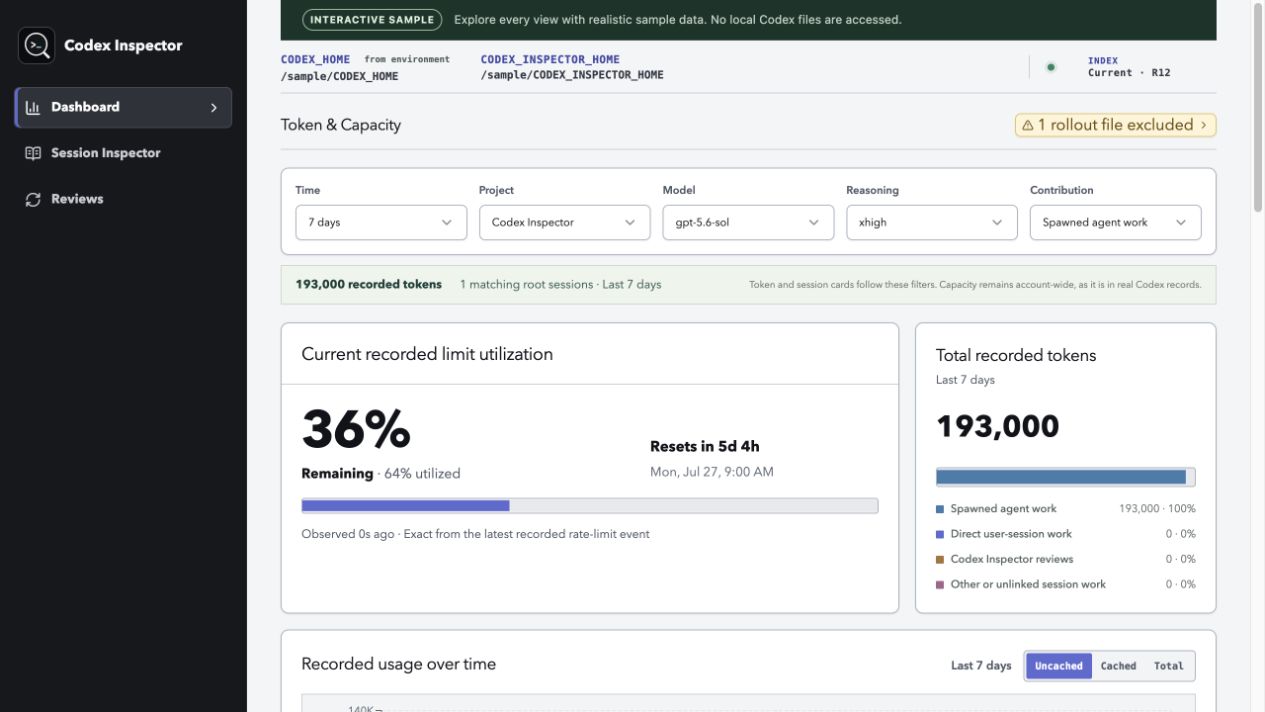
Filtering to the last seven days, Codex Inspector, gpt-5.6-sol, xhigh, and spawned-agent work narrows the same dataset to one root session and 193,000 recorded tokens.
[!NOTE] The current release supports macOS on Apple Silicon and Codex CLI/host
0.142.5or newer. See the support matrix for exact compatibility details.
From session logs to an actionable answer
Without Inspector, answering “where did my Codex capacity go?” means searching session files, connecting spawned-agent work by hand, reconstructing what happened turn by turn, and finding the original evidence behind a suspected problem.
With Inspector, you can start with usage across all sessions, open the session responsible for that activity, separate main-session work from delegated work, inspect the exact turn and events, and start a GPT-5.6 review whose findings link back to that evidence.
Questions Inspector helps you answer
- Where are my Codex tokens and available capacity going?
- Which projects and sessions account for the most activity?
- How much work happened in my main session, and how much was delegated to other agents?
- What did Codex actually do during a session or turn?
- Where did a session get stuck, repeat work, or accumulate too much context?
- What am I doing well, and what should I try differently next time?
Inspector connects every summary and recommendation back to the recorded session evidence behind it. It does not reduce your work to a single quality or efficiency score.
Why Inspector is different
- More than token accounting: Usage leads directly to the sessions, turns, agents, and original evidence behind it.
- Facts before judgment: Normal indexing is local and repeatable. Reviews use a model only when you explicitly start one.
- Advice you can verify: Review findings cite recorded events instead of hiding their reasoning behind an opaque score.
What you can do
Understand your usage
See token use over time, the latest capacity readings recorded by Codex, and the sessions that contributed the most. Work done by the main session and by spawned agents is shown separately.
Investigate a session
Search your sessions, follow work into spawned agents, and replay a turn in the order it happened. You can inspect messages, tool calls, patches, searches, context compactions, and token records without digging through log files.
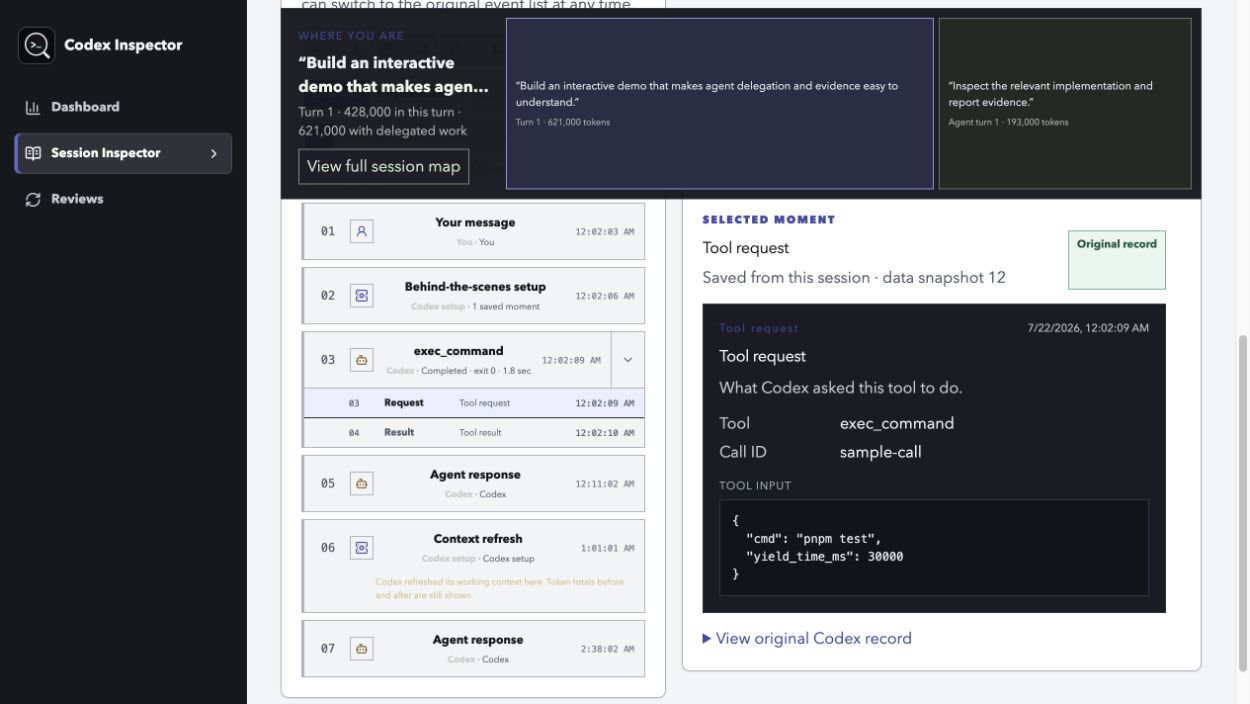
Synthetic session data shows the root turn, delegated work, and original
exec_command evidence side by side. No private Codex history is included.
Improve your workflow
Start an Effectiveness Review for one session or a recent period. Codex looks at task framing, execution, delegation, and opportunities to turn repeated work into reusable guidance or automation. Each finding cites the local evidence that supports it and suggests a concrete next step.
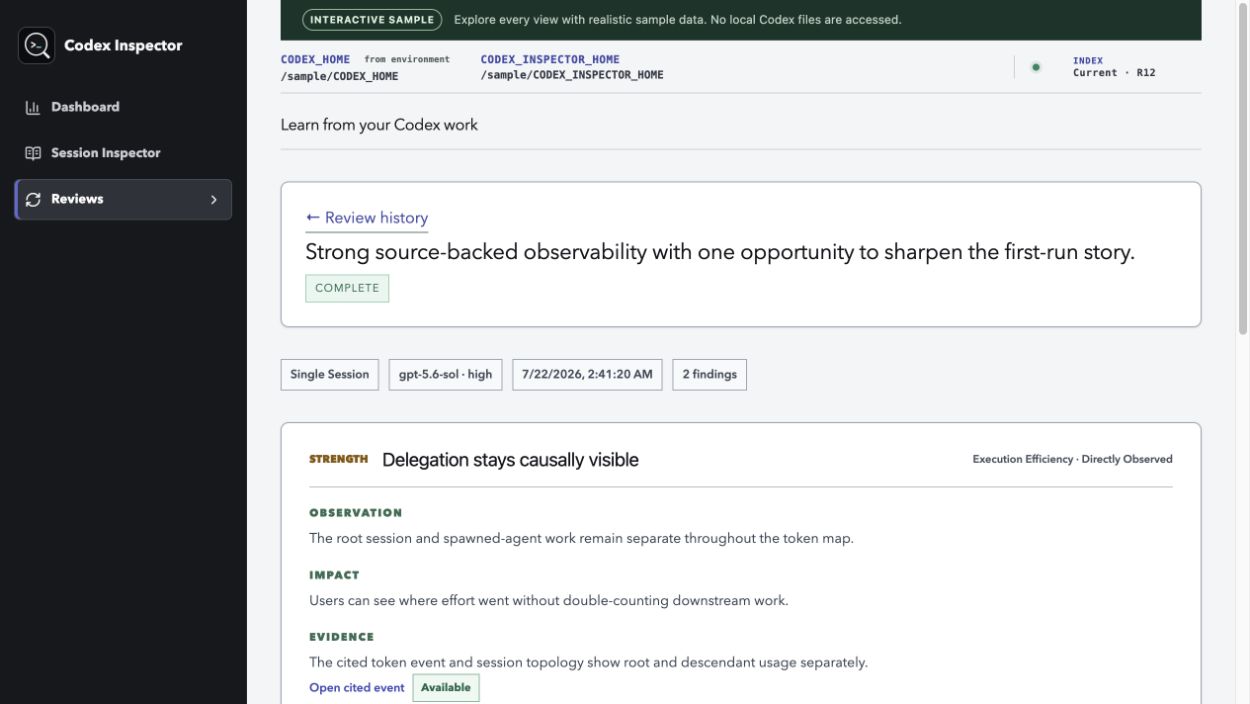
A completed GPT-5.6 review connects each finding to available evidence and a concrete next action. No private Codex history is included.
How it works
Codex Inspector has three parts:
- The Codex plugin connects Inspector to your Codex workflow. Its hooks leave small signals when sessions change, and its bundled skills help you open Inspector, jump to the current session, and run reviews.
- The local CLI reads your existing Codex history and builds a private, rebuildable index on your Mac. It never rewrites your Codex sessions.
- The local dashboard turns that index into usage views, session traces, and review reports in your browser.

Normal indexing is local and deterministic. A review is different: it is an explicit Codex task and may send the evidence it reads to your configured Codex model service. Opening the dashboard never starts a review.
Built with Codex and GPT-5.6
Codex Inspector is an OpenAI Build Week project in the Developer Tools track. We used Codex throughout product discovery, design, implementation, and verification:
- An initial brainstorming and grilling session challenged the target audience, product promise, privacy boundary, evidence standard, technical shape, and must-ship scope.
- Codex helped turn those decisions into the local-first architecture and the connected Token & Capacity, Context Inspector, and Effectiveness Reviews experience.
- We used Codex to implement and test the indexer, dashboard, plugin, review workflow, compatibility checks, and clean-install path.
- Browser-driven design reviews helped us improve the working interface through repeated implementation and verification passes.
GPT-5.6 Sol at high reasoning helped shape the initial product direction and the Effectiveness Reviews experience. GPT-5.6 is also part of the finished product: reviews use Sol by default, offer Terra and Luna, and start a persisted Codex task with the model and reasoning level selected by the user. Each review is bounded to the chosen work, and its findings must cite evidence that Inspector can resolve back to the recorded session.
Codex accelerated the work, but the team made the final product, design, scope, privacy, and release decisions. The original Build Week plan, dashboard exploration, session-map exploration, and review exploration preserve the decisions and tradeoffs that shaped the project.
Install
The easiest path is to install the plugin first, then let Codex install and verify the local CLI.
1. Install the plugin
In a terminal, run:
codex plugin marketplace add "dylanjbarth/codex-inspector@v0.1.2"
codex plugin add codex-inspector@codex-inspector-development
Start a new Codex session. When Codex asks you to review the plugin hooks,
confirm that all seven Inspector hooks run inspector-hook.sh, then choose
Trust all and continue.
2. Ask Codex to open Inspector
In the new session, enter:
Open Codex Inspector.
You can explicitly select the bundled skill if needed:
Use $codex-inspector:open-dashboard to open Codex Inspector.
If the local CLI is missing, Codex will explain what it plans to install and
ask for approval before downloading anything. It checks that your Mac is
supported, verifies the published download, installs the CLI without sudo,
runs a health check, and opens the dashboard.
That is the complete setup. Inspector begins with your recent sessions and continues through older supported history in the background.
Download the binary and checksum from the supported
v0.1.2 release,
verify the checksum, and place codex-inspector in a user-writable directory on
your PATH. The repository also contains an auditable
install.sh that performs those steps without sudo or shell
profile changes.
Then verify and open Inspector:
codex-inspector doctor
codex-inspector open
Use Inspector
Most people can work entirely from the dashboard:
- Open Token & Capacity to see where your usage went.
- Choose a contributing session and investigate it in Context Inspector.
- Select Review effectiveness when you want Codex to analyze that work.
- Follow a report citation back to the exact recorded evidence.
You can also ask Codex to use the bundled skills:
Use $codex-inspector:open-dashboard to open Codex Inspector.
Use $codex-inspector:inspect-session to inspect this session.
For direct terminal control:
codex-inspector open              # open or reconnect to the dashboard
codex-inspector status            # show server, indexing, and hook health
codex-inspector sync --background # look for new session data
codex-inspector stop              # stop the local server
Privacy and trust
- Inspector reads your Codex session history but never rewrites it.
- Its index, reports, and process data stay under
~/.codex-inspectorby default. - The dashboard is served only on your computer.
- Exact evidence may contain prompts, source code, tool inputs and outputs, credentials, or personal data. Treat screenshots and copied evidence as sensitive; Inspector does not mask secrets.
- Reviews run only when you explicitly start them. Inspector never applies a recommendation or changes your projects automatically.
- If the index is removed or damaged, Inspector can rebuild it from the source sessions that are still available.
Current limitations
The current release does not support Intel Macs, Linux, or Windows. It does not stream incomplete turns, reconstruct context that Codex did not record, or guarantee that evidence remains available after its source session is deleted.
For exact coverage and known format constraints, see the support matrix.
Development
Release binaries are the recommended user path. To build the current checkout,
install Go 1.26.0, Node.js 20 or newer, and pnpm 10.28.0, then run:
pnpm install --frozen-lockfile
codex plugin marketplace add "$PWD"
codex plugin add codex-inspector@codex-inspector-development
scripts/dev-rebuild-restart.sh
Restart Codex after adding the local plugin, review and trust its seven hooks, and run the project checks with:
go test ./...
pnpm test
pnpm lint
pnpm typecheck
pnpm build
The demo runbook covers the complete release flow. The MVP architecture is the implementation reference.
License
Codex Inspector is open source under the MIT License.
Analysis
View
Metric
- 89
- 7
- 3


Figures cover GitHub contributors during the hackathon window. A co-authored commit counts in full for each author, so per-member totals add up to more than the whole-team figures.
Technology
- CSSIn code
- GoIn code
- HTMLIn code
- JavaScriptIn code
- ReactIn code
- SQLIn code
- Tailwind CSSIn code
- TypeScriptIn code
8 of 8 appear in the indexed code.
AI coding agents
No AI coding agent signals were found in this repository.
Detected from committed agent config files and commit authorship. Absence of a signal is not proof an agent was unused.
Codebase size
Source size
3.7 MB
Source files
176
Counts recognized source files only; vendored directories, binaries and lockfiles are excluded, so this is smaller than the repository on disk.
Repository
dylanjbarth/codex-inspector
272 files · 16.7 MB · @ 6834230
Structure
Interface
14 files · 5%Screens, components and styles rendered to the user.
API & routing
2 files · 1%Request entry points: routes, handlers and controllers.
Application logic
69 files · 25%Domain rules, services and shared utilities.
+18 moreData & schema
7 files · 3%Schema definitions, migrations and data access.
Supporting
Layers are inferred from where files sit in the tree, not from reading the code. A project that names its directories unconventionally will read oddly here — open the file browser to check anything the diagram implies.
Languages
- JavaScript26%
- Go22%
- HTML18%
- Markdown10%
- TypeScript7%
- YAML7%
- Other (3)9%
Share of indexed source by file size. Binary and vendored files are excluded.
Dependencies
web/package.json
npm · 28- @tailwindcss/vite
- @vitejs/plugin-react
- class-variance-authority
- clsx
- lucide-react
- radix-ui
- react
- react-dom
- recharts
- shadcn
- tailwind-merge
- tailwindcss
- tw-animate-css
- typescript
- vite
- +13 more
go.mod
go · 19- github.com/getkin/kin-openapi
- github.com/santhosh-tekuri/jsonschema/v5
- modernc.org/sqlite
- +16 more
package.json
npm · 11 development-only dependencies.
Declared in the repository’s manifests at the indexed commit. A declared package is not proof it is used, and runtime dependencies are listed first.
This project’s features have not been analysed yet.
Export this project's context (description, README, evidence, key source files) to chat with an AI agent elsewhere.