Project Info
Inspiration
Every minute matters during a medical emergency, yet many people struggle to quickly determine the seriousness of an injury or reach the right medical help in time. We wanted to explore how AI could bridge that gap by providing instant injury assessment, first-aid guidance, and simulated emergency dispatch—all through a simple chat interface. Our goal was to build an intelligent first responder that demonstrates how AI can support faster decision-making in emergency situations.
What it does
Arogyam AI allows a user to upload an image of an injury through a Telegram bot. The system uses AI to: 🩺 Analyze the injury image 🚨 Classify the emergency severity (Low, Medium, High) 💊 Generate first-aid recommendations 🏥 Find the nearest suitable hospital 👨⚕️ Assign an available doctor 🚑 Dispatch the nearest available ambulance (simulated) 📊 Display everything live on an emergency dashboard The dashboard provides emergency responders with real-time information about the patient, AI reasoning, hospital availability, ambulance status, confidence score, and estimated response time.
How we built it
The project consists of four major components: Telegram Bot for user interaction FastAPI backend to process requests Google Gemini Vision for AI-powered injury analysis React Dashboard for live emergency monitoring The backend stores emergency information and updates a live dashboard every few seconds. Mock hospital, ambulance, and doctor datasets simulate a real emergency response network.
Challenges we ran into
During development we faced several technical challenges: Integrating AI vision with a reliable structured JSON response Building a complete end-to-end workflow between Telegram, FastAPI, and React Handling image uploads and different MIME types Managing API quotas while testing Gemini Vision Designing a dashboard that clearly communicates emergency information in real time Each challenge helped us improve both the system architecture and the overall user experience.
What we learned
Throughout this project we gained hands-on experience with: AI Vision APIs Prompt engineering for structured medical outputs FastAPI backend development React dashboard development Telegram Bot development API integration Full-stack system architecture Real-time data flow between multiple services Most importantly, we learned how multiple technologies can work together to create meaningful real-world solutions.
What's next
for Arogyam AI We plan to expand Arogyam AI with: 📍 Live GPS tracking 🚑 Real ambulance APIs 🏥 Real hospital integration 👨⚕️ Doctor availability APIs 📞 Automatic emergency calling 📱 Mobile application 🌍 Multi-language support ❤️ Electronic Health Record (EHR) integration Our long-term vision is to build an AI-powered emergency assistance platform that can support patients and healthcare providers during the critical first few minutes of an emergency.
🩺 Arogyam AI
(v2.0 — "Arogyam 2.0")
AI-Powered Emergency Injury Assessment & Smart Hospital Dispatch System
Turning a photo into a life-saving decision — in seconds.









▶ Watch the Live Demo · Report Bug · Request Feature · Documentation
📖 Table of Contents
- The Problem
- The Solution
- Features
- Tech Stack
- Architecture
- How It Works
- Live Demo
- Screenshots
- Folder Structure
- Getting Started
- Environment Variables
- API Documentation
- Why Gemini?
- Built With Codex & GPT-5.6
- Security Considerations
- Scalability
- Challenges Faced
- Learnings
- Roadmap
- Contributing
- License
- Acknowledgements
🚨 The Problem
In the critical minutes after an injury, two things routinely go wrong:
- Under-reaction — people underestimate a serious injury and delay getting real medical help.
- Over-reaction — minor injuries trigger unnecessary emergency calls, tying up ambulances and hospital beds that someone else may need urgently.
Both failure modes share a root cause: nobody at the scene is qualified to triage the injury in real time. Arogyam AI puts a triage-trained "second opinion" in everyone's pocket.
💡 The Solution
Arogyam AI lets anyone send a photo of an injury over Telegram and get back a structured, medically-reasoned emergency assessment in seconds — including whether they need first aid, a hospital, or an ambulance, dispatched automatically to a live operations dashboard.
📸 Photo in → 🧠 AI reasoning → 🚑 Dispatch decision → 📊 Live dashboard
No app to install. No form to fill. Just a photo and an answer.
✨ Features
| Category | Capability |
|---|---|
| 🧠 AI Analysis | Injury classification, severity scoring, and confidence estimation via Gemini 2.5 Flash Vision |
| 🤖 Telegram Bot | Zero-friction image intake — no app install required |
| ⚡ FastAPI Backend | Modular, async-first REST API for analysis and dispatch |
| 📊 Live Dashboard | Real-time polling dashboard built in React |
| 🏥 Hospital Allocation | Mock hospital resource matching based on severity and proximity |
| 👨⚕️ Doctor Allocation | Automatic assignment of on-call medical staff |
| 🚑 Ambulance Dispatch | Decision engine flags ambulance requirement + ETA |
| 🩹 First Aid Engine | Instant, actionable first-aid guidance while help is en route |
| 🎯 Priority Classification | Emergencies ranked and queued by urgency |
| 🗃️ SQLite Storage | Lightweight, dependency-free persistence layer |
| 🔌 REST API | Clean, documented endpoints for integration |
🛠 Tech Stack
Frontend
- React
- Vite
- JavaScript (ES6+)
- CSS3
Backend
- FastAPI
- Python 3.10+
- Uvicorn (ASGI)
AI / ML
- Gemini 2.5 Flash Vision
- Prompt-based structured extraction
Messaging & Data
- Telegram Bot API
- SQLite
- Git & GitHub
🏗 Architecture
flowchart TD
    A[👤 Telegram User] -->|Uploads injury photo| B[🤖 Telegram Bot]
    B -->|Forwards image| C[⚡ FastAPI Backend]
    C -->|Sends image + prompt| D[🧠 Gemini 2.5 Flash Vision]
    D -->|Structured JSON response| E{🎯 Emergency Decision Engine}
    E -->|High severity| F[🚑 Ambulance Dispatch]
    E -->|Moderate severity| G[🏥 Hospital Allocation]
    E -->|Low severity| H[🩹 First Aid Card]
    F --> I[(🗃️ SQLite DB)]
    G --> I
    H --> I
    I -->|Live polling| J[📊 React Dashboard]
    B -.->|Instant reply| A

    style A fill:#4A90D9,color:#fff
    style D fill:#8E75B2,color:#fff
    style E fill:#E8734A,color:#fff
    style J fill:#61DAFB,color:#000
Sequence of a Single Emergency
sequenceDiagram
    participant U as User
    participant T as Telegram Bot
    participant API as FastAPI Backend
    participant G as Gemini Vision
    participant DB as SQLite
    participant D as Dashboard

    U->>T: Upload injury image
    T->>API: POST /analyze-image
    API->>G: Image + structured prompt
    G-->>API: Injury type, severity, priority, first aid
    API->>API: Run decision engine
    API->>DB: Persist emergency record
    API-->>T: Assessment + instructions
    T-->>U: First aid + dispatch status
    D->>API: GET /latest-emergency (poll)
    API-->>D: Latest emergency state
⚙️ How It Works
| Step | Action |
|---|---|
| 1️⃣ | User uploads an injury image via Telegram |
| 2️⃣ | Telegram Bot forwards it to the backend |
| 3️⃣ | FastAPI backend receives and preprocesses the request |
| 4️⃣ | Gemini 2.5 Flash Vision analyzes the image |
| 5️⃣ | AI returns a structured emergency assessment |
| 6️⃣ | Decision engine determines ambulance/hospital need |
| 7️⃣ | Dashboard updates in real time |
| 8️⃣ | First aid recommendations are shown to the user |
🎬 Live Demo
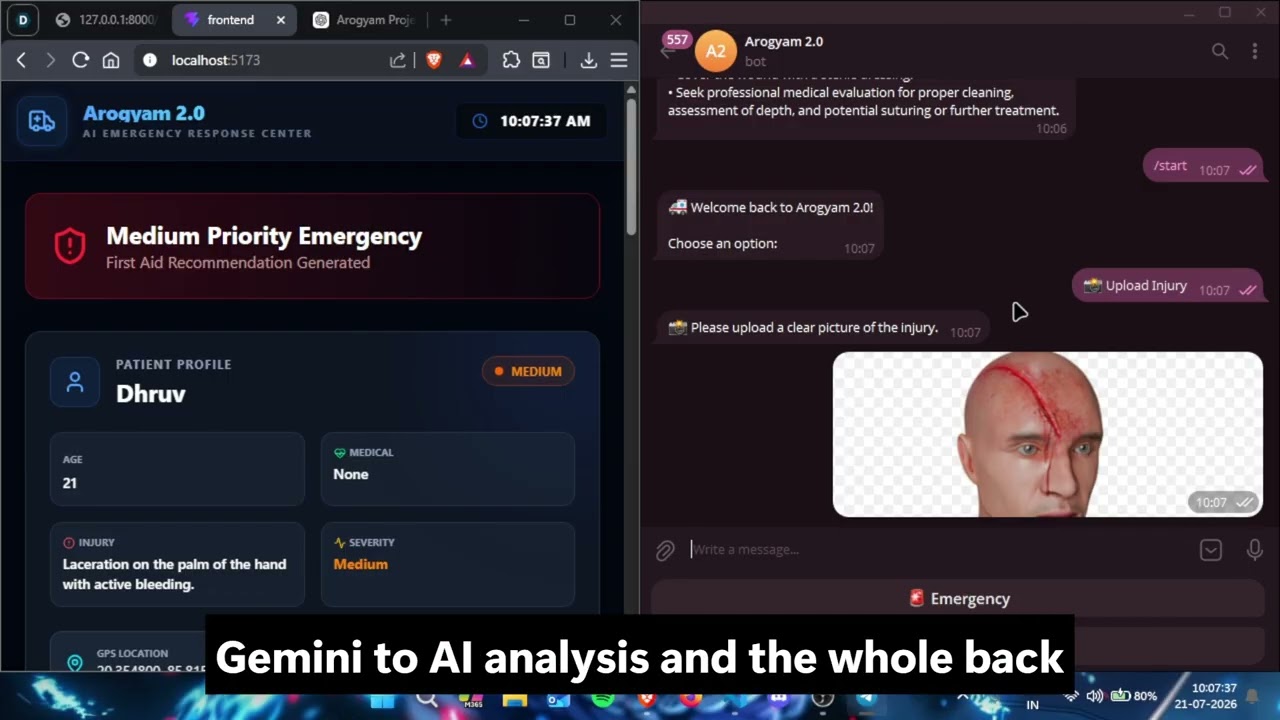
▲ Click to watch on YouTube
The demo walks through the full pipeline end-to-end: a real injury photo sent on Telegram, Gemini's structured analysis coming back with first aid instructions, and the dashboard updating live with priority, ambulance dispatch, and hospital assignment — with a voiceover covering how Codex and GPT-5.6 were used to build the repo.
📸 Screenshots
Telegram Bot — Live Injury Analysis
A real submission: knee laceration detected as Medium severity, with structured first aid steps (pressure, cleaning, antiseptic, bandaging, elevation, and a note to check tetanus vaccination status).
Dashboard — Low Priority Case
The same knee laceration case reflected on the operations dashboard — Medium priority, 92% confidence, ambulance marked "Not Required", and the AI's complete reasoning displayed alongside hospital and doctor availability.
Dashboard — High Priority Case
A deep scalp and forehead laceration with active bleeding classified as High Priority with 95% confidence. The system automatically dispatched Ambulance AMB-101, assigned Dr. Sarah from Apollo Hospital, and estimated a 4-minute arrival time while displaying the AI's medical reasoning.
📁 Folder Structure
arogyam-ai/
├── backend/
│   ├── app/
│   │   ├── main.py              # FastAPI entrypoint
│   │   ├── routes/               # API route handlers
│   │   ├── services/             # Gemini integration, decision engine
│   │   ├── models/               # Pydantic + DB models
│   │   └── db/                   # SQLite setup & queries
│   ├── requirements.txt
│   └── .env.example
│
├── frontend/
│   ├── src/
│   │   ├── components/           # Dashboard UI components
│   │   ├── pages/
│   │   ├── hooks/
│   │   └── App.jsx
│   ├── package.json
│   └── vite.config.js
│
├── telegram-bot/
│   ├── bot.py                    # Bot entrypoint & handlers
│   ├── requirements.txt
│   └── .env.example
│
├── docs/
│   └── assets/                   # Screenshots, banners, diagrams
│
├── LICENSE
└── README.md
🚀 Getting Started
Prerequisites
- Python 3.10+
- Node.js 18+ and npm
- A Gemini API key
- A Telegram Bot Token from @BotFather
1. Backend Setup
# Clone the repository
git clone https://github.com/<your-username>/arogyam-ai.git
cd arogyam-ai/backend

# Create and activate a virtual environment
python -m venv venv
source venv/bin/activate      # On Windows: venv\Scripts\activate

# Install dependencies
pip install -r requirements.txt

# Configure environment variables
cp .env.example .env
# then fill in GEMINI_API_KEY

# Run the backend
uvicorn app.main:app --reload --port 8000
The API will be live at http://localhost:8000 with interactive docs at http://localhost:8000/docs.
2. Frontend Setup
cd ../frontend

# Install dependencies
npm install

# Run the development server
npm run dev
The dashboard will be live at http://localhost:5173.
3. Telegram Bot Setup
cd ../telegram-bot

# Install dependencies
pip install -r requirements.txt

# Configure environment variables
cp .env.example .env
# then fill in BOT_TOKEN

# Run the bot
python bot.py
Send an injury photo to your bot on Telegram to trigger the full pipeline.
✅ For judges/reviewers: sample injury images are provided in
docs/sample-images/— send any of these to the bot to test the full pipeline without needing your own photos.
🔐 Environment Variables
backend/.env
GEMINI_API_KEY=your_gemini_api_key_here
telegram-bot/.env
BOT_TOKEN=your_telegram_bot_token_here
⚠️ Never commit real
.envfiles..env.examplefiles are provided as templates.
📡 API Documentation
POST /analyze-image
Analyzes an uploaded injury image and returns a structured emergency assessment.
Request: multipart/form-data with an image file field.
Response:
| Field | Type | Description |
|---|---|---|
injury | string | Detected injury type |
severity | string | Low | Moderate | High | Critical |
priority | string | Dispatch priority level |
confidence | float | Model confidence score (0–1) |
reasoning | string | Medical rationale behind the assessment |
hospital | boolean | Whether hospital admission is recommended |
doctor | string | null | Allocated on-call doctor, if any |
ambulance | boolean | Whether ambulance dispatch is required |
eta | string | Estimated time of arrival |
first_aid | string[] | Step-by-step first aid instructions |
{
  "injury": "Deep laceration to the scalp and forehead with active bleeding",
  "severity": "High",
  "priority": "High",
  "confidence": 0.95,
  "reasoning": "The image displays a significant, deep laceration extending across the scalp and forehead, accompanied by visible active bleeding. Head wounds, especially deep ones, carry a risk of substantial blood loss, infection, and potential underlying trauma. This type of injury typically requires immediate medical intervention for cleaning, closure, and assessment for complications.",
  "hospital": true,
  "doctor": "Dr. Sarah - Trauma",
  "ambulance": true,
  "eta": "4 mins",
  "first_aid": [
    "Apply firm, direct pressure with a clean cloth",
    "Do not remove any embedded objects",
    "Keep the person still and calm until help arrives",
    "Monitor for signs of shock or loss of consciousness"
  ]
}
{
  "injury": "Laceration on the knee",
  "severity": "Medium",
  "priority": "Medium",
  "confidence": 0.92,
  "reasoning": "The image shows an open wound on the knee, consistent with a laceration. There is visible bleeding and the wound appears to be deep enough to potentially require cleaning and closure (e.g., stitches) by a medical professional. The surrounding skin is red, indicating some inflammation.",
  "hospital": false,
  "doctor": null,
  "ambulance": false,
  "eta": "Not Required",
  "first_aid": [
    "Apply direct pressure with a clean cloth to stop bleeding",
    "Clean the wound gently with mild soap and water",
    "Apply an antiseptic solution or cream if available",
    "Cover the wound with a sterile bandage",
    "Seek medical attention for evaluation and tetanus check"
  ]
}
GET /latest-emergency
Returns the most recent emergency record for dashboard polling.
Response: Same shape as /analyze-image, plus a timestamp field.
🤔 Why Gemini 2.5 Flash Vision?
Gemini 2.5 Flash Vision was chosen over alternatives for a specific reason: speed without sacrificing structured reasoning. Emergency triage is a latency-sensitive problem — a brilliant answer that takes 30 seconds is worse than a good answer in 3. Flash Vision's low-latency multimodal inference made it possible to keep the "photo to decision" loop fast enough to be genuinely useful in a real emergency, while still returning well-reasoned, structured medical insights rather than free-form text — as shown in the reasoning fields captured directly from the demo runs above.
🧩 Built With Codex & GPT-5.6
This project leaned on Codex and GPT-5.6 as an active engineering partner throughout the entire build — not just for boilerplate. Here's exactly where and how:
| Build Phase | How Codex / GPT-5.6 Was Used |
|---|---|
| Backend scaffolding | Codex generated the initial FastAPI route structure, Pydantic response models, and SQLite schema for /analyze-image and /latest-emergency, which we then reviewed and hardened by hand |
| Prompt engineering | GPT-5.6 was used to iteratively design and stress-test the structured-output prompt sent to Gemini — the goal was reliable JSON (injury, severity, priority, confidence, reasoning, first_aid) instead of free-form medical prose, which took several rounds of prompt refinement |
| Decision engine logic | Codex helped translate severity/confidence thresholds (e.g. High severity + ≥90% confidence → auto-dispatch ambulance) into clean, testable Python conditionals |
| Telegram bot handlers | Scaffolded the image-upload handler and the formatted reply template (Injury / Severity / First Aid) shown in the bot screenshot above |
| Dashboard polling logic | Assisted in writing the React polling hook and loading/error states around GET /latest-emergency |
| Debugging & edge cases | Used heavily to trace malformed AI responses, image upload validation failures, and race conditions between bot replies and dashboard polling |
| Documentation | This very README — structure, Mermaid diagrams, and API docs — was drafted with GPT-5.6 assistance and refined against real screenshots and actual API responses from the running app |
What we did not outsource: the problem framing, the severity/priority decision thresholds, the choice of Gemini for vision reasoning, and the final review of every AI-generated line before it was merged. Codex accelerated the build significantly — realistically cutting boilerplate and debugging time by a large margin — but every architectural and medical-safety decision was made and verified by the team.
🎙️ The live demo video includes a voiceover walking through this Codex + GPT-5.6 workflow in detail, including real prompts used during development.
🔒 Security Considerations
- Injury images are processed transiently and are not retained beyond what's needed for the current session.
- API keys and bot tokens are loaded exclusively from environment variables, never hardcoded.
- Input validation is enforced on all upload endpoints to reject non-image payloads.
- Rate limiting is recommended in production to prevent abuse of the Gemini API quota.
- This project is a prototype / hackathon submission and is not a certified medical device — see Disclaimer.
📈 Scalability
The current SQLite-based architecture is intentionally lightweight for demo purposes. The system is designed so each layer can be swapped independently as load grows:
| Component | Current | Scale Path |
|---|---|---|
| Database | SQLite | PostgreSQL / managed cloud DB |
| Backend | Single FastAPI instance | Horizontally scaled with a load balancer |
| Dashboard updates | Polling | WebSockets / Server-Sent Events |
| Image handling | Local processing | Object storage (S3-compatible) + async queue |
| AI inference | Direct API calls | Queued/batched requests with retry & backoff |
🧗 Challenges Faced
- Prompt reliability — getting Gemini to consistently return clean, structured JSON (rather than prose) required iterating on prompt design and adding response parsing safeguards.
- Latency budgeting — balancing image quality sent to the model against response time to keep the Telegram interaction feeling instant.
- Decision engine calibration — mapping AI confidence and severity into ambulance/hospital decisions without over- or under-triggering dispatch, visible in the contrast between the Medium (no ambulance) and High (ambulance dispatched, 4 min ETA) cases above.
- Live dashboard sync — keeping the dashboard state consistent with the backend using simple polling, without introducing stale data.
📚 Learnings
- Designing prompts for structured, parseable output is a discipline of its own, distinct from general prompt engineering.
- A good emergency system optimizes for decisiveness under uncertainty, not just accuracy — a confident "get help now" beats a hedge.
- Keeping the user-facing interface (Telegram) dead simple was more valuable than building a custom app, especially for hackathon judging and real-world usability.
- Using Codex/GPT-5.6 as a pair programmer meaningfully shifted where our time went: less time on boilerplate and syntax, more time on decision-engine correctness and prompt reliability — the parts that actually matter for a safety-relevant system.
🗺 Roadmap & Future Scope
- 🛰️ Live GPS tracking for real-time ambulance location
- 🗺️ Nearby hospital discovery via Maps API
- 📄 OCR support for reading prescriptions and medical documents
- 📞 Voice-based emergency calling
- 🌐 Multi-language support for wider accessibility
- 🧾 Medical history integration for personalized triage
- ⌚ Wearable device integration for automatic incident detection
- 🚑 Integration with real ambulance dispatch APIs
- 🏥 Hospital ERP system integration
- 🧠 Improved AI explainability for medical reasoning
🤝 Contributing
Contributions are what make the open-source community such an amazing place to learn and build. Any contributions are greatly appreciated.
- Fork the repository
- Create your feature branch (
git checkout -b feature/AmazingFeature) - Commit your changes (
git commit -m 'Add some AmazingFeature') - Push to the branch (
git push origin feature/AmazingFeature) - Open a Pull Request
Please open an issue first for major changes to discuss what you'd like to change.
📄 License
Distributed under the MIT License. See LICENSE for more information.
Medical Disclaimer: Arogyam AI is a prototype built for educational and hackathon purposes. It is not a certified medical device and should never replace professional medical judgment or emergency services. In a real emergency, always contact your local emergency number first.
🙏 Acknowledgements
- Google Gemini for multimodal vision capabilities
- OpenAI Codex & GPT-5.6 for accelerating backend scaffolding, prompt iteration, and debugging throughout Build Week
- FastAPI for a delightful backend developer experience
- React + Vite for a fast, modern frontend
- Telegram Bot API for frictionless user intake
- Everyone who tested early versions and gave feedback during the hackathon
If Arogyam AI helped or inspired you, consider giving it a ⭐!
Made with ❤️ (and a lot of Codex) for a future where no one has to wonder "is this serious enough?" alone.
Analysis
View
Metric
- 13

Figures cover GitHub contributors during the hackathon window. A co-authored commit counts in full for each author, so per-member totals add up to more than the whole-team figures.
Technology
- CSSIn code
- HTMLIn code
- JavaScriptIn code
- PythonIn code
- ReactIn code
- Tailwind CSSIn code
- FastAPIClaimed
- Google GeminiClaimed
6 of 8 appear in the indexed code. 2 claimed on Devpost could not be matched to code, which may simply mean the tool leaves no trace in the repository.
AI coding agents
No AI coding agent signals were found in this repository.
Detected from committed agent config files and commit authorship. Absence of a signal is not proof an agent was unused.
Codebase size
Source size
78 KB
Source files
38
Counts recognized source files only; vendored directories, binaries and lockfiles are excluded, so this is smaller than the repository on disk.
Repository
Dhruvtara108/Arogyam-2.0
61 files · 1000 KB · @ bf199c9
Structure
Interface
20 files · 33%Screens, components and styles rendered to the user.
API & routing
1 file · 2%Request entry points: routes, handlers and controllers.
Application logic
14 files · 23%Domain rules, services and shared utilities.
Data & schema
1 file · 2%Schema definitions, migrations and data access.
Supporting
Layers are inferred from where files sit in the tree, not from reading the code. A project that names its directories unconventionally will read oddly here — open the file browser to check anything the diagram implies.
Languages
- JavaScript45%
- Markdown31%
- Python20%
- CSS4%
- HTML0%
Share of indexed source by file size. Binary and vendored files are excluded.
Dependencies
frontend/package.json
npm · 16- @tailwindcss/vite
- axios
- framer-motion
- lucide-react
- react
- react-dom
- tailwindcss
- +9 more
Declared in the repository’s manifests at the indexed commit. A declared package is not proof it is used, and runtime dependencies are listed first.
This project’s features have not been analysed yet.
Export this project's context (description, README, evidence, key source files) to chat with an AI agent elsewhere.