Project Info
Inspiration
Have you ever gone to the gym and forgotten to train your Hugging Face model? Have you ever wanted to show a friend your most recent Fortnite clip, but the file was stuck on your Mac? We've all been there. In today's remote-first world, we're often physically separated from our most powerful tool: our personal computer. We're stuck on the go, desperately needing a local file, a specific app, or the ability to run a complex script that only exists on our Mac. Current remote desktop solutions are clunky, slow, and built for visual control, not quick, conversational commands. We were inspired to bridge this gap. What if you could control your computer as easily as you call a friend? We envisioned a world where you could just FaceTime or iMessage your Mac and tell it exactly what you need.
What it does
FaceTimeOS turns your Mac into a personal assistant you can call or text from anywhere. Remote Control via FaceTime & iMessage: You can place a FaceTime call or send an iMessage to your Mac, and our AI agent answers. You can speak or type natural language commands, like "Find the screen recording I made yesterday about the product demo and upload it to Google Drive," or "Re-run my training script and let me know if it fails." Intelligent Task Automation: The agent doesn't just execute simple commands; it can handle complex, multi-step tasks. It can monitor scripts, identify errors, and even attempt to resolve them based on your instructions. Natural Language & Visual Feedback: The agent keeps you updated through natural speech in the FaceTime call (or via text). It summarizes its actions, so you're not left guessing. Critically, after completing a task, it sends a screenshot to your phone via iMessage to visually confirm the job is done.
How we built it
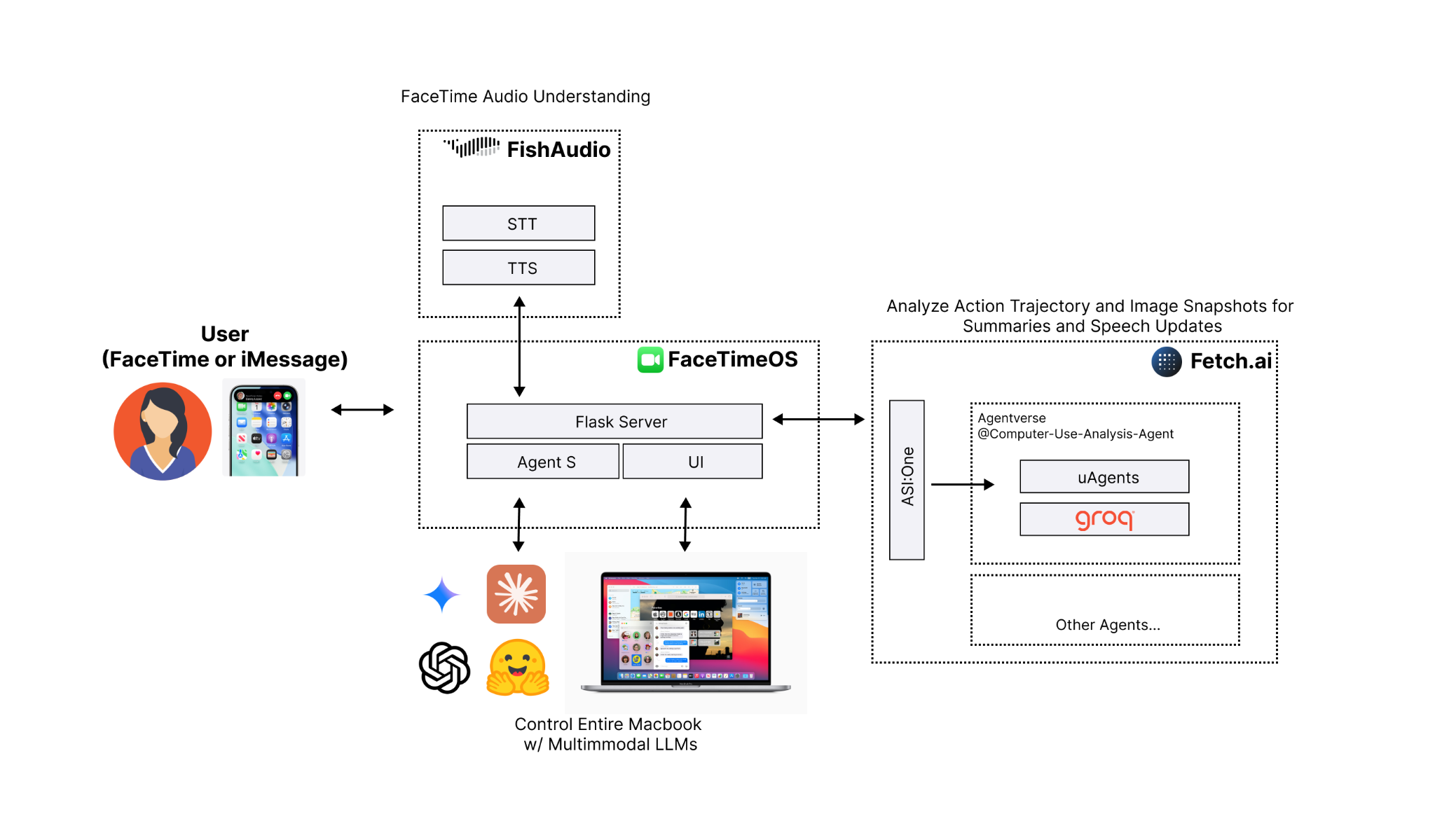
Our system is a multi-agent architecture orchestrated to create a seamless conversational experience. Core Orchestrator: We use Claude as the central orchestrator. It understands the user's high-level intent from the conversation and determines what actions to take. FaceTime Audio Integration: This was the core of our hack. We used Fish Audio to create a virtual microphone and speaker on the Mac. When a FaceTime call comes in, Fish Audio pipes the incoming audio to a speech-to-text service. This text is sent to our Claude agent, which processes the request and generates a text response. This response is then synthesized into speech and played back into the call through the virtual speaker. Task Execution & Summarization: To understand what the computer is doing and report back, we integrated fetch.ai. This agent monitors the "computer-use trajectory" (e.g., file access, app usage, script logs). When the user asks for an update, fetch.ai uses a model running on Groq to instantly summarize these complex actions into a concise, natural-speech update. Application & Backend: The agent itself is a desktop application built with Electron, React, and Tailwind CSS. The backend logic, REST API integrations, and agent coordination are handled by a Python and Flask server.
Challenges we ran into
Smoothly Integrating Everything: Our biggest challenge was getting all the moving parts to talk to each other reliably. We had to create a robust system where the Fish Audio stream, the Claude orchestrator, the fetch.ai summarizer, and the Flask backend all communicated in real-time without dropping requests or getting out of sync. Real-time Audio Hijacking: Getting audio in and out of a closed system like FaceTime was extremely difficult. Configuring Fish Audio's virtual devices to intercept and inject audio in real-time—without creating echoes, feedback loops, or massive latency—took significant trial and error. Multi-Agent Orchestration: Teaching Claude how to be an effective "orchestrator" was difficult. We had to carefully craft our prompts to ensure it knew when to handle a request itself versus when to delegate to fetch.ai for a summary or to the Flask backend for a system action.
Accomplishments we're proud of
Implementing Voice (It Talks Back!): Our biggest "wow" moment. Successfully using Fish Audio to pipe audio from a live FaceTime call, get a response from our AI, and speak it back into the call felt like magic. We turned a simple video call into a powerful C&C interface. Native macOS Integration: This isn't just a web app. By using Electron and integrating directly with system audio via Fish Audio, our agent feels like a native part of the macOS ecosystem, answering FaceTime calls just like a real person. A True Multi-Agent System: We've built a pipeline where Fetch AI orchestrates multiple specialized models (Claude for reasoning, Groq for speed) to fulfill a single, complex user request. The Screenshot Confirmation: Getting the final screenshot sent back to iMessage was a key feature. It provides total peace of mind that the requested task was actually completed correctly, which is critical for a remote tool.
What we learned
Specialized Agents Win: The "agent-of-agents" model is highly effective. Using Groq for its sheer speed in summarization, Fetch AI for orchestration, and Claude for its powerful reasoning allowed us to build a more robust system than one single model could provide. The Future is Conversational: Interfacing with complex systems via natural language (and getting visual feedback) is far more intuitive than traditional UIs for many tasks. Virtual Devices are a Superpower: Tools like Fish Audio are incredibly powerful. They let you integrate AI into existing, closed platforms (like FaceTime) without needing an official API.
What's next
Proactive Assistance: We want the agent to be proactive. It could monitor your computer and ping you—for example, "I see that your training script just failed with the same CUDA error. Would you like me to try and fix it?"
FaceTimeOS: Mac-use AI Voice Agents
Control your entire Mac with AI voice Agents, via:
- FaceTime: Text your Mac asking to start a FaceTime, it start a session and share screen. Then, talk naturally to instruct any computer-related task.
- iMessage: Text any other prompt, it will fulfill your task
🏆 1st Place Grand Prize at Cal Hacks 12.0 (world's largest collegiate hackathon) - Devpost
- Dylan Lu, Calvin Lu, Davyn Paringkoan
FaceTime Demo
Click the image to watch the full demo on YouTube.
iMessage Demo
https://github.com/user-attachments/assets/77a8fe7f-ca2f-4002-9a24-dcf0cfffc0de
Overview
Our project is organized into three folders
Agent-S— Our fork of the current SoTA computer-use agent framework. Original Repobackend- Flask server to handle iMessage/FaceTime and generate voice transcriptions and repliesfrontend— UI to prompt and view current actions of Agent S
Quick Start
All you need is a single LLM key. Export OPENAI_API_KEY (or swap in the key for your preferred provider) and you’re ready.
1. Install dependencies
git clone https://github.com/ThePickleGawd/FaceTimeOS.git
cd FaceTimeOS

# Setup Agent-S (see original repo for more details/debugging)
cd Agent-S
uv sync

cd ..

# Setup backend
cd backend
uv sync

cd ..

# Setup UI
cd frontend
SHARP_IGNORE_GLOBAL_LIBVIPS=1 npm install --ignore-scripts
npm rebuild sharp
For more details on Agent S: https://github.com/simular-ai/Agent-S
2. Provide your API key
# Put this in ~/.zshrc or export it manually
# Grok is recommended and is currently working with no issues
export GROK_API_KEY="xai-your-grok-key"

# There are some issues with OpenAI (it worked at one point though!)
export OPEN_API_KEY="sk-your-openai-key"
See the run_*.sh files in Agent-S for an idea of what providers we support and how to add your own.
https://fish.audio/app/api-keys/
# Optional: To enable TTS and STT
export FISH_API_KEY="key"
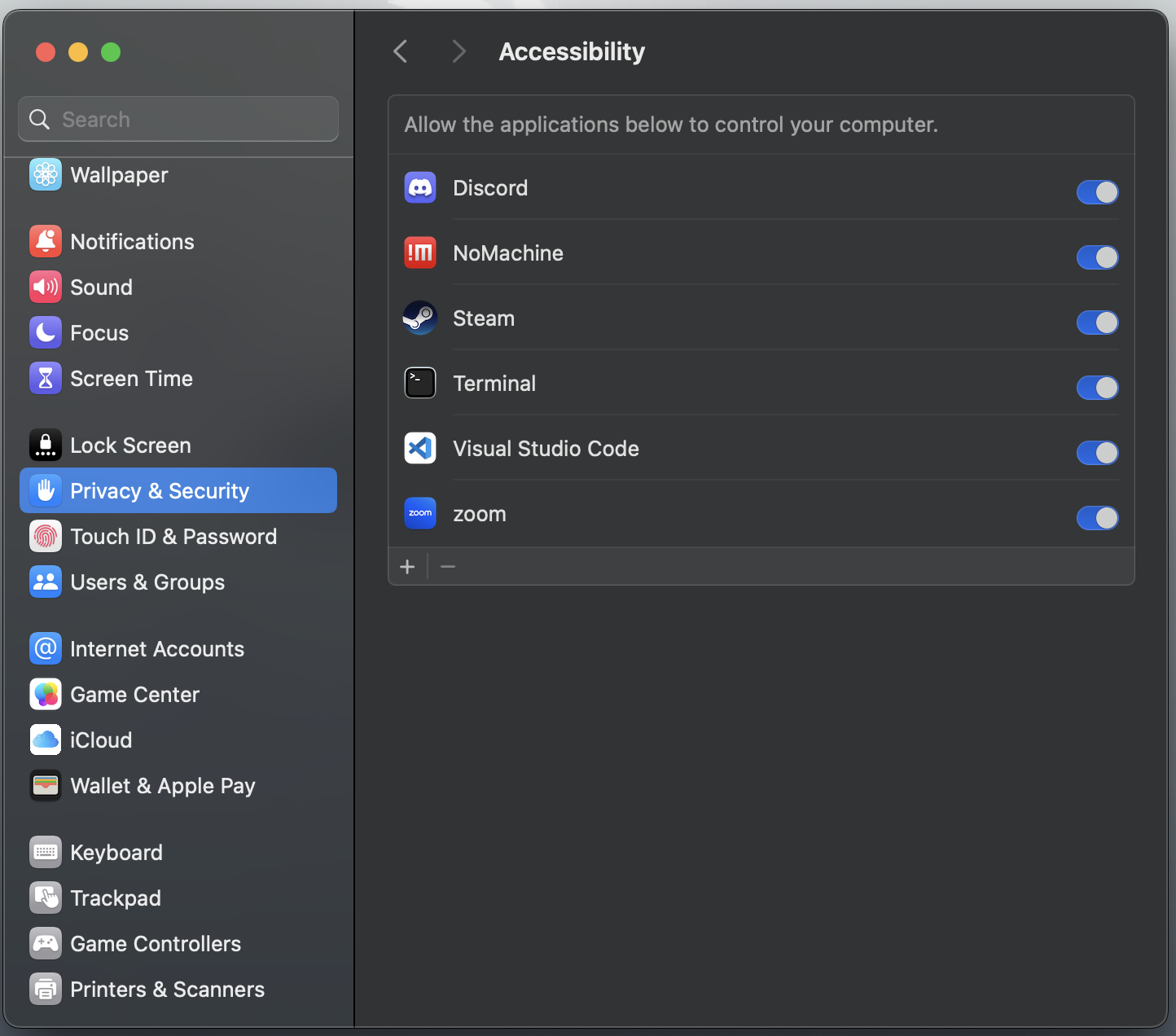
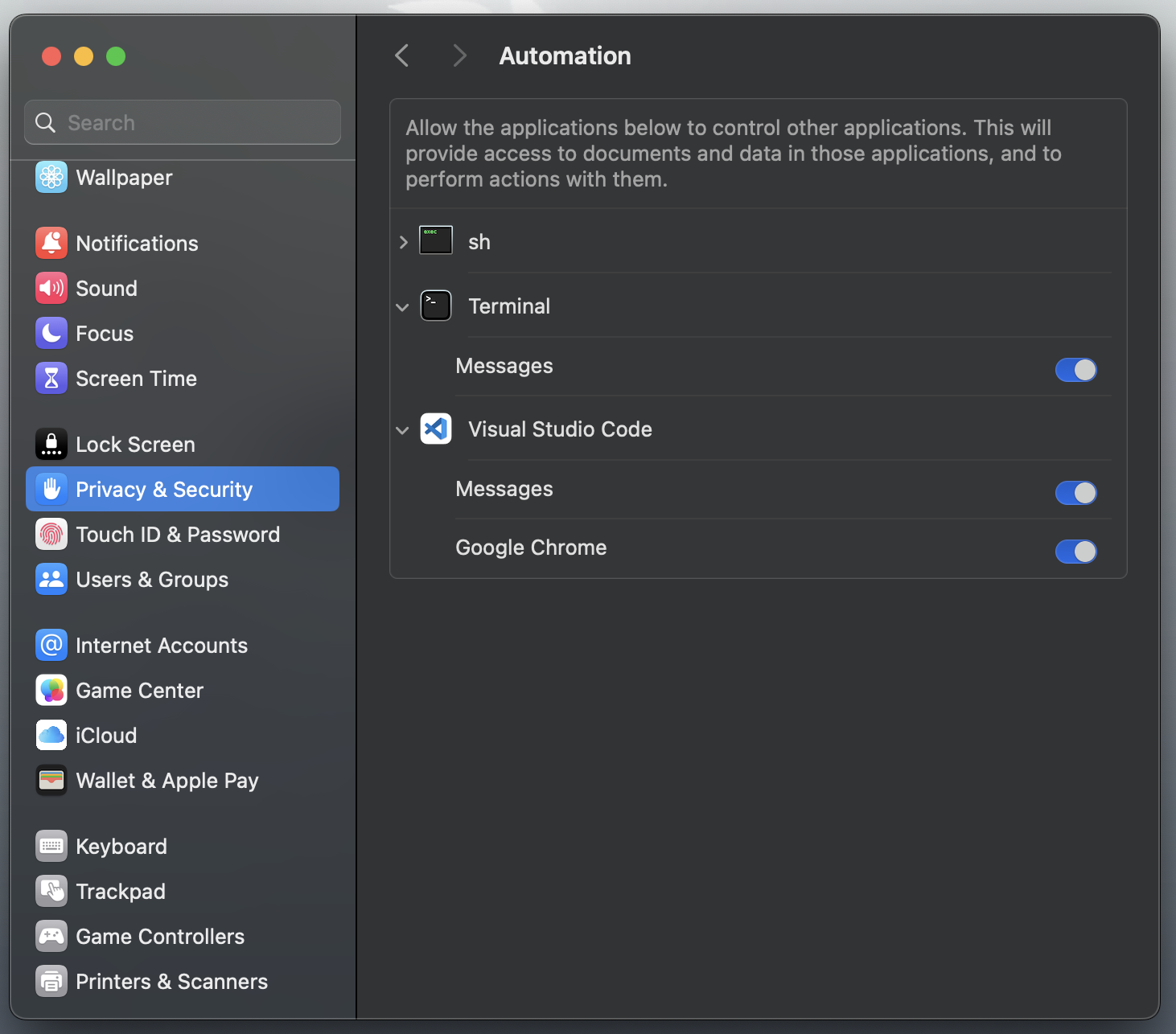
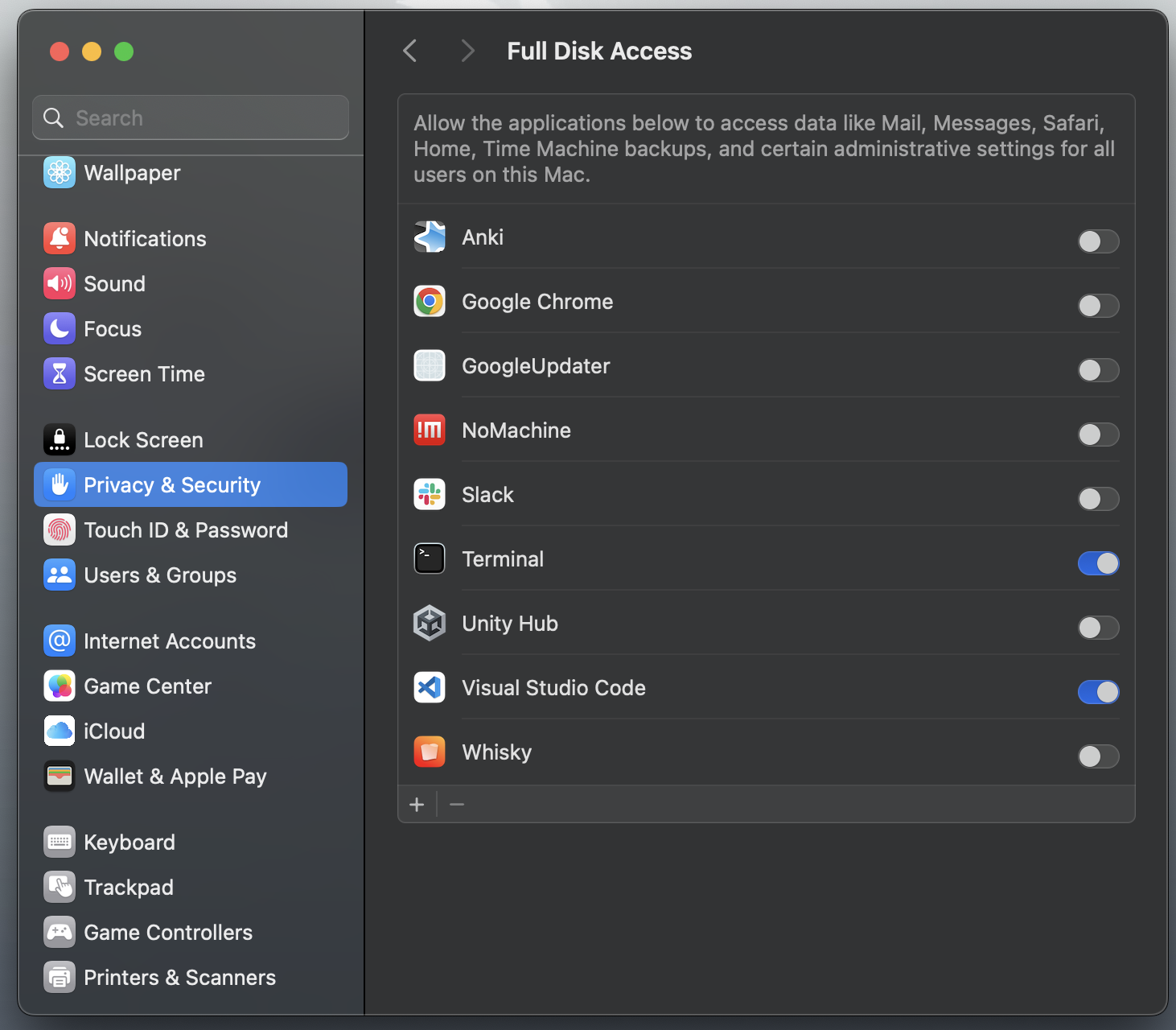
3. Give Agent Permission to Control Keyboard/Mouse
When you launch for the first time (see final step), you will be prompted to give permissions to Terminal or VS Code, etc. This is required for the Agent to control your computer.
| Assesibility | Automation | Disk Access |
|---|---|---|
 |  |  |
4. Route FaceTime audio input/output (optional)
To route audio directly from FaceTime to our AI Agent, install a lightweight MacOS app. This is optional if you want to use iMessage only.
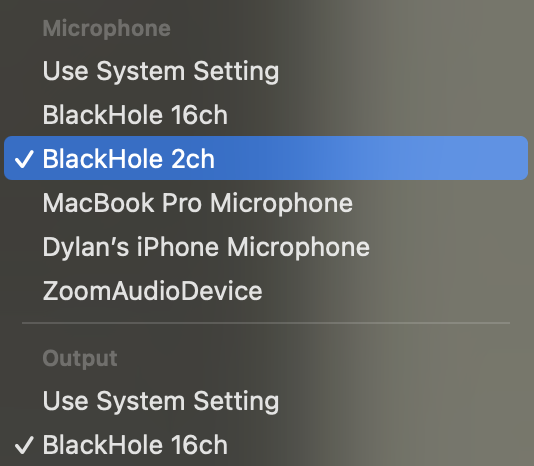
- Install BlackHole App (Install both 2 and 16 channel version. No config is needed): https://github.com/ExistentialAudio/BlackHole
- Restart computer
- In FaceTime menu,
Video->Microphoneset to BlackHole 2ch. AndVideo->Outputset to BlackHole 16ch
5. Launch FaceTimeOS
In the base directory:
# Run everything (UI, backend, Agent S). Change as needed for correct LLM provider
./run.sh
Note: The UI Grounding endpoint is no longer live. However, this is not needed unless you want the absolute best clicking accuracy. To set this up yourself, visit: https://github.com/bytedance/UI-TARS/blob/main/README_deploy.md
Why FaceTimeOS?
1. Seamless Remote Control
Why download clunky remote desktop apps when you can simply FaceTime your Mac?
FaceTimeOS lets you call or message your computer directly through native Apple interfaces — no extra setup, no third-party tools, just the simplicity of FaceTime and iMessage.
2. Human-Level Intelligence
Powered by our extended Agent S3 framework, FaceTimeOS achieves state-of-the-art (OSWorld-verified) performance on common computer-use tasks — surpassing existing systems like OpenAI or Anthropic’s Computer-Use Agents.
We bring human-level computer interaction to everyone, accessible from anywhere in the world.
Analysis
View
Metric
- 50
- 29
- 17


Figures cover GitHub contributors during the hackathon window. A co-authored commit counts in full for each author, so per-member totals add up to more than the whole-team figures.
Technology
- AnthropicIn code
- CSSIn code
- FastAPIIn code
- FlaskIn code
- HTMLIn code
- JavaScriptIn code
- OpenAIIn code
- PythonIn code
- ReactIn code
- Tailwind CSSIn code
- TypeScriptIn code
- Hugging FaceClaimed
11 of 12 appear in the indexed code. 1 claimed on Devpost could not be matched to code, which may simply mean the tool leaves no trace in the repository.
AI coding agents
No AI coding agent signals were found in this repository.
Detected from committed agent config files and commit authorship. Absence of a signal is not proof an agent was unused.
Codebase size
Source size
541 KB
Source files
102
Counts recognized source files only; vendored directories, binaries and lockfiles are excluded, so this is smaller than the repository on disk.
Repository
ThePickleGawd/FaceTimeOS
154 files · 9.9 MB · @ 97745aa
Structure
Interface
6 files · 4%Screens, components and styles rendered to the user.
Application logic
78 files · 51%Domain rules, services and shared utilities.
+3 moreBackground jobs
3 files · 2%Work run outside a request: tasks, workers and schedules.
Supporting
Layers are inferred from where files sit in the tree, not from reading the code. A project that names its directories unconventionally will read oddly here — open the file browser to check anything the diagram implies.
Languages
- Python60%
- TypeScript21%
- Markdown14%
- HTML3%
- CSS2%
- Shell1%
- Other (1)0%
Share of indexed source by file size. Binary and vendored files are excluded.
Dependencies
frontend/package.json
npm · 45- @radix-ui/react-dialog
- @radix-ui/react-toast
- axios
- class-variance-authority
- clsx
- diff
- form-data
- lucide-react
- react
- react-code-blocks
- react-dom
- react-icons
- react-query
- react-syntax-highlighter
- screenshot-desktop
- sharp
- tailwind-merge
- tesseract.js
- +27 more
Agent-S/pyproject.toml
pypi · 27- anthropic
- backoff
- dotenv
- fastapi
- flask
- google-genai
- numpy
- openai
- paddleocr
- paddlepaddle
- pandas
- pyautogui
- pyobjc
- pytesseract
- pytest
- pywin32
- pywinauto
- scikit-learn
- +9 more
backend/pyproject.toml
pypi · 12- fish-audio-sdk
- flask
- flask-cors
- flask-socketio
- numpy
- openai
- pydub
- python-dotenv
- python-socketio[client]
- requests
- sounddevice
- soundfile
frontend/renderer/package.json
npm · 12- @testing-library/jest-dom
- @testing-library/react
- @testing-library/user-event
- @types/jest
- @types/node
- @types/react
- @types/react-dom
- react
- react-dom
- react-scripts
- typescript
- web-vitals
Declared in the repository’s manifests at the indexed commit. A declared package is not proof it is used, and runtime dependencies are listed first.
Feature verification
Electron + React + Tailwind desktop app frontendVerified
The agent is a desktop application built with Electron, React, and Tailwind CSS
Claimed on Devposthigh confidencefrontend/package.json— Lists electron, react, and tailwindcss as dependenciesfrontend/electron/main.ts— Electron main process entry point exists
FaceTime call remote control (call your Mac via FaceTime, agent answers/talks back)Verified
You can place a FaceTime call to your Mac and the AI agent answers, speaks and receives audio via the call
Claimed on readmehigh confidencebackend/call.py:54— AudioCallHandler class manages input/output audio devices for the FaceTime call, streams audio via socket.ioAgent-S/src/s3/agents/grounding.py:415— start_facetime_call opens facetime:// URI via pyautogui/subprocess and notifies backend of call startbackend/main.py:838— call_started endpoint handles Agent-S's notification that a FaceTime call has been initiated
fetch.ai agent monitors computer-use trajectory and summarizes actionsVerified
fetch.ai integration monitors file access/app usage/script logs and summarizes actions on request
Claimed on Devposthigh confidenceAgent-S/src/s3/action_analysis_agent.py:10— Built with uagents (Fetch.ai's agent framework); maintains a per-sender trajectory deque and a summarize_action function producing notification-style summaries from the action history
Fish Audio ASR/TTS for FaceTime voice pipelineVerified
Fish Audio pipes call audio to speech-to-text, and synthesizes agent replies back into the call
Claimed on Devposthigh confidencebackend/audio.py:9— Uses fish_audio_sdk ASRRequest/TTSRequest for transcription and speech synthesisbackend/main.py:453— _synthesize_speech_payload converts agent text responses to speech for playback into the call
iMessage command interfaceVerified
Send any prompt via iMessage and the agent fulfills the task
Claimed on readmehigh confidencebackend/imessage_bridge.py:184— Polls Messages chat.db for new incoming messages and forwards them to the backendbackend/imessage_bridge.py:412— api_send_imessage endpoint sends outgoing iMessagesbackend/main.py:726— new_imessage endpoint routes incoming iMessage text into task handling
Natural language multi-step computer-use task executionVerified
The agent can handle complex multi-step tasks like finding files and uploading them, or re-running scripts
Claimed on Devpostmedium confidenceAgent-S/src/s3/agents/worker.py:24— Worker module drives the Agent-S computer-use loop (SoTA OSWorld-verified agent framework) that plans and executes multi-step GUI actionsAgent-S/src/s3/agents/grounding.py:400— grounding.py exposes concrete OS-level actions (open app, type, click) the agent composes to fulfill tasks
Python/Flask backend for agent coordinationVerified
Backend logic, REST API integrations, and agent coordination are handled by a Python and Flask server
Claimed on Devposthigh confidencebackend/main.py:44— Flask app instantiated and hosts numerous REST endpoints coordinating call, imessage, audio, and task actionsbackend/call.py:443— Separate Flask app for call/audio device handling
Screenshot confirmation sent via iMessage after task completionVerified
After completing a task, the agent sends a screenshot to your phone via iMessage to confirm the job is done
Claimed on Devposthigh confidencebackend/main.py:581— complete_task endpoint captures a screenshot and forwards it as an iMessage attachment to the requester's phone numberbackend/main.py:393— capture_screenshot() implements the actual screen capture
Claude as central orchestrator/reasoning engineCode-supported
Claude is used as the central orchestrator that understands user intent and determines actions
Claimed on Devpostmedium confidenceAgent-S/src/s3/core/engine.py:4— Imports and uses the Anthropic SDK as one of the supported LLM backends for the Agent-S reasoning engineAgent-S/run_claude.sh— Dedicated launch script configures Agent-S to run with Claude as the model provider
Fish Audio creates virtual mic/speaker devicesCode-supported
Fish Audio was used to create a virtual microphone and speaker on the Mac to intercept FaceTime audio
Claimed on Devpostmedium confidencebackend/call.py:40— Comment and setup reference BlackHole (a separate third-party virtual audio driver) for system audio capture/injection, not Fish Audio itself, which only provides ASR/TTS per audio.pyREADME.md— README instructs installing the BlackHole app for virtual audio routing, contradicting the devpost claim that Fish Audio created the virtual devices
Groq used for fast summarizationCode-supported
fetch.ai uses a model running on Groq to instantly summarize actions into natural-speech updates
Claimed on Devpostlow confidenceAgent-S/src/s3/action_analysis_agent.py:25— summarize_action actually calls the OpenAI chat completions API (MODEL_ENGINE=gpt-5), not GroqAgent-S/src/s3/app.py:124— Groq is listed as one of several supported LLM providers for the main Agent-S engine, but no code ties Groq specifically to the fetch.ai summarizer as claimed
Automatic script error monitoring and self-resolutionClaimed only
Agent monitors scripts, identifies errors, and attempts to resolve them based on instructions (e.g., re-running a training script and reporting failures, proactively catching a repeated CUDA error)
Claimed on Devpostmedium confidenceProactive monitoring/notifications ('what's next' roadmap item)Claimed only
Agent proactively monitors the computer and pings the user about issues like a recurring CUDA error
Claimed on Devposthigh confidenceUpload files to Google DriveClaimed only
Agent can find a file and upload it to Google Drive per the example command
Claimed on Devpostmedium confidence
An AI agent derived these features from the project’s Devpost page and readme, then searched the code for each one. Verified features are backed by cited code; claimed-only features had no supporting code, which is not by itself proof a feature is missing.
Export this project's context (description, README, evidence, key source files) to chat with an AI agent elsewhere.