Project Info
Inspiration
While working with a large-scale company facing complex optimization challenges, MIT student Hindy Rossignol observed a clear gap: Businesses urgently need optimization solutions — yet access to operations research expertise is extremely limited. Optimization problems are common across industries (logistics, healthcare, energy, finance), but solving them typically requires: A team of specialized researchers or technical consultants Engagements costing $50,000–$100,000+ Timelines lasting 6–9+ months per problem Meanwhile, top applied mathematicians are concentrated in a small number of labs and firms, creating a structural supply–demand imbalance. Optimization is powerful — but not accessible. What It Does Simply describe your business problem in natural language. Our AI agents: Convert it into a mathematical optimization model Solve it using Gurobi (licensed, state-of-the-art solver) Deliver the optimal strategy back to you in clear, jargon-free English No equations. No modeling expertise required. How We Built It Together with Emmanuel Zheng (Stanford), Mildness Akomoize (Howard), Benjamin Furragganan (Berkeley), and Hindy Rossignol (MIT) we built OptiMATE. Dual-Solver Pipeline Two independent solvers run in parallel: OptiMUS Multi-step decomposition using Claude Sonnet GurobiPy code generation Execution with retry logic OptiMUS Multi-step decomposition using Claude Sonnet GurobiPy code generation Execution with retry logic OptiMind (Microsoft, Jan 2026) Fine-tuned optimization model Single-pass code generation Debug retries via Claude Haiku OptiMind (Microsoft, Jan 2026) Fine-tuned optimization model Single-pass code generation Debug retries via Claude Haiku GPT-4o judge evaluates both outputs and selects the best solution. GPT-4o judge evaluates both outputs and selects the best solution. OptiMind Deployment The full-precision OptiMind-SFT model (~40GB BF16) exceeded the memory capacity of a single L4 GPU (24GB VRAM). We: Converted HuggingFace weights → GGUF format Quantized using llama.cpp (Q8_0 → Q4_K_M) Deployed with llama-server Successfully served the model on a single L4 GPU End-to-End Flow Claude Opus pre-processes input (raw_to_model.py) Both solvers generate GurobiPy models Models execute under a licensed Gurobi environment GPT-4o judge compares solutions Claude Opus (consultant.py) generates final Markdown report: Executive summary Baseline comparison Recommendations Technical appendix Executive summary Baseline comparison Recommendations Technical appendix Frontend Built with Next.js Submits problems via API routes Triggers backend Python pipeline Tracks progress via polling Renders final optimization report Optional HeyGen video generation for executive briefings Challenges We Ran Into Designing a complex multi-agent backend architecture Handling ambiguity in natural language descriptions Quantizing and deploying Microsoft’s newly released OptiMind model Combining multimodal inputs (CSV operational data + natural language) Evaluating correctness of complex mathematical formulations Optimization modeling is unforgiving — small formulation errors can invalidate entire solutions. Accomplishments We're Proud Of Built a robust system capable of solving easy to medium difficulty optimization problems across industries: Healthcare E-commerce Supply chain logistics Energy management Built a robust system capable of solving easy to medium difficulty optimization problems across industries: Healthcare E-commerce Supply chain logistics Energy management Extended SOTA research (OptiMUS + OptiMind) Improved syntactic correctness of generated optimization code Combined multiple research approaches into one orchestrated system Added solution validation via independent judging Extended SOTA research (OptiMUS + OptiMind) Improved syntactic correctness of generated optimization code Combined multiple research approaches into one orchestrated system Added solution validation via independent judging We went beyond simple LLM-wrapping to build a structured decision engine. What We Learned How to design a multi-agent system targeting PhD-level applied mathematics reasoning How to enforce solver-feasible outputs beyond text generation Exposure to new optimization problem classes and industries How to align interdisciplinary expertise under extreme time constraints (24-hour build) We learned that coordination and structured reasoning matter more than raw model size. What’s Next for OptiMATE Gather first user feedback to guide product refinement Benchmark OptiMATE against large optimization datasets Improve robustness for: Noisy data Incomplete data Heterogeneous structured inputs Noisy data Incomplete data Heterogeneous structured inputs Our goal: Make optimization accessible to every business — not just those with in-house operations researchers.
OptiMATE
An ensemble natural-language optimization solver that runs OptiMUS and OptiMind in parallel, uses an LLM judge to pick the best solution, and generates a professional consultant-grade optimization report.
Built during Stanford TreeHacks 2026, with credit to the original creators of OptiMUS and OptiMind.
Architecture
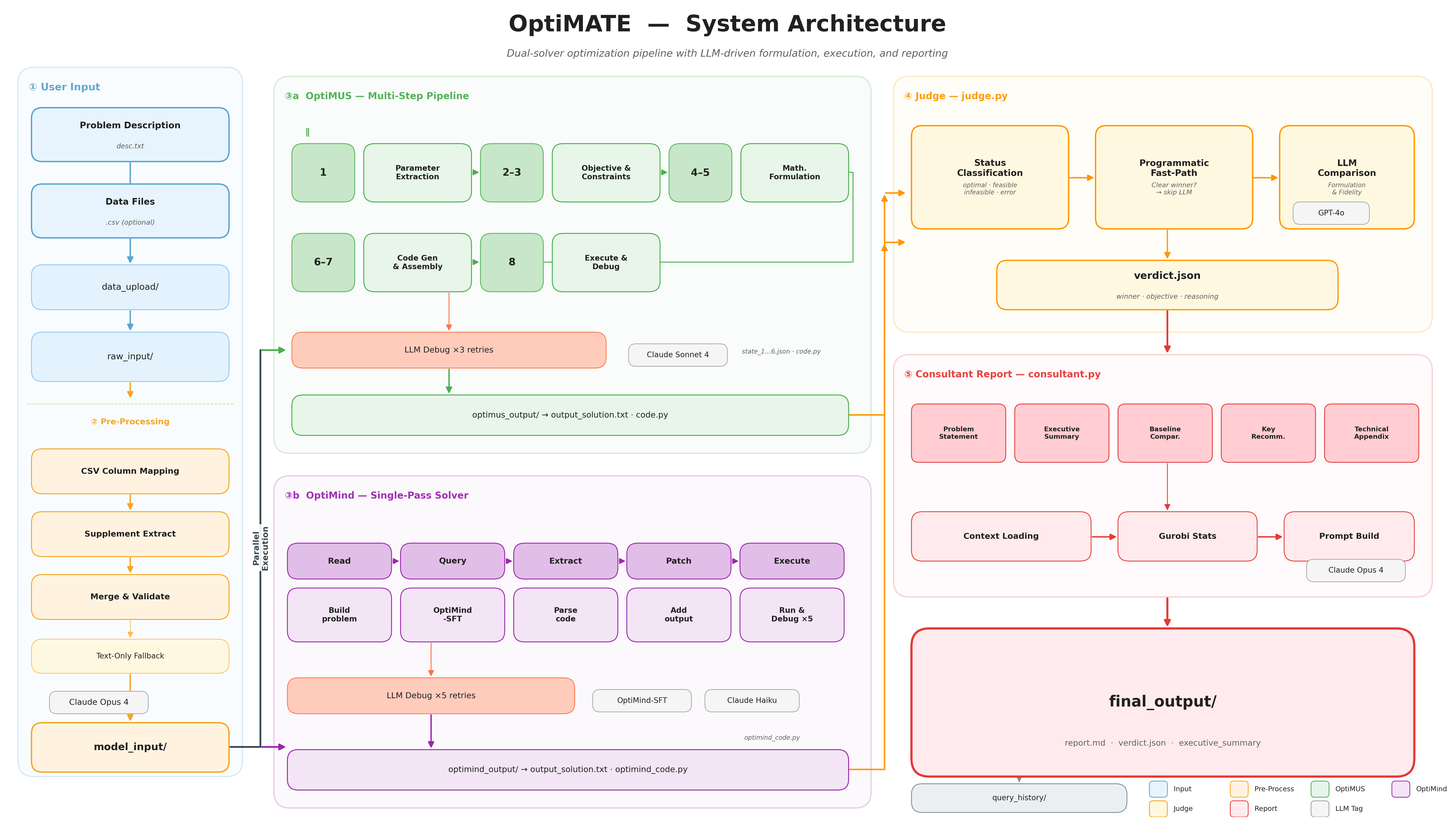
The pipeline flows left to right through five stages:
- User Input — A problem description (
.txt) and optional data files (.csv) are uploaded through the frontend. - Pre-Processing —
raw_to_model.pyuses an LLM to extract structured parameters from raw inputs, producingdesc.txt,params.json, and an optionalbaseline.txt. - Dual Solvers (parallel) — Two independent solvers race to solve the problem:
- OptiMUS — A structured, multi-step pipeline that decomposes the problem into parameters, objectives, and constraints, formulates each mathematically, generates GurobiPy code, and executes it with an LLM-assisted debug loop (×3 retries).
- OptiMind — Microsoft Research's fine-tuned LLM (
OptiMind-SFT) that reasons step-by-step and generates executable GurobiPy code in a single pass, with its own debug loop (×5 retries).
- Judge — Classifies solver statuses, uses a programmatic fast-path for clear winners, and falls back to GPT-4o for nuanced comparison of formulation correctness, implementation fidelity, and objective values.
- Consultant Report — Generates a professional Markdown report with an executive summary, baseline comparison, key recommendations, and a technical appendix.
LLM Models
| Stage | Provider | Model |
|---|---|---|
| Pre-Processing | Anthropic | claude-opus-4-20250514 |
| OptiMUS (all steps) | Anthropic | claude-sonnet-4-20250514 |
| OptiMind (solver) | Self-hosted (GCP) | microsoft/OptiMind-SFT |
| OptiMind (debug) | Anthropic | claude-haiku |
| Judge | OpenAI | gpt-4o |
| Consultant | Anthropic | claude-opus-4-20250514 |
Project Structure
OptiMATE/
├── frontend/                  Next.js web interface
│   ├── app/                   App router pages & API routes
│   ├── components/            React components
│   └── public/                Static assets
│
├── backend/                   Python optimization pipeline
│   ├── main.py                Entry point — runs the full pipeline
│   ├── raw_to_model.py        Converts raw inputs → structured model inputs
│   ├── optimus.py             OptiMUS solver entry point
│   ├── optimind.py            OptiMind solver entry point
│   ├── judge.py               Compares solutions, picks a winner
│   ├── consultant.py          Generates the final report
│   ├── query_manager.py       Workspace archiving & cleanup
│   ├── optimus_pipeline/      OptiMUS step implementations (steps 1–8)
│   ├── data_upload/           Drop input files here
│   ├── current_query/         Working directory (managed automatically)
│   │   ├── raw_input/
│   │   ├── model_input/
│   │   ├── optimus_output/
│   │   ├── optimind_output/
│   │   └── final_output/      verdict.json + report.md
│   └── query_history/         Archived runs (<timestamp>/)
│
└── README.md                  ← You are here
Setup
Prerequisites
- Python 3.10+
- Node.js 18+ and npm
- A valid Gurobi license (academic licenses are free)
Environment Variables
Create a .env file in the backend/ directory (gitignored):
OPENAI_API_KEY=your-openai-key
ANTHROPIC_API_KEY=your-anthropic-key
OPTIMIND_SERVER_URL=http://<VM_IP>/v1

# Gurobi WLS (cloud license — works on any machine)
GRB_WLSACCESSID=your-access-id
GRB_WLSSECRET=your-secret
GRB_LICENSEID=your-license-id
Backend
cd backend
conda activate optima
pip install -r requirements.txt
Frontend
cd frontend
npm install
Gurobi License
The pipeline generates and executes GurobiPy code. You need a valid license:
- Get one: Academic (free) or commercial. Retrieve your key from the Gurobi User Portal.
- Option A — WLS (recommended): Add your Web License Service credentials to
.env(see above). Works on any machine. - Option B — Local license file: Run
grbgetkeyto downloadgurobi.licto~/gurobi.lic. Only works on that machine.
Quick Start
Backend (CLI)
cd backend

# 1. Place your files in data_upload/
#    - A .txt file with the problem description (required)
#    - A .csv file with parameter data          (optional)

# 2. Run the pipeline
python main.py
The script clears the workspace, processes inputs, runs both solvers in parallel, judges the results, and writes the final output to current_query/final_output/.
Alternative: explicit file paths
python main.py --desc path/to/problem.txt
python main.py --desc path/to/problem.txt --data path/to/params.csv
CLI options
python main.py                                    # use data_upload/
python main.py --desc problem.txt                 # explicit desc file
python main.py --desc problem.txt --data data.csv # desc + CSV
python main.py --no-archive                       # skip archiving old results
python main.py --dir other_dir                    # different workspace
Frontend
cd frontend
npm run dev
Open http://localhost:3000 to use the web interface.
Pipeline Detail
What main.py does
| Step | What happens |
|---|---|
| 1 | Archive + clear current_query/ |
| 2 | Copy uploaded files into current_query/raw_input/ |
| 3 | raw_to_model — LLM converts raw inputs to model_input/desc.txt + params.json |
| 4 | optimus + optimind — run in parallel (structured multi-step solver + single-pass LLM solver) |
| 5 | judge — compares both solutions, picks a winner |
| 6 | consultant — generates a professional Markdown report with baseline comparison |
If one solver fails, the other's result is still judged. If both fail, you get a clear error.
Backend Components
raw_to_model.py — Pre-Processing
Converts raw_input/ into model_input/. Two modes, chosen automatically:
- CSV+Text mode (raw_desc.txt + CSVs): LLM maps CSV columns to optimization parameters, then extracts additional numeric constants from the description text. Merges both sources.
- Text mode (raw_desc.txt only): LLM extracts parameters directly from prose.
OptiMUS — Multi-Step Structured Pipeline
Decomposes the problem into parameters, objectives, and constraints, formulates each mathematically, generates code, then executes and debugs it. Steps 2 and 3 run in parallel.
| Step | File | What it does |
|---|---|---|
| 1 | step01_parameters.py | Extract parameters from the problem description |
| 2 | step02_objective.py | Identify the optimization objective (parallel with 3) |
| 3 | step03_constraints.py | Extract constraints (parallel with 2) |
| 4 | step04_constraint_model.py | Formulate constraints in LaTeX |
| 5 | step05_objective_model.py | Formulate objective in LaTeX |
| 6 | step06_target_code.py | Generate GurobiPy code for each constraint/objective |
| 7 | step07_generate_code.py | Assemble the complete solver script |
| 8 | step08_execute_code.py | Execute the script; if it errors, reflect and retry |
All step files live in optimus_pipeline/.
OptiMind — Single-Pass LLM Solver
Microsoft Research's fine-tuned LLM for optimization. Given a natural-language problem, it reasons step-by-step and generates executable GurobiPy code in a single pass.
- Model:
microsoft/OptiMind-SFT(20B params, MoE architecture with 3.6B activated) - Serving: Self-hosted on a GCP VM with NVIDIA L4 GPU (24GB VRAM), served via llama.cpp with Q4_K_M quantization
- Paper: OptiMind: Teaching LLMs to Think Like Optimization Experts
OptiMind Deployment
The full-precision model (~40GB BF16) exceeds the L4's 24GB VRAM. We use offline quantization via llama.cpp's GGUF format:
- Build llama.cpp from source with CUDA support
- Convert HuggingFace safetensors to GGUF Q8_0 intermediate (~22GB)
- Quantize to Q4_K_M (~15GB, fits in 24GB VRAM)
- Serve with
llama-serverwith all layers offloaded to GPU
An nginx reverse proxy on port 80 forwards to llama-server on port 30000. For step-by-step setup, see backend/docs/OPTIMIND_GOOGLE_CLOUD_SETUP.md.
Judge — Solution Comparison
- Status classification —
optimal,feasible,infeasible,unbounded,error,no_result - Programmatic fast-path — Clear winners (one crashed, one succeeded) skip the LLM
- LLM comparison — GPT-4o evaluates formulation correctness, fidelity, and objective value
- Sanity override — Prevents the LLM from picking crashed solvers
Consultant — Report Generation
Produces a professional client-ready Markdown report:
- Executive Summary — C-suite ready, no jargon
- Baseline Comparison — Compares against the client's current strategy (from
baseline.txt) - Key Recommendations — Numbered, actionable implementation steps
- Technical Appendix — Mathematical formulation, variable values, solver statistics, and code
Known Issues & Future Work
1. OptiMind: Data Truncation in Generated Code
Problem: OptiMind receives full raw parameter values in its prompt (e.g. 1,190-element vectors). The LLM cannot reproduce all values in generated code, so it truncates arrays, causing runtime crashes.
Proposed fix: Change _read_problem() so it provides a data summary instead of raw values, and instruct the LLM to read params.json from disk at runtime.
2. OptiMUS: Fragile Constraint Formulation Parser
Problem: Character-by-character string scanning in step04_constraint_model.py breaks when the LLM formats responses slightly differently than expected.
Proposed fix: Replace with regex-based extraction or a two-pass strategy (extract JSON first, then pull LaTeX from JSON values).
3. Constraint Description Format Inconsistency
Problem: Step 3 sometimes returns constraint descriptions as nested dicts instead of plain strings, confusing downstream steps.
Proposed fix: Add a normalization step that ensures every constraint description is a plain string.
4. Baseline Extraction from User Input
Problem: baseline.txt must be manually created. No automated way to separate a user's input into problem description and baseline strategy.
Proposed fix: Add a preprocessing LLM step that splits raw input into desc.txt and baseline.txt.
5. Inaccurate Parameter Extraction from CSVs
Problem: raw_to_model.py frequently produces incorrect results with structured CSV formats (flattening key-value data, missing parameters, type confusion).
Proposed fixes: Stronger prompt engineering with more sample rows, multi-pass extraction with validation, schema detection pre-step, or human-in-the-loop review.
Analysis
View
Metric
- 16
- 13
- 13
- 13


Figures cover GitHub contributors during the hackathon window. A co-authored commit counts in full for each author, so per-member totals add up to more than the whole-team figures.
Technology
- AnthropicIn code
- CSSIn code
- Next.jsIn code
- OpenAIIn code
- PythonIn code
- ReactIn code
- Tailwind CSSIn code
- TypeScriptIn code
- VercelClaimed
8 of 9 appear in the indexed code. 1 claimed on Devpost could not be matched to code, which may simply mean the tool leaves no trace in the repository.
AI coding agents
- CursorCommits
Detected from committed agent config files and commit authorship. Absence of a signal is not proof an agent was unused.
Codebase size
Source size
383 KB
Source files
55
Counts recognized source files only; vendored directories, binaries and lockfiles are excluded, so this is smaller than the repository on disk.
Repository
hindyros/OptiMATE
95 files · 1.6 MB · @ d0ddd00
Structure
Interface
9 files · 9%Screens, components and styles rendered to the user.
API & routing
10 files · 11%Request entry points: routes, handlers and controllers.
Application logic
42 files · 44%Domain rules, services and shared utilities.
Supporting
Layers are inferred from where files sit in the tree, not from reading the code. A project that names its directories unconventionally will read oddly here — open the file browser to check anything the diagram implies.
Languages
- Python50%
- TypeScript33%
- Markdown14%
- CSS2%
- Shell1%
- YAML0%
Share of indexed source by file size. Binary and vendored files are excluded.
Dependencies
frontend/package.json
npm · 30- @types/react-syntax-highlighter
- framer-motion
- katex
- marked
- nanoid
- next
- next-themes
- openai
- pdf-lib
- prism-react-renderer
- react
- react-dom
- react-katex
- react-markdown
- react-syntax-highlighter
- recharts
- rehype-katex
- remark-gfm
- +12 more
backend/requirements.txt
pypi · 10- anthropic
- groq
- gurobipy
- langchain_chroma
- langchain_openai
- numpy
- openai
- openpyxl
- pandas
- python-dotenv
Declared in the repository’s manifests at the indexed commit. A declared package is not proof it is used, and runtime dependencies are listed first.
This project’s features have not been analysed yet.
Export this project's context (description, README, evidence, key source files) to chat with an AI agent elsewhere.