Project Info
Inspiration
Hi! We’re Jenny, Emma, Alice, and YJ, sophomores at Stanford University passionate about education and accessibility. We powered through this hackathon through Tejava Teas, Matcha Pocky, and Spotify Blends.
What it does
The COVID-19 pandemic had widespread impacts on human interaction, especially for young children. Research indicates that the pandemic's restrictions, such as virtual schooling, have significantly affected children's ability to learn social cues from external stimuli. This disruption in a child’s vital developmental process highlights the urgent need for innovative solutions to support children's emotional and social learning. We wanted to create an engaging education tool children would show a genuine interest in. Sentiment Storybook is envisioned to not only leverage technology to bridge the learning gap in a nurturing and accessible manner but also facilitate a deeper understanding among parents of their children’s needs while fostering parent-child quality time. We sought to teach children how to navigate situations that require different responses in a fun and engaging way. Functionality We introduce Sentiment Storybook, an interactive digital storybook that invites parents to embark on a journey of emotional learning alongside their children. Here's how it works: parents and children begin by selecting a core value or principle they wish to explore together — whether it be respect, compassion, honesty, or any other virtue pivotal to emotional and ethical growth. Using a fine-tuned Mistral LLM and Stable Diffusion technologies, Sentiment Storybook generates a unique picture book illustrating a scenario demonstrating how to practice this value. The scenarios feature colorful drawings that users can navigate through to simulate the experience of reading a physical picture book. The accompanying storyline provides context and depth to the illustrated scenarios. It's designed to prompt discussions between parents and children, encouraging them to reflect on the story, relate it to their own lives, and consider how they can apply the learned values in their daily interactions. What’s more — Sentiment Storybook enables parents and children to experience a unique story each time, ensuring a fresh learning adventure every time. Furthermore, children get the opportunity to reflect on diverse scenarios, deepening their understanding.
How we built it
On the high level, we hoped to pass in a value (such as “kindness”) as an input into our web application and receive a sequence of 4-6 illustrations, accompanied by text, to demonstrate that value. To generate the picturebook, we first generated 4-6 story sentences from the value, as well as the illustration descriptions corresponding to each sentence in the story. This required building an API endpoint to Monster API’s Llama2-7B-Chat model and several iterations of prompt engineering to receive our desired format of sentences and illustration descriptions. After processing the response to build a list of the illustration descriptions, we passed them into Monster API’s sdxl-base model (with another API endpoint) to generate our illustrations. Next, we uploaded the values, story sentences, and illustrations to Convex’s cloud-hosted database. We chose Convex to incorporate real time updates on the frontend, so that picturebooks would generate and immediately populate the frontend upon user input. We implemented the above generation process through Typescript as Convex actions and saved to our database with Convex mutations. Finally, for the front-end, we designed our picture book through Figma and built it through ReactJS + Tailwind. Note: Initially, we hoped to build our own LLM model for generating a story and illustrations by fine-tuning with the MonsterAPI. To do so, we first created our own custom dataset from the values as our input and the story as our output with GPT-4 and careful prompt engineering. With this dataset, we fine-tuned the Mistral 7B language model with MonsterAPI to generate our 4-6 step story sentences and illustration descriptions. Finally, we employed stable diffusion XL with MonsterAPI, passing in the illustration descriptions to generate our picture book illustrations! We successfully deployed the model and hit the endpoint to receive our picture book. However, our deployed model was terminated unexpectedly (potentially due to depleting our tokens), so we reverted to our original model for generation. In future steps, we hope to continue exploring an even more robust fine-tuned model!
Challenges we ran into
Our project involved several key phases and challenges, each requiring its own set of innovative solutions and collaborative efforts: Exploring New APIs: Our team delved into uncharted waters by integrating Convex DB and Monster API into our workflow. This introduced a steep learning curve for our team as we navigated the intricacies of these tools; however, we persevered until the end. Prompt Engineering Iterations: We began our journey by testing basic prompts with GPT-4; however, when we transitioned to open-source LLMs on Monster API, we encountered diverse outcomes. Many generated stories were unrelated to our intended content, lacking the desired structure. To address this, we iteratively refined our prompts, assessing the ideal balance of specificity and structure to elicit descriptive narratives effectively. We also fine-tuned and deployed Mixtral-8x7B-Instruct-v0.1 LLM for this purpose. Stable Diffusion Challenges: Attempting to leverage Stable Diffusion XL for image generation, we faced a lot of hurdles. For instance, inputting a prompt for a scene featuring both a turtle and a frog resulted in the model generating only one of the specified animals. To overcome such obstacles, we undertook a rigorous process of hyperparameter tuning and adapted our prompt structuring methods to enhance model comprehension. Custom Dataset Generation: Recognizing the importance of fine-tuning models for our specific requirements, we embarked on custom dataset generation. This process aimed to optimize model performance and accuracy for our application. Overcoming Deployment Hurdles: During the deployment phase, we encountered obstacles in fine-tuning and deploying models using Monster API. However, with invaluable assistance from the dedicated team at MonsterAPI—whose round-the-clock support on Discord proved instrumental—we successfully deployed a fine-tuned model capable of consistently generating desired outputs. Other Unexpected Results: Throughout our journey, we encountered unexpected results stemming from various factors such as NSFW issues and the necessity of including character names for accurate image descriptions. Additionally, we had to devise strategies for processing data with varying formats, ensuring consistency to facilitate smooth operation.
Accomplishments we're proud of
As students passionate about education, it was incredible to work towards solving an issue we all care about. Especially since some of us have had the opportunity to teach and interact with young kids, we kept them in mind as we built our product, which made the process so much more rewarding. We are also proud that we built a generative picturebook from scratch! We had little experience with the APIs, platforms, and fine-tuning LLMs, but through scrutinizing the documentation and running back and forth from Gates to Huang to seek help from mentors, we were able to pull all the pieces together. Especially when merging the pieces from the generation process to the database to the frontend, we were shocked and overjoyed that it worked.
What we learned
On the technical side, we learned how to work with completely new platforms and APIs such as Convex, MonsterAPI, and Hugging Face. We also struggled with creating a custom dataset from scratch and prompt engineering to receive our desired output formats, but we triumphed after much trial and error. Finally, many of us experienced our first hackathon! From idea brainstorming to debugging and more debugging to building our final product, we learned how to work as a team and organize our priorities. We delegated tasks according to each teammate’s passion or experience level and planned out our time strategically to ensure we had a MVP up and running first.
What's next
The following are a few of the next steps that we hope to take in the near future. Adding more interactive features, such as offering several options for the storyline or presenting positive and negative examples for the kids to choose between. Fine-tuning SDXL with Monster API once it’s released (or HuggingFace) so that we can get better, more consistent images for our storybook. Continuing to fine-tune the LLM to generate longer, more comprehensive stories for older age-groups. We can also have age-group as another variable. Applicable beyond just learning core values/principles. It can be stories that teach more nuanced morals – eg. importance of healthy lifestyle
Convex Hack Pack
Hello, hackers! Welcome to Convex, a full-featured backend platform you can use to rapidly prototype any hackathon app you can think of!
So you want to build an app, ASAP
If you're building an app for a hackathon, there's no time to waste! Convex is the perfect partner for hackers on a deadline because:
- you get a cloud-hosted database & serverless backend for free
- your frontend clients get automatic, realtime data updates
- you can flexibly change your database schema as your product evolves
- you get file storage, text- and vector-based search, cron jobs, and lots more out of the box
Whatever your idea is, Convex can help you make it happen!
What is this hack pack?
This repository is your starting point for getting hacking with Convex. It includes:
- A simple Convex demo app to demonstrate the basics
- Hands-on exercises to get you started (below)
- Lots of further reading links & resources to keep you going (below)
Before you begin
- Sign up for a free Convex account at convex.dev
- [highly recommended] Sign up for a Github account if you don't have one already
- Get your development environment set up:
- [optional] Read up on the technologies we'll be using:
- JavaScript and TypeScript programming languages
- React JS/TS frontend framework
- Vite JS/TS build & development tool
- and of course, Convex!
Install the hack pack
-
Download a local copy of this repository from Github using
git:git clone https://github.com/get-convex/convex-hack-pack.git(Note: if you prefer, you can also clone the repo with the Github CLI or download a ZIP file of the contents)
-
Install the project dependencies:
cd convex-hack-pack npm install -
Run the following command, then follow the prompts to configure a new project in your Convex account and start the development server for the demo site:
npm run dev -
You should see the demo app automatically open in your web browser (if not, navigate to localhost:5173)
-
In the demo app, type in a new app idea and click "Save", and/or click the "Generate a random app idea" button, and you should see the ideas appear!
You may have noticed that "Include random ideas" checkbox in the demo app doesn't work! Don't worry, we're going to fix it. But before we do, let's take a closer look at our data in the Convex dashboard.
Exercises
Exercise 1: Update your data
- In the browser, navigate to the
convex-hack-packproject in your Convex dashboard (if it didn't open automatically) - you'll be taken to the 'Data' tab where you should see theideastable and any documents inside it - Edit data:
- Double-click in the 'idea' field of any document and edit the text
- Back in your demo app, you'll see the text has automatically updated!
- Add new data:
- In the dashboard
ideastable, click the "Add documents" button on the top right - In the document editor that opens, type a new app idea to fill out the
ideaproperty (e.g."A brainstorming app for developers"- in quotes, because it's a string value) - Click "Save" to save the new document
- In both the dashboard and the demo app, you should now see your new idea!
- In the dashboard
But we're not done yet - that "Include random ideas" checkbox in our app still doesn't work! Let's fix that.
Exercise 2: Update your backend
-
Update your
listIdeasfunction:-
In your code editor, open
convex/myFunctions.ts -
In the
listIdeasquery function, add an additional argument namedincludeRandomto theargsobject, whose value is a boolean (v.boolean()). Theargsobject should now look like this:args: { includeRandom: v.boolean() }, -
In the
handlerfunction, add anifconditional based on the value ofargs.includeRandom: if true, return the same query results as before, but if false, filter the data to only return documents where therandomfield is not equal totrue, like so:handler: async (ctx, args) => { if (args.includeRandom) { return await ctx.db.query("ideas").collect(); // Returns all documents in the 'ideas' table } else { return await ctx.db .query("ideas") .filter((q) => q.neq(q.field("random"), true)) // Only returns documents whose 'random' field is not equal to `true` .collect(); } }, -
Save the
myFunctions.tsfile, and in the terminal where you havenpm run devrunning, you should see a log line that says "Convex functions ready!" (this means your new function code has been successfully deployed)
-
-
Test out your updated function
- Go to your Convex dashboard, navigate to the
"Functions" tab (
</>) and openmyFunctions:listIdeas. You should now see the new version of your code there! - Click the "Run function" button to try out your new function in the dashboard
- In the "Arguments" panel, edit the value of
includeRandomand verify that you see the correct results in the "Query outcome" panel!
- Go to your Convex dashboard, navigate to the
"Functions" tab (
Great, we've confirmed in the Convex dashboard that our backend change was successful!
But now when visiting localhost:5173 you'll see a whole lot of nothing. That's because our backend function change broke the frontend code that invokes that function! Let's fix it and get our ideas back.
Exercise 3: Update your frontend
- In your code editor, open
src/App.tsx - In the
Appfunction, find the line near the top whereideasis defined using theuseQuery()hook to call theapi.myFunctions.listIdeasquery function - The
useQueryhook can take an optional second argument, anargsobject that matches theargsvalidator of the given query function. Update the call touseQuery()to pass{ includeRandom }as the second argument, like so:const ideas = useQuery(api.myFunctions.listIdeas, { includeRandom }); - Now, not only are the ideas displaying properly, but when you (un)check the "Include random ideas" checkbox you should see the results update accordingly!
Bonus: Challenge Exercises
If you've got extra time, try your hand at implementing some new features for the app!
Challenge 1: Delete idea button
Currently, there is no way for a user to delete an idea from the page. Your challenge is to add a button that fixes that!
Hints:
- In
convex/myFunctions.tsyou'll need to create a new mutation functiondeleteIdea, which deletes a document from theideastable using its Convex document ID - In
src/App.tsx, you'll need theuseMutationhook to invoke your newdeleteIdeafunction as needed from the frontend - In
src/App.tsx, you can add a new button using theButtoncomponent (see the "Generate a random app idea" button for an example)
Challenge 2: Prevent duplicates
At the moment, the app doesn't prevent you from adding the same idea twice (try it!), so we might save duplicate ideas to the database. Your challenge is to fix that by making sure that we check for duplicates before saving a new idea!
Hints:
- In
convex/myFunctions.ts, you can modify thesaveIdeafunction to check for duplicates by performing a filtered query before inserting the new document. If the query finds any documents whoseideafield exactly matches the new idea, do not insert the new document - To let users know what's happening, you probably want to treat the did-not-save-duplicate case as an application error and handle it in the frontend accordingly
Challenge 3: Pagination
As the list of ideas grows, the page will get very long! Improve performance by paginating the list of ideas to show only 20 ideas at a time, and let users page through the rest of the results.
Hints:
- In
convex/myFunctions.ts, you can change thelistIdeasquery function to a paginated query function by accepting apaginationOptsargument - In
src/App.tsxyou'll also need to update the frontend code to use theusePaginatedQueryhook instead of theuseQueryhook when invoking thelistIdeasfunction - Don't forget to add some buttons or another way for users to access the next/previous page(s)!
Next steps
Now that you've grokked the basics, you're ready to get building!
Create a new app from a starter template
You can quickly spin up a new Convex app with the command:
npm create convex@latest
This will install the
create-convex bootstrapper
tool, which will then ask you a series of questions to configure your starter
code. Walk through the prompts and the instructions that follow.
Explore the Convex platform and everything it can do
Convex offers lots of functionality, so you can pick and choose the parts of the platform you need to build the app of your dreams!
Here are some resources to help get you building:
- For a more in-depth structured intro to Convex, take the guided tour
- The Convex docs are a comprehensive reference of platform features and how to use them
- Stack is Convex's developer learning portal, with tons of articles & videos on best practices and how-tos
- You can ask questions, get help, and share your Convex projects in the community Discord
- Convex Search lets you search across all of the above to find the info you need!
- The template gallery has tons of sample apps for different tech stacks and use cases
And in case you want to jump right in to implementing common app features, here are some resouces on how to:
- Model relationships between documents
- Authenticate & manage users
- Paginate query results
- Retrieve documents with text or vector search
- Schedule function runs
- Store and manage files
- Build AI apps
What is Convex?
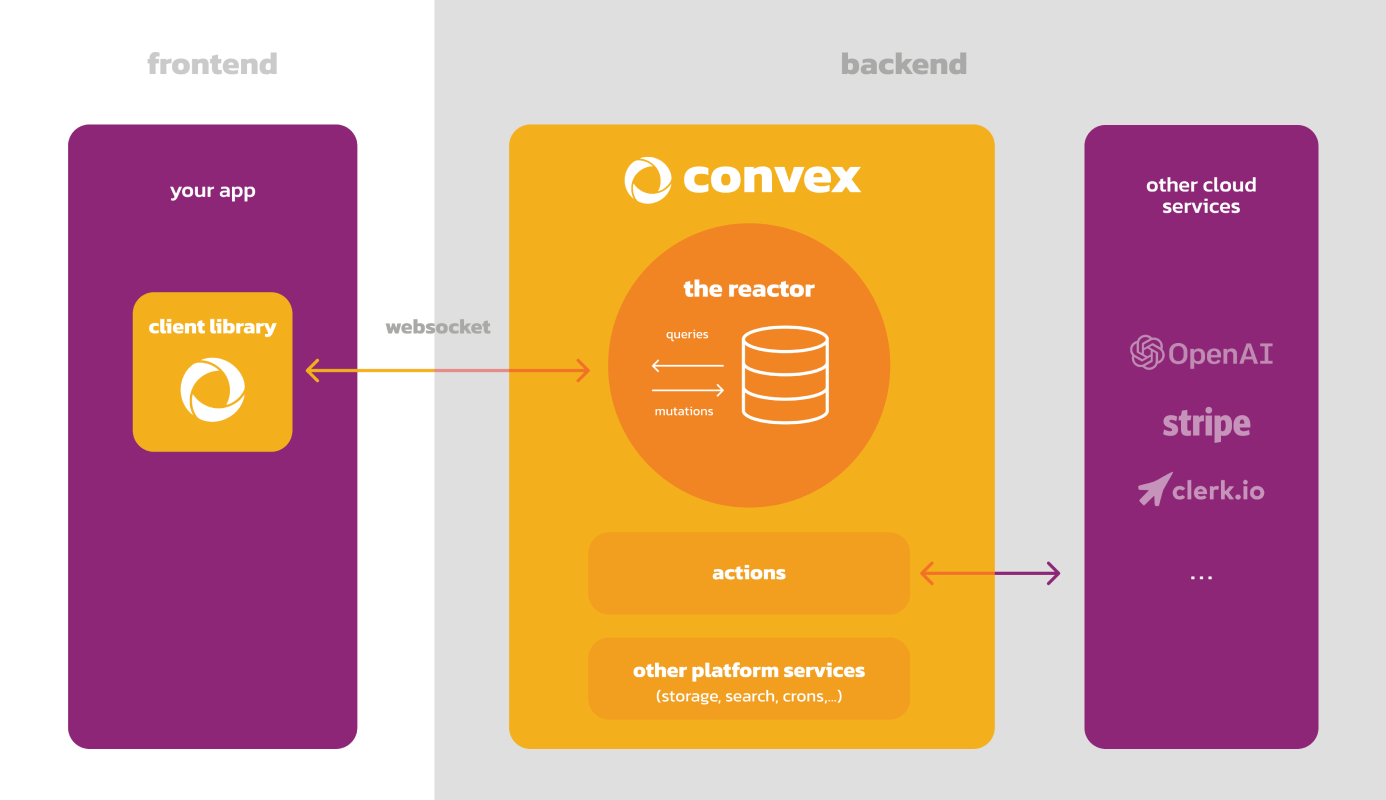
Convex is a hosted backend platform with a built-in
database that lets you write your
database schema and
server functions in
TypeScript. Server-side database
queries automatically
cache
and subscribe to data,
powering a
realtime useQuery hook
in our React client. There are also
Python,
Rust,
ReactNative, and
Node clients, as well as a
straightforward
HTTP API.
The database supports NoSQL-style documents with relationships, custom indexes (including on fields in nested objects) and vector search.
The query and
mutation server
functions have transactional, low latency access to the database and leverage
our v8 runtime with
determinism guardrails
to provide the strongest ACID guarantees on the market: immediate consistency,
serializable isolation, and automatic conflict resolution via
optimistic multi-version concurrency control
(OCC / MVCC).
The action server functions have
access to external APIs and enable other side-effects and non-determinism in
either our optimized v8 runtime
or a more
flexible node runtime.
Functions can run in the background via scheduling and cron jobs.
Development is cloud-first, with hot reloads for server function editing via the CLI. There is a dashbord UI to browse and edit data, edit environment variables, view logs, run server functions, and more.
There are built-in features for reactive pagination, file storage, reactive search, https endpoints (for webhooks), streaming import/export, and runtime data validation for function arguments and database data.
Everything scales automatically, and it’s free to start.
Analysis
View
Metric
- 7
- 6


Figures cover GitHub contributors during the hackathon window. A co-authored commit counts in full for each author, so per-member totals add up to more than the whole-team figures.
Technology
- CSSIn code
- HTMLIn code
- JavaScriptIn code
- ReactIn code
- Tailwind CSSIn code
- TypeScriptIn code
- Mistral AIClaimed
6 of 7 appear in the indexed code. 1 claimed on Devpost could not be matched to code, which may simply mean the tool leaves no trace in the repository.
AI coding agents
No AI coding agent signals were found in this repository.
Detected from committed agent config files and commit authorship. Absence of a signal is not proof an agent was unused.
Codebase size
Source size
67 KB
Source files
29
Counts recognized source files only; vendored directories, binaries and lockfiles are excluded, so this is smaller than the repository on disk.
Repository
YJC23/TreeHacksProj
42 files · 2.1 MB · @ aba2a33
Structure
Interface
11 files · 26%Screens, components and styles rendered to the user.
Application logic
16 files · 38%Domain rules, services and shared utilities.
Supporting
Layers are inferred from where files sit in the tree, not from reading the code. A project that names its directories unconventionally will read oddly here — open the file browser to check anything the diagram implies.
Languages
- TypeScript58%
- Markdown26%
- JavaScript9%
- CSS6%
- HTML1%
Share of indexed source by file size. Binary and vendored files are excluded.
Dependencies
package.json
npm · 34- @hookform/resolvers
- @radix-ui/react-checkbox
- @radix-ui/react-icons
- @radix-ui/react-label
- @radix-ui/react-slot
- class-variance-authority
- clsx
- cmdk
- convex
- date-fns
- monsterapi
- react
- react-day-picker
- react-dom
- react-hook-form
- react-native-get-random-values
- tailwind-merge
- tailwindcss-animate
- +16 more
Declared in the repository’s manifests at the indexed commit. A declared package is not proof it is used, and runtime dependencies are listed first.
This project’s features have not been analysed yet.
Export this project's context (description, README, evidence, key source files) to chat with an AI agent elsewhere.