Project Info
Inspiration
We were inspired to work this project by looking at the lack of ADA certified infrastructure and walkways present throughout a large amount of underdeveloped communities in the country. The lack of this can hinder people with impaired vision from being able to access the resources they need throughout their city, town, or neighborhood. As such we wanted to design a system that can be taken with them wherever they need to go and would augment their navigation capabilities in these under-developed areas.
What it does
The smart cane activates and uses a small scale LiDAR sensor to scan up to 6ft ahead of ground from the cane's position. The cane establishes a base height that will indicate that the ground being walked on is level, and if the LiDAR detects any significant change in the elevation or "flatness" of the ground, it will send a signal to a set of vibrating motors on the cane to gently alert the user that the direction they are pointing the cane towards has a curb, a hole, or some other change in the ground level.
How we built it
We built our device using distance sensors and vibration motors from the IF Magic company. The distance sensors needed to be positioned at an angle in order to accurately calculate the distance from ground ledges and drop-offs. After finishing this, we used the information from the sensors to process the information on the main UI graphs which therefore vibrated the motors immediately alerting the blind user. The software stack we used were Python for the backend logic and device communication, JavaScript to handle real-time data flow, and CSS to design the user interface.
Challenges we ran into
The main obstacles to this project were mechanical design, hardware compatibility, and integration. Mechanical design It was hard to attach the sensor to the cane in a way that accurately measured the change in ground level. This was because the sensor needed to be angled relative to the cane's axis. We iterated through several designs, but eventually landed on a design that would make MacGyver proud. Hardware compatibility We decided to use the IF Magic framework for connecting the physical world (distance sensors, vibration modules) and the software (frontend, algorithm to detect ground level change, etc.). The IF Magic team were incredible. We were pushing the limits of the software package and forcing the development team to quickly push updates and bug fixes in response to our use case. Integration We had many different machines to coordinate with each other. IF Magic provided us with 2 separate processor modules and 2 different sensors. Streaming the data was relatively straight-forward in Python (thanks to their library) but the main challenge was fetching the processed data and displaying into the frontend, in real-time. We were stuck for a while because there was a very noticeable 1 second delay between an object being detected and a vibration being enabled. To overcome this, we switched to using IF Magic's 'Equations', while still displaying real-time data via our own dashboard.
Accomplishments we're proud of
Despite the challenges, we made a working prototype within 36 hours. It's not perfect, but the proof of concept is there and we see many opportunities for improvement. Also, against all odds, we affixed our sensor to our cane without damage. Finally, we are happy that we could make a project which has a positive impact on the community.
What we learned
Integration is the hardest part of any project. We all were able to complete our individual tasks but in doing so we made many assumptions on the format and structure of the input/output data. It was only when we came together to try and connect the pieces that we had to establish clearer abstractions. We also learned that physical feedback to the user needs to have a delay of less than 100 ms, otherwise it's unusable.
What's next
There are many directions we could take CaneYouSee. There are general improvements involving UI, latency, and false positive error rate. There are more involved endeavors including adding additional sensors and training ML models instead of hard-coded algorithms to know when to vibrate.
Can(e) you see?
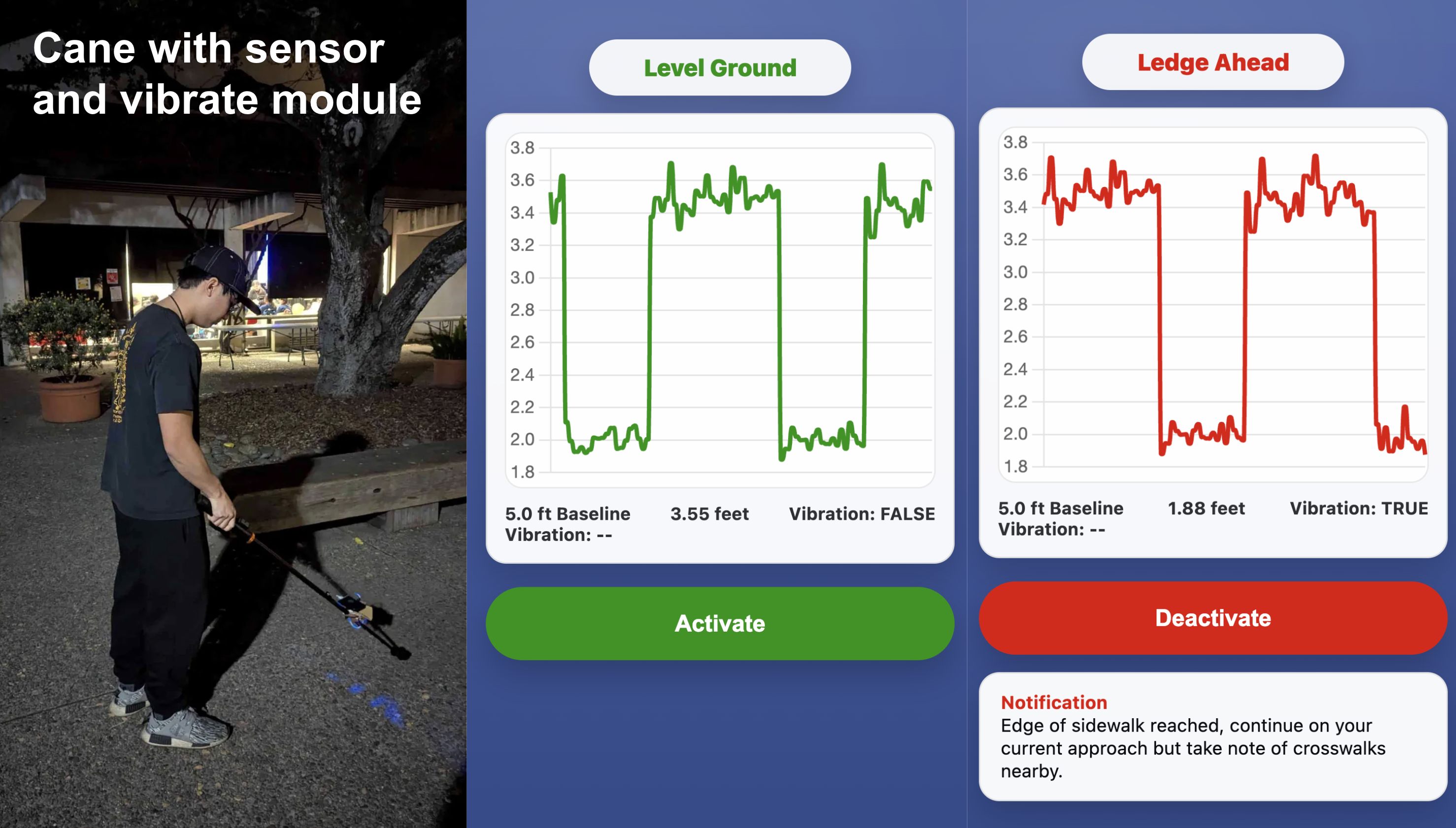
A cane equipped with a distance sensor and a vibration module. The cane vibrates when it detects significant changes in ground-level elevation.
For additional information, check out the DevPost for this project.
Tech stack
Hardware/firmware
Uses IF Magic framework which integrate ESP32 microcontrollers, sensors, and firmware. We specifically used 1 vibration module, 1 distance sensor, and a mesh network with 2 ESP32 microcontroller modules.
For the microcontroller attached to the cane, we used IF Magic's 'Equations' firmware. The device then connects to a mesh network and communicates with another ESP32 module talking to a MacOS via a serial port.
Software
We leverage IF Magic's Python API to stream the distance data directly to a Python program. Some calibration / debouncing is applied to this data, which is then packaged into a JSON file and saved to the local filesystem.
Another Python script running a Flask app then reads this JSON file and serves any requests on a localhost /data endpoint.
Finally, a simple HTML frontend fetches data from the /data endpoint and displays the real-time distance data in a web browser.
Getting started
1. Environment and installation
Note: project was only tested on MacOS running Sequoia 15.7.3 and Python 3.12.12
First, clone this repo:
git clone https://github.com/j-silv/caneyousee.git
Next, setup a Python virtual environment and install the dependencies.
cd caneyousee
python3 -m venv venv
source venv/bin/activate
pip install -r requirements.txt
To communicate with the IF Magic hardware, you will also need to setup the SLAB USB driver. Instructions are provided here.
2. Hardware setup
Our system uses a mesh network of two Bare^2 ESP32 modules. As of writing, there are currently no public docs on how to correctly set up this mesh network. Please reach out to IF Magic for more information.
Assuming the mesh network is correctly configured and the driver installed, you can plug in one of devices into your computer and verify that the device is detected. You should see /dev/cu.SLAB_USBtoUART in the output
ls /dev/cu.*
The other Bare^2 module should be attached with a vibration sensor and a distance sensor at port 0 and port 3 respectively (the exact port numbers may be different, so refer to the source code in sensor.py and change if needed).
Another step not described here is the programming of the cane module using IF Magic's 'Equations'. This is described in their documentation, but essentially the remote cane module needs to be programmed with the following equation:
WHEN milimeters of distance IS LESS THAN 1000 turn relay to on once & WHEN milimeters of distance IS GREATER THAN 1000 turn relay to off once
3. Software
The main script which gathers data from the IF Magic modules is sensor.py. The following command starts the data streaming process. For details on command-line arguments, pass in the -h option.
python sensor.py
After this runs, you should see distance data streaming through. If the mesh network was correctly configured, you should also be able to see real-time updates to the values when moving your hand around the distance sensor.
Position: 3.2 feet (baseline: 3)
Position: 3.1 feet (baseline: 3)
Position: 3.5 feet (baseline: 3)
Position: 3.4 feet (baseline: 3)
...
Next, you need to setup the Flask app which serves JSON data to an endpoint the frontend code can query. In another terminal, start up the Flask server:
python server.py
Finally, start up the frontend server and open up a web browser to localhost:3000.
python -m http.server 3000
You should be able to see streaming data in the window.
Acknowledgements
Huge shout-out to the IF Magic team, especially to Lance and Paul. Without their help this project would of not been possible.
Thank you also to the CruzHacks 2026 team for organizing such a fun event.
Analysis
View
Metric
- 13
- 12


Figures cover GitHub contributors during the hackathon window. A co-authored commit counts in full for each author, so per-member totals add up to more than the whole-team figures.
Technology
- CSSIn code
- FlaskIn code
- HTMLIn code
- JavaScriptIn code
- PythonIn code
5 of 5 appear in the indexed code.
AI coding agents
No AI coding agent signals were found in this repository.
Detected from committed agent config files and commit authorship. Absence of a signal is not proof an agent was unused.
Codebase size
Source size
19 KB
Source files
6
Counts recognized source files only; vendored directories, binaries and lockfiles are excluded, so this is smaller than the repository on disk.
Repository
j-silv/caneyousee
9 files · 2.9 MB · @ 6f895de
Structure
Interface
2 files · 22%Screens, components and styles rendered to the user.
Application logic
3 files · 33%Domain rules, services and shared utilities.
Supporting
Layers are inferred from where files sit in the tree, not from reading the code. A project that names its directories unconventionally will read oddly here — open the file browser to check anything the diagram implies.
Languages
- Python41%
- Markdown21%
- JavaScript19%
- CSS13%
- HTML6%
Share of indexed source by file size. Binary and vendored files are excluded.
Dependencies
requirements.txt
pypi · 5- flask
- flask-cors
- indistinguishable-from-magic
- numpy
- pyserial
Declared in the repository’s manifests at the indexed commit. A declared package is not proof it is used, and runtime dependencies are listed first.
This project’s features have not been analysed yet.
Export this project's context (description, README, evidence, key source files) to chat with an AI agent elsewhere.