Project Info
This project did not submit a demo video on Devpost.
Inspiration
This project was inspired by Visualizing the Loss Landscape of Neural Nets, a NeurIPS 2018 paper. The paper describes a method for visualizing loss landscapes, which are graphs that reveal the error of neural network predictions as a function of their parameters. These visualizations are useful for understanding how the neural network is learning during the training process, and provides insight into the generalization of these models. These 3D surface plots are really cool to view on plotting libraries / 3D modeling software, but I've always wished I could move around and view the shape of the meshes in real life.
What it does
This project directly applies the Visualizing the Loss Landscape of Neural Nets paper by rendering these loss landscapes using the Snap Spectacles. With wearable tech and smart glasses like the Snap Spectacles, we can finally have an immersive experience in AR to better visualize the shapes of these 3D surface plots, and have visibility into more fine-grain or precise details. The differences that the paper finds when comparing how different model architectures lead to different loss surfaces and optimization trajectories can be clearly seen when viewing through the Snap Spectacles.
How we built it
The loss-landscape repo provides code to generate .vtp files for the 3D loss surface plots of a few neural net models. Lens Studio only allows for 3D object imports from .fbx, .obj, and .gltf file formats, so we convert the .vtp files to .obj files using PyVista, a 3D plotting Python library. Then, we import these loss surface meshes into Lens Studio as assets, and customize the arrangement of the camera, change scaling and positioning of the mesh, enable surface detection, and apply material to the mesh for the color gradient. And with some sync'ing to the Spectacles, we have a working lens!
Challenges we ran into
There were many challenges on the AR development side, as this was our first time working with AR. One notable challenge was shading. Shading the mesh was not an easy task, but we found a hacky solution that uses the Twist material, disabling its animation, and warping the mesh slightly, which gives our desired color gradient effect. We also began fine-tuning some LLMs (ie. Llama 3), but didn't have enough time to generate the 3D surface plots for the loss landscape.
Accomplishments we're proud of
Considering that this was our first time building with AR, we felt immediate wins even when we created our first barebones version of our lens. In only a few hours, we were able to get our Snap Spectacles set up and a lens with our desired outcome.
What we learned
Developing the Spectacles on Lens Studio was very pleasant. The software provides an UI similar to Premiere Pro where you import and configure assets on the left, with your simulated scene on the right, making the development process quite intuitive for us (and probably other content creators as well). We learned a lot on the different types of 3D modeling software out there and gained exposure to how shaders work with a hint of OpenGL.
What's next
for Loss Landscapes Although we have working code to generate the 3D surface plots given some model, we're hoping there's a way to automate the setup of the assets in Lens Studio. We're also hoping to continue fine-tuning some LLMs such as Llama 3 and diffusion models like FLUX.1-dev to see how the loss surfaces may have changed for newer models compared to the traditional models (ie. DenseNet, ResNet, and VGG) presented in the paper. Acknowledgements [1] thumbnail modified from here [2] loss-landscape repo
Loss Landscapes in a Lens
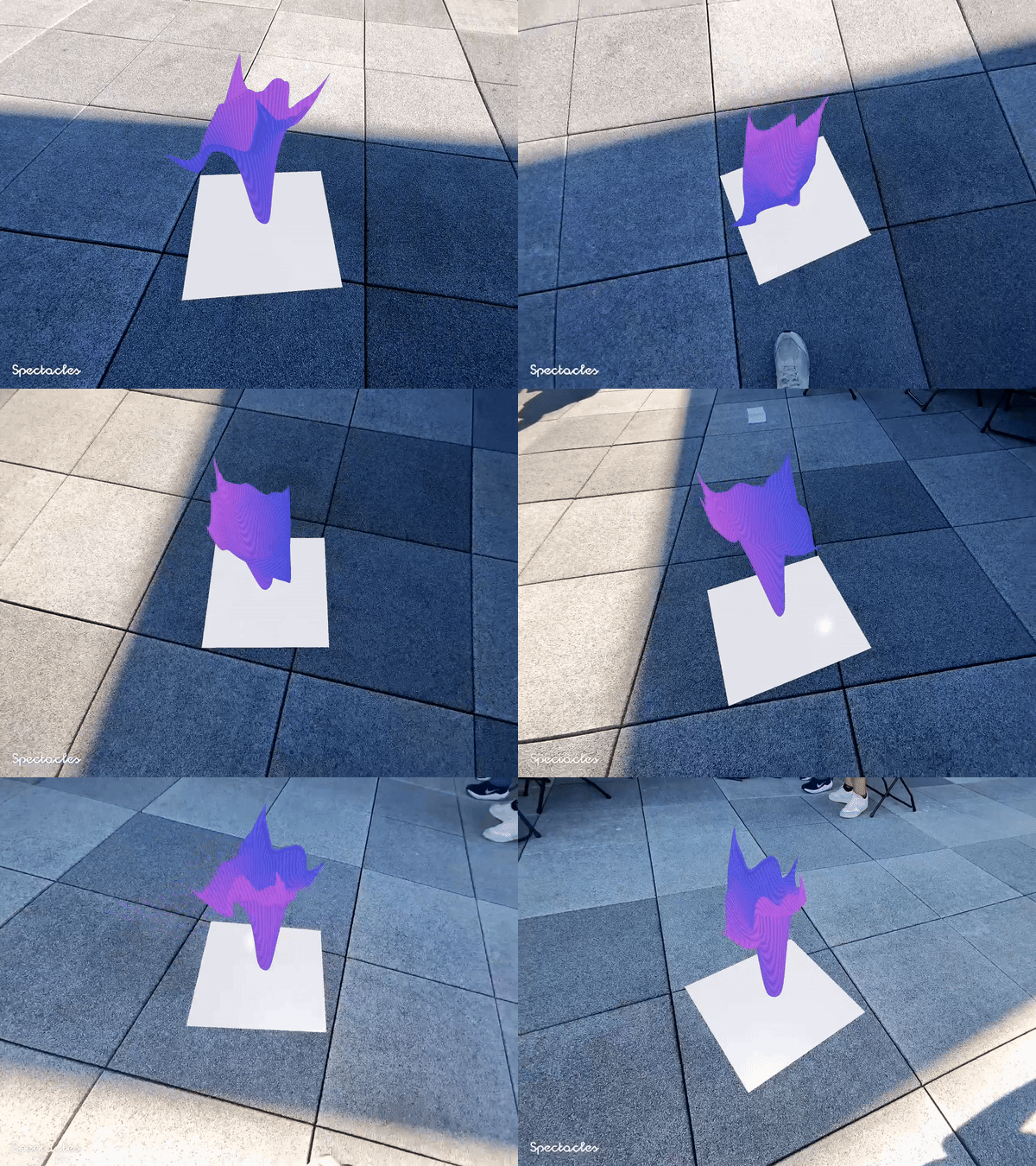
This project was inspired by Visualizing the Loss Landscape of Neural Nets, a NeurIPS 2018 paper. The paper describes a method for visualizing loss landscapes of neural networks by applying normalization to specific model parameters, and then plotting loss values along 2 randomly selected directions during training. This project directly applies the paper by rendering these loss landscapes in real life using the Snap Spectacles.
With wearable tech and smart glasses like the Snap Spectacles, we can finally have an immersive experience in AR to better visualize the shapes of these 3D surface plots, and have visibility into more fine-grain or precise details. The lens can be found here.
Usage
- To install dependencies, create a Python virtual environment and run the following command.
pip install -r requirements.txt
-
loss-landscape/corresponds to the loss-landscape repo, which provides code to generate .vtp files for the 3D loss surface plots of a few models. -
Lens Studio only allows for 3D object imports from .fbx, .obj, and .gltf file formats, so we convert the .vtp files to .obj files using PyVista, a 3D plotting Python library. The notebook can be found at
vtp2obj.ipynb. -
lens/holds the Lens Studio project with the project file and assets. We import these loss surface meshes into Lens Studio as assets, and customize the arrangement of the camera, change scaling and positioning of the mesh, enable surface detection, and apply material to the mesh for the color gradient.
And with some sync'ing to the Spectacles, we have a working lens!
Future Work
Although we have working code to generate the 3D surface plots given some model, we're hoping there's a way to automate the setup of the assets in Lens Studio.
We're also hoping to continue fine-tuning some LLMs such as Llama 3 and diffusion models like FLUX.1-dev to see how the loss surfaces differ for newer models compared to the traditional models (ie. DenseNet, ResNet, and VGG) presented in the paper.
Acknowledgements
Code heavily borrowed from loss-landscape.
Analysis
View
Metric
- 9

Figures cover GitHub contributors during the hackathon window. A co-authored commit counts in full for each author, so per-member totals add up to more than the whole-team figures.
Technology
- PythonIn code
- PyTorchIn code
2 of 2 appear in the indexed code.
AI coding agents
No AI coding agent signals were found in this repository.
Detected from committed agent config files and commit authorship. Absence of a signal is not proof an agent was unused.
Codebase size
Source size
153 KB
Source files
41
Counts recognized source files only; vendored directories, binaries and lockfiles are excluded, so this is smaller than the repository on disk.
Repository
amosyou/loss-landscapes-lens
92 files · 20.8 MB · @ a052d39
Structure
Application logic
31 files · 34%Domain rules, services and shared utilities.
Data & schema
4 files · 4%Schema definitions, migrations and data access.
Supporting
Layers are inferred from where files sit in the tree, not from reading the code. A project that names its directories unconventionally will read oddly here — open the file browser to check anything the diagram implies.
Languages
- Python82%
- Shell8%
- Markdown7%
- YAML3%
Share of indexed source by file size. Binary and vendored files are excluded.
Dependencies
requirements.txt
pypi · 12- h5py
- jupyter
- matplotlib
- mpi4py
- numpy
- openmpi
- pyvista
- scikit-learn
- scipy
- seaborn
- torch
- torchvision
Declared in the repository’s manifests at the indexed commit. A declared package is not proof it is used, and runtime dependencies are listed first.
Feature verification
Built with PyTorch (model loading/training code)Verified
Built with: hyperbolic, python, pytorch, snapchat
Claimed on Devposthigh confidenceloss-landscape/model_loader.py— PyTorch-based model loading code for the neural net models used to generate loss landscapesrequirements.txt:1— torch listed as a project dependency
Conversion of .vtp loss surface meshes to .obj using PyVistaVerified
we convert the .vtp files to .obj files using PyVista, a 3D plotting Python library. The notebook can be found at vtp2obj.ipynb
Claimed on readmehigh confidencevtp2obj.ipynb— Notebook reads a .vtp file with pyvista.get_reader, builds a Plotter, and calls pl.export_obj('resnet56.obj') to produce the .obj meshresnet56.obj— Resulting .obj mesh file present in repo root, matching the notebook's export targetrequirements.txt:10— pyvista listed as a dependency
Import of loss surface mesh as Lens Studio asset with scaling/positioningVerified
we import these loss surface meshes into Lens Studio as assets, and customize the arrangement of the camera, change scaling and positioning of the mesh
Claimed on readmehigh confidencelens/Assets/resnet.obj— Imported mesh asset present in Lens Studio project Assets folder, alongside resnet.mtllens/Assets/Scene.scene:469— SceneObject named 'resnet' with a non-default LocalTransform (position y=25, z=-30, scale 10x10x10), confirming positioning/scaling was customizedlens/Assets/Scene.scene:31— A Camera SceneObject with Perspective CameraType is present in the scene
Loss landscape .vtp surface generation via loss-landscape repoVerified
The loss-landscape repo provides code to generate .vtp files for the 3D loss surface plots of a few neural net models
Claimed on readmehigh confidenceloss-landscape/plot_surface.py— Script that computes and writes loss surface plot data (referenced by README as the source of .vtp files)loss-landscape/cifar10/models/resnet.py— Model architectures (resnet, densenet, vgg) present for generating the loss landscapes described
Custom material with color gradient shading (Twist material hack)Code-supported
found a hacky solution that uses the Twist material, disabling its animation, and warping the mesh slightly, which gives our desired color gradient effect
Claimed on Devpostmedium confidencelens/Assets/Twist Material/Twist.mat— A material asset named Twist.mat exists in the project, matching the described hacky Twist-material shading techniquelens/Assets/Scene.scene:205— Materials are assigned on scene mesh visual components, consistent with a custom material being applied to the loss-surface mesh
Surface detection enabled for AR placementCode-supported
enable surface detection ... for the Snap Spectacles lens
Claimed on readmemedium confidencelens/Assets/Surface Detection.lspkg— Snap's Surface Detection package asset is included in the Lens Studio projectlens/Assets/Scene.scene:469— The resnet mesh object is nested as a child of the 'Example [EDIT ME]' object, which is the default template hierarchy provided by Snap's Surface Detection package, suggesting it is wired into the surface-detection template
Built with HyperbolicClaimed only
Built with: hyperbolic, python, pytorch, snapchat
Claimed on Devpostmedium confidenceFine-tuning LLMs (Llama 3) and diffusion models (FLUX.1-dev) to generate new loss surfacesClaimed only
We also began fine-tuning some LLMs (ie. Llama 3), but didn't have enough time to generate the 3D surface plots for the loss landscape
Claimed on Devposthigh confidencePublished, working Snap Spectacles lensBlocked
The lens can be found here (snapchat.com/lens/...) ... with some sync'ing to the Spectacles, we have a working lens!
Claimed on readmelow confidence
An AI agent derived these features from the project’s Devpost page and readme, then searched the code for each one. Verified features are backed by cited code; claimed-only features had no supporting code, which is not by itself proof a feature is missing.
Export this project's context (description, README, evidence, key source files) to chat with an AI agent elsewhere.