Project Info
Inspiration
It was past midnight, and a Claude API call had just failed. I did what every developer does at that hour — I assumed it was me. I checked my code. I checked my network. I regenerated my API key. I re-read my own request three times. Then I opened the official status page — green, "all systems operational" — while my requests kept failing. I'd lost twenty minutes to a problem that was never mine. The provider was degraded; the status page just hadn't admitted it yet. That gap — the stretch where a service is already down but nothing official says so, and you're left debugging perfectly fine code — is the entire reason Watchtower AI exists. I wanted a tool that collapses those twenty minutes into a few seconds and answers the only question that matters at midnight: is it down, or is it me — and if it's down, whose fault is it, really? This was my first hackathon, done solo, in 24 hours.
What it does
Watchtower AI is a local "flight radar" for AI services. It runs on your machine, with your keys, and answers two questions: Is the provider okay right now? It fires concurrent probes at Claude, GPT, and Gemini every 30 seconds — and it doesn't just ping. It sends a real QA prompt and grades the answer, measures tokens-per-second, and tracks flagship and mid tiers separately, auto-selecting valid models so it never 404s on a renamed endpoint. If something's wrong, whose problem is it? A four-way attribution engine sorts every failure into your environment / your account / the provider / all-clear, and recommends a concrete fallback (e.g. route to Claude mid). When a provider degrades, Watchtower corroborates with live community signal and official status feeds, then states — honestly — how confident it can be from where you sit.
How we built it
The probe engine is a FastAPI + asyncio backend that runs concurrent health checks with httpx. Results persist to SQLite, so the trend sparklines survive a restart instead of resetting to zero — a small detail, but it's the difference between a toy and a tool you'd actually leave running. The attribution layer turns raw probe results into a verdict. Local diagnostics (DNS, TCP :443, API-key check) rule out your side in seconds; if every model on your account is impaired, it's likely the provider — but Watchtower deliberately frames this as "provider-wide from your vantage point," not as global truth (more on that below). Community corroboration went through a complete redesign mid-hackathon. We pull live Hacker News chatter through the Algolia Search API (free, no auth, works behind campus firewalls) and parse each provider's official status-page JSON. The most interesting source is Downdetector: it has no public API and hides behind Cloudflare, so we drive a real browser session through Browserbase (Playwright over CDP), auto-clear the Cloudflare challenge, wait for content, and scrape the headline and user comments. Then Claude Haiku reads the actual comments and returns a structured {problems_found, summary, comments[]}, which feeds back into spike detection. The payoff: Downdetector's own headline said "no current problems," but our LLM read the comments and surfaced connection failures and safety-routing degradation — more honest than the crowd-sourced top line. The research backbone is a backtest against the VU Amsterdam dataset from the ICPE 2025 paper An Empirical Characterization of Outages and Incidents in Public Services for LLMs (Chu et al.). On 542 real incidents, 29.7% (161) were never marked "investigating" in real time — they only ever got a "resolved" post. Median time from investigating to resolved was 73 minutes (Anthropic: 55.5, N=381). That's the documented blind window Watchtower is built to fill. The observability layer is Sentry, three layers deep — structured events, fingerprinting that groups every probe cycle, and performance traces. Then we closed the loop: we let Sentry's Seer agent do root-cause analysis on a real TypeError in our own backend and open a pull request to fix it. A tool that monitors AI, monitored and repaired by AI. The build pipeline leaned on agents at every stage. The initial probe engine and the early large-scale rewrites were built with Claude Code, with Sentry wired in alongside development for live observability from day one. Cursor handled later code generation. Simular's Sai drove a hands-off UI/UX redesign pass, and Devin (Cognition) ran whole-project syntax and security/vulnerability sweeps with up to five cloud agents in parallel. Frontend is Next.js + Tailwind; everything ships via Docker / docker-compose, running locally on your keys. How we used each tool We didn't bolt these on for the prizes — each tool does real work in the product or the build, which is exactly why we leaned into the sponsor tracks. Here's the honest, tool-by-tool breakdown: Claude (Best Use of Claude) — In-product, Claude Haiku reads the raw user comments we scrape from Downdetector and returns structured {problems_found, summary, comments[]}, which feeds straight into spike detection. That's the engine behind our sharpest line: Downdetector's headline says "no current problems," but the comments say image generation is down. Under the hood, Claude Code built the initial probe engine and the early rewrites. And across the whole 24 hours, Claude was the architecture-and-judgment partner — including talking me out of over-claiming on the research narrative. Sentry (Best Use of Sentry API) — Three layers in production: structured events, fingerprinting that groups every probe cycle, and performance traces — wired in alongside development from day one. Then Seer closed the loop, root-causing a real TypeError in our backend and opening a PR to fix it. A monitoring tool for AI, itself monitored and repaired by AI. Browserbase (Best Use of Browserbase) — Downdetector has no public API and sits behind Cloudflare. We run a real remote browser (Playwright over CDP) that auto-clears the challenge and pulls live user reports — 100+ sessions over the build. Browserbase's exact promise (give agents the web that has no API), used for a genuine need rather than a staged demo. Simular (Sai) (Best Use of Simular) — We used Sai, Simular's autonomous computer-use agent, to drive a hands-off UI/UX redesign — clicking through every screen and reshaping layout and copy. An AI redesigning the interface of an AI-monitoring tool. Cognition (Devin) (Best Use of Cognition) — Devin ran whole-project syntax and security/vulnerability sweeps with up to five cloud agents in parallel, catching issues across the codebase far faster than one solo builder could under a 24-hour clock. Claude Code & Cursor — The initial probe engine and the early big rewrites were built with Claude Code; Cursor handled later code generation. Tracks we're aiming for Ddoski's Toolbox (Grand Prize) — Watchtower is a developer utility in the purest sense: a local tool that erases the 20 minutes of "is it me?" at midnight. Useful, usable, and actually running — not just an idea. Best UI/UX — A clean provider dashboard with live sparklines, a plain-language "whose problem?" verdict, and an honesty-first design voice ("not a global oracle"), refined through the Sai-driven redesign. Best Solo Hack & Best Beginner Hack — Built solo, in 24 hours, as my first hackathon — where the judgment to cut 16 of 41 directions mattered more than any single feature.
Challenges we ran into
Reddit collapsed on us. Community signal was originally Reddit-based. Mid-build we hit Reddit's 2025 Responsible Builder Policy, which now requires pre-approval for all app access and explicitly bans scraping — impossible on a hackathon timeline. We killed it and revived Hacker News as the live source instead. Conditions changed; the judgment changed with them. Cloudflare vs. Downdetector. A plain fetch can't run JS or pass an interactive challenge. That's exactly why Browserbase fit — a real remote browser session clears the challenge, and we wait on actual content rather than a fixed sleep. A git crisis at hour ~20. Parallel AI-assisted branches, cherry-pick failures, and a broken SQLite wiring chain left main in pieces. Untangling it cost real time and taught me to stop running parallel code-gen on overlapping files. The hardest discipline was honesty, not code. The premise of a status-monitoring tool is "we catch what they miss" — and it's tempting to dress that up. We didn't. We pulled a spurious +1,140-minute case out of the backtest the moment it looked too good. We labeled every estimated value as an estimate. When the temptation came to borrow the paper's claim that outages are periodic and predictable, I cut it — our early-warning is real-time latency-trend extrapolation, not historical-cycle prediction, and conflating the two would have been dishonest. We state the detection gap as "the window we can fill," never as a measured head-start we never instrumented. For the demo, the GPT outage is triggered by a DEMO_FORCE_DOWN flag (disclosed on screen) — but the Downdetector and Hacker News corroboration around it is real.
What we learned
The thing I'm proudest of isn't how much I built — it's how much I cut. I proposed roughly 41 directions and shipped about 22, deliberately killing 16 (SLA loss tracking, a crowdsource button, public signal service, ML classifier, periodicity prediction…) because they either fought the local-tool positioning, couldn't be done honestly in the time, or just weren't worth it. The fastest way to die in a solo hackathon is to want everything and finish nothing at half quality. Saying no, correctly and repeatedly, turned out to be the most valuable skill of the whole 24 hours. I also learned that honesty is a feature, not a constraint. A monitor that's candid about its own blind spots ("not a global oracle") is more trustworthy than one that pretends to omniscience — and that candor is the differentiator, not a liability. And I learned to build with a swarm of agents without letting them trip over each other — Claude Code and Cursor writing code, Devin's five cloud agents sweeping for bugs, Sai redesigning the UI, Seer fixing what broke. The hour-20 git crisis taught me the hard way that parallel agents on overlapping files collide; the fix was clearer boundaries, not fewer agents.
What's next
Multi-vantage probing (multiple regions/keys) to move from "your route" toward genuine breadth. A real classifier on the VU dataset to put calibrated confidence behind anomaly calls. Optional, privacy-preserving aggregation so users can opt in to a shared signal without giving up the local-first model. Built with Next.js · Tailwind · FastAPI · asyncio · httpx · SQLite · Playwright · Browserbase · Sentry · Sentry Seer · Claude (Haiku) · Hacker News Algolia API · VU Amsterdam / ICPE 2025 dataset · Docker · Claude Code · Cursor · Devin (Cognition) · Simular Sai
WatchTower AI



Next.js · React · TypeScript · Tailwind · FastAPI · Python · SQLite · Docker · Sentry
| Source | https://github.com/kaiiiichen/WatchTower-AI |
| Hackathon | UC Berkeley AI Hackathon 2026 |
| Local demo | Frontend http://localhost:3000 · Backend http://localhost:8000 |
| Docker demo | docker compose up --build → http://localhost:3000 |
YouTube Demo Video
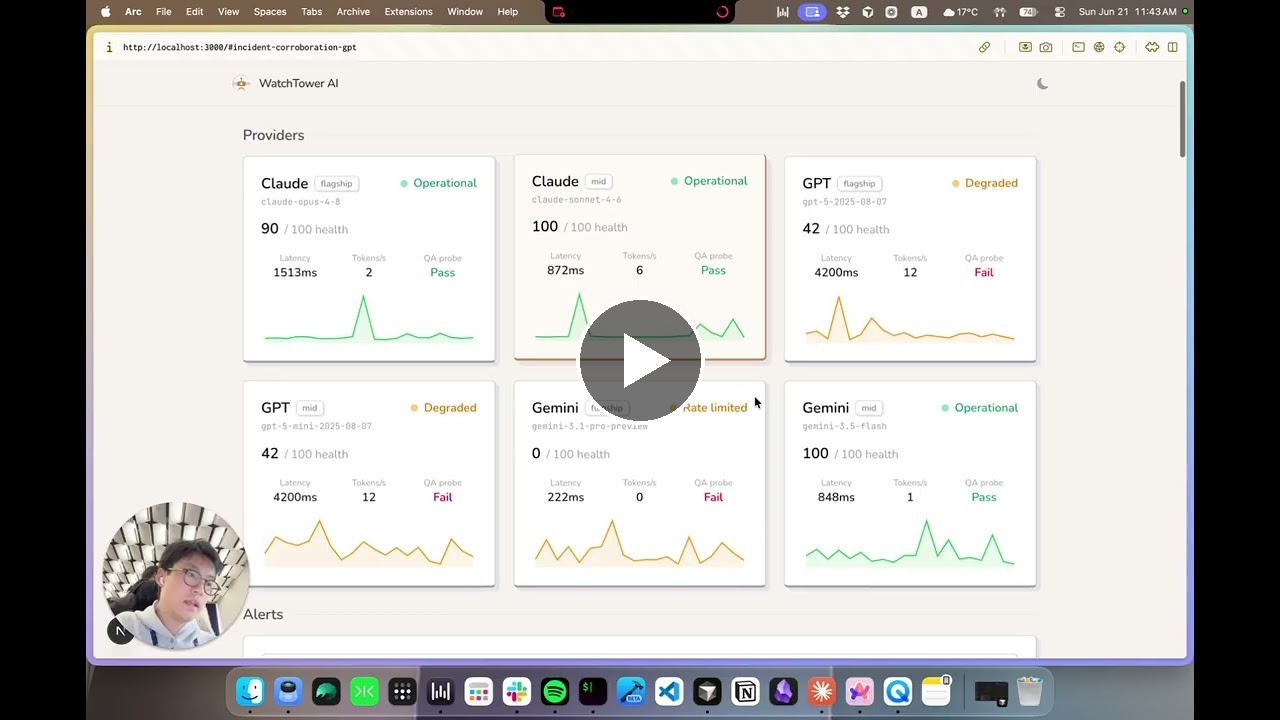
English
→ 中文
Contents
- The idea
- UC Berkeley AI Hackathon 2026
- What WatchTower AI does
- Reception
- Getting started — pick your path
- Prerequisites
- Quick start (Docker)
- Quick start (local dev)
- Verify it works
- Configuration
- Troubleshooting
- API reference
- Architecture
- Detection gap & academic backing
- Product philosophy
- Project structure
- Testing
- Deployment notes
- Documentation map
- License
The idea
WatchTower AI is flight radar for AI services — detect Claude / GPT / Gemini outages before the official status page, and answer the question that keeps you up at 2 AM: is it the service, or is it me?
Official status pages are slow, incomplete, and never tell you whether your environment is fine. WatchTower AI closes that gap with continuous independent probing, QA checks beyond "HTTP 200", local environment diagnosis, and honest data about how far official pages lag behind real user impact.
It is a local developer tool: you run it on your machine, your API keys stay yours, and probe history lives in a local SQLite file — nothing is uploaded to a shared cloud service.
UC Berkeley AI Hackathon 2026
Built at UC Berkeley AI Hackathon 2026 (June 20–21, 2026) by Kai Chen (@kaiiiichen) as a solo project. All implementation occurred during the hackathon window.
Elevator pitch (for Devpost)
WatchTower AI is a local flight radar for Claude, GPT, and Gemini — it probes providers every 30 seconds with real QA checks, diagnoses whether an outage is on your side or theirs, and backs its "detection gap" claims with peer-reviewed outage research. When something breaks at 2 AM, you get an honest answer in seconds instead of refreshing a status page that may still say "operational."
Devpost submission checklist
| Requirement | Where |
|---|---|
| 2–3 sentence summary | Use the elevator pitch above |
| Project image | Screenshot of the dashboard (localhost:3000 or deployed URL) |
| GitHub repository link | https://github.com/kaiiiichen/WatchTower-AI |
| Team name & table number | Enter on Devpost |
| Demo | Live dashboard + GET /health JSON; 5-minute table presentation |
| Built during hackathon | Yes — ideation allowed beforehand; all code written June 20–21, 2026 |
Judging alignment (Application · Functionality · Creativity · Technical complexity):
- Application — Every LLM developer hits midnight outages; independent probing + local diagnostics is immediately usable.
- Functionality — Full probe loop, four-way verdict, alerts, HN + Downdetector corroboration, official status pages, VU dataset backtest, optional Sentry — all implemented, not mocked.
- Creativity — QA probe ("2+2=4"), precursor
degradingtrend, multi-source corroboration as additive signals, honest boundaries on what we can claim. - Technical complexity — Dynamic model discovery, asyncio concurrent probes, SQLite history, Playwright adapters (Browserbase CDP + optional local Chromium), three-layer Sentry integration, research backtest from bundled CSV.
Sponsor track note: Sentry integration (events + fingerprinting + performance traces with API-key redaction) qualifies for the Best Use of Sentry API prize criteria.
What WatchTower AI does
WatchTower AI is organized in layers. Each layer is implemented and live.
1. Probe layer — real-time monitoring
| Capability | Description |
|---|---|
| Independent probe network | Concurrently probes Anthropic, OpenAI, and Google every 30 seconds (asyncio.gather). |
| Dynamic model discovery | At startup, queries each provider's list-models API and picks flagship and mid tiers by rule — no hard-coded model IDs that 404 when retired. |
| Multi-tier coverage | Each provider gets two dashboard cards (e.g. claude-opus-* + claude-sonnet-*). |
| QA quality probe | Asks "What is 2+2? Answer with just the number." and verifies the reply contains "4". |
| Token generation rate | Estimates output tokens per second from each probe response. |
| Health scoring | Rule-based score 0–100 → operational (≥85), degraded (≥50), or down. |
Precursor warning (degrading) | Detects steadily climbing latency before status crosses into degraded/down. |
| Failure semantics | Distinguishes service faults (down, degraded) from account faults (rate_limited, misconfigured). |
| Graceful degradation | Missing API key → unknown; probe loop never crashes. |
2. Attribution layer — whose problem is it?
| Capability | Description |
|---|---|
| Four-way verdict | Local diagnostics: your-side, account-side, service-side, or all-clear. |
| Local environment checks | Per provider: DNS, TCP :443, minimal authenticated request. |
| Smart alerts | Rule-based alerts compare tiers, recommend failover, never conflate 429 with "service down". |
| Community corroboration | Hacker News complaint-rate spikes + optional Downdetector (Browserbase CDP) — additive only. |
| Official status pages | Statuspage JSON (Claude, OpenAI) + Gemini AI Studio adapter; cites provider wording when available. |
3. Research layer — why this matters
| Capability | Description |
|---|---|
| VU Amsterdam dataset backtest | Real numbers from bundled CSV (backend/data/vu_dataset/). |
| Coverage gap | 29.7% of incidents (161/542) never marked "investigating" in real time. |
| Official response latency | Median 73 min investigating → resolved (N=381). |
| Honest boundaries | Does not claim measured head-start without historical probe data. |
4. Observability — Sentry integration
| Layer | What it does |
|---|---|
| Events | Sentry events for each degraded/down provider. |
| Fingerprinting | Groups repeated probe cycles into one issue. |
| Performance traces | One transaction per probe cycle, one span per provider. |
| Redaction | Scrubs API keys from URLs before anything leaves the process. |
5. Persistence & engineering
| Capability | Description |
|---|---|
| SQLite history | backend/data/watchtower.db; 7-day retention (ephemeral in Docker unless you mount a volume). |
| Frontend proxy | Next.js /api/* routes proxy FastAPI; dashboard shows a clear offline state when backend is unreachable. |
Reception
At the hackathon, five judges stopped by the booth — above the event average of three — which made it one of the busier tables in the room. A judge from Google DeepMind called the project "very interesting," said "great job," and, hearing it was my first hackathon, gently urged me to worry less and come back for more. I'm quietly proud that the work landed that way.
"Very interesting — great job. Knowing this was your first hackathon, don't be so anxious; you should join more hackathons." — Judge, Google DeepMind
Getting started — pick your path
WatchTower AI is a monorepo with two services: a FastAPI probe engine (backend/) and a Next.js dashboard (frontend/). There are two ways to run them — pick based on what you're trying to do:
| Path | Best for | You need on your machine | Hot reload |
|---|---|---|---|
| Docker Compose | First run, demos, self-hosting, "just show me it works" | Docker Desktop (or Docker Engine + Compose v2) + Git | No |
| Local dev | Contributing, debugging probes, iterating on UI | Node.js 20+, Python 3.12+, Git | Yes |
Why two paths? Docker bundles Node and Python inside containers so you don't install them — but you must have Docker installed first. Local dev gives you
--reloadon the backend andnext devHMR on the frontend, which is what you want when changing code.
API keys are optional for both paths. Without keys, each provider shows unknown on the dashboard — the app still starts, probes still run where possible, and you can explore the UI. Add keys when you want live health data.
Prerequisites
Read this before running any commands. Each path has different requirements.
Path A — Docker Compose
| Requirement | Minimum version | Why |
|---|---|---|
| Git | any recent | Clone the repo |
| Docker Engine | 20.10+ | Builds and runs both containers |
| Docker Compose v2 | bundled with Docker Desktop | Orchestrates backend + frontend (docker compose, not legacy docker-compose) |
Verify Docker is installed and running (do this first — many "it doesn't work" reports are just missing Docker):
docker --version          # e.g. Docker version 27.x
docker compose version    # e.g. Docker Compose version v2.x
docker info               # should NOT say "Cannot connect to the Docker daemon"
If docker info fails, install Docker Desktop (macOS/Windows) or Docker Engine (Linux), then start the daemon.
Also check: port 3000 must be free (frontend publishes it). Port 8000 stays internal to the compose network.
# macOS / Linux — should print nothing if free
lsof -i :3000
Path B — Local development
| Requirement | Minimum version | Why |
|---|---|---|
| Git | any recent | Clone the repo |
| Node.js | 20+ | Frontend (frontend/package.json) |
| npm | 9+ (ships with Node 20) | Install frontend deps |
| Python | 3.12+ | Backend (matches backend/Dockerfile) |
| pip + venv | stdlib | Backend dependencies |
Verify local toolchain:
node --version    # v20.x or v22.x
npm --version     # 9.x or 10.x
python3 --version # 3.12.x or 3.13.x
Optional (local dev only):
| Tool | When you need it |
|---|---|
playwright install chromium | Gemini official status via local headless browser (GEMINI_STATUS_BROWSER=1, the default in backend/.env.example) |
| Provider API keys | Live probe data instead of unknown |
| Browserbase API key | Downdetector corroboration (DOWNDETECTOR_ENABLED=1) |
jq | Pretty-print JSON in the verify commands below |
Also check: ports 3000 (frontend) and 8000 (backend) must both be free when running locally.
Quick start (Docker)
Requires: Docker prerequisites verified above.
Step 1 — Clone and configure
git clone https://github.com/kaiiiichen/WatchTower-AI.git
cd WatchTower-AI
cp .env.example .env
Edit .env at the repo root — add any API keys you have (see Configuration). Empty keys are fine for a first look.
Step 2 — Build and run
docker compose up --build
First build downloads base images and installs dependencies — expect a few minutes. Subsequent starts are faster.
Step 3 — Open the dashboard
The frontend container talks to the backend at http://backend:8000 inside the compose network (set automatically — you don't configure this for Docker).
What the containers include
| Service | Image | Port | Role |
|---|---|---|---|
backend | python:3.12-slim | 8000 (internal) | FastAPI probe engine |
frontend | node:20-alpine | 3000 (published) | Next.js dashboard |
Docker-specific behavior (read before wondering "why is X broken?")
We made deliberate trade-offs in the Docker images. Knowing them upfront saves debugging time:
| Feature | In Docker | Workaround |
|---|---|---|
| Gemini official status (local Chromium) | Does not work out of the box — slim image has no browser binaries | Set GEMINI_STATUS_BROWSER=0 in .env, or use local dev with playwright install chromium |
| Downdetector | Works via Browserbase remote CDP (no local browser needed) | Set DOWNDETECTOR_ENABLED=1 + BROWSERBASE_API_KEY in .env |
| Probe history (SQLite) | Lives inside the backend container — lost on docker compose down unless you add a volume | Mount ./backend/data:/app/data (see Deployment notes) |
| Hot reload | Not available | Use local dev for code changes |
Stop containers: Ctrl+C, then optionally docker compose down.
Quick start (local dev)
Requires: Local dev prerequisites verified above.
Local dev runs two processes in two terminals. Start the backend first — the frontend proxies to it.
Terminal 1 — Backend (probe engine)
cd backend
python3 -m venv .venv
.venv/bin/pip install -r requirements.txt
.venv/bin/playwright install chromium   # optional — skip if GEMINI_STATUS_BROWSER=0
cp .env.example .env
# Edit backend/.env — add ANTHROPIC_API_KEY, OPENAI_API_KEY, GEMINI_API_KEY
.venv/bin/uvicorn app.main:app --reload --port 8000
Wait until you see probe cycle complete in the logs — the first cycle may take 10–20 seconds while models are discovered.
Terminal 2 — Frontend (dashboard)
cd frontend
npm install
echo 'BACKEND_URL=http://localhost:8000' > .env.local
npm run dev
Open http://localhost:3000.
BACKEND_URLis required. Without it,/api/*routes return 503 with"Backend offline — set BACKEND_URL". The dashboard will not show live probe data.
Package-specific details: backend/README.md · frontend/README.md
Verify it works
Run these after either path. Expected: JSON with a providers array.
Through the frontend proxy (works for both Docker and local dev):
curl -s http://localhost:3000/api/health | jq .
Direct to backend (local dev only — port 8000 is not published in Docker):
curl -s http://localhost:8000/health | jq .
| What you see | Meaning |
|---|---|
providers with "status": "operational" | API keys work, probes succeeded |
providers with "status": "unknown" | Missing API key for that provider — expected if you skipped keys |
HTTP 503 from /api/health | Frontend can't reach backend — check BACKEND_URL, backend logs, or that backend container is running |
Empty page / connection refused on :3000 | Frontend not running, or port 3000 taken by another app |
Other endpoints (same proxy pattern):
curl -s http://localhost:3000/api/diagnose | jq .
curl -s http://localhost:3000/api/backtest | jq .
Configuration
WatchTower AI uses different env files depending on how you run it. This trips people up — here's why:
| How you run | Env file location | Template |
|---|---|---|
| Docker Compose | .env at repo root | .env.example |
| Local backend | backend/.env | backend/.env.example |
| Local frontend | frontend/.env.local | create manually (one variable) |
Docker Compose reads the root .env via env_file in docker-compose.yml and injects BACKEND_URL / CORS_ORIGINS for you. Local dev needs you to set those yourself.
Root .env (Docker) — key variables
| Variable | Default | Description |
|---|---|---|
ANTHROPIC_API_KEY | — | Anthropic API key |
OPENAI_API_KEY | — | OpenAI API key |
GEMINI_API_KEY | — | Google AI key |
DOWNDETECTOR_ENABLED | 0 | Set 1 to enable Downdetector corroboration |
BROWSERBASE_API_KEY | — | Required when Downdetector enabled |
DOWNDETECTOR_SUMMARY_MODEL | claude-3-5-haiku-latest | Model for Downdetector comment summaries |
GEMINI_STATUS_BROWSER | 1 | Set 0 in Docker unless you customize the image with Chromium |
SENTRY_DSN | — | Sentry DSN (unset = disabled) |
backend/.env (local dev) — additional knobs
See backend/.env.example for the full list. Highlights:
| Variable | Default | Description |
|---|---|---|
PROBE_INTERVAL | 30 | Seconds between probe cycles |
PROBE_TIMEOUT | 20 | Per-request timeout (seconds) |
GEMINI_STATUS_BROWSER | 1 | Local headless Chromium for Gemini official status |
ENABLE_DOCS | off | Set 1 for /docs and OpenAPI at http://localhost:8000/docs |
DEMO_FORCE_DOWN | off | Demo flag — force one provider to degraded |
Model env vars (ANTHROPIC_MODEL, etc.) are fallbacks only when dynamic discovery fails.
frontend/.env.local (local dev)
| Variable | Description |
|---|---|
BACKEND_URL | FastAPI base URL, e.g. http://localhost:8000 |
Troubleshooting
Common issues we anticipated when writing this README — if you're stuck, check here first.
Docker
| Symptom | Likely cause | Fix |
|---|---|---|
docker: command not found | Docker not installed | Install Docker Desktop or Docker Engine, then re-open your terminal |
Cannot connect to the Docker daemon | Docker installed but not running | Start Docker Desktop / sudo systemctl start docker |
docker-compose: command not found | Using legacy v1 binary | Use docker compose (space, v2) — bundled with Docker Desktop |
| Port 3000 already allocated | Another app using 3000 | Stop the other app, or change the host port in docker-compose.yml ("3001:3000") |
| Build fails on Apple Silicon | Rare base-image issues | Ensure Docker Desktop is updated; build uses standard linux/amd64-compatible images |
Providers all unknown after adding keys | .env not at repo root, or container not restarted | Keys go in root .env; run docker compose up --build again after editing |
| Gemini official status empty | No Chromium in Docker image | Set GEMINI_STATUS_BROWSER=0 in root .env and restart |
| History lost after restart | SQLite inside ephemeral container | Add a volume mount on backend/data/ (see Deployment notes) |
Local dev
| Symptom | Likely cause | Fix |
|---|---|---|
| Dashboard shows "Backend offline" | Missing or wrong BACKEND_URL | Create frontend/.env.local with BACKEND_URL=http://localhost:8000; restart npm run dev |
503 from /api/health | Backend not running or crashed | Check Terminal 1 — look for errors in uvicorn logs |
ModuleNotFoundError | venv not activated / wrong Python | Use .venv/bin/uvicorn explicitly (as shown above) |
All providers unknown | Keys in wrong file | Keys go in backend/.env, not the repo root .env |
| Playwright / Chromium errors | Browser not installed | Run .venv/bin/playwright install chromium, or set GEMINI_STATUS_BROWSER=0 |
| Port 8000 in use | Another service on 8000 | lsof -i :8000 and stop the conflicting process, or use --port 8001 and update BACKEND_URL |
General
| Symptom | Likely cause | Fix |
|---|---|---|
Provider rate_limited | Your API quota / rate limit hit | Not a service outage — check provider billing/limits |
Provider misconfigured | Invalid or expired API key | Rotate the key in your .env |
/backtest returns 503 | VU dataset CSV missing | Ensure backend/data/vu_dataset/ is present (bundled in repo) |
| CORS errors in browser | Wrong CORS_ORIGINS | Local dev: defaults allow localhost:3000; Docker sets this in compose |
API reference
| Route | Description |
|---|---|
GET /health | Live probe snapshot: providers, alerts, community signals |
GET /diagnose | Local DNS/TCP/key checks + four-way verdict |
GET /backtest | VU dataset detection-gap analysis (503 if CSV missing) |
Frontend proxies: GET /api/health, /api/diagnose, /api/backtest.
Provider status values: operational · degrading · degraded · down · unknown · rate_limited · misconfigured
Verdict kinds: your-side · account-side · service-side · all-clear · indeterminate
Types shared in frontend/src/lib/types.ts and backend/app/models.py.
Architecture
┌─────────────────────────────────────────────────────────────────┐
│  Browser  →  localhost:3000                                     │
│    Next.js dashboard (theme, provider cards, alerts, backtest)  │
│    Polls /api/health every 30s                                  │
└───────────────────────────┬─────────────────────────────────────┘
                            │ BACKEND_URL
                            ▼
┌─────────────────────────────────────────────────────────────────┐
│  FastAPI probe engine (:8000)                                   │
│  Probe loop (30s) · Community hub (HN + Downdetector)           │
│  Official status (Statuspage + Gemini adapter) · SQLite history │
│  GET /health · GET /diagnose · GET /backtest · Sentry (optional)│
└─────────────────────────────────────────────────────────────────┘

Docker Compose runs both services; only port 3000 is published.
| Layer | Technology |
|---|---|
| Frontend | Next.js 16 (standalone) + React 19 + Tailwind CSS 4 |
| Backend | FastAPI + asyncio + httpx + Playwright (CDP) |
| Packaging | Docker Compose (backend/Dockerfile, frontend/Dockerfile) |
| Persistence | SQLite (stdlib sqlite3) |
| Observability | Sentry SDK (optional) |
| Research data | VU Amsterdam status-page dataset (bundled CSV) |
Detection gap & academic backing
Paper: An Empirical Characterization of Outages and Incidents in Public Services for LLMs — Xiaoyu Chu et al., VU Amsterdam, ICPE '25.
Dataset: Zenodo 14018219 · GitHub atlarge-research/llm-service-analysis
| Metric | Value |
|---|---|
| Incidents never marked "investigating" in real time | 29.7% (161/542) |
| Median investigating → resolved | 73 min (N=381) |
| Anthropic median investigating → resolved | 55.5 min |
What we claim: Official status pages leave a blind window; high-frequency probing with QA checks can surface anomalies inside that window.
What we do not claim: Measured head-start over the status page on historical incidents.
Product philosophy
- You run it — keys and probe history stay on your machine.
- Corroboration, not dependency — HN, Downdetector, and official status upgrade alerts but never block core detection.
- Honest numbers — backtest metrics computed from CSV; estimates flagged.
- Shippable — Docker Compose for one-command deploy; local dev path for contributors.
Project structure
WatchTower-AI/
├── README.md                 # You are here — start here
├── docker-compose.yml        # Orchestrates backend + frontend (Docker path)
├── .env.example              # Docker env template → copy to .env at repo root
├── LICENSE
├── CONTRIBUTING.md           # Contributor workflow + PR checks
├── CODE_OF_CONDUCT.md
├── SECURITY.md               # Responsible disclosure (don't paste keys in issues)
├── .github/
│   └── pull_request_template.md
│
├── backend/                  # FastAPI probe engine
│   ├── Dockerfile
│   ├── .env.example          # Local dev env template → copy to backend/.env
│   ├── requirements.txt
│   ├── README.md             # Probe semantics, model discovery, tests
│   ├── app/
│   │   ├── main.py           # FastAPI app, background loops, HTTP routes
│   │   ├── probes.py         # Per-provider adapters, scoring, probe_all
│   │   ├── diagnostics.py    # Local DNS/TCP/key checks + verdict
│   │   ├── models.py         # Pydantic models (mirrors frontend types)
│   │   ├── config.py         # Env-based configuration
│   │   ├── store.py          # SQLite probe history
│   │   ├── backtest.py       # VU dataset analysis
│   │   ├── community_hub.py  # HN + Downdetector orchestration
│   │   ├── community.py      # Hacker News Algolia signals
│   │   ├── community_downdetector.py
│   │   ├── official_status.py
│   │   ├── gemini_status_browser.py  # Optional headless Chromium adapter
│   │   ├── monitoring.py     # Sentry integration
│   │   └── redaction.py      # API key scrubbing
│   ├── data/
│   │   ├── vu_dataset/       # Bundled research CSV (committed)
│   │   └── watchtower.db     # Runtime SQLite (gitignored, created on first run)
│   └── tests/                # pytest + offline discovery tests
│
└── frontend/                 # Next.js 16 dashboard
    ├── Dockerfile
    ├── package.json
    ├── README.md             # Proxy routes, components, scripts
    ├── AGENTS.md             # Next.js 16 notes for AI coding agents
    ├── next.config.ts
    └── src/
        ├── app/
        │   ├── page.tsx      # Dashboard entry
        │   ├── layout.tsx
        │   └── api/          # Proxy routes → backend
        │       ├── health/route.ts
        │       ├── diagnose/route.ts
        │       └── backtest/route.ts
        ├── components/       # ProviderCard, AlertBanner, DetectionGap, …
        └── lib/
            ├── types.ts      # Shared JSON contract with backend
            └── backend.ts    # BACKEND_URL resolution + offline responses
Shared contract: frontend/src/lib/types.ts ↔ backend/app/models.py — keep these aligned when changing API responses.
Testing
Backend (backend/):
cd backend
PYTHONPATH=. .venv/bin/python tests/test_discovery.py
PYTHONPATH=. .venv/bin/python -m pytest tests/ -q   # requires: pip install pytest
Frontend (frontend/):
cd frontend
npm run lint      # ESLint + semantic color checks
npm run build     # Production build smoke test
See CONTRIBUTING.md for the full pre-PR checklist.
Deployment notes
| Path | When to use | Notes |
|---|---|---|
| Docker Compose | Quick deploy, demos, self-hosting | docker compose up --build — see Quick start (Docker) |
| Vercel + PaaS | Split frontend/backend | Set BACKEND_URL on Vercel; run backend on Railway, Fly.io, etc. |
| Local dev | Contributing | Hot reload — see Quick start (local dev) |
| Concern | Guidance |
|---|---|
| Secrets | Env vars only — never commit .env / .env.local |
| SQLite persistence | Add to docker-compose.yml under backend: volumes: ["./backend/data:/app/data"] — adjust ProbeHistoryStore path if needed |
| Outbound network | Backend needs HTTPS to provider APIs (+ Browserbase if Downdetector enabled) |
| Gemini browser in prod | Prefer GEMINI_STATUS_BROWSER=0 in containerized deploys unless you build a custom image with Chromium |
Documentation map
| File | Contents |
|---|---|
| README.md | This file — idea, paths, prerequisites, troubleshooting |
| backend/README.md | Probe engine, model discovery, tests |
| frontend/README.md | Dashboard setup, proxy routes, components |
| CONTRIBUTING.md | How to contribute, PR checks |
| CODE_OF_CONDUCT.md | Community standards |
| SECURITY.md | Responsible disclosure |
| frontend/AGENTS.md | AI agent / Next.js 16 notes |
| backend/.env.example | Backend env var names (local dev) |
| .env.example | Docker Compose env var names |
License
GNU General Public License v3.0 — see LICENSE. Report vulnerabilities via SECURITY.md.
API keys and local watchtower.db are yours — do not commit them.
↑ English · 中文 →
中文
→ English
目录
- 理念
- UC Berkeley AI Hackathon 2026
- 功能概览
- 快速开始 — 选择路径
- 环境要求
- 快速开始(Docker)
- 快速开始(本地开发)
- 验证是否正常运行
- 配置
- 常见问题
- 部署说明
- 项目结构
- 文档索引
理念
WatchTower AI 是 AI 服务的航班雷达 —— 在官方状态页更新之前发现 Claude / GPT / Gemini 的故障,并回答那个让你凌晨两点睡不着的问题:是服务商挂了,还是我自己的问题?
官方状态页慢、不全,也不会告诉你你的环境是否正常。WatchTower AI 用持续独立探测、超越「HTTP 200」的 QA 检查、本地环境诊断,以及关于官方页面滞后于真实影响的诚实数据来填补这一空白。
这是一款本地开发者工具:在你自己的机器上运行,API 密钥归你所有,探测历史保存在本地 SQLite 文件中 —— 不会上传到共享云服务。
UC Berkeley AI Hackathon 2026
本项目在 UC Berkeley AI Hackathon 2026(2026 年 6 月 20–21 日)期间由 Kai Chen(@kaiiiichen)以个人项目完成。
电梯演讲(Devpost 用)
WatchTower AI 是 Claude、GPT、Gemini 的本地航班雷达 —— 每 30 秒用真实 QA 检查探测各提供商,诊断故障是在你这边还是他们那边,并用同行评审的故障研究数据支撑「检测空白」论点。凌晨两点出问题时,你可以在几秒内得到诚实答案,而不必刷新仍显示「一切正常」的状态页。
功能概览
| 层级 | 能力 |
|---|---|
| 探测层 | 30 秒并发探测、动态模型发现、QA 探针、健康评分、前兆 degrading 预警 |
| 归因层 | 四方裁决(你的环境 / 账户 / 服务 / 一切正常)、本地 DNS/TCP/密钥检查、HN + Downdetector 社区佐证、官方状态页 |
| 研究层 | VU Amsterdam 数据集回测 —— 29.7% 事件从未实时标记为 investigating |
| 可观测性 | Sentry 三层集成(事件、指纹分组、性能追踪)+ API 密钥脱敏 |
| 持久化 | SQLite 探测历史、Next.js API 代理(后端离线时明确提示) |
| 部署 | Docker Compose 一键打包前后端 |
快速开始 — 选择路径
本项目是 monorepo,包含 FastAPI 后端(backend/)和 Next.js 前端(frontend/)。两种运行方式:
| 路径 | 适合场景 | 本机需要 | 热重载 |
|---|---|---|---|
| Docker Compose | 首次体验、演示、自托管 | Docker Desktop(或 Docker Engine + Compose v2)+ Git | 否 |
| 本地开发 | 贡献代码、调试探针、改 UI | Node.js 20+、Python 3.12+、Git | 是 |
为什么两条路径? Docker 把 Node 和 Python 打包进容器,你不需要单独安装 —— 但必须先安装 Docker。本地开发提供后端
--reload和前端 HMR,适合改代码。
API 密钥对两条路径都是可选的。 没有密钥时,各提供商显示 unknown,应用仍可启动,你可以先浏览 UI。
环境要求
运行任何命令之前先读这一节。两条路径的要求不同。
路径 A — Docker Compose
| 依赖 | 最低版本 | 用途 |
|---|---|---|
| Git | 任意较新版本 | 克隆仓库 |
| Docker Engine | 20.10+ | 构建并运行容器 |
| Docker Compose v2 | 随 Docker Desktop 附带 | 编排前后端(命令是 docker compose,不是旧版 docker-compose) |
先验证 Docker 已安装且正在运行(很多「跑不起来」其实是没装 Docker):
docker --version
docker compose version
docker info    # 不应出现 "Cannot connect to the Docker daemon"
若 docker info 失败,请安装 Docker Desktop 并启动。
端口 3000 必须空闲(前端对外暴露)。8000 仅在 compose 内网使用。
路径 B — 本地开发
| 依赖 | 最低版本 | 用途 |
|---|---|---|
| Git | 任意较新版本 | 克隆仓库 |
| Node.js | 20+ | 前端 |
| npm | 9+ | 安装前端依赖 |
| Python | 3.12+ | 后端 |
node --version    # v20.x 或 v22.x
python3 --version # 3.12.x 或 3.13.x
可选: playwright install chromium(Gemini 官方状态页本地浏览器)、提供商 API 密钥、jq(格式化 JSON)。
端口 3000 和 8000 均需空闲。
快速开始(Docker)
前提: 上方 Docker 环境要求 已验证通过。
git clone https://github.com/kaiiiichen/WatchTower-AI.git
cd WatchTower-AI
cp .env.example .env
# 编辑 .env,填入你有的 API 密钥(也可以先留空)
docker compose up --build
Docker 特有说明(避免踩坑)
| 功能 | Docker 中 | 处理方式 |
|---|---|---|
| Gemini 官方状态(本地 Chromium) | 默认不可用(镜像无浏览器) | 在 .env 中设 GEMINI_STATUS_BROWSER=0,或用本地开发 + playwright install chromium |
| Downdetector | 通过 Browserbase 远程 CDP(无需本地浏览器) | DOWNDETECTOR_ENABLED=1 + BROWSERBASE_API_KEY |
| SQLite 历史 | 存在容器内,docker compose down 后丢失 | 挂载 ./backend/data 卷(见部署说明) |
停止:Ctrl+C,可选 docker compose down。
快速开始(本地开发)
前提: 上方 本地开发环境要求 已验证通过。
需要两个终端,先启动后端。
终端 1 — 后端:
cd backend
python3 -m venv .venv
.venv/bin/pip install -r requirements.txt
.venv/bin/playwright install chromium   # 可选
cp .env.example .env
# 编辑 backend/.env,填入密钥
.venv/bin/uvicorn app.main:app --reload --port 8000
终端 2 — 前端:
cd frontend
npm install
echo 'BACKEND_URL=http://localhost:8000' > .env.local
npm run dev
未设置
BACKEND_URL时,/api/*返回 503「Backend offline」。仪表盘不会显示实时探测数据。
验证是否正常运行
curl -s http://localhost:3000/api/health | jq .
| 现象 | 含义 |
|---|---|
providers 中 "status": "operational" | 密钥有效,探测成功 |
"status": "unknown" | 该提供商缺少 API 密钥 —— 预期行为 |
| HTTP 503 | 前端连不上后端 —— 检查 BACKEND_URL 或后端日志 |
:3000 连接被拒绝 | 前端未启动,或 3000 端口被占用 |
本地开发还可直接访问后端:
curl -s http://localhost:8000/health | jq .
配置
| 运行方式 | 环境文件位置 | 模板 |
|---|---|---|
| Docker Compose | 仓库根目录 .env | .env.example |
| 本地后端 | backend/.env | backend/.env.example |
| 本地前端 | frontend/.env.local | 手动创建(一个变量) |
Docker 通过 docker-compose.yml 自动注入 BACKEND_URL 和 CORS_ORIGINS。本地开发需自行设置。
根目录 .env 主要变量:ANTHROPIC_API_KEY、OPENAI_API_KEY、GEMINI_API_KEY、DOWNDETECTOR_ENABLED、BROWSERBASE_API_KEY、GEMINI_STATUS_BROWSER(Docker 建议设 0)、SENTRY_DSN。
本地后端更多选项见 backend/.env.example(PROBE_INTERVAL、ENABLE_DOCS 等)。
常见问题
Docker
| 现象 | 原因 | 解决 |
|---|---|---|
docker: command not found | 未安装 Docker | 安装 Docker Desktop |
Cannot connect to the Docker daemon | Docker 未启动 | 启动 Docker Desktop |
| 端口 3000 被占用 | 其他程序占用 | 停止冲突程序,或改 docker-compose.yml 端口映射 |
加了密钥仍全部 unknown | .env 位置错误或容器未重启 | 密钥放在仓库根目录 .env;重新 docker compose up --build |
本地开发
| 现象 | 原因 | 解决 |
|---|---|---|
| 仪表盘显示 Backend offline | 缺少 BACKEND_URL | 创建 frontend/.env.local |
全部 unknown | 密钥放错文件 | 密钥放在 backend/.env,不是根目录 .env |
| Playwright 报错 | 未安装 Chromium | playwright install chromium 或设 GEMINI_STATUS_BROWSER=0 |
部署说明
| 方式 | 适用场景 |
|---|---|
| Docker Compose | 快速部署、演示、自托管 |
| Vercel + PaaS | 前后端分离部署 |
| 本地开发 | 贡献代码、热重载 |
密钥仅通过环境变量注入,切勿提交 .env。生产 Docker 建议挂载 backend/data/ 卷以保留 SQLite 历史。
项目结构
WatchTower-AI/
├── README.md              # 从这里开始
├── docker-compose.yml     # Docker 编排
├── .env.example           # Docker 环境模板
├── backend/               # FastAPI 探针引擎
│   ├── app/               # main.py, probes.py, diagnostics.py, …
│   ├── data/              # vu_dataset/(已提交), watchtower.db(运行时生成)
│   └── tests/
└── frontend/              # Next.js 16 仪表盘
    └── src/
        ├── app/api/       # 代理路由 → 后端
        ├── components/
        └── lib/types.ts   # 与 backend/app/models.py 对齐
详见英文版 Project structure 完整目录树。
文档索引
| 文件 | 内容 |
|---|---|
| README.md | 本文件 —— 路径选择、环境要求、排错 |
| backend/README.md | 后端详情 |
| frontend/README.md | 前端详情 |
| CONTRIBUTING.md | 贡献指南 |
| SECURITY.md | 安全披露 |
| .env.example | Docker 环境变量 |
| backend/.env.example | 本地后端环境变量 |
许可证
GNU General Public License v3.0 —— 见 LICENSE。
→ English · ↑ 中文
WatchTower AI — is it the service, or is it me?
Analysis
View
Metric
- 41
- 11
- 6
- 4
- 2
- 2


Figures cover GitHub contributors during the hackathon window. A co-authored commit counts in full for each author, so per-member totals add up to more than the whole-team figures.
Technology
- CSSIn code
- FastAPIIn code
- Next.jsIn code
- PythonIn code
- ReactIn code
- Tailwind CSSIn code
- TypeScriptIn code
- DockerClaimed
7 of 8 appear in the indexed code. 1 claimed on Devpost could not be matched to code, which may simply mean the tool leaves no trace in the repository.
AI coding agents
- Claude CodeConfig · Commits
- CodexConfig
- CursorConfig · Commits
Detected from committed agent config files and commit authorship. Absence of a signal is not proof an agent was unused.
Codebase size
Source size
458 KB
Source files
80
Counts recognized source files only; vendored directories, binaries and lockfiles are excluded, so this is smaller than the repository on disk.
Repository
kaiiiichen/WatchTower-AI
113 files · 1.5 MB · @ de31057
Structure
Interface
42 files · 37%Screens, components and styles rendered to the user.
API & routing
3 files · 3%Request entry points: routes, handlers and controllers.
Application logic
13 files · 12%Domain rules, services and shared utilities.
Supporting
Layers are inferred from where files sit in the tree, not from reading the code. A project that names its directories unconventionally will read oddly here — open the file browser to check anything the diagram implies.
Languages
- Python59%
- TypeScript27%
- Markdown13%
- CSS1%
- YAML0%
Share of indexed source by file size. Binary and vendored files are excluded.
Dependencies
frontend/package.json
npm · 13- @fontsource/jetbrains-mono
- @fontsource/nunito
- next
- react
- react-dom
- +8 more
backend/requirements.txt
pypi · 6- fastapi
- httpx
- playwright
- python-dotenv
- sentry-sdk
- uvicorn[standard]
Declared in the repository’s manifests at the indexed commit. A declared package is not proof it is used, and runtime dependencies are listed first.
This project’s features have not been analysed yet.
Export this project's context (description, README, evidence, key source files) to chat with an AI agent elsewhere.