Project Info
About the project
Inspiration
Sport is one of the most shared experiences we have, but for Deaf and hard-of-hearing fans, a live match is mostly silence. Closed captions lag, often aren't there at all for live commentary, and even when present they flatten the play-by-play into text that can't keep up with the pace or carry the feeling of the moment. We wanted to build the thing that's actually missing: a live sign-language layer that sits on top of the broadcast everyone is already watching, so nobody has to wait for a special accessible feed that may never come.
What it does
SignCast embeds any YouTube live stream and overlays a real-time American Sign Language interpreter on top of it. It captures the broadcast's audio, transcribes the commentary, rewrites it into ASL grammar, and plays real human-signer video clips in a small, draggable, resizable overlay you can park in any corner. Underneath, a separate validation agent measures translation quality across five sign languages, so the system can be held to a standard instead of trusted on faith.
How we built it
The live path is a streaming pipeline with two WebSocket hops: Capture: the browser grabs the tab's audio via getDisplayMedia, downsamples it to 16 kHz mono PCM, and streams it to the backend. Transcribe: Deepgram (Nova-3) turns that into text; we buffer the fragments into complete utterances, flushing on a natural pause or after a few seconds, because continuous commentary over crowd noise rarely produces a clean pause on its own. Translate: Claude rewrites each utterance into ASL-ordered gloss steps: topic-first, articles and copulas dropped, common base-form words for signs, and fingerspelling for proper nouns and anything uncertain. Render: each sign word is matched live against the WLASL dataset of human-signer clips; unmatched words fall back to fingerspelling. The backend streams one clip event per word over WebSocket, and the overlay plays them with captions, speeding each clip up slightly so the signing tracks the commentator's actual pace. Alongside this, we built a validation agent: Claude generates realistic match commentary across eight scenarios, a translator converts it into ASL using per-language grammar rules, and Claude-as-judge scores every output on five metrics, producing a markdown report that flags its own weakest cases.
What we learned
Sign language is not English with hands. The hard part isn't playing clips, it's reordering into a different grammar and knowing when not to translate (fingerspell the name instead of inventing a sign). Generated signing was the wrong instinct. Synthetic avatars driven straight from text produce signing that's unreadable, even offensive, to fluent signers. Pre-recorded human clips with an honest fingerspelling fallback are slower to scale but actually usable and more respectful. Streaming STT fights you on live audio. The endpointing that works for clean speech stalls on nonstop commentary, which is why the utterance buffering has a time-based escape hatch. You can't claim accuracy; you have to measure it. Building the evaluator changed how we talked about the product. Challenges we faced The no-audio race. Deepgram closes a connection that gets no audio within ~10 seconds, less time than it takes a human to click "start capture" and clear the browser's tab-share permission dialog. We had to wait for the first real audio chunk before ever opening the Deepgram connection. Keeping signing in sync with live speech. WLASL clips are recorded at a slow, deliberate teaching pace; played at 1× they fall further and further behind. We pass each utterance's spoken duration through to the frontend and speed up playback (clamped) so it keeps up without looking unnatural. Vocabulary gaps. No clip set covers everything, so unmatched signs are demoted to fingerspelling rather than dropped or faked. Honest scope under a deadline. Five languages translate and grade well in evaluation, but only ASL has backing clips in the live overlay; we kept the demo honest about that line.
SignCast — Real-time ASL Interpretation Pipeline
Converts any video or audio source into a live ASL sign sequence for Deaf viewers.
Audio source (file/URL, or live browser tab capture)
    → audio_extractor.py   (raw PCM bytes)            \_ stt_service.py picks one
    → pipeline_server.py    (live browser audio relay) /
    → stt_service.py       (Deepgram → transcript text, buffered into utterances)
    → gloss_pipeline.py    (Claude → ASL sign/fingerspell steps, verified against WLASL)
    → pipeline_server.py   (WebSocket broadcast + WLASL clips served over HTTP)
    → frontend/            (browser overlay plays the clips, in sync with the video)
System architecture
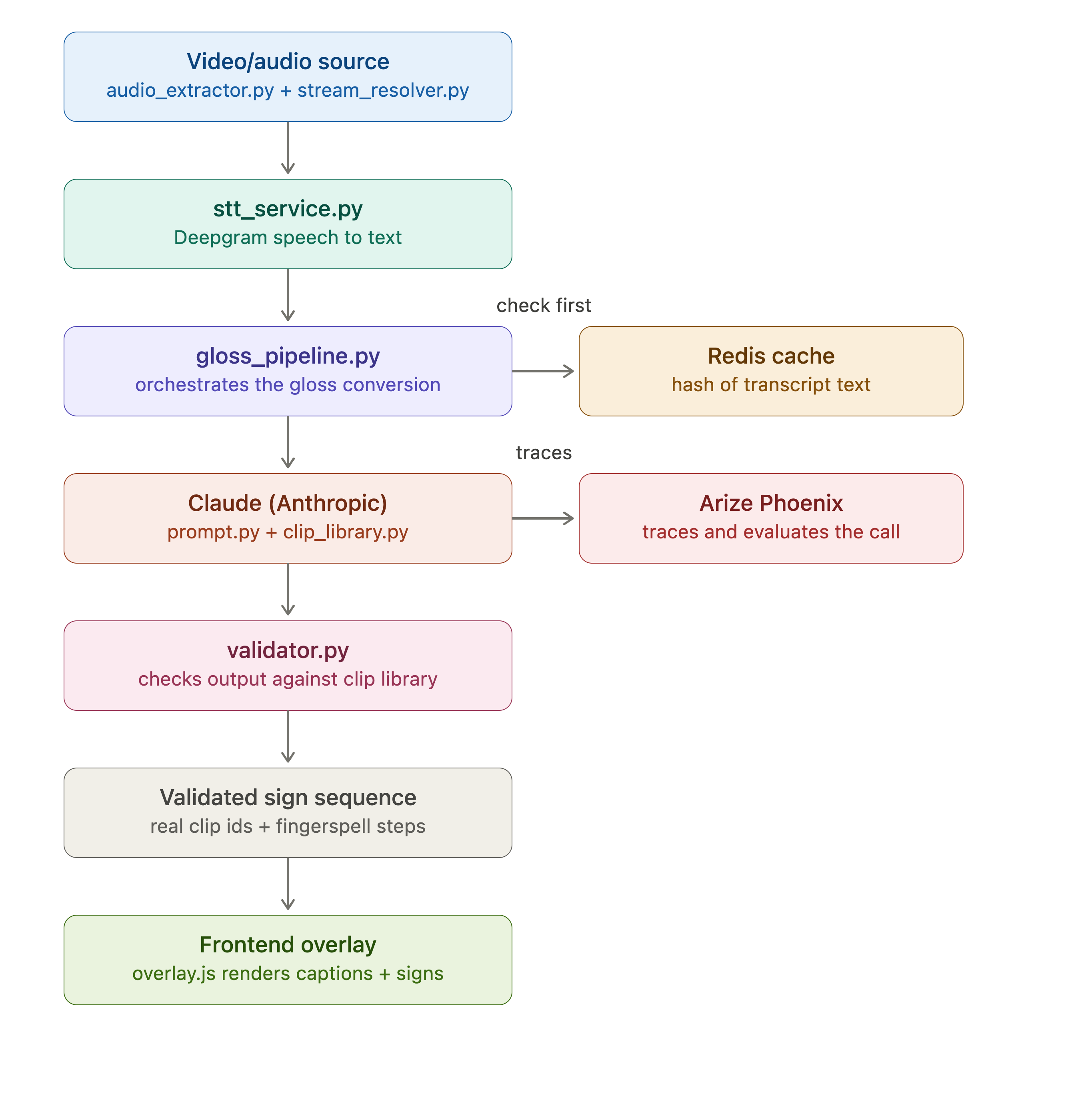
Files
audio_extractor.py— pulls audio from any source (local file, HLS, RTMP, HTTP stream), decodes to real-time 16kHz mono PCM, emits bytes viaon_audio. Used whenstt_service.pyis given a file/URL directly.stream_resolver.py— resolves YouTube / yt-dlp-supported URLs into something ffmpeg can consume.download=Truedownloads first to avoid truncating the first few words.stt_service.py— feeds PCM bytes to Deepgram (fromaudio_extractoror, with--from-browser, from live browser tab audio viapipeline_server), buffers fragments into complete utterances (onspeech_final), sends each togloss_pipeline, and broadcasts the result over WebSocket.prompt.py— builds the Claude system prompt. Claude freely picks the simplest common English word per concept; no fixed vocabulary list.validator.py— validates the shape of Claude's JSON output (well-formed steps), not vocabulary membership.gloss_pipeline.py— calls Claude to convert a transcript string into sign/fingerspell steps, then checks each "sign" step againstwlasl_lookupand demotes unmatched ones to fingerspelling.wlasl_lookup.py— looks up a gloss word directly against a local WLASL dataset (WLASL_v0.3.json+videos/) on every call. No pre-curation step.pipeline_server.py— FastAPI/WebSocket bridge. Serves WLASL clips over HTTP at/clips/<id>.mp4, broadcasts{clipUrl, gloss, caption, ts, lang}events per word tofrontend/over/ws, and (in--from-browsermode) receives live PCM fromfrontend/audio-capture.jsover/audio-in.frontend/— the browser overlay (see its own section below) that actually displays the sign clips, draggable/resizable on top of the YouTube player.sign_window.py— standalone native OpenCV window for local testing/debugging without a browser (python sign_window.py "GOAL TEAM"or--file glosses.txt). Not used by the livestt_service.pypipeline anymore — the browser overlay is the real output now.glosses.txt— a sample word list for testingsign_window.py --file glosses.txtdirectly.
Setup
-
Install dependencies:
pip install -r requirements.txt -
Set API keys in
.env:DEEPGRAM_API_KEY=... ANTHROPIC_API_KEY=... -
Point
wlasl_lookup.pyat your local WLASL dataset (defaults toC:\Users\hp\Downloads\wlasl-processed, override with theWLASL_DIRenv var):WLASL_DIR=/path/to/wlasl-processed -
Run it directly on a file/URL (prints transcripts/gloss; nothing to watch unless you also open
frontend/):python stt_service.py <file-or-stream-url> python stt_service.py "https://www.youtube.com/watch?v=VIDEO_ID" --duration 20 --downloadOr run it against live browser audio (the real demo path — see "Frontend overlay" below):
python stt_service.py --from-browser --duration 60 -
Open the overlay (separate terminal):
cd frontend && python -m http.server 5500Go to
http://localhost:5500, load any YouTube video via the picker, click Start audio capture, and pick "This Tab" + check "Share tab audio" in the browser's permission dialog. The overlay plays signs live, matching whatever's actually playing in that tab.
Next steps
- Pass rolling context (previous utterance) into
gloss_pipeline.process_transcript(context=...)for better continuity across sentences. - Add a real fingerspelling clip set (currently fingerspell steps just show a text placeholder, no per-letter clips).
SignCast · Sign-Language Accessibility (team scope)
Three pieces toward the team's goal — a sign-language layer that live-translates match commentary for Deaf and hard-of-hearing fans.
| Piece | Folder | What it does |
|---|---|---|
| Validation agent | validation/ | Auto-generates test commentary for 5 sign languages, runs the translator, grades each output on 5 metrics with Claude-as-judge, writes a report. |
| Frontend overlay | frontend/ | Web app embedding a YouTube live with a translucent, draggable, resizable sign-language video overlay you can place in any corner; switch among ASL/BSL/LSF/CSL/JSL. |
| Real pipeline | stt_service.py + pipeline_server.py | The working backend — Deepgram → Claude gloss → WLASL clips, broadcast to the overlay over WebSocket. Replaces the old mock pipeline entirely (ASL only for now; BSL/LSF/CSL/JSL in the dropdown are unimplemented). |
Sign languages: ASL, BSL, LSF (French), CSL (Chinese), JSL (Japanese).
1. Validation agent
cd validation
pip install -r requirements.txt
export ANTHROPIC_API_KEY=sk-...
# optional: export ANTHROPIC_MODEL=claude-sonnet-4-5
python agent.py            # 1 test case per scenario per language
python agent.py --per 2    # more cases
Output: validation/reports/validation_report.md — a table of 5 languages × 5 metrics
(grammatical accuracy, semantic accuracy, completeness, gloss validity, real-time fluency),
overall scores, and the weakest cases flagged.
Pipeline: testgen.py (writes cases) → translator.py (the system under test:
English → SL gloss) → judge.py (Claude-as-judge, 1–5 per metric) → report.py.
Optional live dashboard: observability.py adds an Arize Phoenix tracing layer
on top — no-op unless USE_PHOENIX=1 is set, so python agent.py behaves identically
with or without it. See validation/PHOENIX_SETUP.md for setup; the short version:
export USE_PHOENIX=1
python agent.py --per 2
prints a Phoenix UI URL (default http://localhost:6006) showing every traced
translate→judge span with its 5 scores, sortable worst-first.
2. Frontend overlay
cd frontend
python -m http.server 5500
# open http://localhost:5500
- Change the match: set
window.YT_VIDEO_ID(inyoutube.js) to any YouTube video/live id. - Point at a different pipeline: set
window.PIPELINE_WS(defaultws://localhost:8000/ws). - Drag the overlay by its header, resize from the bottom-right handle, place it in any corner with the corner picker, switch sign language with the dropdown.
3. Real pipeline (replaces the old mock)
python stt_service.py --from-browser
Starts pipeline_server.py automatically (no separate process needed). Emits one
clip event per gloss word:
{ "clipUrl": "http://localhost:8000/clips/24872.mp4", "gloss": "GOAL", "caption": "the team scored a goal", "ts": 0, "lang": "ASL" }
Demo
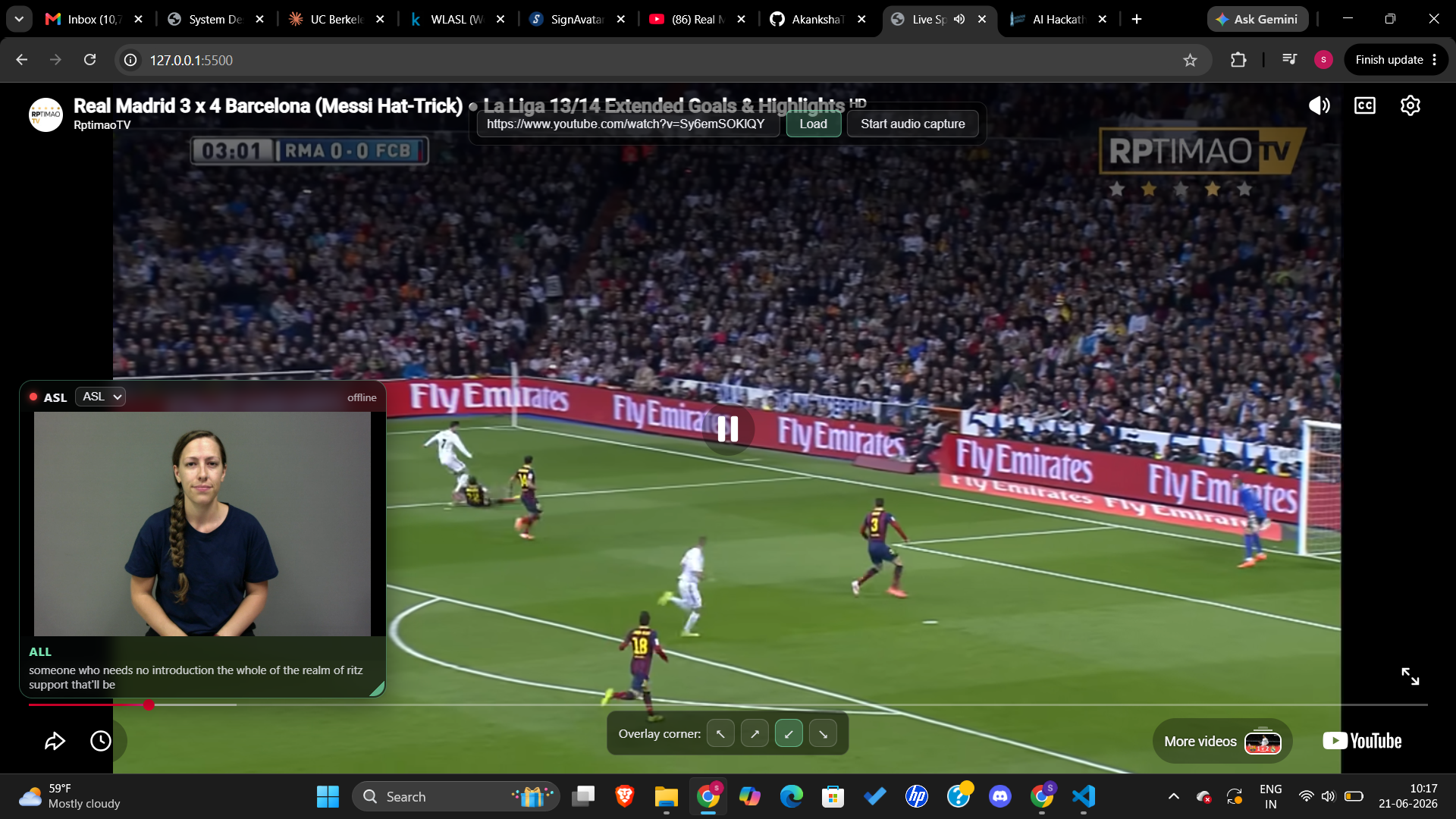
A screenshot of the system
Youtube Demo Link: Demo Link
Quick full-demo run order
- Terminal A:
python stt_service.py --from-browser(waits for browser audio; startspipeline_serveron port 8000) - Terminal B:
cd frontend && python -m http.server 5500 - Browser:
http://localhost:5500→ load a video, click Start audio capture, share the tab's audio → live signing overlay. - (Separately)
cd validation && python agent.py→ show the quality report.
Notes / known gaps
- Only ASL is implemented (via the WLASL dataset) — BSL/LSF/CSL/JSL exist in the language dropdown but have no backing clips or translation yet.
gloss_pipeline.pypicks plain English words and verifies them live against the local WLASL clip set — no pre-built clip library or Midjourney/Redis step.
Analysis
View
Metric
- 9
- 2


Figures cover GitHub contributors during the hackathon window. A co-authored commit counts in full for each author, so per-member totals add up to more than the whole-team figures.
Technology
- AnthropicIn code
- CSSIn code
- FastAPIIn code
- HTMLIn code
- JavaScriptIn code
- PythonIn code
- RedisClaimed
6 of 7 appear in the indexed code. 1 claimed on Devpost could not be matched to code, which may simply mean the tool leaves no trace in the repository.
AI coding agents
No AI coding agent signals were found in this repository.
Detected from committed agent config files and commit authorship. Absence of a signal is not proof an agent was unused.
Codebase size
Source size
86 KB
Source files
27
Counts recognized source files only; vendored directories, binaries and lockfiles are excluded, so this is smaller than the repository on disk.
Repository
AkankshaThalla-24/CalHacks26
33 files · 2.3 MB · @ 901842a
Structure
Interface
2 files · 6%Screens, components and styles rendered to the user.
Application logic
22 files · 67%Domain rules, services and shared utilities.
Supporting
Layers are inferred from where files sit in the tree, not from reading the code. A project that names its directories unconventionally will read oddly here — open the file browser to check anything the diagram implies.
Languages
- Python62%
- JavaScript17%
- Markdown14%
- CSS5%
- HTML2%
Share of indexed source by file size. Binary and vendored files are excluded.
Dependencies
requirements.txt
pypi · 12- anthropic
- arize-phoenix
- arize-phoenix-otel
- deepgram-sdk
- fastapi
- numpy
- opencv-python
- openinference-instrumentation-anthropic
- pandas
- python-dotenv
- uvicorn[standard]
- yt-dlp
validation/requirements.txt
pypi · 3- anthropic
- jinja2
- python-dotenv
Declared in the repository’s manifests at the indexed commit. A declared package is not proof it is used, and runtime dependencies are listed first.
This project’s features have not been analysed yet.
Export this project's context (description, README, evidence, key source files) to chat with an AI agent elsewhere.