Project Info
Inspiration
We love using Claude Code as our go-to coding agent for building software, and we wanted to keep using the agent we love when building and debugging our hardware projects too. The problem: Claude Code lives in our IDE and terminal, with no idea what's happening on the breadboard and microcontroller in front of us. So we built PinPal, an MCP server that gives your Claude Code instance real context about your circuits: how components are wired together, which GPIO pins they connect to, and even the code running on the microcontrollers inside the circuit.
What it does
PinPal bridges your coding agent and the physical world. Once connected, Claude Code can "see" your circuit, understand its wiring as a netlist, read the firmware running on it, and reason about it, so you can debug real hardware the same way you'd debug code, all from your terminal.
How we built it
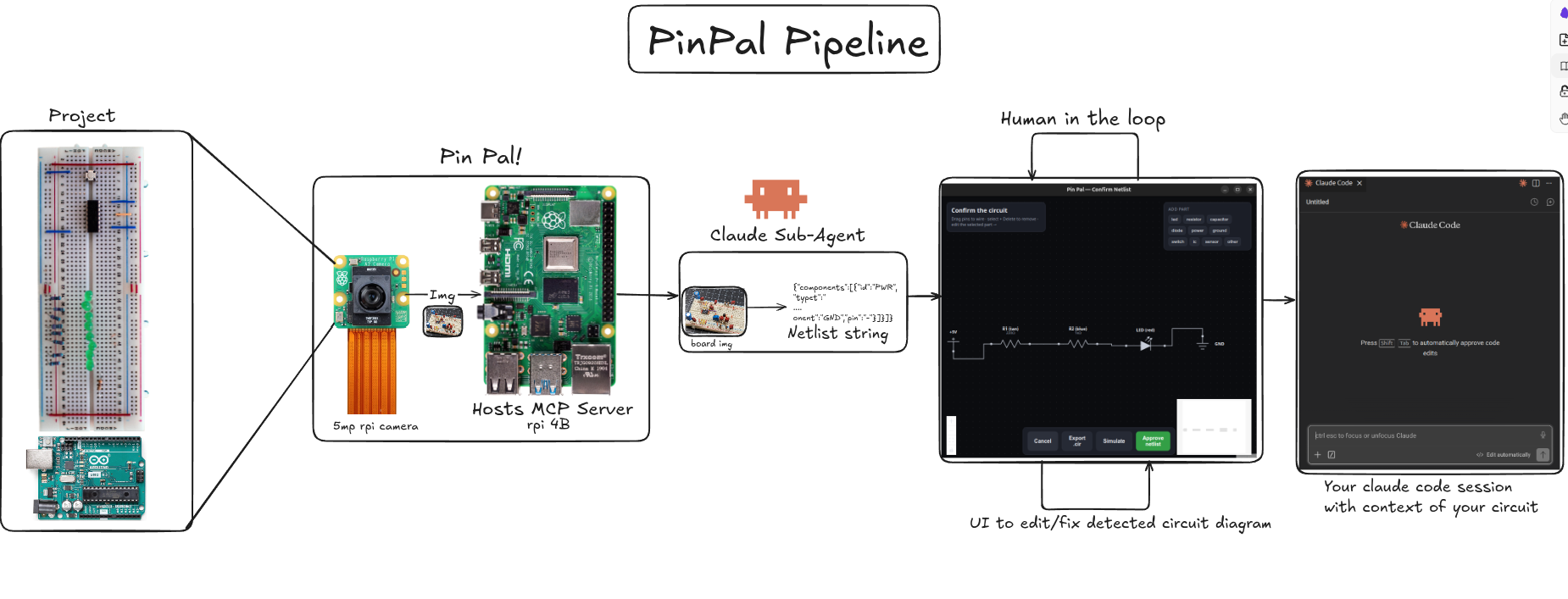
We set up a persistent MCP server running on a Raspberry Pi 4B. Your Claude Code instance connects to it over a Tailscale SSH tunnel, so the link is secure and works from anywhere. A Pi Camera is pointed at your circuit and snaps a picture whenever Claude Code asks for context. That image is streamed over the SSH tunnel to a Claude Code subagent, which runs computer vision on it to extract the circuit's netlist, essentially recovering the schematic of components and connections from the photo. Because computer vision is never perfect, we kept a human in the loop. Before the netlist ever enters your context window, a UI renders so you can fix any mistakes the CV made and confirm the circuit is correct, guarding against errors even if the model powering the agent hallucinates. From there, you can run simulations with ngspice or let Claude Code troubleshoot directly with the new context in hand.
Challenges we ran into
Designing the system end-to-end and getting the processing pipeline (camera → CV → netlist → context) to flow cleanly. Designing the human-in-the-loop so it caught CV and hallucination errors without getting in the user's way. Cracking the SD card that stored the Pi OS and all of our code, right before submission, while we were mounting everything into our 3D-printed case.
Accomplishments we're proud of
We got a full end-to-end pipeline working: a real photo of a real breadboard becomes a verified netlist inside Claude Code, ready to simulate. We're especially proud of the human-in-the-loop correction step that keeps the agent honest, and of recovering from a cracked SD card with the clock running.
What we learned
Hardware is messy, and that's exactly why an imperfect CV pipeline needs a human checkpoint rather than blind trust. We also learned how powerful MCP is as a layer for connecting agents to the physical world, and that the last 10% of a hardware demo (mounting, casing, cabling) can break you faster than the code ever will.
What's next
We want to support more microcontrollers and richer firmware introspection, improve the CV so the netlist needs less correction, and let Claude Code close the loop, proposing fixes and re-checking the circuit automatically after each change.
Pin Pal
A Raspberry Pi that clips onto a breadboard and gives Claude Code real hardware senses — I2C, GPIO, serial, and a camera — plus the ability to flash firmware and run code on a target board. You talk to Claude Code on your own laptop; it calls out to the Pi to look at and act on whatever's wired up.
This doc is the practical "how do I actually use this" guide. For the full design rationale
(why vision is never trusted alone, the netlist pipeline, etc.) see app/PIN_PAL.md.
What works right now
- The Pi (hostname
pinpal, reachable aspinpal.local) runs all 6 tools:scan_i2c,read_gpio,read_serial,capture_image,flash_firmware,deploy_run. Once its owner has run./pi/provision.shonce, the dependencies are installed and the venv auto-activates on login — start the server by hand withpython pi/server.py. - The camera works and is verified.
- No target board or sensor is wired up by default. Until you connect one,
scan_i2cwill report an empty bus andread_serial/flash_firmwarehave nothing to talk to — that's expected, not broken.capture_imageand basic GPIO reads still work with no target attached. flash_firmware's toolchains (arduino-cli,esptool,mpremote) aren't installed on the Pi yet — that happens whenever someone first needs to flash an actual board.- The netlist/web-verification UI (a teammate's separate companion service) is not
merged into
mainyet and isn't part of this flow.
Pi owner: one-time setup
If you're the one who owns the Pi, run this once on the Pi to set up its dependencies:
./pi/provision.sh
It installs system deps, enables I2C, sets the hostname to pinpal (so it advertises
pinpal.local), builds a --system-site-packages venv, and auto-activates that venv on login —
after which you can start the probe server by hand with python pi/server.py (no venv to
reactivate). Everyone else skips this and goes straight to step 1.
1. Connect Claude Code to the Pi
You need: this repo cloned, git/ssh available, and Claude Code installed.
./scripts/pinpal_connect.sh
First time only: this will fail and print a public key line. Send that line to whoever manages the Pi. On their own laptop (not on the Pi itself — the script SSHs into the Pi remotely, it doesn't run there), they run:
./scripts/pinpal_authorize.sh "<the line you were sent>"
Then re-run ./scripts/pinpal_connect.sh yourself. It should now succeed: it opens a
self-healing SSH tunnel (auto-reconnects if it drops) and registers the Pi with Claude Code
automatically. You won't need to repeat this step again on this machine.
The script finds the Pi at pinpal.local over mDNS — no IP to configure. On Linux that needs
avahi-daemon/libnss-mdns installed (macOS has it built in); if mDNS isn't available, pass the
Pi's IP directly: PINPAL_HOST=<pi-ip> ./scripts/pinpal_connect.sh.
Connection is always over the SSH tunnel — never a direct LAN/HTTP connection to the Pi.
The tunnel forwards a local port to the Pi's :8000, so Claude Code talks to localhost
and SSH carries the traffic (works across networks, encrypted, and survives WiFi drops).
2. Start a fresh Claude Code session
MCP connections are only picked up when a session starts — if you had Claude Code open before running the connect script, close it and start a new session now.
Verify it worked:
claude mcp list
You should see pin-pal ... ✔ Connected.
3. Try it
Just talk to Claude Code in plain English — it decides which tool to call.
- "Take a picture of the breadboard" → calls
capture_image, returns a real photo from the Pi's camera. - "Is anything on the I2C bus?" → calls
scan_i2c. With nothing wired up, expect an empty list — that's correct, not an error. - "Read GPIO pin 17" → calls
read_gpio, reports HIGH/LOW. - "My sensor isn't reading anything" (once you have one wired up) → Claude scans the bus, checks the relevant pins, looks at a photo, and gives you a single diagnosis instead of just one tool's output.
- "Flash this code to the Arduino and check the serial output" (once a board is plugged in via USB) → drives the full write-then-observe loop.
Known rough edges right now
- This session's tools won't reach the Pi until you've completed step 1 and started a fresh session (step 2) — reusing an old session is the most common reason "nothing happens."
- Captured images are never saved anywhere — each
capture_imagecall returns the photo directly into that one conversation and nothing is persisted on the Pi or in this repo. - No vision-reliability calibration ("vision spike") has been done yet, so there's no
documented answer yet for how much to trust the camera on a dense/cluttered board —
always treat a visual claim as a guess until
scan_i2c/read_gpioconfirms it.
Analysis
View
Metric
- 18
- 8
- 5


Figures cover GitHub contributors during the hackathon window. A co-authored commit counts in full for each author, so per-member totals add up to more than the whole-team figures.
Technology
- CSSIn code
- HTMLIn code
- PythonIn code
- ReactIn code
- TypeScriptIn code
5 of 5 appear in the indexed code.
AI coding agents
- Claude CodeConfig · Commits
Detected from committed agent config files and commit authorship. Absence of a signal is not proof an agent was unused.
Codebase size
Source size
127 KB
Source files
32
Counts recognized source files only; vendored directories, binaries and lockfiles are excluded, so this is smaller than the repository on disk.
Repository
Cedroz/PinPal
43 files · 197 KB · @ b5a9d61
Structure
Interface
19 files · 44%Screens, components and styles rendered to the user.
Application logic
8 files · 19%Domain rules, services and shared utilities.
Supporting
Layers are inferred from where files sit in the tree, not from reading the code. A project that names its directories unconventionally will read oddly here — open the file browser to check anything the diagram implies.
Languages
- Python29%
- Markdown27%
- Shell22%
- TypeScript18%
- CSS3%
- HTML0%
Share of indexed source by file size. Binary and vendored files are excluded.
Dependencies
requirements.txt
pypi · 11- esptool
- gpiozero
- lgpio
- mcp[cli]
- mpremote
- opencv-python
- pillow
- pyserial
- python-dotenv
- smbus2
- st7789
app/web/package.json
npm · 9- @dagrejs/dagre
- @xyflow/react
- react
- react-dom
- +5 more
app/requirements.txt
pypi · 4- mcp[cli]
- PySide6
- pywebview
- qtpy
Declared in the repository’s manifests at the indexed commit. A declared package is not proof it is used, and runtime dependencies are listed first.
Export this project's context (description, README, evidence, key source files) to chat with an AI agent elsewhere.