# Project export: Superspace
This document was generated by HackStack to give an AI agent context about a hackathon project. Sections are labeled with their provenance; content marked as truncated was cut to keep this document small.
## Project metadata
- Hackathon: TreeHacks 2026
- Tagline: Remodel your room using a 3D replica! Add anything you want to the place you love.
- Devpost: https://devpost.com/software/superspace-3wkvde
- GitHub: https://github.com/Dude346/The_Ultimate_FloorPlan
- Video: https://www.youtube.com/embed/1rtGnGzZgrw?enablejsapi=1&hl=en_US&rel=0&start=&version=3&wmode=transparent
- Team: 2 GitHub contributor(s) — Ash (12 commits), Bhushan Mohanraj (10 commits)
## Devpost submission (written by the team)
### Inspiration
As kids, our rooms have never just felt perfect. We take every opportunity to remodel our room, striving to make it that much better. This extends to adulthood, where people spend so much time picking furniture and decorations. This process is often time-consuming and labor-intensive, as it requires actually moving around heavy furniture and even returning new items. We decided to build SuperSpace, a way of being able to visualize your room online and quickly edit it to finally get the perfect room you always wanted!
### What it does
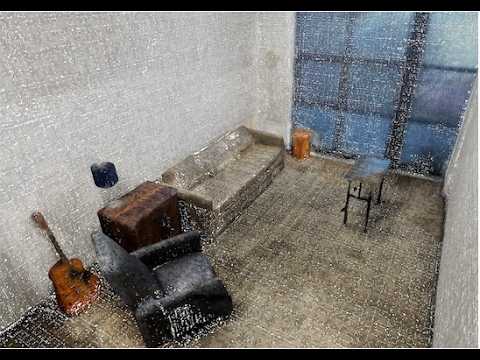
The process begins with taking a full scan of a room. iOS apps (as iPhones often have Lidar sensors) can instruct users on taking scans and guide them through scanning all parts of a room. The 3D files from an app can be uploaded to the Superspace platform, where users can explore a virtual version of the room, add new objects generated from text descriptions, and experiment with moving existing items around.
### How we built it
We use a Three.js-based frontend to render PLY files, with keyboard controls designed to emulate games like Minecraft. The segmentation of those 3D objects is done by a custom, heuristic-based Python algorithm to separate objects from floors, walls, and ceilings. The generation of new 3D objects is done by ML models deployed to Modal, and the frontend directly loads PLY files generated by the backend.
### Challenges we ran into
Many of the technical components of our project were difficult to iron out: we experimented with designing our own 3D mesh generation from video files, tried multiple formats for storing and modifying 3D objects (such as Gaussian splats and point clouds), and focused on the speed of various components to support a user-facing app.
### Accomplishments we're proud of
Learning so much about 3D object representations and the computational and ML techniques to visualize and modify them. Creating a user friendly and fun app with a technical focus but also an intuitive interface
## README (from the GitHub repository)
# SuperSpace
### The Ultimate Floor Plan BOOM TreeHacks 2026
Youtube Demo: https://youtu.be/1rtGnGzZgrw
## Setup
```bash
uv venv
source .venv/bin/activate
uv sync
```
Connect Modal and create the shared volume once:
```bash
modal token new
modal volume create floorplan-volume
```
## Generate 3D assets
Shap-E:
```bash
uv run modal run scripts/generate_3d_asset/modal_shape_e_generate.py \
--prompt "Green Office Chair" \
--guidance-scale 18 \
--karras-steps 96 \
--output-path "generated_assets/green_office_chair.ply"
```
Point-E:
```bash
uv run modal run scripts/generate_3d_asset/modal_point_e_generate.py \
--prompt "Green Office Chair" \
--karras-steps 96 \
--grid-size 96 \
--output-path "generated_assets/green_office_chair_point_e.ply"
```
## Generate and place asset into a scene
One command (generate with Shap-E + place in scene):
```bash
uv run python scripts/generate_and_place_shap_e_asset.py \
examples/Bathroom_Mesh.ply \
"Green Office Chair" \
--output examples/Bathroom_With_Green_Office_Chair.ply
```
Higher quality generation:
```bash
uv run python scripts/generate_and_place_shap_e_asset.py \
examples/Bathroom_Mesh.ply \
"Green Office Chair" \
--guidance-scale 20 \
--karras-steps 128 \
--output examples/Bathroom_With_Green_Office_Chair_hq.ply
```
Optional placement tuning:
```bash
uv run python scripts/generate_and_place_shap_e_asset.py \
examples/Bathroom_Mesh.ply \
"Green Office Chair" \
--target-footprint-ratio 0.08 \
--offset-x 0.1 \
--offset-z -0.1 \
--y-lift 0.0 \
--output examples/Bathroom_With_Green_Office_Chair_tuned.ply
```
If you already have an asset PLY and only want placement:
```bash
uv run python scripts/place_asset_in_scene.py \
examples/Bathroom_Mesh.ply \
generated_assets/green_office_chair.ply \
--output examples/Bathroom_With_Green_Office_Chair.ply
```
## Render and interact with the world
Start the viewer:
```bash
cd viewer
npm install
npm run dev:world -- --file ../examples/Bathroom_With_Green_Office_Chair.ply
```
Render other files the same way:
```bash
npm run dev:world -- --file ../examples/Bathroom_Mesh.ply
npm run dev:world -- --file ../examples/Living_Room_Mesh.glb
```
Viewer controls:
- Click `Click to enter`: pointer lock + FPS mode.
- `W/A/S/D`: move
- `E` / `C`: up / down
- `Shift`: sprint
- `F`: pick up asset at screen center
- `G`: place held asset in free 3D space (in front of camera)
- `+`: open scale dialog for held asset
- Scaling now accepts decimals (for example, `0.5` scales to half size).
- Scale dialog: enter a positive multiplier (`0.5` = half size, `2` = 2x), then `Enter`/`Apply`
- Scale dialog: `Esc`/`Cancel` closes without changing scale
- `Esc`: unlock cursor
- Top-right gizmo: world `X/Y/Z` + plane orientation (`XY/XZ/YZ`)
## New backend (`backend/`)
Simple FastAPI service that wraps the existing Modal Shap-E generator script:
- `POST /generate-ply` with JSON body:
- `prompt` (string, required)
- `guidance_scale` (float, optional, default `18`)
- `karras_steps` (int, optional, default `96`)
- `GET /health`
Run locally:
```bash
cd backend
uv pip install -r requirements.txt
uvicorn app:app --reload --port 8000
```
Deploy on Modal:
```bash
cd backend
modal serve modal_app.py
```
## New frontend (`frontend/`)
Vite web app that reuses the existing `viewer/main.js` engine and adds:
- startup-style side panel UI
- local browser persistence of uploaded room `.ply` files (IndexedDB)
- prompt input that calls backend `POST /generate-ply`
- generated mesh insertion into the live viewer as movable assets
Run:
```bash
cd frontend
npm install
npm run dev
```
## Detected evidence (automated analysis)
Indexed codebase: 23 recognized source files, 133 KB.
- CSS (language) — detected in the code
- FastAPI (technology) — detected in the code
- HTML (language) — detected in the code
- JavaScript (language) — detected in the code
- Python (language) — detected in the code
## Codebase structure (from repository index)
### Files (39 of 39)
```
.gitignore
.python-version
backend/app.py
backend/modal_app.py
backend/requirements.txt
examples/splat.ply
frontend/index.html
frontend/package.json
frontend/src/main.js
frontend/src/styles.css
frontend/vite.config.js
pyproject.toml
README.md
scripts/generate_3d_asset/modal_point_e_generate.py
scripts/generate_3d_asset/modal_shape_e_generate.py
scripts/generate_and_place_shap_e_asset.py
scripts/place_asset_in_scene.py
scripts/video_to_frames.py
src/buildInDocker.sh
src/Dockerfile.openmvs
src/Dockerfile.openmvs.cdcseacave
src/floorplan/__init__.py
src/floorplan/__main__.py
src/floorplan/base.py
src/floorplan/nerfstudio.py
src/floorplan/upload.py
uv.lock
viewer/index_glb.html
viewer/index.html
viewer/main_glb.js
viewer/main.js
viewer/package.json
viewer/public/.gitkeep
viewer/public/model.glb
viewer/public/model.ply
viewer/run-with-glb.mjs
viewer/run-with-ply.mjs
viewer/run-world.mjs
viewer/styles.css
```
### Dependencies
- backend/requirements.txt: fastapi@>=0.116.0, modal@>=1.3.3, pydantic@>=2.11.0, uvicorn@>=0.35.0
- frontend/package.json: three@^0.165.0, vite@^5.4.10
- pyproject.toml: modal@>=1.3.3, open3d@>=0.19.0, opencv-python@>=4.13.0.92
- viewer/package.json: three@^0.165.0, vite@^5.4.10
### Recent commits (newest first)
- Change video link format in README.md
- Add video thumbnail link to README
- Add project title and YouTube demo link to README
- Revise project title and include demo link
- Added Dark Mode
- Fix command to install Python dependencies
- Update viewer.
- Add app.
- Merge branch 'main' of https://github.com/Dude346/The_Ultimate_FloorPlan
- Added scaling down
- Merge branch 'main' of https://github.com/Dude346/The_Ultimate_FloorPlan
- Added Scaling
- Update project title in README.md
- Created Render and Moving Assets
- Merge branch 'main' of https://github.com/Dude346/The_Ultimate_FloorPlan
- Add Render Viewing Code
- Continue improving OpenMVS Dockerfile to address errors.
- Add `universe` for Boost.
- Merge branch 'main' of https://github.com/Dude346/The_Ultimate_FloorPlan
- Fix Boost installation for modern Ubuntu.
## Key source files (fetched from GitHub, selected and truncated for size)
### pyproject.toml
```
[project]
name = "floorplan"
version = "0.1.0"
description = "Add your description here"
readme = "README.md"
authors = [
{ name = "Bhushan Mohanraj", email = "50306448+bhushan-mohanraj@users.noreply.github.com" }
]
requires-python = ">=3.12"
dependencies = [
"modal>=1.3.3",
"open3d>=0.19.0",
"opencv-python>=4.13.0.92",
]
[project.scripts]
floorplan = "floorplan:main"
[build-system]
requires = ["hatchling"]
build-backend = "hatchling.build"
[dependency-groups]
dev = [
"ruff>=0.15.1",
]
backend = [
"fastapi>=0.116.0",
"python-multipart>=0.0.20",
"trimesh>=4.7.0",
"uvicorn[standard]>=0.35.0",
]
```
### backend/requirements.txt
```
fastapi>=0.116.0
modal>=1.3.3
pydantic>=2.11.0
uvicorn>=0.35.0
```
### frontend/package.json
```
{
"name": "floorplan-frontend",
"private": true,
"version": "0.1.0",
"type": "module",
"scripts": {
"dev": "vite",
"build": "vite build",
"preview": "vite preview"
},
"dependencies": {
"three": "^0.165.0"
},
"devDependencies": {
"vite": "^5.4.10"
}
}
```
### viewer/package.json
```
{
"name": "mesh-ply-viewer",
"private": true,
"version": "0.1.0",
"type": "module",
"scripts": {
"dev": "vite",
"dev:ply": "node ./run-with-ply.mjs",
"dev:glb": "node ./run-with-glb.mjs",
"dev:fbx": "node ./run-with-fbx.mjs",
"dev:world": "node ./run-world.mjs",
"build": "vite build",
"preview": "vite preview"
},
"dependencies": {
"three": "^0.165.0"
},
"devDependencies": {
"vite": "^5.4.10"
}
}
```
### backend/app.py
```python
from __future__ import annotations
import re
import subprocess
import tempfile
from pathlib import Path
from fastapi import FastAPI, HTTPException
from fastapi.middleware.cors import CORSMiddleware
from fastapi.responses import Response
from pydantic import BaseModel, Field
def _slugify(text: str) -> str:
slug = re.sub(r"[^a-zA-Z0-9]+", "_", text.strip().lower()).strip("_")
return slug or "asset"
class GenerateRequest(BaseModel):
prompt: str = Field(min_length=1)
guidance_scale: float = 18.0
karras_steps: int = 96
app = FastAPI(title="Floorplan Mesh API", version="0.1.0")
app.add_middleware(
CORSMiddleware,
allow_origins=["*"],
allow_credentials=True,
allow_methods=["*"],
allow_headers=["*"],
)
REPO_ROOT = Path(__file__).resolve().parents[1]
SCRIPT_PATH = REPO_ROOT / "scripts" / "generate_3d_asset" / "modal_shape_e_generate.py"
@app.get("/health")
def health() -> dict[str, str]:
return {"status": "ok"}
@app.post("/generate-ply")
def generate_ply(payload: GenerateRequest) -> Response:
if not SCRIPT_PATH.exists():
raise HTTPException(status_code=500, detail=f"Script not found: {SCRIPT_PATH}")
slug = _slugify(payload.prompt)
with tempfile.TemporaryDirectory(prefix="mesh_gen_") as tmp_dir:
output_path = Path(tmp_dir) / f"{slug}.ply"
cmd = [
"uv",
"run",
"modal",
"run",
str(SCRIPT_PATH),
"--prompt",
payload.prompt,
"--output-path",
str(output_path),
"--guidance-scale",
str(payload.guidance_scale),
"--karras-steps",
str(payload.karras_steps),
]
try:
subprocess.run(cmd, check=True, cwd=str(REPO_ROOT))
except subprocess.CalledProcessError as exc:
raise HTTPException(status_code=500, detail=f"Modal generation failed: {exc}") from exc
if not output_path.exists():
raise HTTPException(status_code=500, detail="Modal run completed but no PLY was produced.")
data = output_path.read_bytes()
return Response(
content=data,
media_type="application/octet-stream",
headers={"Content-Disposition": f'attachment; filename="{slug}.ply"'},
)
```
### frontend/src/main.js
```javascript
import "../../viewer/styles.css";
import "./styles.css";
import "../../viewer/main.js";
const DB_NAME = "floorplan-local-scenes";
const DB_VERSION = 1;
const STORE_NAME = "scenes";
const apiBaseInput = document.getElementById("apiBase");
const appShell = document.querySelector(".app-shell");
const busyOverlay = document.getElementById("busyOverlay");
const busyText = document.getElementById("busyText");
const controlPanel = document.getElementById("controlPanel");
const sidebarToggleButton = document.getElementById("sidebarToggleButton");
const themeToggleButton = document.getElementById("themeToggleButton");
const sidebarScrim = document.getElementById("sidebarScrim");
const sceneUploadInput = document.getElementById("sceneUploadInput");
const savedScenesSelect = document.getElementById("savedScenesSelect");
const loadSavedSceneButton = document.getElementById("loadSavedSceneButton");
const promptInput = document.getElementById("promptInput");
const generateAssetButton = document.getElementById("generateAssetButton");
const frontendStatus = document.getElementById("frontendStatus");
let busyCount = 0;
let pendingUploadedFile = null;
const loadButtonDefaultText = loadSavedSceneButton?.textContent || "Load";
const THEME_STORAGE_KEY = "floorplan-theme";
function applyTheme(theme) {
const normalized = theme === "light" ? "light" : "dark";
document.documentElement.setAttribute("data-theme", normalized);
if (themeToggleButton) {
themeToggleButton.textContent = normalized === "dark" ? "Light mode" : "Dark mode";
}
}
function toggleTheme() {
const current = document.documentElement.getAttribute("data-theme") === "light" ? "light" : "dark";
const next = current === "dark" ? "light" : "dark";
applyTheme(next);
try {
localStorage.setItem(THEME_STORAGE_KEY, next);
} catch {
// Ignore storage failures.
}
}
function lockViewerPointer() {
if (document.pointerLockElement) return;
document.body.requestPointerLock?.();
}
function setSidebarOpen(open, { relockViewer = true } = {}) {
if (!appShell || !controlPanel) return;
appShell.classList.toggle("sidebar-open", open);
controlPanel.classList.toggle("is-open", open);
if (open && document.pointerLockElement) {
document.exitPointerLock();
} else if (!open && relockViewer) {
lockViewerPointer();
}
}
function isTypingInField() {
const active = document.activeElement;
if (!active) return false;
const tag = active.tagName;
return tag === "INPUT" || tag === "TEXTAREA" || tag === "SELECT" || active.isContentEditable;
}
function setFrontendStatus(text) {
frontendStatus.textContent = text;
}
function setBusy(message, isBusy) {
if (!busyOverlay) return;
if (isBusy) {
busyCount += 1;
if (busyText && message) busyText.textContent = message;
busyOverlay.classList.remove("hidden");
return;
}
busyCount = Math.max(0, busyCount - 1);
if (busyCount === 0) {
busyOverlay.classList.add("hidden");
}
}
async function withBusy(message, run) {
setBusy(message, true);
await new Promise((resolve) => requestAnimationFrame(resolve));
try {
return await run();
} finally {
setBusy("", false);
}
}
function openDb() {
return new Promise((resolve, reject) => {
const request = indexedDB.open(DB_NAME, DB_VERSION);
request.onupgradeneeded = () => {
const db = request.result;
if (!db.objectStoreNames.contains(STORE_NAME)) {
db.createObjectStore(STORE_NAME, { keyPath: "id" });
}
};
request.onsuccess = () => resolve(request.result);
request.onerror = () => reject(request.error);
});
}
async function listScenes() {
const db = await openDb();
return new Promise((resolve, reject) => {
const tx = db.transaction(STORE_NAME, "readonly");
const store = tx.objectStore(STORE_NAME);
const request = store.getAll();
request.onsuccess = () => {
const scenes = (request.result || []).sort((a, b) => b.updatedAt - a.updatedAt);
resolve(scenes);
};
request.onerror = () => reject(request.error);
});
}
async function saveSceneFile(file) {
const id = `${Date.now()}-${file.name}`;
const bytes = await file.arrayBuffer();
const payload = {
id,
name: file.name,
bytes,
updatedAt: Date.now(),
};
const db = await openDb();
return new Promise((resolve, reject) => {
const tx = db.transaction(STORE_NAME, "readwrite");
tx.objectStore(STORE_NAME).put(payload);
tx.oncomplete = () => resolve(payload);
tx.onerror = () => reject(tx.error);
});
}
async function getSceneById(id) {
const db = await openDb();
return new Promise((resolve, reject) => {
const tx = db.transaction(STORE_NAME, "readonly");
const request = tx.objectStore(STORE_NAME).get(id);
request.onsuccess = () => resolve(request.result || null);
request.onerror = () => reject(request.error);
});
}
async function refreshSavedSceneList() {
const scenes = await listScenes();
savedScenesSelect.innerHTML = "";
const truncate = (value, max = 28) => (value.length > max ? `${value.slice(0, max - 1)}...` : value);
for (const scene of scenes) {
const option = document.createElement("option");
option.value = scene.id;
option.textContent = `${truncate(scene.name)} (${new Date(scene.updatedAt).toLocaleString()})`;
savedScenesSelect.appendChild(option);
}
}
function getViewerApi() {
const api = window.viewerApi;
if (!api) throw new Error("Viewer is still loading.");
return api;
}
async function loadSceneRecord(sceneRecord) {
const api = getViewerApi();
api.loadSceneFromArrayBuffer(sceneRecord.bytes, sceneRecord.name);
}
function setLoadButtonBusy(isBusy) {
if (!loadSavedSceneButton) return;
loadSavedSceneButton.classList.toggle("is-loading", isBusy);
loadSavedSceneButton.disabled = isBusy;
loadSavedSceneButton.innerHTML = isBusy ? '' : loadButtonDefaultText;
}
function setDesignBusy(isBusy) {
promptI
[truncated — 3494 more characters]
```
### frontend/vite.config.js
```javascript
import { defineConfig } from "vite";
export default defineConfig({
server: {
fs: {
allow: [".."],
},
proxy: {
"/api": {
target: "http://127.0.0.1:8000",
changeOrigin: true,
},
},
},
});
```
### backend/modal_app.py
```python
from __future__ import annotations
import modal
image = (
modal.Image.debian_slim(python_version="3.12").pip_install_from_requirements(
"requirements.txt"
)
)
app = modal.App("floorplan-mesh-api", image=image)
@app.function(timeout=60 * 20)
@modal.asgi_app()
def fastapi_app():
from app import app as web_app
return web_app
```
### viewer/index_glb.html
```html
GLB Mesh Viewer
WASD move · E up · C down · Shift sprint · Esc unlock
GLB Mesh Viewer
Loading /model.glb ...
Click: pointer lock
W/A/S/D: move
E: rise
C: descend
Shift: sprint
Open/drag-drop .glb supported
```
### scripts/video_to_frames.py
```python
import cv2
from pathlib import Path
def video_to_frames_opencv(
video_path: str,
fps: float = 2.0,
max_width: int = 1280,
overwrite: bool = False,
):
video_path = Path(video_path).resolve()
if not video_path.exists():
raise FileNotFoundError(f"Video not found: {video_path}")
output_dir = video_path.parent / video_path.stem
output_dir.mkdir(parents=True, exist_ok=True)
if any(output_dir.iterdir()) and not overwrite:
print(f"Directory {output_dir} already contains files. Skipping extraction.")
return output_dir
cap = cv2.VideoCapture(str(video_path))
if not cap.isOpened():
raise RuntimeError("Could not open video file")
original_fps = cap.get(cv2.CAP_PROP_FPS)
frame_interval = int(round(original_fps / fps))
frame_count = 0
saved_count = 0
print(f"Original FPS: {original_fps}")
print(f"Extracting ~{fps} FPS")
while True:
ret, frame = cap.read()
if not ret:
break
if frame_count % frame_interval == 0:
# Resize while keeping aspect ratio
h, w = frame.shape[:2]
if w > max_width:
scale = max_width / w
frame = cv2.resize(frame, (int(w * scale), int(h * scale)))
output_path = output_dir / f"frame_{saved_count:06d}.jpg"
cv2.imwrite(str(output_path), frame, [cv2.IMWRITE_JPEG_QUALITY, 95])
saved_count += 1
frame_count += 1
cap.release()
print(f"Saved {saved_count} frames to {output_dir}")
return output_dir
```
[15 more indexed source files omitted to keep this export small. The full file list is in the Codebase structure section above.]